
二维码之qrencode生成(带logo)
从github下载的qrencode没有QRCodeGenerator文件,需要引入
//
// QR Code Generator - generates UIImage from NSString
//
// Copyright (C) 2012 http://moqod.com Andrew Kopanev <andrew@moqod.com>
//
// Permission is hereby granted, free of charge, to any person obtaining a copy
// of this software and associated documentation files (the "Software"), to deal
// in the Software without restriction, including without limitation the rights
// to use, copy, modify, merge, publish, distribute, sublicense, and/or sell copies
// of the Software, and to permit persons to whom the Software is furnished to do so,
// subject to the following conditions:
//
// The above copyright notice and this permission notice shall be included in all
// copies or substantial portions of the Software.
//
// THE SOFTWARE IS PROVIDED "AS IS", WITHOUT WARRANTY OF ANY KIND, EXPRESS OR IMPLIED,
// INCLUDING BUT NOT LIMITED TO THE WARRANTIES OF MERCHANTABILITY, FITNESS FOR A PARTICULAR
// PURPOSE AND NONINFRINGEMENT. IN NO EVENT SHALL THE AUTHORS OR COPYRIGHT HOLDERS BE LIABLE
// FOR ANY CLAIM, DAMAGES OR OTHER LIABILITY, WHETHER IN AN ACTION OF CONTRACT, TORT OR
// OTHERWISE, ARISING FROM, OUT OF OR IN CONNECTION WITH THE SOFTWARE OR THE USE OR OTHER
// DEALINGS IN THE SOFTWARE.
//

#import <Foundation/Foundation.h>
#import <UIKit/UIKit.h>

@interface QRCodeGenerator : NSObject

+ (UIImage *)qrImageForString:(NSString *)string imageSize:(CGFloat)size;

@end
//
// QR Code Generator - generates UIImage from NSString
//
// Copyright (C) 2012 http://moqod.com Andrew Kopanev <andrew@moqod.com>
//
// Permission is hereby granted, free of charge, to any person obtaining a copy
// of this software and associated documentation files (the "Software"), to deal
// in the Software without restriction, including without limitation the rights
// to use, copy, modify, merge, publish, distribute, sublicense, and/or sell copies
// of the Software, and to permit persons to whom the Software is furnished to do so,
// subject to the following conditions:
//
// The above copyright notice and this permission notice shall be included in all
// copies or substantial portions of the Software.
//
// THE SOFTWARE IS PROVIDED "AS IS", WITHOUT WARRANTY OF ANY KIND, EXPRESS OR IMPLIED,
// INCLUDING BUT NOT LIMITED TO THE WARRANTIES OF MERCHANTABILITY, FITNESS FOR A PARTICULAR
// PURPOSE AND NONINFRINGEMENT. IN NO EVENT SHALL THE AUTHORS OR COPYRIGHT HOLDERS BE LIABLE
// FOR ANY CLAIM, DAMAGES OR OTHER LIABILITY, WHETHER IN AN ACTION OF CONTRACT, TORT OR
// OTHERWISE, ARISING FROM, OUT OF OR IN CONNECTION WITH THE SOFTWARE OR THE USE OR OTHER
// DEALINGS IN THE SOFTWARE.
//

#import "QRCodeGenerator.h"
#import "qrencode.h"

enum {
    qr_margin =
};

@implementation QRCodeGenerator

+ (void)drawQRCode:(QRcode *)code context:(CGContextRef)ctx size:(CGFloat)size {
    unsigned ;
    int width;
    data = code->data;
    width = code->width;
    float zoom = (double)size / (code->width + 2.0 * qr_margin);
    CGRect rectDraw = CGRectMake(, , zoom, zoom);

    // draw
    CGContextSetFillColor(ctx, CGColorGetComponents([UIColor blackColor].CGColor));
    ; i < width; ++i) {
        ; j < width; ++j) {
            ) {
                rectDraw.origin = CGPointMake((j + qr_margin) * zoom,(i + qr_margin) * zoom);
                CGContextAddRect(ctx, rectDraw);
            }
            ++data;
        }
    }
    CGContextFillPath(ctx);
}

+ (UIImage *)qrImageForString:(NSString *)string imageSize:(CGFloat)size {
    if (![string length]) {
        return nil;
    }

    QRcode *code = QRcode_encodeString([, QR_ECLEVEL_L, QR_MODE_8, );
    if (!code) {
        return nil;
    }

    // create context
    CGColorSpaceRef colorSpace = CGColorSpaceCreateDeviceRGB();
    CGContextRef ctx = CGBitmapContextCreate(, size, size, , size * , colorSpace, kCGImageAlphaPremultipliedLast);

    CGAffineTransform translateTransform = CGAffineTransformMakeTranslation(, -size);
    CGAffineTransform scaleTransform = CGAffineTransformMakeScale(, -);
    CGContextConcatCTM(ctx, CGAffineTransformConcat(translateTransform, scaleTransform));

    // draw QR on this context
    [QRCodeGenerator drawQRCode:code context:ctx size:size];

    // get image
    CGImageRef qrCGImage = CGBitmapContextCreateImage(ctx);
    UIImage * qrImage = [UIImage imageWithCGImage:qrCGImage];

    // some releases
    CGContextRelease(ctx);
    CGImageRelease(qrCGImage);
    CGColorSpaceRelease(colorSpace);
    QRcode_free(code);

    return qrImage;
}

@end
在需要的文件中加入#import "QRCodeGenerator.h"即可
//
//  ViewController.m
//  qRenCode
//
//  Created by City--Online on 15/6/9.
//  Copyright (c) 2015年 CYW. All rights reserved.
//

#import "ViewController.h"
#import "QRCodeGenerator.h"
@interface ViewController ()
@property(nonatomic,strong) UITextField *textField;
@property(nonatomic,strong) UIButton *btn;
@property(nonatomic,strong) UIImageView *imgView;
@end

@implementation ViewController

- (void)viewDidLoad {
    [super viewDidLoad];
    _textField=[[UITextField alloc]initWithFrame:CGRectMake(, , , )];
    _textField.borderStyle=UITextBorderStyleLine;
    [self.view addSubview:_textField];

    _btn=[UIButton buttonWithType:UIButtonTypeSystem];
    [_btn setTitle:@"生成" forState:UIControlStateNormal];
    [_btn setTitleColor:[UIColor redColor] forState:UIControlStateNormal];
    _btn.frame=CGRectMake(, , , );
    [_btn addTarget:self action:@selector(btnClick:) forControlEvents:UIControlEventTouchUpInside];
    [self.view addSubview:_btn];

    _imgView=[[UIImageView alloc]initWithFrame:CGRectMake(, , , )];
//    _imgView.backgroundColor=[UIColor blackColor];
    [self.view addSubview:_imgView];
}
-(void)btnClick:(id)sender
{
    _imgView.image = [QRCodeGenerator qrImageForString:_textField.text imageSize:_imgView.bounds.size.width];

}
-(void)touchesBegan:(NSSet *)touches withEvent:(UIEvent *)event
{
    [_textField resignFirstResponder];
}
- (void)didReceiveMemoryWarning {
    [super didReceiveMemoryWarning];
    // Dispose of any resources that can be recreated.
}

@end
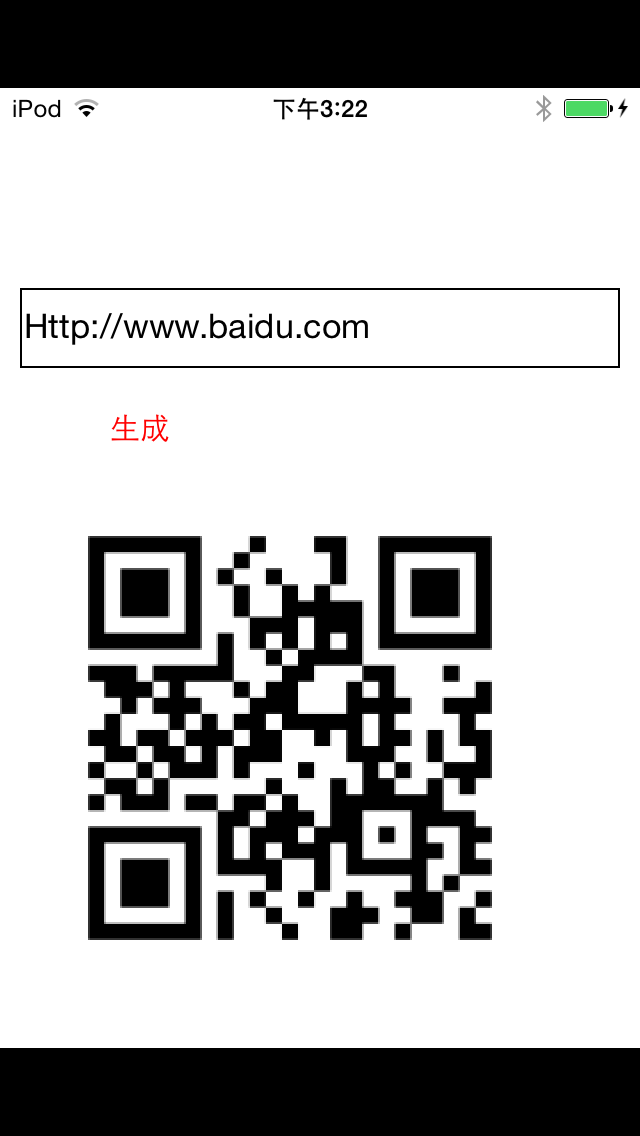
有时候想在二维码中间带个Logo,犹豫二维码有容错率,所以可以直接将图片添加上去
-(void)btnClick:(id)sender
{
    _imgView.image = [QRCodeGenerator qrImageForString:_textField.text imageSize:_imgView.bounds.size.width];
    UIImageView *img=[[UIImageView alloc]initWithImage:[UIImage imageNamed:@"1.jpg"]];
    img.frame=CGRectMake(_imgView.bounds.size.width*/, _imgView.bounds.size.height*/, _imgView.bounds.size.width/, _imgView.bounds.size.height/);
    img.backgroundColor=[UIColor redColor];
    [_imgView addSubview:img];

}

二维码之qrencode生成(带logo)的更多相关文章
- 生成二维码、条形码、带logo的二维码
Nuget安装ZXing.Net,帮助类: using System; using System.Collections.Generic; using System.Drawing; using Sy ...
- C# 生成二维码并且在中间加Logo
今天做项目的时候有个在生成二维码并且在中间加入Logo的需求,动手试了几把,总感觉效果没有之前写的好,就翻出旧代码,果然还是熟悉的味道,生成一张效果图如下 左边是微信里面的,右边是我自己生成的 原理比 ...
- QRCode生成二维码,jq QRCode生成二维码,QRCode生成电子名片
[QRCode官网]http://phpqrcode.sourceforge.net/ PHP QRCode生成二维码 官网下载QRCode源码包,引入源码包中的 qrlib.php . <?p ...
- iOS开发技术 - 二维码扫描、生成
QRecLevel:QR_ECLEVEL_H // 二维码容错率,最高为30%(即QR_ECLEVEL_H),即LOGO有大 ...
- 二维码(QR Code)生成与解析
二维码(QR Code)生成与解析 写在前面 经常在大街上听到扫码送什么什么,如果真闲着没事,从头扫到位,估计书包都装满了各种东西.各种扫各种送,太泛滥了.项目中从没接触过二维码的东东,最近要使用,就 ...
- Android二维码扫描、生成
Android二维码扫描.生成 现在使用二维码作为信息的载体已经越来越普及,那么二维码的生成以及扫描是如何实现的呢 google为我们提供了zxing开源库供我们使用 zxing GitHub源码地址 ...
- iOS 原生二维码扫描和生成
代码地址如下:http://www.demodashi.com/demo/12551.html 一.效果预览: 功能描述:WSLNativeScanTool是在利用原生API的条件下封装的二维码扫描工 ...
- 二维码相关---java生成二维码名片,而且自己主动保存到手机通讯录中...
版权声明:本文为博主原创文章,未经博主credreamer 同意不得转载 违者追究法律责任. https://blog.csdn.net/lidew521/article/details/244418 ...
- java生成带logo的二维码,自定义大小,logo路径取服务器端
package com.qishunet.eaehweb.util; import java.awt.BasicStroke; import java.awt.Graphics; import jav ...
随机推荐
- ActiveMq 配置多队列
一直在赶项目,好久没有写博文了,中间偶尔有些代码什么的,也都是放到github了,不过大多都是测试代码,毕竟有些成型的东西是给公司写的,鉴于职业道德,还是不好公开. 言归正传,这两天在接入第三方的收费 ...
- Jersey Client Post Bean参数
代码: public static void main(String[] args) { Student st = new Student("Adriana", "Bar ...
- AndroidPn源码分析(二)
接上篇: (一)客户端与服务器建立连接 上一篇写到ClientSession createClientSession这里,创建一个客户端的session.在SessionManager类中创建了ses ...
- SSRS (一)创建基础报表
ReportService创建基础报表 1.数据库SQL Server2012选择SQL Server Data Tools 2.创建商业智能(BI)项目 选择报表服务器项目 ReportServic ...
- 【Cocos2d-Js基础教学(1)JS -Mac配置篇】
一.准备工作 Windows配置篇请见 http://cn.cocos2d-x.org/tutorial/show?id=1396 1.安装python 2.下载Android SDK Android ...
- 记录初学Spring boot中使用GraphQL编写API的几种方式
Spring boot+graphql 一.使用graphql-java-tools方式 <dependency> <groupId>com.graphql-java-kick ...
- hashlib(摘要算法的模块)--重要 (一)
课件地址:https://www.cnblogs.com/mys6/p/10584933.html 搜索hashlib模块 # 登录认证# 加密 --> 解密# 摘要算法# 两个字符串 :# ...
- jzoj5710
對於每個詢問,我們先考慮插入1~r中每個數的答案,這樣子就不用考慮後面數對現在的影響 那麼我們可以在權值線段樹的每一個位置存儲每一個值最後一次結束的位置 問題變成了,如何判斷區間連續? 我們可以對線段 ...
- Kafka运维
如何在Kafka上创建topic? 手工脚本创建 ./kafka-topics.sh –zookeeper 127.0.0.1:2181 –create –topic test.example –re ...
- Debian&&ubuntu系安装MegaCli
MegaCli这个命令可以用来监控raid状态.磁盘状况等,最近上了一批ubuntu系统跑openstack,问题是MegaCli在官网上只有rpm格式的包,没有deb的包,但是还是有办法解决的,rp ...