
How to install Mysql in the CentOS
This article will walk through you the process of installing and updating latest MySQL 5.7.9 version onRHEL/CentOS 7/6/5 and Fedora 23/22/21 using MySQL Yum repository via YUM utility.
Step 1: Adding the MySQL Yum Repository
1. We will use official MySQL Yum software repository, which will provides RPM packages for installing the latest version of MySQL server, client, MySQL Utilities, MySQL Workbench, Connector/ODBC, and Connector/Python for the RHEL/CentOS 7/6/5 and Fedora 23-21.
Important: These instructions only works on fresh installation of MySQL on the server, if there is already a MySQL installed using a third-party-distributed RPM package, then I recommend you to upgrade or replace the installed MySQL package using the MySQL Yum Repository”.
Before Upgrading or Replacing old MySQL package, don’t forget to take all important databases backup and configuration files.
2. Now download and add the following MySQL Yum repository to your respective Linux distribution system’s repository list to install the latest version of MySQL (i.e. 5.7.9 released on 21 October 2015).
--------------- On RHEL/CentOS 7 ---------------

# wget http://dev.mysql.com/get/mysql57-community-release-el7-7.noarch.rpm
--------------- On RHEL/CentOS 6 ---------------

# wget http://dev.mysql.com/get/mysql57-community-release-el6-7.noarch.rpm
--------------- On RHEL/CentOS 5 ---------------

# wget http://dev.mysql.com/get/mysql57-community-release-el5-7.noarch.rpm
--------------- On Fedora 23 ---------------

# wget http://dev.mysql.com/get/mysql57-community-release-fc23-7.noarch.rpm
--------------- On Fedora 22 ---------------

# wget http://dev.mysql.com/get/mysql57-community-release-fc22-7.noarch.rpm
--------------- On Fedora 21 ---------------

# wget http://dev.mysql.com/get/mysql57-community-release-fc21-7.noarch.rpm
3. After downloading the package for your Linux platform, now install the downloaded package with the following command.
--------------- On RHEL/CentOS 7 ---------------

# yum localinstall mysql57-community-release-el7-7.noarch.rpm
--------------- On RHEL/CentOS 6 ---------------

# yum localinstall mysql57-community-release-el6-7.noarch.rpm
--------------- On RHEL/CentOS 5 ---------------

# yum localinstall mysql57-community-release-el5-7.noarch.rpm
--------------- On Fedora 23 ---------------

# dnf localinstall mysql57-community-release-fc23-7.noarch.rpm
--------------- On Fedora 22 ---------------

# dnf localinstall mysql57-community-release-fc22-7.noarch.rpm
--------------- On Fedora 21 ---------------

# yum localinstall mysql57-community-release-fc21-7.noarch.rpm
The above installation command adds the MySQL Yum repository to system’s repository list and downloads the GnuPG key to verify the integrity of the packages.
4. You can verify that the MySQL Yum repository has been added successfully by using following command.
# yum repolist enabled | grep "mysql.*-community.*"

# dnf repolist enabled | grep "mysql.*-community.*"      [On Fedora 22+ versions]

Verify MySQL Yum Repository
Step 2: Installing Latest MySQL Version
5. Install latest version of MySQL (currently 5.7) using the following command.
# yum install mysql-community-server

# dnf install mysql-community-server      [On Fedora 22+ versions]
The above command installs all the needed packages for MySQL server mysql-community-server, mysql-community-client, mysql-community-common and mysql-community-libs.
Step 3: Installing MySQL Release Series
6. You can also install different MySQL version using different sub-repositories of MySQL Community Server. The sub-repository for the recent MySQL series (currently MySQL 5.7) is activated by default, and the sub-repositories for all other versions (for example, the MySQL 5.6 or 5.5 series) are deactivated by default.
To install specific version from specific sub-repository, you can use --enable or --disable options usingyum-config-manager or dnf config-manager as shown:
# yum-config-manager --disable mysql57-community

# yum-config-manager --enable mysql56-community
------------------ Fedora 22+ Versions ------------------

# dnf config-manager --disable mysql57-community

# dnf config-manager --enable mysql56-community
Step 4: Starting the MySQL Server
7. After successful installation of MySQL, it’s time to start the MySQL server with the following command:
# service mysqld start
You can verify the status of the MySQL server with the help of following command.
# service mysqld status
This is the sample output of running MySQL under my CentOS 7 box.
Redirecting to /bin/systemctl status  mysqld.service

mysqld.service - MySQL Server

   Loaded: loaded (/usr/lib/systemd/system/mysqld.service; enabled)

   Active: active (running) since Thu 2015-10-29 05:15:19 EDT; 4min 5s ago

  Process: 5314 ExecStart=/usr/sbin/mysqld --daemonize $MYSQLD_OPTS (code=exited, status=0/SUCCESS)

  Process: 5298 ExecStartPre=/usr/bin/mysqld_pre_systemd (code=exited, status=0/SUCCESS)

 Main PID: 5317 (mysqld)

   CGroup: /system.slice/mysqld.service

           └─5317 /usr/sbin/mysqld --daemonize

Oct 29 05:15:19 localhost.localdomain systemd[1]: Started MySQL Server.
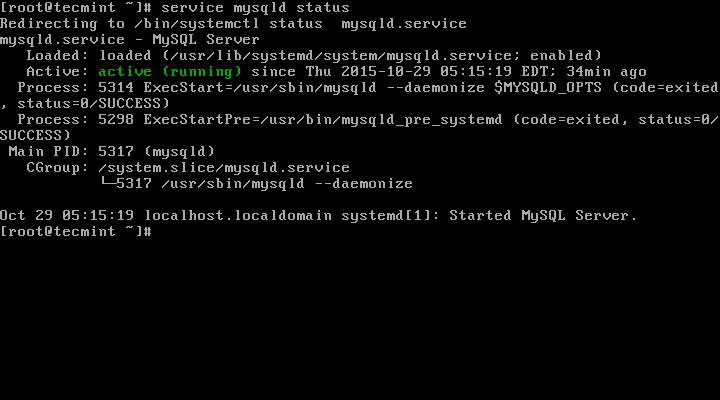
Check Mysql Status
8. Now finally verify the installed MySQL version using following command.
# mysql --version

mysql  Ver 14.14 Distrib 5.7.9, for Linux (x86_64) using  EditLine wrapper

Check MySQL Installed Version
Step 5: Securing the MySQL Installation
9. The command mysql_secure_installation allows you to secure your MySQL installation by performing important settings like setting the root password, removing anonymous users, removing root login, and so on.
# mysql_secure_installation
Now follow the onscreen instructions carefully, for reference see the output of the above command below.
Sample Output
Securing the MySQL server deployment.

Enter password for user root: Enter New Root Password

VALIDATE PASSWORD PLUGIN can be used to test passwords

and improve security. It checks the strength of password

and allows the users to set only those passwords which are

secure enough. Would you like to setup VALIDATE PASSWORD plugin?

Press y|Y for Yes, any other key for No: y

There are three levels of password validation policy:

LOW    Length >= 8

MEDIUM Length >= 8, numeric, mixed case, and special characters

STRONG Length >= 8, numeric, mixed case, special characters and dictionary                  file

Please enter 0 = LOW, 1 = MEDIUM and 2 = STRONG: 2

Using existing password for root.

Estimated strength of the password: 50

Change the password for root ? ((Press y|Y for Yes, any other key for No) : y

New password: Set New MySQL Password

Re-enter new password: Re-enter New MySQL Password

Estimated strength of the password: 100

Do you wish to continue with the password provided?(Press y|Y for Yes, any other key for No) : y

By default, a MySQL installation has an anonymous user,

allowing anyone to log into MySQL without having to have

a user account created for them. This is intended only for

testing, and to make the installation go a bit smoother.

You should remove them before moving into a production

environment.

Remove anonymous users? (Press y|Y for Yes, any other key for No) : y

Success.

Normally, root should only be allowed to connect from

'localhost'. This ensures that someone cannot guess at

the root password from the network.

Disallow root login remotely? (Press y|Y for Yes, any other key for No) : y

Success.

By default, MySQL comes with a database named 'test' that

anyone can access. This is also intended only for testing,

and should be removed before moving into a production

environment.

Remove test database and access to it? (Press y|Y for Yes, any other key for No) : y

 - Dropping test database...

Success.

 - Removing privileges on test database...

Success.

Reloading the privilege tables will ensure that all changes

made so far will take effect immediately.

Reload privilege tables now? (Press y|Y for Yes, any other key for No) : y

Success.

All done!
Step 6: Connecting to MySQL Server
10. Connecting to newly installed MySQL server by providing username and password.
# mysql -u root -p
Sample Output:
Welcome to the MySQL monitor.  Commands end with ; or \g.

Your MySQL connection id is 19

Server version: 5.7.9 MySQL Community Server (GPL)

Copyright (c) 2000, 2015, Oracle and/or its affiliates. All rights reserved.

Oracle is a registered trademark of Oracle Corporation and/or its

affiliates. Other names may be trademarks of their respective

owners.

Type 'help;' or '\h' for help. Type '\c' to clear the current input statement.

mysql>
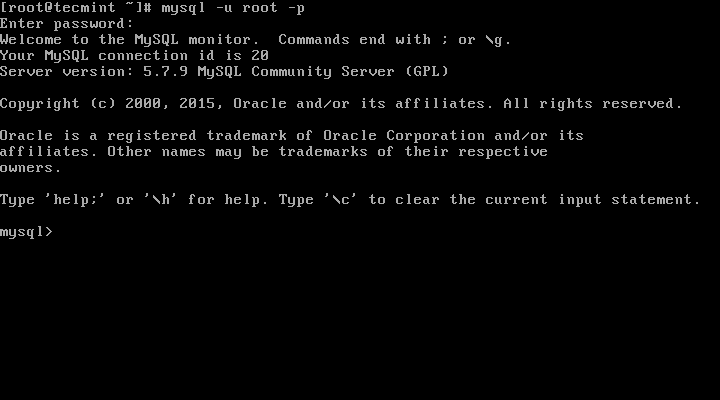
Connect to MySQL Server
Step 7: Updating MySQL with Yum
11. Besides fresh installation, you can also do updates for MySQL products and components with the help of following command.
# yum update mysql-server

# dnf update mysql-server       [On Fedora 22+ versions]
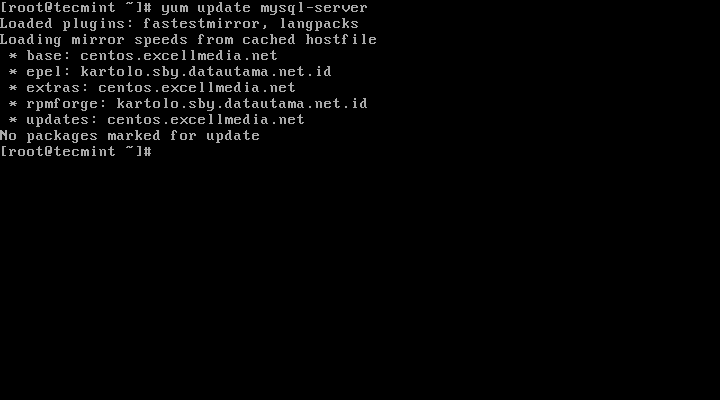
Update MySQL Version
When new updates are available for MySQL, it will auto install them, if not you will get a message saying NO packages marked for updates.
That’s it, you’ve successfully installed MySQL 5.7.9 on your system. If you’re having any trouble installing feel free to use our comment section for solutions.
How to install Mysql in the CentOS的更多相关文章
- Install MySQL 5.7 on Fedora 25/24, CentOS/RHEL 7.3/6.8/5.11
MySQL is a relational database management system (RDBMS) that runs as a server providing multi-user ...
- Install MySql on CentOS
Installing & Configuring MySQL Server This Howto will show you how to install MySQL 5.x, start t ...
- How to Install MySQL on CentOS 7
CentOS 7的yum源中貌似没有正常安装mysql时的mysql-sever文件,需要去官网上下载 # wget http://dev.mysql.com/get/mysql-communit ...
- Installing MySQL Server on CentOS
MySQL is an open-source relational database. For those unfamiliar with these terms, a database is wh ...
- linux下安装多个mysql实例(摘自国外:How to create multiple mysql instance in CentOS 6.4 and Red Hat 6.4)
How to create multiple mysql instance in CentOS 6.4 and Red Hat 6.4 from:http://sharadchhetri.com/20 ...
- Mysql 5.7 CentOS 7 安装MHA
Table of Contents 1. MHA简介 1.1. 功能 1.2. MHA切换逻辑 1.3. 工具 2. 环境 2.1. 软件 2.2. 环境 3. Mysql 主从复制 3.1. Mys ...
- Install MySQL on Mac by Homebrew
1. 安装mysql brew update brew install mysql 2. 启动mysql mysql.server start 3. 登录mysql mysql -uroot -p ...
- yum install mysql
rpm -qa|grep -i mysqlmysql-libs-5.1.52-1.1.alios6.1.x86_64mysql-5.1.52-1.1.alios6.1.x86_64mysql-deve ...
- 在OSX狮子(Lion)上安装MYSQL(Install MySQL on Mac OSX)
这篇文章简述了在Mac OSX狮子(Lion)上安装MySQL Community Server最新版本v10.6.7的过程. MySQL是最流行的开源数据库管理系统.首先,从MySQL的下载页面上下 ...
随机推荐
- PS常用技能综合
1.ps中怎么吧选中的一块区域覆盖到另一个区域中? 1.用PS中选取工具或套索工具--选好后用移动工具把你选取的区域移动到你要覆盖的地方2.或用图章工具中的仿制图章 2.如何将选中的区域新建为一个新图 ...
- mondrian4 kylin saiku 整合踩坑记录
1 先说了版本: Mondrian 4 .kylin2.2 .saiku 3.15 2 saiku 3.15 使用的xml是基于 mondrian4 的schema的xml.判断是不是mondrian ...
- C#.NET常见问题(FAQ)-如何给Listbox添加右键菜单
1 拖一个ContextMenuStrip控件,然后可以直接在界面上编辑,也可以在FormLoad的时候动态添加 2 把这两个控件关联起来就可以实现listBox1的右键菜单跟ContextMen ...
- WPF{ComboBox绑定类对象, 下拉列显示的值,与取到的值}
DisplayMemberPath 是用来显示下拉列表的值 SelectedValuePath是用来取得选中项的值. ComboBox绑定类对象, 下拉列显示的值,与取到的值 string. Join ...
- Lisp分配给保护的符号…
在进行调试时,弹出"分配给保护的符号:pf,是否进入中断循环",但似乎不会影响结果. 明经版主解译说是:给受保护的符号重新赋值了,所以有此提示,此提示仅在打开了vlide 编辑器才 ...
- 剑指offer(2) - 二维数组中的查找
题目: 在一个二维数组中.每一行都依照从左到右递增的顺序排序,每一列都依照从上往下递增的顺序排序.请写一个函数,输入一个二维数组和一个整数,推断数组中是否含有该整数. 比如以下的二维数组就是每行.每列 ...
- Android 如何将Canvas上绘制的内容保存成本地图片(转)
效果如下图所示 保存在sd卡上的文件为 手机上显示效果为: 1>>在Manifest文件中增加相应权限 <!-- 在SDCard中创建与删除文件权限 --> <uses- ...
- 28种CSS3炫酷载入动画特效
这是一组效果很炫酷的纯CSS3 Loading载入动画特效.这组loading动画共同拥有27种不同的效果.每一种loading动画都是通过CSS3的keyframes帧动画来完毕的,每个载入动画都构 ...
- scala class和object,trait的区别
Scala类 1 2 3 4 5 6 7 8 9 10 11 12 13 class Counter { private var value = 0 // 必须初始化字段 def increm ...
- Python处理JSON(转)
参考: 概念 序列化(Serialization):将对象的状态信息转换为可以存储或可以通过网络传输的过程,传输的格式可以是JSON.XML等.反序列化就是从存储区域(JSON,XML)读取反序列化对 ...