
将jsonModel转化为文件
将jsonModel转化为文件

这个类是我自己写着用的,用于将字典文件直接转换成Model的文件,省去你写无数Model中属性的代码:
TransformDictionary.h 与 TransformDictionary.m
//

//  TransformDictionary.h

//  Dic

//

//  Copyright (c) 2014年 Y.X. All rights reserved.

//

#import <Foundation/Foundation.h>

@interface TransformDictionary : NSObject

+ (void)withDictionary:(NSDictionary *)dictionary fileName:(NSString *)name;

@end
//

//  TransformDictionary.m

//  Dic

//

//  Copyright (c) 2014年 Y.X. All rights reserved.

//

#import "TransformDictionary.h"

@implementation TransformDictionary

+ (void)withDictionary:(NSDictionary *)dictionary fileName:(NSString *)name

{

    NSDictionary *dic         = dictionary;

    NSString *shortName       = name;

    NSString *fullHeadName    = [name stringByAppendingString:@".h"];

    NSString *fullContentName = [name stringByAppendingString:@".m"];

    // .h 文件头部信息

    __block NSString *headFileString = \

    [NSString stringWithFormat:@"//\n//  %@\n//\n//  Copyright (c) 2014年 Y.X. All rights reserved.\n//\n\n#import <Foundation/Foundation.h>\n\n@interface %@ : NSObject\n\n\n", fullHeadName, shortName];

    // .h 文件中间信息

    [dic enumerateKeysAndObjectsUsingBlock:^(id key, id obj, BOOL *stop) {

        if ([key isKindOfClass:[NSString class]]) {

            if ([dic[key] isKindOfClass:[NSString class]]) {

                headFileString = [headFileString stringByAppendingString:[NSString stringWithFormat:@"@property (nonatomic, strong) NSString       *%@;\n", key]];

            } else if ([dic[key] isKindOfClass:[NSNumber class]]) {

                headFileString = [headFileString stringByAppendingString:[NSString stringWithFormat:@"@property (nonatomic, strong) NSNumber       *%@;\n", key]];

            } else if ([dic[key] isKindOfClass:[NSDictionary class]]) {

                headFileString = [headFileString stringByAppendingString:[NSString stringWithFormat:@"@property (nonatomic, strong) NSDictionary   *%@;\n", key]];

            } else if ([dic[key] isKindOfClass:[NSArray class]]) {

                headFileString = [headFileString stringByAppendingString:[NSString stringWithFormat:@"@property (nonatomic, strong) NSArray        *%@;\n", key]];

            } else {

                NSLog(@"%@   %@",[dic[key] class], key);

                headFileString = [headFileString stringByAppendingString:[NSString stringWithFormat:@"//@property (nonatomic, strong) %@     *%@;\n", [dic[key] class], key]];

            }

        }

    }];

    // - (void)setValue:(id)value forUndefinedKey:(NSString *)key

    headFileString = [headFileString stringByAppendingString:@"\n\n- (void)setValue:(id)value forUndefinedKey:(NSString *)key;\n"];

    // - (instancetype)initWithDictionary:(NSDictionary *)dictionary

    headFileString = [headFileString stringByAppendingString:@"- (instancetype)initWithDictionary:(NSDictionary *)dictionary;\n"];

    // .h 文件尾部信息

    headFileString = [headFileString stringByAppendingString:@"\n\n@end\n\n"];

    // .h 文件路径

    NSString *headFileStringPath = \

    [NSHomeDirectory() stringByAppendingPathComponent:[NSString stringWithFormat:@"/Documents/%@", fullHeadName]];

    // 写文件

    [headFileString writeToFile:headFileStringPath

                     atomically:YES

                       encoding:NSUTF8StringEncoding

                          error:nil];

    // ================================================================================= //

    // .m 文件

    NSString *contentFileString = \

    [NSString stringWithFormat:@"//\n//  %@\n//\n//  Copyright (c) 2014年 Y.X. All rights reserved.\n//\n\n#import \"%@\"\n\n@implementation %@\n\n", fullContentName, fullHeadName, shortName];

    // .m 文件中间部分

    // - (void)setValue:(id)value forUndefinedKey:(NSString *)key

    contentFileString = [contentFileString stringByAppendingString:@"- (void)setValue:(id)value forUndefinedKey:(NSString *)key\n{\n//    if([key isEqualToString:@\"id\"]) {\n//        self.productID = value;\n//    }\n}\n"];

    // - (void)setValue:(id)value forKey:(NSString *)key

    contentFileString = [contentFileString stringByAppendingString:@"\n- (void)setValue:(id)value forKey:(NSString *)key\n{\n    if ([value isKindOfClass:[NSNull class]]) {\n        return;\n    }\n\n    [super setValue:value forKey:key];\n}"];

    // - (instancetype)initWithDictionary:(NSDictionary *)dictionary

    contentFileString = [contentFileString stringByAppendingString:@"\n- (instancetype)initWithDictionary:(NSDictionary *)dictionary\n{\n    self = [super init];\n    if (self)\n    {\n        if ([dictionary isKindOfClass:[NSDictionary class]])\n        {\n            [self setValuesForKeysWithDictionary:dictionary];\n        }\n    }\n\n    return self;\n}\n"];

    // .m 文件尾部信息

    contentFileString = [contentFileString stringByAppendingString:@"\n\n@end"];

    // .m 文件路径

    NSString *contentFileStringPath = \

    [NSHomeDirectory() stringByAppendingPathComponent:[NSString stringWithFormat:@"/Documents/%@", fullContentName]];

    [contentFileString writeToFile:contentFileStringPath

                        atomically:YES

                          encoding:NSUTF8StringEncoding

                             error:nil];

    // 提示信息

    NSLog(@"生成的文件在以下路径中 \n%@", [NSHomeDirectory() stringByAppendingPathComponent:[NSString stringWithFormat:@"/Documents"]]);

}

@end
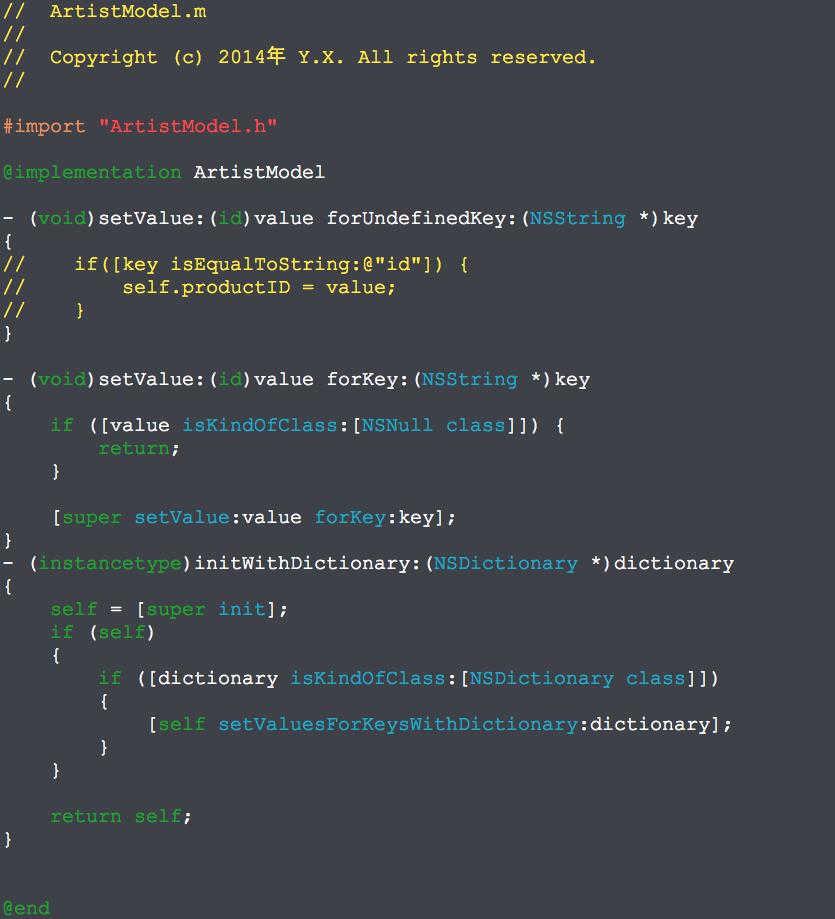
用工具生成的Model如下:

将jsonModel转化为文件的更多相关文章
- 用 ghostscript 转化PDF文件为图片 的参数设置
example: gswin32 -dSAFER -dBATCH -dNOPAUSE -r300 -dTextAlphaBits=4 -dGraphicsAlphaBits=4 -sDEVICE=jp ...
- .axf 转化 .bin文件 的方法
按住shift 右击按键,进入在 X:\Program Files\Keil\MDK510\ARM\ARMCC\bin . 中打开命令cmd.exe ,然后进入一下操作. 编译自己的工程,并将&quo ...
- 转载.怎样在Quartus II中转化HDL文件为bsf文件?
步骤1 新建或打开Quartus II工程,用QII自带文本编辑器打开HDL文件. 图1 用QII自带的文本编辑器打开HDL文件 步骤2 选择File>Create / Update>Cr ...
- dos2unix 批量转化文件
在windows和linux双平台下开发,同时也用git作为同步工具,但前期没有注意,导致很多文件使用windows下的换行符CRLF 参考资料了解dos2unix可以转化格式. 但有个问题,虽然可以 ...
- C# 其他的Url 文件的路径转化为二进制流
//将虚拟路径转化为文件的路径然后最后转化为文件流 public ActionResult SaveImage(string path) { var url =System.Web.HttpConte ...
- Win10系统下安装labelme,json文件批量转化
一.安装环境:windows10,anaconda3,python3.6 由于框架maskrcnn需要json数据集,在没安装labelme环境和跑深度学习之前,我安装的是anacon ...
- C# 给PDF文件添加水印
水印种类及功能介绍 PDF水印分为两种:文本水印和图片水印.文本水印一般被用在商业领域,提醒读者该文档是受版权保护的,其他人不能抄袭或者免费使用.除了这个特征,水印还可以用来标记这个文档 的一些基 ...
- Excel文件转plist文件出现的文件编码问题
今天在测试时遇到了需要将大量整理好的Excel数据转换为plist文件的情况.百度了一下教程,发现虽然别人也遇到过类似的情况,但是有些讲的还是不够细致.所以做如下整理. 百度到的内容中有使用Mes ...
- python基础之文件处理
读和写文件 读写文件是最常见的IO操作.Python内置了读写文件的函数,用法和C是兼容的. 读写文件前,我们先必须了解一下,在磁盘上读写文件的功能都是由操作系统提供的,现代操作系统不允许普通的程序直 ...
随机推荐
- NLP 装桶(Bucketing)和填充(padding)
翻译模型也是用了装桶(bucketing)和填充(padding),这两种方法是用于高效地处理不同长度句子的情况.我们首先来弄清楚是怎么一回事.当我们从英语翻译成法语的时候,假设我们的输入英语的长度为 ...
- Golang gRPC 使用
一.概念 1.gRPC默认使用protocol buffers,这是google开源的一套成熟的结构数据序列化机制(当然也可以使用其他数据格式如JSON),可以用proto files创建gRPC服务 ...
- struct in_addr 结构体
struct in_addr 结构体: struct in_addr { in_addr_t s_addr; }; 表示一个32位的IPv4地址. in_addr_t一般为32位的unsigned i ...
- 移动端H5适配方法(盒子+图片+文字)
一.怎么让H5页面适应手机 a.利用meta标签 <meta name="viewport" content="width=device-width,initial ...
- [转]Asp.Net 网站多语言解决方案
本文转自:https://www.cnblogs.com/FredTang/archive/2013/01/23/2873231.html 最近领导要求实现PMSWeb应用程序的多区域语言的支持,所以 ...
- [转]使用Visual Studio Code开发Asp.Net Core WebApi学习笔记(三)-- Logger
本文转自:https://www.cnblogs.com/niklai/p/5662094.html 本篇是在上一篇的基础上添加日志功能,并记录NLog在Asp.Net Core里的使用方法. 第一部 ...
- mysql与mysqli的一些区别和方法
一.mysql与mysqli的概念相关: 1.mysql与mysqli都是php方面的函数集,与mysql数据库关联不大. 2.在php5版本之前,一般是用php的mysql函数去驱动mysql数据库 ...
- “Device eth0 does not seem to be present”解决办法
在KVM中克隆出新的CentOS虚拟机时,出现如下问题:# service network restartShutting down loopback insterface: [ OK ]Bringi ...
- Web前端开发工程师常用技术网站整理
1.常用工具相关 有道云笔记 http://note.youdao.com/signIn/index.html 36镇-最好用的共享收藏夹 http://www.36zhen.com/ 浏览器同步测试 ...
- ZUI分页器的使用案例(ECLIPSE SMS项目)
不足:并未编写导出功能 HTML代码: <form action="${basePath}/SMSLogList.cwai" method="post" ...