
[翻译] AYVibrantButton
AYVibrantButton
https://github.com/a1anyip/AYVibrantButton
AYVibrantButton is a stylish button with iOS 8 vibrancy effect. It is a subclass of UIButton that has a simple yet elegant appearance and built-in support for UIVisualEffectView and UIVibrancyEffect classes introduced in iOS 8. Yet, it can be used on iOS 7 without the vibrancy effect.
AYVibrantButton是一个具有 iOS 8 模糊背景效果的按钮.他继承自 UIButton, 有一个很漂亮的样式, 内置了 iOS8 中新出的 UIVisualEffectView 与 UIVibrancyEffect .当然, 你也可以用在 iOS7 上, 只是没有模糊背景效果而已.
Configurations
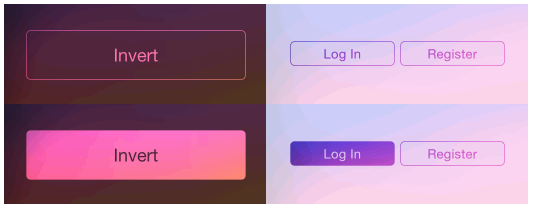
Vibrant buttons can be configured with one of the three supported button styles, invert, translucentand fill (see examples below).
该按钮可以配置3种样式.
Some basic properties like icon, text, font, alpha, corner radius, border width and background color (for no vibrancy effect) can all be changed easily.
所有的基本属性,如图片, 文本, 字体, 透明度, 圆角, 以及边缘线条宽度以及背景色等等属性, 都可以进行修改.
The default vibrancy effect is for blur effect UIBlurEffectStyleLight. It could be set to anyUIVibrancyEffect instance. For today extensions, it should be set to [UIVibrancyEffect notificationCenterVibrancyEffect].
默认的模糊效果是 UIBlurEffectStyleLight , 他可以用来设置任何的 anyUIVibrancyEffect 对象. 现在已经对其进行了很多扩展, 支持 [UIVibrancyEffect notificationCenterVibrancyEffect] .
Note
Though vibrant buttons can be placed anywhere, it is recommended that vibrant buttons with vibrancy effects should be placed in the contentView of UIVisualEffectView (except in today view).
UIVisualEffectView can be created as follows.
虽然这个按钮可以放置在任何地方, 但是呢, 我还是推荐将其放置在 UIVisualEffectView 的 contentView 里面.
UIVisualEffectView *effectView = [[UIVisualEffectView alloc] initWithEffect:[UIBlurEffect effectWithStyle:UIBlurEffectStyleExtraLight]];

effectView.frame = self.view.bounds;

[self.view addSubview:effectView];
Installation
CocoaPods
Add the following line to the Podfile.
你可以用 pod "AYVibrantButton" 来进行安装.
pod "AYVibrantButton"
Manual Installation
Simply add AYVibrantButton.h and AYVibrantButton.m to your project.
直接将 AYVibrantButton.h 与 AYVibrantButton.m 拖到你的项目中去即可.
Examples
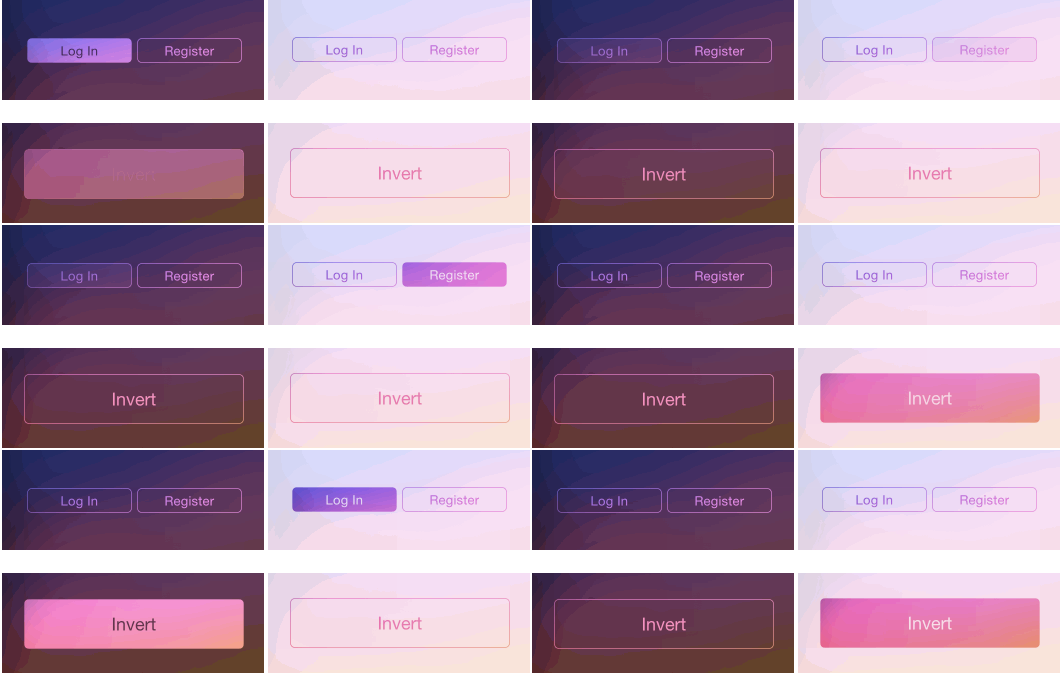
The following images show the normal and highlighted (being pressed) button appearances.
以下例子演示了正常状态与高亮状态中的按钮的样式.
Invert style with vibrancy effect
AYVibrantButton *invertButton = [[AYVibrantButton alloc] initWithFrame:CGRectZero style:AYVibrantButtonStyleInvert];

invertButton.vibrancyEffect = [UIVibrancyEffect effectForBlurEffect:[UIBlurEffect effectWithStyle:UIBlurEffectStyleExtraLight]];

invertButton.text = @"Invert";

invertButton.font = [UIFont systemFontOfSize:18.0];

[effectView.contentView addSubview:invertButton];
Translucent style with vibrancy effect
AYVibrantButton *translucentButton = [[AYVibrantButton alloc] initWithFrame:CGRectZero style:AYVibrantButtonStyleTranslucent];

translucentButton.vibrancyEffect = [UIVibrancyEffect effectForBlurEffect:[UIBlurEffect effectWithStyle:UIBlurEffectStyleExtraLight]];

translucentButton.text = @"Translucent";

translucentButton.font = [UIFont systemFontOfSize:18.0];

[effectView.contentView addSubview:translucentButton];
Translucent style without vibrancy effect
Changelog
1.0.3
- Added a new button style
AYVibrantButtonStyleFill - Fixed an issue that setting button alpha removes the vibrancy effect
1.0.2
- Support setting icon image
Creator
Alan Yip
License
The MIT License (MIT)

Copyright (c) 2014 Alan Yip

Permission is hereby granted, free of charge, to any person obtaining a copy

of this software and associated documentation files (the "Software"), to deal

in the Software without restriction, including without limitation the rights

to use, copy, modify, merge, publish, distribute, sublicense, and/or sell

copies of the Software, and to permit persons to whom the Software is

furnished to do so, subject to the following conditions:

The above copyright notice and this permission notice shall be included in all

copies or substantial portions of the Software.

THE SOFTWARE IS PROVIDED "AS IS", WITHOUT WARRANTY OF ANY KIND, EXPRESS OR

IMPLIED, INCLUDING BUT NOT LIMITED TO THE WARRANTIES OF MERCHANTABILITY,

FITNESS FOR A PARTICULAR PURPOSE AND NONINFRINGEMENT. IN NO EVENT SHALL THE

AUTHORS OR COPYRIGHT HOLDERS BE LIABLE FOR ANY CLAIM, DAMAGES OR OTHER

LIABILITY, WHETHER IN AN ACTION OF CONTRACT, TORT OR OTHERWISE, ARISING FROM,

OUT OF OR IN CONNECTION WITH THE SOFTWARE OR THE USE OR OTHER DEALINGS IN THE

SOFTWARE.
[翻译] AYVibrantButton的更多相关文章
- 《Django By Example》第五章 中文 翻译 (个人学习,渣翻)
书籍出处:https://www.packtpub.com/web-development/django-example 原作者:Antonio Melé (译者@ucag注:大家好,我是新来的翻译, ...
- 《Django By Example》第四章 中文 翻译 (个人学习,渣翻)
书籍出处:https://www.packtpub.com/web-development/django-example 原作者:Antonio Melé (译者注:祝大家新年快乐,这次带来<D ...
- [翻译]开发文档:android Bitmap的高效使用
内容概述 本文内容来自开发文档"Traning > Displaying Bitmaps Efficiently",包括大尺寸Bitmap的高效加载,图片的异步加载和数据缓存 ...
- 【探索】机器指令翻译成 JavaScript
前言 前些时候研究脚本混淆时,打算先学一些「程序流程」相关的概念.为了不因太枯燥而放弃,决定想一个有趣的案例,可以边探索边学. 于是想了一个话题:尝试将机器指令 1:1 翻译 成 JavaScript ...
- 《Django By Example》第三章 中文 翻译 (个人学习,渣翻)
书籍出处:https://www.packtpub.com/web-development/django-example 原作者:Antonio Melé (译者注:第三章滚烫出炉,大家请不要吐槽文中 ...
- 《Django By Example》第二章 中文 翻译 (个人学习,渣翻)
书籍出处:https://www.packtpub.com/web-development/django-example 原作者:Antonio Melé (译者注:翻译完第一章后,发现翻译第二章的速 ...
- 《Django By Example》第一章 中文 翻译 (个人学习,渣翻)
书籍出处:https://www.packtpub.com/web-development/django-example 原作者:Antonio Melé (译者注:本人目前在杭州某家互联网公司工作, ...
- 【翻译】Awesome R资源大全中文版来了,全球最火的R工具包一网打尽,超过300+工具,还在等什么?
0.前言 虽然很早就知道R被微软收购,也很早知道R在统计分析处理方面很强大,开始一直没有行动过...直到 直到12月初在微软技术大会,看到我软的工程师演示R的使用,我就震惊了,然后最近在网上到处了解和 ...
- ASP.NET MVC with Entity Framework and CSS一书翻译系列文章之第一章:创建基本的MVC Web站点
在这一章中,我们将学习如何使用基架快速搭建和运行一个简单的Microsoft ASP.NET MVC Web站点.在我们马上投入学习和编码之前,我们首先了解一些有关ASP.NET MVC和Entity ...
随机推荐
- java8 学习之路之lambda
前言 目前我们知道java的版本已经发布到12了,之前的项目用的是JDK1.7,听说JDK1.8的改动相对来说大一些,因此抽空学学JDK1.8的一些新特性.本人也是通过阅读Java8实战这本书做一些小 ...
- 【好书分享】容器网络到kubernetes网络
Nginx 公司的 Michael Hausenblas 发布了一本关于 docker 和 kubernetes 中的容器网络的小册子.这份资料一共 72 页,是大家由浅入深的了解 Docker 和 ...
- LDAP落地实战(一):OpenLDAP部署及管理维护
公司内部会有许多第三方系统或服务,例如Svn,Git,VPN,Jira,Jenkins等等,每个系统都需要维护一份账号密码以支持用户认证,当然公司也会有许多的主机或服务器,需要开放登录权限给用户登录使 ...
- Java跨语言调用,使用JNA访问Java外部接口
1. JNA简单介绍 先说JNI(Java Native Interface)吧,有过不同语言间通信经历的一般都知道,它允许Java代码和其他语言(尤其C/C++)写的代码进行交互,只要遵守调用约定即 ...
- 忽略“Signal: SIGSEGV (Segmentation fault)”
1. touch ~/.gdbinit 2. 在.gdbinit文件中添加“handle SIGSEGV nostop noprint pass”
- logback 日志打印输出
slf4j 其实是一个日志的抽象层, 其本质仍然需要真正的实现 他可以解决代码中独立于任意特定的日志类库, 可以减少很多维护日志的麻烦, 除此之外, 还有占位符的特性, {}, 类似于String#f ...
- 百度前端技术学院-task1.8源代码
主要是不采用bootstrap实现网格. 遇到的困难及注意点如下: 1.[class*='col-'],这个是选择col-开头的类,第一次用,以前也只是看到过: 2.媒体查询,总觉得容易理解错误.@m ...
- sql基础语法大全 转载过来的,出处忘了!
一.基础 1.说明:创建数据库CREATE DATABASE database-name 2.说明:删除数据库drop database dbname3.说明:备份sql server--- 创建 备 ...
- 关于git远程版本库的一些问题之解决
Part1:CentOS6.5免密码登录 修改/etc/ssh/sshd_config RSAAuthentication yesPubkeyAuthentication yesAuthorizedK ...
- wcf远程服务器返回错误404
最近根据quartz.net 和wcf做资讯内容定时推送,wcf调用的时候出现远程服务器返回错误404,一直找不到原因是什么,客户端和服务器地址和配置都没啥问题,最后发现wcf请求数据,有传输大小限制 ...