
PyMysql复习
参考:http://www.cnblogs.com/liwenzhou/p/8032238.html
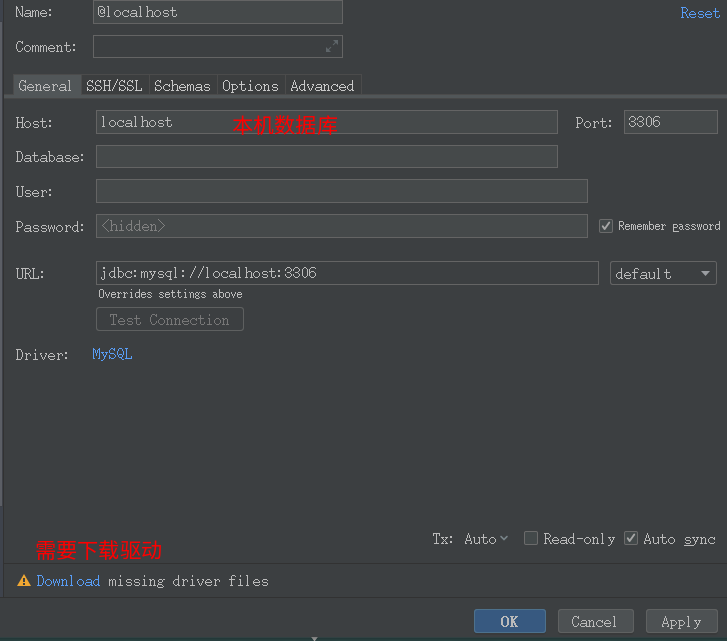
使用pycharm操作数据库。
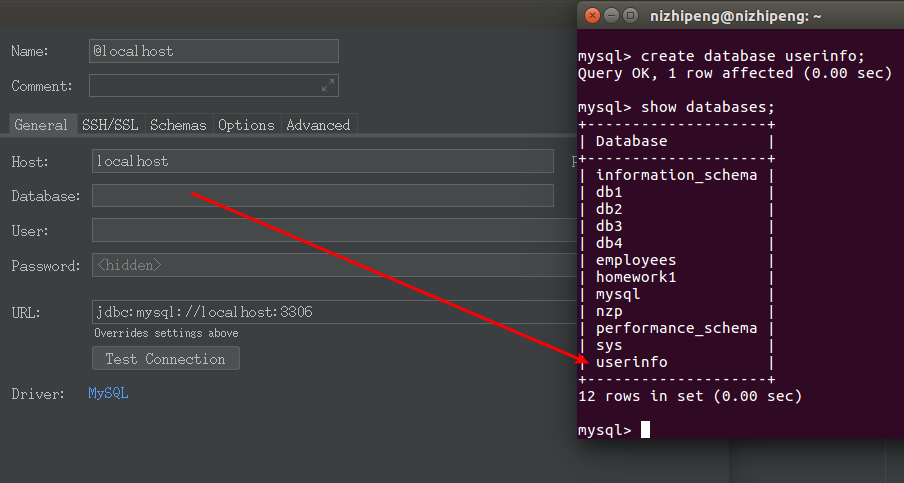
填一个数据库名,User:填root
填写要连接的数据库。
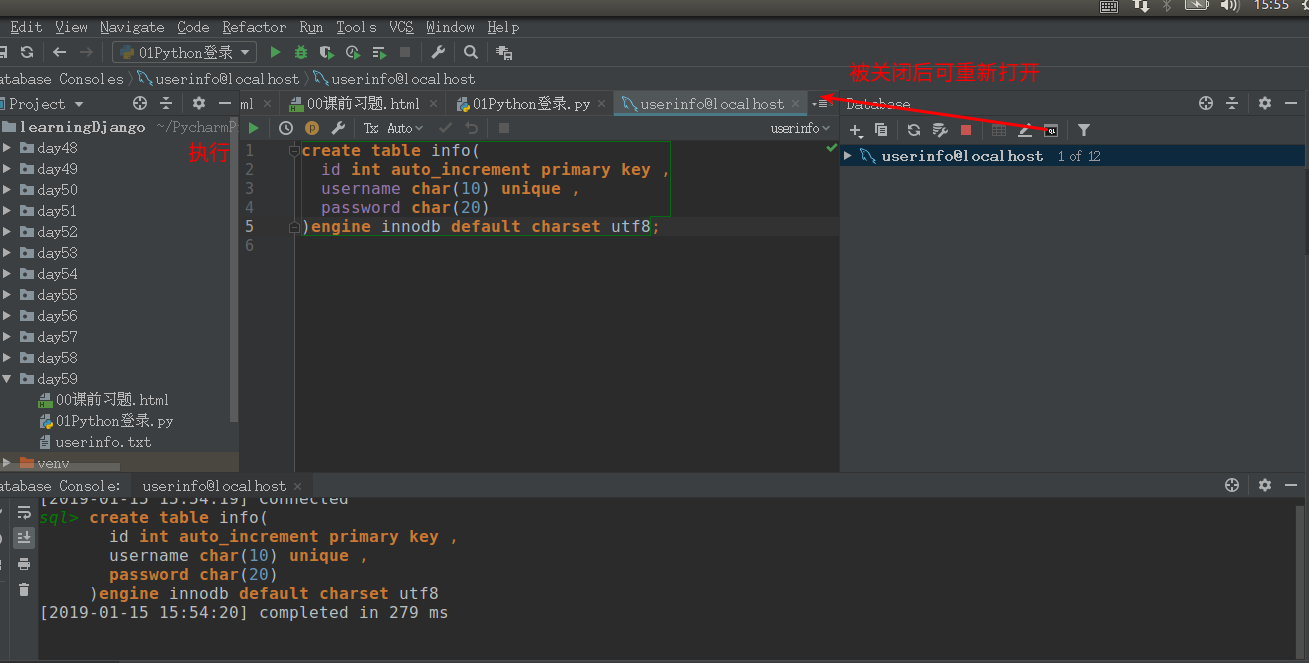
建表。
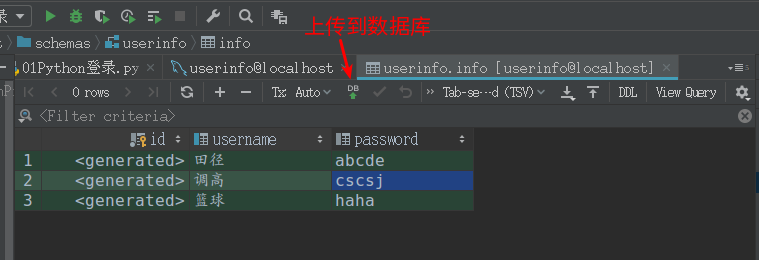
上传填写完的数据库。
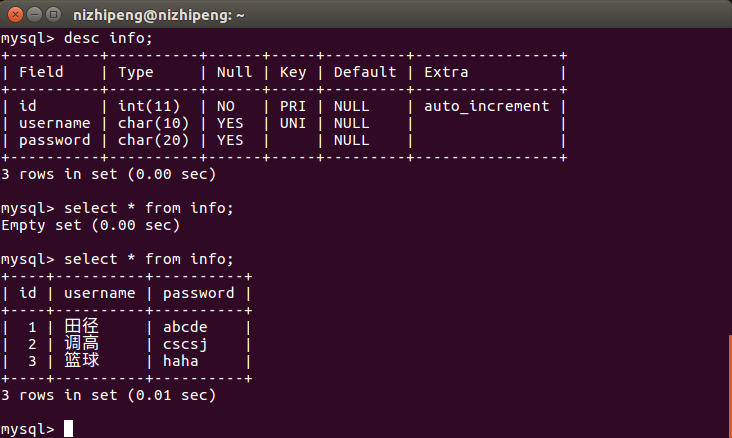
PyMysql操作数据库。
import pymysql

# 拿到用户输入的用户名密码

# 去数据库里面判断用户名和密码是否正确

# 1. 连接数据库

conn = pymysql.connect(

    host="localhost",

    port=3306,  # 端口号是数字类型

    database="userinfo",  # 写自己本地的数据库名字

    user="root",

    password="1**3*8",

    charset="utf8"   # 千万记得没有-

)

cursor = conn.cursor()  # 获取输入SQL语句的 光标 对象

sql = "select * from info;"

ret = cursor.execute(sql)

print(ret)

# 关闭连接

cursor.close()

conn.close()
结果:
3

Process finished with exit code 0
SQL防注入
import pymysql

# 获取用户输入

username = input("输入用户名:")

pwd = input("请输入密码:")

# 连接数据库检索有没有该用户

conn = pymysql.connect(

    host="localhost",

    port=3306,

    database="userinfo",

    user="root",

    password="",

    charset="utf8"

)

cursor = conn.cursor()  # 获取光标

# 拼接要执行的SQL语句

sql = 'select * from info where username=%s and password=%s' #  %s 不再需要引号

print(sql)

print("=" * 120)

# 执行SQL语句

ret = cursor.execute(sql, [username, pwd])  # 让pymysql帮我们拼接SQL语句

if ret:

    print("登录成功")

else:

    print("登录失败!")

# 关闭光标对像

cursor.close()

# 关闭连接

conn.close()
数据出错回滚操作:
 """

 pymysql增操作

 """

 import pymysql

 conn = pymysql.connect(

     host="localhost",

     port=3306,

     database="userinfo",

     user="root",

     password="1×××××",

     charset="utf8"

 )

 cursor = conn.cursor()#获取要执行的光标

 # 拼接语句

 sql = "insert into info (username, password)VALUES (%s, %s)"

 # 执行

 try:

     cursor.execute(sql, ["大旭",])

     # 自己写个for循环 (今天作业自己试下)

     conn.commit() #确认

 except Exception as e:

     print("报错啦:", str(e))

     conn.rollback()  # 错误回滚

 # 对数据库做写操作一定要记得提交assword

 cursor.close()

 conn.close()
lastrowid(cid是获取的另一张表的id,使两个id对应)
import pymysql

conn = pymysql.connect(

    host="localhost",

    port=3306,

    database="userinfo",

    user="root",

    password="",

    charset="utf8"

)

cursor = conn.cursor()

# 创建班级的sql语句

sql1 = "insert into class (name) VALUES (%s)"

# 创建学生的sql语句

sql2 = "insert into student (name, cid) VALUES (%s, %s)"

cursor.execute(sql1, "全栈9期")

new_id = cursor.lastrowid  # 获取刚插入数据的ID值

cursor.execute(sql2, ["小东北", new_id])

conn.commit()

cursor.close()

conn.close()
 import pymysql

 conn = pymysql.connect(

     host="localhost",

     port=3306,

     database="userinfo",

     user="root",

     password="1*****",

     charset="utf8"

 )

 cursor = conn.cursor(cursor=pymysql.cursors.DictCursor)  # 指定返回的数据格式为字典格式

 sql = "select * from info"

 cursor.execute(sql)  # 返回的不是具体的数据而是受影响的行数

 # ret = cursor.fetchall()  # 返回所有的数据

 # ret = cursor.fetchone()  # 返回第一条的数据

 # print(ret)

 # ret = cursor.fetchone()  # 返回一条的数据

 # print(ret)

 # ret = cursor.fetchone()  # 返回一条的数据

 # print(ret)

 # ret = cursor.fetchone()  # 返回一条的数据

 # print(ret)

 # ret = cursor.fetchone()  # 返回一条的数据

 # print(ret)

 # ret = cursor.fetchone()  # 返回一条的数据

 # print(ret)

 # ret = cursor.fetchone()  # 返回一条的数据

 # print(ret)

 ret = cursor.fetchmany(3)  # 查询具体多少条数据

 print(ret)

 # cursor.scroll(0, mode="absolute")  # 绝对移动,写多少就是移到多少

 cursor.scroll(-1, mode="relative") # 光标往前移一格

 ret = cursor.fetchall() #( -1 )这里的光标是从第3条后开始的

 print(ret)

 cursor.close()

 conn.close()
结果:
[{'username': '田径', 'password': 'abcde', 'id': 1}, {'username': '调高', 'password': 'cscsj', 'id': 2}, {'username': '篮球', 'password': 'haha', 'id': 3}]

[{'username': '篮球', 'password': 'haha', 'id': 3}]

Process finished with exit code 0
PyMysql复习的更多相关文章
- sqlalchemy.exc.ProgrammingError: (pymysql.err.ProgrammingError)
在我学习flask建立网站时间碰到了一个棘手的问题,就是在我进行操作日志的更新时间,发现表格建立有点错误,导致表缺失,从而报了下面的错误 sqlalchemy.exc.ProgrammingError ...
- python基础复习
复习-基础 一.review-base 其他语言吗和python的对比 c vs Python c语言是python的底层实现,解释器就是由python编写的. c语言开发的程序执行效率高,开发现率低 ...
- day43 多表查询和pymysql
复习 增删改查全语法 # 增 insert into db1.t1(字段2, 字段1, ..., 字段n)|省略 values (值2, 值1, ..., 值n)|(值1, 值2, ..., 值n)[ ...
- auth复习和BBS项目的登录(1)
auth复习 auth组件 验证:authenticate(request,username='andy',password='123) 登录:login(request,user) 注销:login ...
- 巩固复习(Django最基础的部分_具体查看官方文档)
Django学习路1 1.脚本不能随便运行,没准 linux 运行完就上不去了 2.pip 在 linux 上 写 pip3 同理 python 写为 python3 3.在 pycharm 上安装库 ...
- iOS总结_UI层自我复习总结
UI层复习笔记 在main文件中,UIApplicationMain函数一共做了三件事 根据第三个参数创建了一个应用程序对象 默认写nil,即创建的是UIApplication类型的对象,此对象看成是 ...
- vuex复习方案
这次复习vuex,发现官方vuex2.0的文档写得太简略了,有些看不懂了.然后看了看1.0的文档,感觉很不错.那以后需要复习的话,还是先看1.0的文档吧.
- 我的操作系统复习——I/O控制和系统调用
上篇博客介绍了存储器管理的相关知识——我的操作系统复习——存储器管理,本篇讲设备管理中的I/O控制方式和操作系统中的系统调用. 一.I/O控制方式 I/O就是输入输出,I/O设备指的是输入输出设备和存 ...
- pyMysql
本篇对于Python操作MySQL主要使用两种方式: 原生模块 pymsql ORM框架 SQLAchemy pymsql pymsql是Python中操作MySQL的模块,其使用方法和MySQLdb ...
随机推荐
- vmware fusion 10序列号
vmware fusion pro 10序列号 亲测可用激活 FG3TU-DDX1M-084CY-MFYQX-QC0RD
- win7安装qt5 纯记录 水文
去qt官网下载http://www.qt.io/看见download就点进去看看吧 目前的下载地址路径是http://www.qt.io/download-open-source选择Offline I ...
- sublime3中运行python 和设置
点bulid system建立下面文件 {"cmd":["C:/ProgramData/Anaconda3/python.exe", "-u" ...
- css页面组件
页面组件 1 元素的尺寸/边框/背景 1.1 css尺寸相关属性 height 高度 min-height 最小高度 max-height 最大高度 width 宽度 min-width 最小宽度 m ...
- 通过电机编码器AB相输出确定电机转向
AB相输出相差90度,即当A相"正跳变"时如果B相是高电平那么是"正转",反之是"反转" 图片: 正转 反转 #include <Ti ...
- Python 正斜杠/与反斜杠\
首先,"/"左倾斜是正斜杠,"\"右倾斜是反斜杠,可以记为:除号是正斜杠一般来说对于目录分隔符,Unix和Web用正斜杠/,Windows用反斜杠,但是现在Wi ...
- (KMP 根据循环节来计算)Period -- hdu -- 1358
http://acm.hdu.edu.cn/showproblem.php?pid=1358 Period Time Limit: 2000/1000 MS (Java/Others) Memo ...
- (水题) Div 3 -- SGU -- 105
链接: http://vj.acmclub.cn/contest/view.action?cid=168#problem/E 时限:250MS 内存:4096KB 64位IO格式:%I ...
- 团队作业第四周(HCL盐酸队)——项目冲刺(第一篇)
任务认领情况: 1.坦克类实现:李密,卢泰佑 2.子弹类,线程类实现:黄国航 赖少勇 3.画笔类,地图的实现:陈舒标 黄宇航 明日任务安排: 今天在通过已经购买的GUI书籍的帮助下,已经实现了界面的 ...
- jquery使用ajax报错[Uncaught SyntaxError: Unexpected token :]
$.post('/ajax/validate.do',{"id": id},function(ret){ //ret }); 返回值明明是json,格式也是正确的,却解析不成功,在 ...