
c#_导出table功能
一:第一张导出方法,简单快捷   请注意:一般表格都有真分页,查询数据时候注意把分页条件去掉

#region 此处是获取的list数组 然后转table再调用ExportExcel
      var list="你的list数据库源"

            DataTable dt = new DataTable();

            dt.Columns.Add("序号", typeof(string));

            dt.Columns.Add("姓名", typeof(string));

          int datacount = 1;

            foreach (var item in list)//list给table赋值

            {

                DataRow tr = dt.NewRow();

                tr[0] = datacount;

                tr[1] = item.XM;

                datacount++;

            }
//然后调用
ExportExcel("dt","文件名字")
//或者直接调用
ExportExcel("table数据源","文件名字")
 /// <summary>

        /// 导出功能    此方法直接给table 和导出的文件名即可 已经封装好 直接调用

        /// </summary>

        /// <param name="dt">数据源</param>

        /// <param name="tablename">导出的名字</param>

        public void ExportExcel(DataTable dt, string filename)

        {

            string path = AppDomain.CurrentDomain.BaseDirectory + @"" + filename + ".xls";

            WriteExcel(dt, path);

            System.IO.FileInfo filet = new System.IO.FileInfo(path);

            Response.Clear();

            Response.Charset = "GB2312";

            Response.ContentEncoding = System.Text.Encoding.UTF8;

            Response.AddHeader("Content-Disposition", "attachment; filename=" + Server.UrlEncode(filename + ".xls"));

            Response.AddHeader("Content-Length", filet.Length.ToString());

            Response.ContentType = "application/ms-excel";

            Response.WriteFile(filet.FullName);

            Response.End();

        }

        public void WriteExcel(DataTable dt, string path)

        {

            try

            {

                long totalCount = dt.Rows.Count;

                long rowRead = ;

                float percent = ;

                System.IO.StreamWriter sw = new System.IO.StreamWriter(path, false, System.Text.Encoding.GetEncoding("gb2312"));

                System.Text.StringBuilder sb = new System.Text.StringBuilder();

                for (int k = ; k < dt.Columns.Count; k++)

                {

                    sb.Append(dt.Columns[k].ColumnName.ToString() + "     \t");

                }

                sb.Append(Environment.NewLine);

                for (int i = ; i < dt.Rows.Count; i++)

                {

                    rowRead++;

                    percent = ((float)( * rowRead)) / totalCount;

                    for (int j = ; j < dt.Columns.Count; j++)

                    {

                        sb.Append(dt.Rows[i][j].ToString() + "\t");

                    }

                    sb.Append(Environment.NewLine);

                }

                sw.Write(sb.ToString());

                sw.Flush();

                sw.Close();

            }

            catch (Exception ex)

            {

            }

        }
此导出方式实际是.CSV(数字与纯文本格式)能用excel打开而已  所以在设置导出格式无能为力(如时间格式就会出现问题)
二:第二种,能改变导出excel格式
引用 NPOI文件来进行 导出, 也是封装好的, 只需要把相对应的引用文件 引用好直接调用就可以
引用到的NPOI 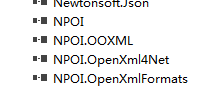
请注意: 此方法无法用于AJAX ,可解决导出时间或者身份证显示######问题
例子
    //前台调用导出按钮

            $("#WriteDoctor").click(function () {

                var StartTime = $("#startDate").val();

                var EndTime = $("#endDate").val();

                var Department = $(".drop_btn .drop_btn_val").text();

                var DoctorName = $(".drop_btn2 .drop_btn_val").text();

                if (Department == "全部") {

                    Department = ""

                }

                if (DoctorName == "全部") {

                    DoctorName = ""

                }

                window.location.href = "@Url.Action("WriteDoctor")?StartTime=" + StartTime + "&EndTime=" + EndTime ;

            })

  //后台方法

        public ActionResult WriteDoctor(DateTime StartTime)

        {

            DataSet ds = 去查询数据库数据(DateTIme, StarTime);

            string paths = "table表名字" + DateTime.Now.ToString("yyyyMMdd") + ".xls";

            NPOIHelper.ExportByWeb(ds, "table表名字" + DateTime.Now.ToString("yyyyMMdd"), paths);

            return Json(new { success = true }, JsonRequestBehavior.AllowGet);

        }
using NPOI.HPSF;
using NPOI.HSSF.UserModel;
using NPOI.SS.UserModel;
using NPOI.SS.Util;
using NPOI.XSSF.UserModel;
using System;
using System.Collections.Generic;
using System.Data;
using System.IO;
using System.Linq;
using System.Text;
using System.Threading.Tasks;
using System.Web; //引用 System.Web
using System.Collections.Generic; namespace DBUtility
{
public class NPOIHelper
{
/// <summary>
/// DataTable导出到Excel文件
/// </summary>
/// <param name="dtSource">源DataTable</param>
/// <param name="strHeaderText">表头文本</param>
/// <param name="strFileName">保存位置</param>
public static void Export(DataTable dtSource, string strHeaderText, string strFileName)
{
using (MemoryStream ms = Export(dtSource, strHeaderText))
{
using (FileStream fs = new FileStream(strFileName, FileMode.Create, FileAccess.Write))
{
byte[] data = ms.ToArray();
fs.Write(data, , data.Length);
fs.Flush();
}
}
} /// <summary>
/// DataTable导出到Excel的MemoryStream
/// </summary>
/// <param name="dtSource">源DataTable</param>
/// <param name="strHeaderText">表头文本</param>
public static MemoryStream Export(DataTable dtSource, string strHeaderText)
{
HSSFWorkbook workbook = new HSSFWorkbook();
ISheet sheet = workbook.CreateSheet(); #region 右击文件 属性信息
{
DocumentSummaryInformation dsi = PropertySetFactory.CreateDocumentSummaryInformation();
dsi.Company = "";
workbook.DocumentSummaryInformation = dsi; SummaryInformation si = PropertySetFactory.CreateSummaryInformation();
si.Author = ""; //填加xls文件作者信息
si.ApplicationName = ""; //填加xls文件创建程序信息
si.LastAuthor = ""; //填加xls文件最后保存者信息
si.Comments = ""; //填加xls文件作者信息
si.Title = ""; //填加xls文件标题信息
si.Subject = "";//填加文件主题信息
si.CreateDateTime = DateTime.Now;
workbook.SummaryInformation = si;
}
#endregion ICellStyle dateStyle = workbook.CreateCellStyle();
IDataFormat format = workbook.CreateDataFormat();
ICellStyle dataStyle = workbook.CreateCellStyle();
dateStyle.DataFormat = format.GetFormat("yyyy-mm-dd");
dateStyle.Alignment = HorizontalAlignment.Center;
dateStyle.VerticalAlignment = VerticalAlignment.Center;
dateStyle.BorderBottom = BorderStyle.Thin;
dateStyle.BorderLeft = BorderStyle.Thin;
dateStyle.BorderRight = BorderStyle.Thin;
dateStyle.BorderTop = BorderStyle.Thin;
//-----
dataStyle.Alignment = HorizontalAlignment.Center;
dataStyle.VerticalAlignment = VerticalAlignment.Center;
dataStyle.BorderBottom = BorderStyle.Thin;
dataStyle.BorderLeft = BorderStyle.Thin;
dataStyle.BorderRight = BorderStyle.Thin;
dataStyle.BorderTop = BorderStyle.Thin;
//取得列宽
int[] arrColWidth = new int[dtSource.Columns.Count];
foreach (DataColumn item in dtSource.Columns)
{
arrColWidth[item.Ordinal] = Encoding.GetEncoding().GetBytes(item.ColumnName.ToString()).Length;
}
for (int i = ; i < dtSource.Rows.Count; i++)
{
for (int j = ; j < dtSource.Columns.Count; j++)
{
int intTemp = Encoding.GetEncoding().GetBytes(dtSource.Rows[i][j].ToString()).Length;
if (intTemp > arrColWidth[j])
{
arrColWidth[j] = intTemp;
}
}
}
int rowIndex = ;
foreach (DataRow row in dtSource.Rows)
{
#region 新建表,填充表头,填充列头,样式
if (rowIndex == || rowIndex == )
{
if (rowIndex != )
{
sheet = workbook.CreateSheet();
} #region 表头及样式
{
IRow headerRow = sheet.CreateRow();
headerRow.HeightInPoints = ;
headerRow.CreateCell().SetCellValue(strHeaderText);
ICellStyle headStyle = workbook.CreateCellStyle();
headStyle.Alignment = HorizontalAlignment.Center;
headStyle.VerticalAlignment = VerticalAlignment.Center;
IFont font = workbook.CreateFont();
font.FontHeightInPoints = ;
font.Boldweight = ;
headStyle.SetFont(font);
headerRow.GetCell().CellStyle = headStyle;
sheet.AddMergedRegion(new CellRangeAddress(, , , dtSource.Columns.Count - )); }
#endregion #region 列头及样式
{
IRow headerRow = sheet.CreateRow();
ICellStyle headStyle = workbook.CreateCellStyle();
headStyle.Alignment = HorizontalAlignment.Center;
headStyle.VerticalAlignment = VerticalAlignment.Center;
headStyle.BorderBottom = BorderStyle.Thin;
headStyle.BorderLeft = BorderStyle.Thin;
headStyle.BorderRight = BorderStyle.Thin;
headStyle.BorderTop = BorderStyle.Thin;
IFont font = workbook.CreateFont();
font.FontHeightInPoints = ;
font.Boldweight = ;
headStyle.SetFont(font);
foreach (DataColumn column in dtSource.Columns)
{
headerRow.CreateCell(column.Ordinal).SetCellValue(column.ColumnName);
headerRow.GetCell(column.Ordinal).CellStyle = headStyle; //设置列宽
sheet.SetColumnWidth(column.Ordinal, (arrColWidth[column.Ordinal] + ) * );
}
// headerRow.Dispose();
}
#endregion rowIndex = ;
}
#endregion #region 填充内容
IRow dataRow = sheet.CreateRow(rowIndex);
foreach (DataColumn column in dtSource.Columns)
{
ICell newCell = dataRow.CreateCell(column.Ordinal); string drValue = row[column].ToString(); switch (column.DataType.ToString())
{
case "System.String"://字符串类型
newCell.SetCellValue(drValue);
newCell.CellStyle = dataStyle;
break;
case "System.DateTime"://日期类型
DateTime dateV;
DateTime.TryParse(drValue, out dateV);
newCell.SetCellValue(dateV); newCell.CellStyle = dateStyle;//格式化显示
break;
case "System.Boolean"://布尔型
bool boolV = false;
bool.TryParse(drValue, out boolV);
newCell.SetCellValue(boolV);
newCell.CellStyle = dataStyle;
break;
case "System.Int16"://整型
case "System.Int32":
case "System.Int64":
case "System.Byte":
int intV = ;
int.TryParse(drValue, out intV);
newCell.SetCellValue(intV);
newCell.CellStyle = dataStyle;
break;
case "System.Decimal"://浮点型
case "System.Double":
double doubV = ;
double.TryParse(drValue, out doubV);
newCell.SetCellValue(doubV);
newCell.CellStyle = dataStyle;
break;
case "System.DBNull"://空值处理
newCell.SetCellValue("");
newCell.CellStyle = dataStyle;
break;
default:
newCell.SetCellValue("");
newCell.CellStyle = dataStyle;
break;
} }
#endregion rowIndex++;
}
using (MemoryStream ms = new MemoryStream())
{
workbook.Write(ms);
ms.Flush();
ms.Position = ;
////workbook.c
// workbook
//workbook.Dispose();//一般只用写这一个就OK了,他会遍历并释放所有资源,但当前版本有问题所以只释放sheet
return ms;
}
} /// <summary>
/// DataTable导出到Excel的MemoryStream
/// </summary>
/// <param name="dtSource">源DataSet</param>
/// <param name="strHeaderText">表头文本</param>
public static MemoryStream ExportMoreTable(DataSet dsSource, string strHeaderText)
{
HSSFWorkbook workbook = new HSSFWorkbook(); foreach (DataTable dtSource in dsSource.Tables)
{
ISheet sheet = workbook.CreateSheet(); #region 右击文件 属性信息
{
DocumentSummaryInformation dsi = PropertySetFactory.CreateDocumentSummaryInformation();
dsi.Company = "";
workbook.DocumentSummaryInformation = dsi; SummaryInformation si = PropertySetFactory.CreateSummaryInformation();
si.Author = ""; //填加xls文件作者信息
si.ApplicationName = ""; //填加xls文件创建程序信息
si.LastAuthor = ""; //填加xls文件最后保存者信息
si.Comments = ""; //填加xls文件作者信息
si.Title = ""; //填加xls文件标题信息
si.Subject = "";//填加文件主题信息
si.CreateDateTime = DateTime.Now;
workbook.SummaryInformation = si;
}
#endregion ICellStyle dateStyle = workbook.CreateCellStyle();
IDataFormat format = workbook.CreateDataFormat();
ICellStyle dataStyle = workbook.CreateCellStyle();
dateStyle.DataFormat = format.GetFormat("yyyy-mm-dd");
dateStyle.Alignment = HorizontalAlignment.Center;
dateStyle.VerticalAlignment = VerticalAlignment.Center;
dateStyle.BorderBottom = BorderStyle.Thin;
dateStyle.BorderLeft = BorderStyle.Thin;
dateStyle.BorderRight = BorderStyle.Thin;
dateStyle.BorderTop = BorderStyle.Thin;
//-----
dataStyle.Alignment = HorizontalAlignment.Center;
dataStyle.VerticalAlignment = VerticalAlignment.Center;
dataStyle.BorderBottom = BorderStyle.Thin;
dataStyle.BorderLeft = BorderStyle.Thin;
dataStyle.BorderRight = BorderStyle.Thin;
dataStyle.BorderTop = BorderStyle.Thin;
//取得列宽
int[] arrColWidth = new int[dtSource.Columns.Count];
foreach (DataColumn item in dtSource.Columns)
{
arrColWidth[item.Ordinal] = Encoding.GetEncoding().GetBytes(item.ColumnName.ToString()).Length;
}
for (int i = ; i < dtSource.Rows.Count; i++)
{
for (int j = ; j < dtSource.Columns.Count; j++)
{
int intTemp = Encoding.GetEncoding().GetBytes(dtSource.Rows[i][j].ToString()).Length;
if (intTemp > arrColWidth[j])
{
arrColWidth[j] = intTemp;
}
}
}
int rowIndex = ;
foreach (DataRow row in dtSource.Rows)
{
#region 新建表,填充表头,填充列头,样式
if (rowIndex == || rowIndex == )
{
if (rowIndex != )
{
sheet = workbook.CreateSheet();
} #region 表头及样式
{
IRow headerRow = sheet.CreateRow();
headerRow.HeightInPoints = ;
headerRow.CreateCell().SetCellValue(strHeaderText);
ICellStyle headStyle = workbook.CreateCellStyle();
headStyle.Alignment = HorizontalAlignment.Center;
headStyle.VerticalAlignment = VerticalAlignment.Center;
IFont font = workbook.CreateFont();
font.FontHeightInPoints = ;
font.Boldweight = ;
headStyle.SetFont(font);
headerRow.GetCell().CellStyle = headStyle;
sheet.AddMergedRegion(new CellRangeAddress(, , , dtSource.Columns.Count - )); }
#endregion #region 列头及样式
{
IRow headerRow = sheet.CreateRow();
ICellStyle headStyle = workbook.CreateCellStyle();
headStyle.Alignment = HorizontalAlignment.Center;
headStyle.VerticalAlignment = VerticalAlignment.Center;
headStyle.BorderBottom = BorderStyle.Thin;
headStyle.BorderLeft = BorderStyle.Thin;
headStyle.BorderRight = BorderStyle.Thin;
headStyle.BorderTop = BorderStyle.Thin;
IFont font = workbook.CreateFont();
font.FontHeightInPoints = ;
font.Boldweight = ;
headStyle.SetFont(font);
foreach (DataColumn column in dtSource.Columns)
{
headerRow.CreateCell(column.Ordinal).SetCellValue(column.ColumnName);
headerRow.GetCell(column.Ordinal).CellStyle = headStyle; //设置列宽
sheet.SetColumnWidth(column.Ordinal, (arrColWidth[column.Ordinal] + ) * );
}
// headerRow.Dispose();
}
#endregion rowIndex = ;
}
#endregion #region 填充内容
IRow dataRow = sheet.CreateRow(rowIndex);
foreach (DataColumn column in dtSource.Columns)
{
ICell newCell = dataRow.CreateCell(column.Ordinal); string drValue = row[column].ToString(); switch (column.DataType.ToString())
{
case "System.String"://字符串类型
newCell.SetCellValue(drValue);
newCell.CellStyle = dataStyle;
break;
case "System.DateTime"://日期类型
DateTime dateV;
DateTime.TryParse(drValue, out dateV);
newCell.SetCellValue(dateV); newCell.CellStyle = dateStyle;//格式化显示
break;
case "System.Boolean"://布尔型
bool boolV = false;
bool.TryParse(drValue, out boolV);
newCell.SetCellValue(boolV);
newCell.CellStyle = dataStyle;
break;
case "System.Int16"://整型
case "System.Int32":
case "System.Int64":
case "System.Byte":
int intV = ;
int.TryParse(drValue, out intV);
newCell.SetCellValue(intV);
newCell.CellStyle = dataStyle;
break;
case "System.Decimal"://浮点型
case "System.Double":
double doubV = ;
double.TryParse(drValue, out doubV);
newCell.SetCellValue(doubV);
newCell.CellStyle = dataStyle;
break;
case "System.DBNull"://空值处理
newCell.SetCellValue("");
newCell.CellStyle = dataStyle;
break;
default:
newCell.SetCellValue("");
newCell.CellStyle = dataStyle;
break;
} }
#endregion rowIndex++;
}
} using (MemoryStream ms = new MemoryStream())
{
workbook.Write(ms);
ms.Flush();
ms.Position = ;
////workbook.c
// workbook
//workbook.Dispose();//一般只用写这一个就OK了,他会遍历并释放所有资源,但当前版本有问题所以只释放sheet
return ms;
}
}
///// <summary>
///// 用于Web网页 直接导出
///// </summary>
///// <param name="dtSource">源DataTable</param>
///// <param name="strHeaderText">表头文本</param>
///// <param name="strFileName">文件名</param>
public static void ExportByWeb(DataSet dtSource, string strHeaderText, string strFileName)
{
HttpContext curContext = HttpContext.Current; // 设置编码和附件格式
curContext.Response.ContentType = "application/vnd.ms-excel";
curContext.Response.ContentEncoding = Encoding.UTF8;
curContext.Response.Charset = "";
curContext.Response.AppendHeader("Content-Disposition",
"attachment;filename=" + HttpUtility.UrlEncode(strFileName, Encoding.UTF8)); curContext.Response.BinaryWrite(ExportMoreTable(dtSource, strHeaderText).GetBuffer());
curContext.Response.End();
} public static void ExportByWeb(MemoryStream file, string strFileName)
{
HttpContext curContext = HttpContext.Current; // 设置编码和附件格式
curContext.Response.ContentType = "application/vnd.ms-excel";
curContext.Response.ContentEncoding = Encoding.UTF8;
curContext.Response.Charset = "";
curContext.Response.AppendHeader("Content-Disposition",
"attachment;filename=" + HttpUtility.UrlEncode(strFileName, Encoding.UTF8)); curContext.Response.BinaryWrite(file.ToArray());
curContext.Response.End();
} /// <summary>读取excel
/// 默认第一行为标头
/// </summary>
/// <param name="strFileName">excel文档路径</param>
/// <returns></returns>
public static DataTable Import(string strFileName)
{ DataTable dt = new DataTable();
//XSSFWorkbook xhssfworkbook;
HSSFWorkbook hssfworkbook;
using (FileStream file = new FileStream(strFileName, FileMode.Open, FileAccess.Read))
{
hssfworkbook = new HSSFWorkbook(file);
}
ISheet sheet = hssfworkbook.GetSheetAt();
System.Collections.IEnumerator rows = sheet.GetRowEnumerator(); IRow headerRow = sheet.GetRow();
int cellCount = headerRow.LastCellNum; for (int j = ; j < cellCount; j++)
{
ICell cell = headerRow.GetCell(j);
dt.Columns.Add(cell.ToString());
} for (int i = (sheet.FirstRowNum + ); i <= sheet.LastRowNum; i++)
{
IRow row = sheet.GetRow(i);
DataRow dataRow = dt.NewRow(); for (int j = row.FirstCellNum; j < cellCount; j++)
{
if (row.GetCell(j) != null)
dataRow[j] = row.GetCell(j).ToString();
} dt.Rows.Add(dataRow);
}
return dt;
} public static DataTable ImportOther(string strFileName)
{ DataTable dt = new DataTable();
HSSFWorkbook hssfworkbook;
XSSFWorkbook xhssfworkbook; ISheet sheet = null;
using (FileStream file = new FileStream(strFileName, FileMode.Open, FileAccess.Read))
{
if (!strFileName.Contains(".xlsx"))
{
hssfworkbook = new HSSFWorkbook(file);
sheet = hssfworkbook.GetSheetAt();
}
else
{
xhssfworkbook = new XSSFWorkbook(file);
sheet = xhssfworkbook.GetSheetAt();
}
} System.Collections.IEnumerator rows = sheet.GetRowEnumerator(); IRow headerRow = sheet.GetRow();
int cellCount = headerRow.LastCellNum; for (int j = ; j < cellCount; j++)
{
ICell cell = headerRow.GetCell(j);
dt.Columns.Add(cell.ToString());
} for (int i = (sheet.FirstRowNum + ); i <= sheet.LastRowNum; i++)
{
IRow row = sheet.GetRow(i);
DataRow dataRow = dt.NewRow(); for (int j = row.FirstCellNum; j < cellCount; j++)
{
if (row.GetCell(j) != null)
dataRow[j] = row.GetCell(j).ToString();
} dt.Rows.Add(dataRow);
}
return dt;
} /// <summary>
/// 将datatable导出为excel
/// 图片默认显示在excel 第二行最后一列
/// </summary>
/// <param name="table">数据源</param>
/// <param name="excelInfo">Tuple<excel列名,datatable列名,excel列宽度></param>
/// <param name="sheetName">工作簿名称</param>
/// <param name="picBytes">导出图片字节流</param>
/// <param name="mergedRegion">合并单元格信息:null不合并单元格</param>
/// <returns></returns>
public static MemoryStream ExportToExcel2007(DataTable table, List<Tuple<string, string, int>> excelInfo, string sheetName, byte[] picBytes, List<CellRangeAddress> mergedRegion)
{
MemoryStream ms = new MemoryStream();
try
{
using (table)
{
IWorkbook workbook = new XSSFWorkbook();
ISheet sheet = workbook.CreateSheet(sheetName);
for (int i = ; i < excelInfo.Count; i++)
{
sheet.SetColumnWidth(i, excelInfo[i].Item3 * );
}
IRow headerRow = sheet.CreateRow();
for (int i = ; i < excelInfo.Count; i++)
{
headerRow.CreateCell(i).SetCellValue(excelInfo[i].Item1);
}
int rowIndex = ;
foreach (DataRow row in table.Rows)
{
IRow dataRow = sheet.CreateRow(rowIndex);
for (int i = ; i < excelInfo.Count; i++)
{
dataRow.CreateCell(i).SetCellValue(row[excelInfo[i].Item2].ToString());
}
rowIndex++;
}
//合并单元格
if (mergedRegion != null && mergedRegion.Count > )
{
foreach (CellRangeAddress cellRangeAddress in mergedRegion)
{
//设置一个合并单元格区域,使用上下左右定义CellRangeAddress区域
//CellRangeAddress四个参数为:起始行,结束行,起始列,结束列
sheet.AddMergedRegion(cellRangeAddress);
ICellStyle style = workbook.CreateCellStyle(); //设置单元格的样式:水平对齐居中
style.Alignment = HorizontalAlignment.Center;
//将新的样式赋给单元格
var cell = sheet.GetRow(cellRangeAddress.FirstRow).GetCell(cellRangeAddress.FirstColumn);
cell.CellStyle = style;
}
}
//插入图片
if (picBytes != null && picBytes.Length > )
{
var row1 = ;
var col1 = excelInfo.Count + ;
/* Add Picture to Workbook, Specify picture type as PNG and Get an Index */
int pictureIdx = workbook.AddPicture(picBytes, NPOI.SS.UserModel.PictureType.PNG); //添加图片
/* Create the drawing container */
XSSFDrawing drawing = (XSSFDrawing)sheet.CreateDrawingPatriarch();
/* Create an anchor point */
XSSFClientAnchor anchor = new XSSFClientAnchor(, , , , col1, row1, col1 + , row1 + ); /* Invoke createPicture and pass the anchor point and ID */
XSSFPicture picture = (XSSFPicture)drawing.CreatePicture(anchor, pictureIdx);
/* Call resize method, which resizes the image */
picture.Resize(); picBytes = null;
}
workbook.Write(ms);
// workbook.Close();
}
}
catch (Exception ex)
{
ms = null;
}
return ms;
}
/// <summary>
/// 将datatable导出为excel
/// 图片默认显示在excel 第二行最后一列
/// </summary>
/// <param name="table">数据源</param>
/// <param name="excelInfo">Tuple<excel列名,datatable列名,excel列宽度></param>
/// <param name="sheetName">工作簿名称</param>
/// <param name="picBytes">导出图片字节流</param>
/// <param name="mergedRegion">合并单元格信息:null不合并单元格</param>
/// <returns></returns>
public static MemoryStream ExportToExcel97(DataTable table, List<Tuple<string, string, int>> excelInfo, string sheetName, byte[] picBytes, List<CellRangeAddress> mergedRegion)
{
MemoryStream ms = new MemoryStream();
try
{
using (table)
{
IWorkbook workbook = new HSSFWorkbook();
ISheet sheet = workbook.CreateSheet(sheetName);
for (int i = ; i < excelInfo.Count; i++)
{
sheet.SetColumnWidth(i, excelInfo[i].Item3 * );
}
IRow headerRow = sheet.CreateRow();
for (int i = ; i < excelInfo.Count; i++)
{
headerRow.CreateCell(i).SetCellValue(excelInfo[i].Item1);
}
int rowIndex = ;
foreach (DataRow row in table.Rows)
{
IRow dataRow = sheet.CreateRow(rowIndex);
for (int i = ; i < excelInfo.Count; i++)
{
dataRow.CreateCell(i).SetCellValue(row[excelInfo[i].Item2].ToString());
}
rowIndex++;
}
//合并单元格
if (mergedRegion != null && mergedRegion.Count > )
{
foreach (CellRangeAddress cellRangeAddress in mergedRegion)
{
//设置一个合并单元格区域,使用上下左右定义CellRangeAddress区域
//CellRangeAddress四个参数为:起始行,结束行,起始列,结束列
sheet.AddMergedRegion(cellRangeAddress);
ICellStyle style = workbook.CreateCellStyle(); //设置单元格的样式:水平对齐居中
style.Alignment = HorizontalAlignment.Center;
//将新的样式赋给单元格
var cell = sheet.GetRow(cellRangeAddress.FirstRow).GetCell(cellRangeAddress.FirstColumn);
cell.CellStyle = style;
} }
//插入图片
if (picBytes != null && picBytes.Length > )
{
var row1 = ;
var col1 = excelInfo.Count + ;
int pictureIdx = workbook.AddPicture(picBytes, NPOI.SS.UserModel.PictureType.PNG); //添加图片 HSSFPatriarch patriarch = (HSSFPatriarch)sheet.CreateDrawingPatriarch(); HSSFClientAnchor anchor = new HSSFClientAnchor(, , , , col1, row1, col1 + , row1 + ); //图片位置,图片左上角为(col, row)
HSSFPicture pict = (HSSFPicture)patriarch.CreatePicture(anchor, pictureIdx);
pict.Resize(); //用图片原始大小来显示
picBytes = null;
}
workbook.Write(ms);
ms.Flush();
ms.Position = ;
}
}
catch (Exception ex)
{
ms = null;
}
return ms;
} /// <param name="hssfworkbook">Excel操作类</param>
/// <param name="fontname">字体名</param>
/// <param name="fontcolor">字体颜色</param>
/// <param name="fontsize">字体大小</param>
/// <returns></returns>
//public static IFont GetFontStyle(HSSFWorkbook hssfworkbook, string fontfamily, HSSFColor fontcolor, int fontsize)
//{
// IFont font1 = hssfworkbook.CreateFont();
// if (string.IsNullOrEmpty(fontfamily))
// {
// font1.FontName = fontfamily;
// }
// if (fontcolor != null)
// {
// font1.Color = fontcolor.Indexed;
// }
// font1.IsItalic = true;
// font1.FontHeightInPoints = (short)fontsize;
// return font1;
//} /// <param name="hssfworkbook">Excel操作类</param>
/// <param name="font">单元格字体</param>
/// <param name="fillForegroundColor">图案的颜色</param>
/// <param name="fillPattern">图案样式</param>
/// <param name="fillBackgroundColor">单元格背景</param>
/// <param name="ha">垂直对齐方式</param>
/// <param name="va">垂直对齐方式</param>
/// <returns></returns>
//public static ICellStyle GetCellStyle(HSSFWorkbook hssfworkbook, IFont font, NPOI.HSSF.Util.HSSFColor fillForegroundColor, FillPattern fillPattern, HSSFColor fillBackgroundColor, HorizontalAlignment ha, VerticalAlignment va)
//{
// ICellStyle cellstyle = hssfworkbook.CreateCellStyle();
// cellstyle.FillPattern = fillPattern;
// cellstyle.Alignment = ha;
// cellstyle.VerticalAlignment = va;
// if (fillForegroundColor != null)
// {
// cellstyle.FillForegroundColor = fillForegroundColor.Indexed;
// }
// if (fillBackgroundColor != null)
// {
// cellstyle.FillBackgroundColor = fillBackgroundColor.Indexed;
// }
// if (font != null)
// {
// cellstyle.SetFont(font);
// }
// //有边框
// cellstyle.BorderBottom = BorderStyle.Thin;
// cellstyle.BorderLeft = BorderStyle.Thin;
// cellstyle.BorderRight = BorderStyle.Thin;
// cellstyle.BorderTop = BorderStyle.Thin;
// return cellstyle;
//} /// <param name="sheet">要合并单元格所在的sheet</param>
/// <param name="rowstart">开始行的索引</param>
/// <param name="rowend">结束行的索引</param>
/// <param name="colstart">开始列的索引</param>
/// <param name="colend">结束列的索引</param>
public static void SetCellRangeAddress(ISheet sheet, int rowstart, int rowend, int colstart, int colend)
{
CellRangeAddress cellRangeAddress = new CellRangeAddress(rowstart, rowend, colstart, colend);
sheet.AddMergedRegion(cellRangeAddress);
}
}
}
c#_导出table功能的更多相关文章
- Atitit.导出excel功能的设计 与解决方案
Atitit.导出excel功能的设计 与解决方案 1.1. 项目起源于背景1 1.2. Js jquery方案(推荐)jquery.table2excel1 1.3. 服务器方案2 1.4. 详细 ...
- 系统管理模块_岗位管理_实现CRUD功能的具体步骤并设计Role实体
系统管理模块_岗位管理_实现CRUD功能的具体步骤并设计Role实体 1,设计实体/表 设计实体 --> JavaBean --> hbm.xml --> 建表 设计Role实体 p ...
- 项目笔记:导出Excel功能
1.前台这块: var ids=""; $.post("${basePath}/assets/unRegDeviceAction_getDeviceIds.do" ...
- 项目笔记:导出Excel功能分sheet页插入数据
导出Excel功能分sheet页处理数据: /*导出EXCEL*/ public void createExcel() { log.info("导出Excel功能已经启动-BEGIN&quo ...
- js导出table中的EXCEL总结
导出EXCEL通常是用PHP做,可是项目中,有时候PHP后端project师返回的数据不是我们想要的,作为前端开发project师,把相应的数据编号转换为文字后,展示给用户.可是.需求要把数据同一时候 ...
- RMAN RECOVER TABLE 功能是 Oracle Database 12c 的新增功能 (Doc ID 1521524.1)
RMAN RECOVER TABLE Feature New to Oracle Database 12c (Doc ID 1521524.1) APPLIES TO: Oracle Database ...
- 【HTML5版】导出Table数据并保存为Excel
首发我的博客 http://blog.meathill.com/tech/js/export-table-data-into-a-excel-file.html 最近接到这么个需求,要把<tab ...
- FusionChart 导出图片 功能实现(转载)
FusionChart 导出图片 功能实现(转载) http://www.cnblogs.com/jiagoushi/archive/2013/02/05/2893468.html 题目:精美Fusi ...
- 导出word功能,用html代码在word中插入分页符
<span lang=EN-US style="font-size:10.5pt;mso-bidi-font-size:12.0pt;font-family:" mce_st ...
随机推荐
- 如何创建一个Quartz.NET的工作,需要注射autofac
问题: 使用 Quartz.Net 做定时任务时,实现IJob对象的服务,Autofac不会自动注入,使用构造函数会直接出现异常,无法执行Execute方法. 解决方式 方法一: 使用 Autofac ...
- VMWare虚拟机下为Windows Server 2012配置静态IP(NAT方式)
利用VMWare Workstation安装了Windows Server 2012 R2, 对于服务器来说,使用动态分配的IP会很不方便,最好设置为静态IP,此例中虚拟机和主机的网络联接方式为NAT ...
- Sequelize-nodejs-8-Transactions
Transactions事务 Sequelize supports two ways of using transactions: Sequelize支持两种使用transactions的方法 One ...
- 20165302 2017-2018-2《Java程序设计》课程总结
20165302 2017-2018-2<Java程序设计>课程总结 每周作业汇总 预备作业1 对师生关系的看法 预备作业2 C语言基础调查 预备作业3 安装虚拟机,初步学习虚拟机及常用命 ...
- jdk8中tomcat修改配置PermSize为MetaspaceSize 标签: tomcatPermSizeMetaspaceSize
JDK8中用metaspace代替permsize,因此在许多我们设置permsize大小的地方同样需要修改配置为metaspace 将-XX:PermSize=200m;-XX:MaxPermSiz ...
- 关于SX1278、SX1276、SX1262的简单详解资料
通常的物联网解决方案和设备一直都非常昂贵,或在实施中不切合实际.理想的无线连接技术应该是低成本.高可靠性的,可进行长距离传输,且拥有超长的电池续航时间.像zigbee.Bluetooth和Wi-Fi这 ...
- 【原型图】Mockplus
Mockplus 原型设计工具
- 执行Import-SPWeb报错的解决办法
题描述] Import-SPWeb : Requested value 'PublishingPages' was not found. [解决办法] 1.找到CPM文件 2.把cpm文件后缀名改为c ...
- 【 腾讯敏捷转型No.4 】为什么敏捷团队不要超过15人
早期,腾讯公司的架构是比较简单的.从上至下分别是:公司——商业单元(BU)——部门——组——员工,每个部门基本上就是负责一个大的产品,每个组都是按照专业进行分工和管理,例如:产品组.终端组.后台组.设 ...
- fastRPC服务使用
现在出现了很多中间件解决跨语言问题,使用RPC远程调用:但是庞大是个问题,而且要按照格式使用.尤其是源码量比较庞大. 为了简单易用,我采用订阅发布模型,在此基础上创建了fastRPC,模拟RPC,调用 ...