
jenkins pipeline构建项目
以前用的jenkins自由风格发布代码。界面丑陋,出现问题位置不够清晰。今天改进一下流程使用jenkins pipeline构建项目。
学习使我快乐
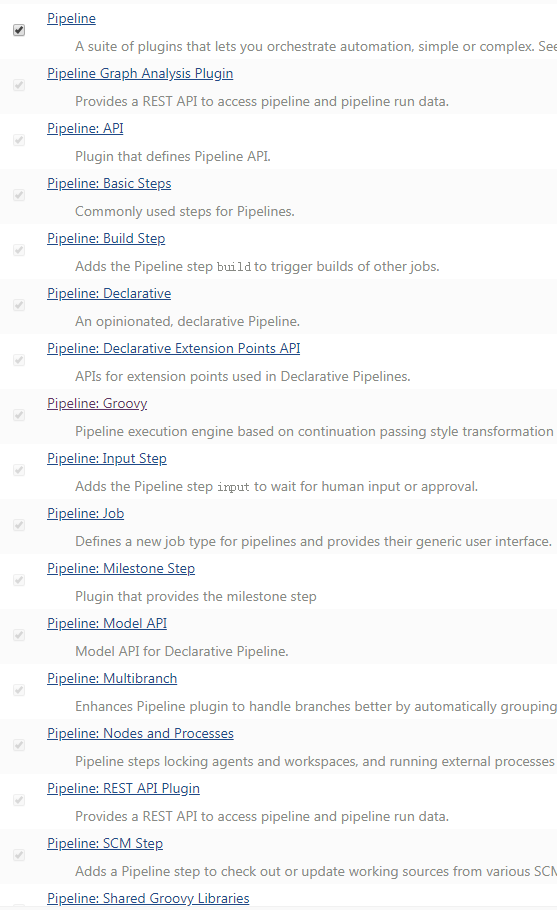
步骤一、安装pipeline插件
点击系统管理->插件管理->可选插件,输入pipeline,选择如下插件安装

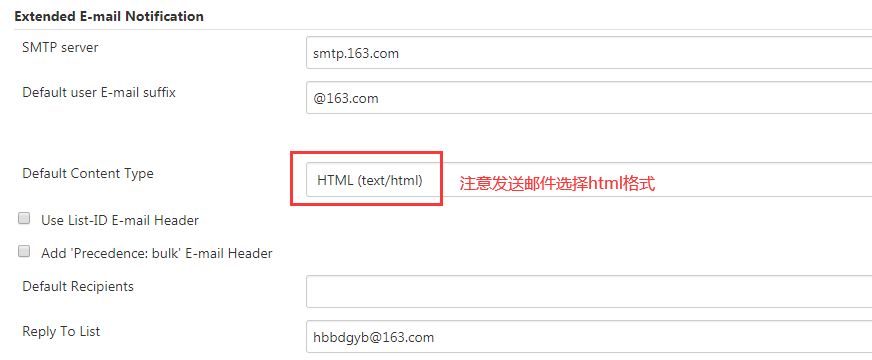
步骤二、Jenkins设置邮箱相关参数
Manage Jenkins->Configure System


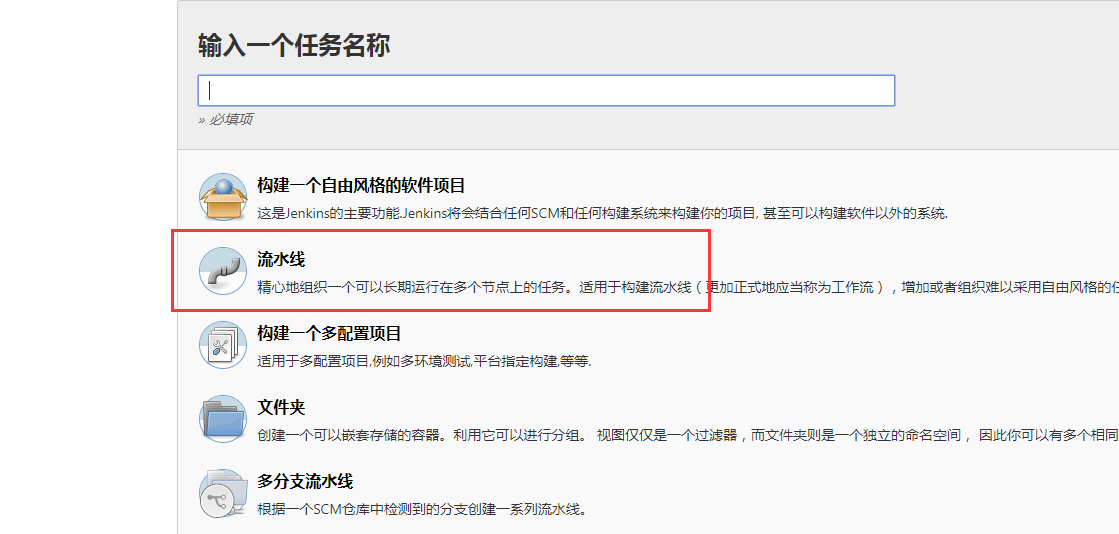
步骤三、创建流水线项目
新建任务->选择流水线
描述瞎写,自己区分项目内容
丢弃旧的构建,选择构建天数,输入保持构建的最大个数。然后直接拉到最下面,在流水线里选择pipeline script或者pipeline script from SCM

先贴一下自己常用的一段代码
def createVersion() {

    // 定义一个版本号作为当次构建的版本,输出结果 20191210175842_69

    return new Date().format('yyyyMMddHHmmss') + "_${env.BUILD_ID}"

}

pipeline{

    agent any

    parameters {

        gitParameter branch: '', branchFilter: '.*', defaultValue: 'master', description: '选择代码分支', name: 'branch', quickFilterEnabled: false, selectedValue: 'NONE', sortMode: 'NONE', tagFilter: '*', type: 'PT_BRANCH'

        choice choices: ['张晓琳', '裴明明', '刘新潮'], description: '填写开发人员', name: 'developer'

        text defaultValue: '', description: '请填写更新日志', name: 'record'

    }

    environment {

        def ip = "ip地址"

        def remotedir = "/home/wwwroot/hxtPayAdmin"

        def _version = createVersion()

        def tmpdir = "/tmp/hxtPayAdmin_${_version}"

        def today = sh(script: "echo `date +%Y_%m_%d`", returnStdout: true).trim()

    }

    stages{

        stage('拉取代码'){

            steps{

                checkout([$class: 'GitSCM', branches: [[name: '$branch']], doGenerateSubmoduleConfigurations: false, extensions: [], submoduleCfg: [], userRemoteConfigs: [[credentialsId: '9df82ae3-5563-4d32-808b-00e8aa9ae26c', url: 'git@192.168.80.13:php/hxtPayAdmin.git']]])

            }

        }

        stage('备份服务器文件'){

            steps{

                sh label: '', script: '''ansible ${ip} -m file -a "path=$tmpdir state=directory"

                ansible ${ip} -m shell -a "rsync -aqp --exclude=\'storage\' --exclude=\'*.csv\' $remotedir  $tmpdir"'''

            }

        }

        stage('发布文件到服务器'){

            steps {

                sh label: '', script: 'chown www.www . -R'

                sh label: '', script: 'ansible ${ip} -m synchronize -a "src=${WORKSPACE}/ dest=$remotedir delete=no archive=yes compress=yes rsync_opts=--exclude=\'.git\',--exclude=\'storage\',--exclude=\'vendor\',--exclude=\'.env\'"'

            }

        }

    }

    post('send mail'){

        always{

            emailext(

                subject: '构建通知:${PROJECT_NAME} - Build # ${BUILD_NUMBER} -${BUILD_STATUS}!',

                body: '${FILE,path="/root/script/email.html"}',

                to: 'guoyabin@96199.com.cn')

            echo "-----构建状态: ${currentBuild.currentResult}-----"

            sh label: '', script: '''

                now=`date "+%Y_%m_%d_%H_%M_%S"`

                echo "时间: $now" >> /root/update_log/$today

                echo "开发者:   $developer" >> /root/update_log/$today

                echo "git地址:  git@192.168.80.13:php/hxtPayAdmin.git" >> /root/update_log/$today

                echo "项目名称: ${JOB_NAME}" >> /root/update_log/$today

                echo "构建编号: $BUILD_NUMBER" >> /root/update_log/$today

                echo "分支名字: $branch" >> /root/update_log/$today

                echo "更新日志: $record" >> /root/update_log/$today

                '''

            sh label: '', script: "echo 构建状态: ${currentBuild.currentResult} >> /root/update_log/$today"

            sh label: '', script: "echo -e \'-----------------------------------\\n\' >> /root/update_log/$today"

        }

    }

}
贴一下body里的发email代码
<!DOCTYPE html>
<html>
<head>
<meta charset="UTF-8">
<title>${ENV, var="JOB_NAME"}-第${BUILD_NUMBER}次构建日志</title>
</head>
<body leftmargin="8" marginwidth="0" topmargin="8" marginheight="4"
offset="0">
<table width="95%" cellpadding="0" cellspacing="0"
style="font-size: 11pt; font-family: Tahoma, Arial, Helvetica, sans-
serif">
<tr>
<td>(本邮件是程序自动下发的,请勿回复!)</td>
</tr>
<tr>
<td><h2>
<font color="#0000FF">构建结果 - ${BUILD_STATUS}</font>
</h2></td>
</tr>
<tr>
<td><br />
<b><font color="#0B610B">构建信息</font></b>
<hr size="2" width="100%" align="center" /></td>
</tr>
<tr>
<td>
<ul>
<li>项目名称 : ${PROJECT_NAME}</li>
<li>构建编号 : 第${BUILD_NUMBER}次构建</li>
<li>触发原因: ${CAUSE}</li>
<li>构建日志: <a href="${BUILD_URL}console">${BUILD_URL}console</a></li>
<li>构建 Url : <a href="${BUILD_URL}">${BUILD_URL}</a></li>
<li>工作目录 : <a href="${PROJECT_URL}ws">${PROJECT_URL}ws</a></li>
<li>项目 Url : <a href="${PROJECT_URL}">${PROJECT_URL}</a></li>
</ul>
</td>
</tr>
<tr>
<td><b><font color="#0B610B">Changes Since Last
Successful Build:</font></b>
<hr size="2" width="100%" align="center" /></td>
</tr>
编写Jenkinsfile添加构建后发送邮件
<tr>
<td>
<ul>
<li>历史变更记录 : <a href="${PROJECT_URL}changes">${PROJECT_URL}changes</a></li>
</ul> ${CHANGES_SINCE_LAST_SUCCESS,reverse=true, format="Changes for Build #%n:<br />%c<br />",showPaths=true,changesFormat="<pre>[%a]<br/>%m</pre>",pathFormat=" %p"}
</td>
</tr>
<tr>
<td><b>Failed Test Results</b>
<hr size="2" width="100%" align="center" /></td>
</tr>
<tr>
<td><pre
style="font-size: 11pt; font-family: Tahoma, Arial, Helvetica,
sans-serif">$FAILED_TESTS</pre>
<br /></td>
</tr>
<tr>
<td><b><font color="#0B610B">构建日志 (最后 100行):</font></b>
<hr size="2" width="100%" align="center" /></td>
</tr>
<tr>
<td><textarea cols="80" rows="30" readonly="readonly"
style="font-family: Courier New">${BUILD_LOG,maxLines=100}</textarea>
</td>
</tr>
</table>
</body>
</html>
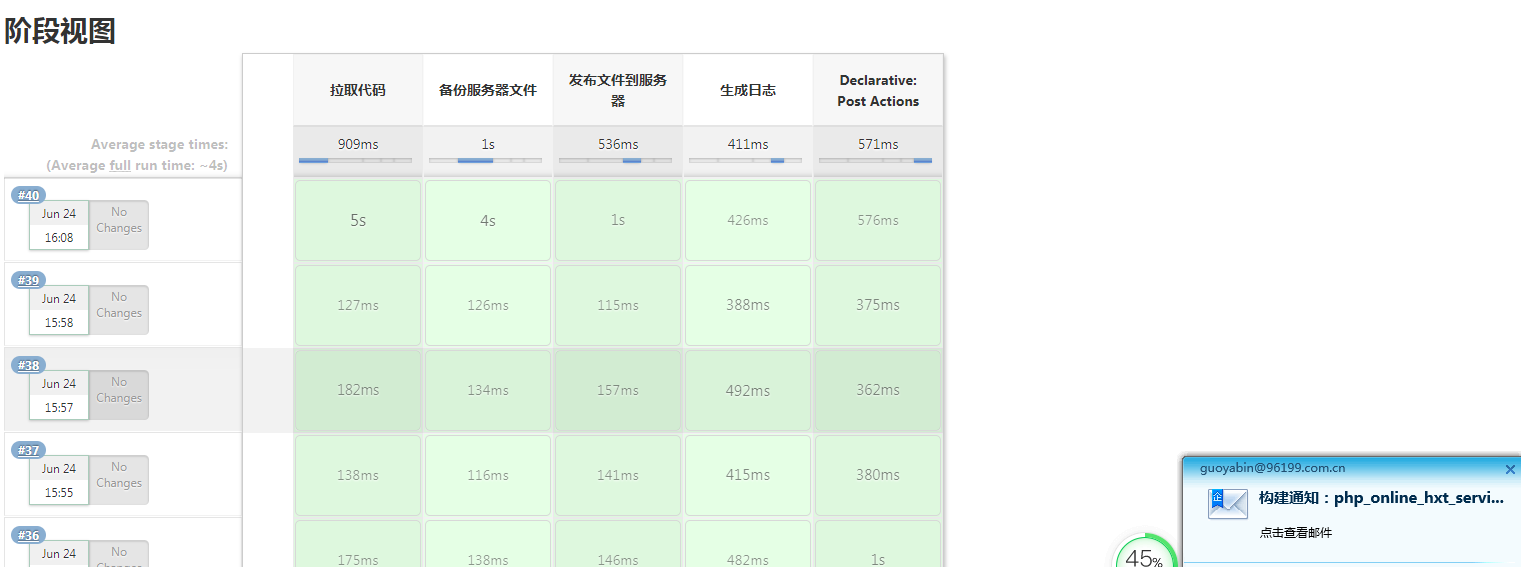
步骤四、点击构建,测试,查看日志流程。
五、其他
pipeline语法可以从流水线语法这里检查学习,

jenkins pipeline构建项目的更多相关文章
- Jenkins + Pipeline 构建流水线发布
Jenkins + Pipeline 构建流水线发布 利用Jenkins的Pipeline配置发布流水线 参考: https://jenkins.io/doc/pipeline/tour/depl ...
- jenkins pipeline构建后发送邮件通知
jenkins pipeline构建后发送邮件通知 mail配置 进入系统配置 找到最下边的邮件通知 创建任务 Pipeline片段 post { always { bat "" ...
- jenkins pipeline构建后返回构建结果给gitlab
jenkins pipeline构建后返回构建结果给gitlab 使用场景 gitlab 合并请求时要求管道任务必须成功,否则无法执行合并操作,又不想使用gitlab ci 工具. 实现方法 1.Ge ...
- jenkins(2): jenkins定时构建项目
参考:http://blog.sina.com.cn/s/blog_b5fe6b270102v7xo.html https://blog.csdn.net/xueyingqi/article/deta ...
- jenkins的构建项目配置
继http://www.cnblogs.com/yajing-zh/p/5109517.html搭建好jenkins系统配置之后,新建jenkins构建项目,用于自动化构建. 点击Jenkins界面左 ...
- DEVOPS技术实践_02:jenkins自动构建项目
一.用户名密码错误 打开jenkins发现用户名密码错误,解决 1.1 找到config.xml文件 [root@jenkins-master ~]# ll -a drwxr-xr-x. root r ...
- Jenkins定时构建项目
我们是不是可以自动的来构建项目那么此时我们需要使用Poll SCM和Build periodically,我们在构建触发中选择这两项即可,其实他们两个就是一个自动任务 触发远程构建:触发远程构建Bui ...
- jenkins + pipeline构建自动化部署
一.引言 Jenkins 2.x的精髓是Pipeline as Code,那为什么要用Pipeline呢?jenkins1.0也能实现自动化构建,但Pipeline能够将以前project中的配置信息 ...
- jenkins+git 构建项目
首先先参照了网上几篇文章 http://blog.csdn.net/kefengwang/article/details/54233584 https://www.liaoxuefeng.com/ar ...
随机推荐
- shell基础知识查缺补漏
最近在看<Linux程序设计(第4版)>,其中有一个章节主要讲了shell脚本方面的,内容不细,但是利用较短的篇幅讲的也不少了.对我们自己来说也是一个查缺补漏的过程,所以就写下这篇读书笔记 ...
- opencv 4.0 + linux下静态编译,展示详细ccmake的参数配置
#先安装 cmake 3.14 # cmake安装到了 /usr/local/bin #配置PATH export PATH="$PATH:/usr/local/bin" #下载最 ...
- 【海淘域名】GoDaddy账户被锁定后的解决方法
转载自[美国海淘网]http://www.usahaitao.com/Experience/Detail_2886.html 通过ICANN申诉顺利的从国内无良奸商(35互联与商务中国,小编的域名 ...
- echarts的通用属性的介绍
通常做数据可视化时,会用到统计图,这里我使用的是Echarts,对于第一次用的人来说,还是有点难度的,主要是里面的属性太多,看的头痛,这里我自己做个笔记 这里的配置项手册里面就是查找各种属性了,在Ec ...
- IoC容器-Bean管理(bean作用域)
IoC操作Bean管理(bean作用域) 1,在Spring里面,设置创建bean实例是单实例还是多实例 2,在Spring里面,默认情况下,bean是单实例对象 3,如何设置单实例还是多实例 (1) ...
- linux实时监控并实时备份数据(rsync)
目录 一:rsync实时监控备份流程 1.安装rsync(服务端 与 客服端)守护进程模式 2.修改配置文件(服务端) 3.解析配置内容 4.创建系统用户 5.创建密码文件 6.授权(必须授权为600 ...
- Docker常用命令速查
docker pull ${CONTAINER NAME} #拉取镜像 docker images #查看本地所有镜像 docker ps #查看所有正在运行的容器,加-q返回id docker ps ...
- Loadrunner11录制移动端测试脚本(原文:http://blog.csdn.net/zhailihua/article/details/73610317)
一.LR配置 1)LR设置代理,利用手机录制脚本 1-协议选择Web(HTTP/HTML)协议即可 2-录制开始前,对Recoding Options中的Port Mapping配置如下 a.新建Ne ...
- 从我做起[AutoMapper实现模块化注册自定义扩展MapTo<>()].Net Core 之二
AutoMapper实现模块化注册自定义扩展MapTo<>() 我们都知道AutoMapper是使用的最多的实体模型映射,如果没有AutoMapper做对象映射那么我们需要想一下是怎么写的 ...
- AT2272 [ARC066B] Xor Sum
我们可以知道异或可以看成不进位的加法,那么我们就可以得到 \(a + b = a\) ^ \(b + ((a \& b) << 1)\),不难发现 \(\frac{v - u}{2 ...