
Part 28 AngularJS default route
At the moment the problem is that, if you try to navigate to a route that is not configured, you will see only the layout page without any partial template injected into it.
For example if you navigate to http://localhost:51983/ABC, since ABC is not a configured route you will see the layout page (index.html) as shown below.
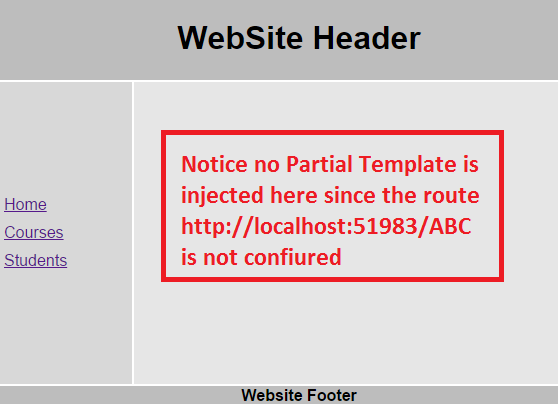
You will also have this same problem if you navigate to the root of the site i.ehttp://localhost:51983. The reason angular is displaying the empty layout template in both these cases, is because it does not know what partial template to inject. We want angular to redirect to default route if the user is trying to navigate to a route that is not configured.
How to configure the default route in Angular : Well that is straight forward. All you need is the following line in config() function in script.js file
.otherwise({

    redirectTo: "/home"

})
With the above change the code in config() function should be as shown below.
.config(function ($routeProvider, $locationProvider) {

    $routeProvider

        .when("/home", {

            templateUrl: "Templates/home.html",

            controller: "homeController"

        })

        .when("/courses", {

            templateUrl: "Templates/courses.html",

            controller: "coursesController"

        })

        .when("/students", {

            templateUrl: "Templates/students.html",

            controller: "studentsController"

        })

        .otherwise({

            redirectTo: "/home"

        })

    $locationProvider.html5Mode(true);

})
With this change if the user tries to navigate to a route that is not configured (http://localhost:51983/ABC) or just to the rooot URL (http://localhost:51983), the user will be automatically redirected to http://localhost:51983/home.
Part 28 AngularJS default route的更多相关文章
- Default route and zero route
A default route of a computer that is participating in computer networking is the packet forwarding ...
- FreeBSD Set a Default Route / Gateway
Task: View / Display FreeBSD Routing Table Use netstat command with -r option:$ netstat -r$ netstat ...
- 永久改动redhat的default route
1,能够用route命令暂时改动: route add default gw <gateway ip> 2, 通过改动/etc/sysconfig/network 文件永久改动: 脚本: ...
- 【angularJS】Route路由
介绍 AngularJS 路由允许我们通过不同的 URL 访问不同的内容. 通过 AngularJS 可以实现多视图的单页Web应用(single page web application,SPA). ...
- angularJS中-$route路由-$http(ajax)的使用
后台请求使用的是nodeJS驱动(后面帖代码),很简单的RESTFUL, 页面使用的是bottstarp3.0(懒人神器); 第一个例子: 在本地架设NODEJS, angular的所有请求都是请求本 ...
- [AngularJS] Default Child state and nav between child state
Let's say we want a parent state which is a abstract state. Two children states, one is for sinlge a ...
- AngularJS中Route例子
代码:https://files.cnblogs.com/files/xiandedanteng/angularJSRouteSample.rar 点击‘首页’后: 点击‘电脑’后: <!DOC ...
- 002 static and default route
r2(config)#ip route 192.168.1.0 255.255.255.0 192.168.2.1 r1(config)#ip route 192.168.3.0 255.255.25 ...
- Change Default Route
route delete 0.0.0.0route add 0.0.0.0 mask 0.0.0.0 10.226.4.14
随机推荐
- 系统设计实践(03)- Instagram社交服务
前言 系统设计实践篇的文章将会根据<系统设计面试的万金油>为前置模板,讲解数十个常见系统的设计思路. 前置阅读: <系统设计面试的万金油> 系统设计实践(01) - 短链服务 ...
- Linux环境yum,安装MySQL
Linux 使用yum命令安装mysql [安装步骤] 1.先检查系统是否安装有mysql [root@localhost ~]#yum list installed mysql* [root@loc ...
- 洛谷 P7541 DOBRA 题解
hhh... 我又来写题解了 solution 题意简化 一个字符串,将所有的 _ 替换成大写字母,使结果字符串符合要求: 1.不包含三个连续 元音 或 辅音 字母: 2.字符串中至少有一个 L . ...
- Windows下node-gyp查找VS安装路径简单解析
node-gyp的作用我已经不想赘述了,这里给一个我之前文章的链接:cnblogs看这里,知乎看这里.本文主要从源码入手,介绍node-gyp查找VisualStudio的过程 为了方便我们研究nod ...
- Python Pandas的使用 !!!!!详解
Pandas是一个基于python中Numpy模块的一个模块 Python在数据处理和准备⽅⾯⼀直做得很好,但在数据分析和建模⽅⾯就差⼀些.pandas帮助填补了这⼀空⽩,使您能够在Python中执 ...
- CF911G Mass Change Queries(线段树+暴力)
cf机子真的快. 其实这个题的维护的信息还是很巧妙的. 首先,观察到题目中涉及到,区间修改这个操作,然后最后只查询一次,我们不妨用线段树来维护这个过程. 但是貌似直接维护每个位置的值可能不太好维护. ...
- JavaScript04
分离绑定事件 使用分离方式绑定元素事件可以使用页面元素与JavaScript代码完全分离,有利于代码分工和维护,是目前开发主流,分为两步: 1.获取需要绑定事件的元素 语法:根据id属性值取元素节点 ...
- 【数据结构与算法Python版学习笔记】图——强连通分支
互联网 我们关注一下互联网相关的非常巨大图: 由主机通过网线(或无线)连接而形成的图: 以及由网页通过超链接连接而形成的图. 网页形成的图 以网页(URI作为id)为顶点,网页内包含的超链接作为边,可 ...
- 【二食堂】Alpha - Scrum Meeting 7
Scrum Meeting 7 例会时间:4.17 11:40 - 12:00 进度情况 组员 昨日进度 今日任务 李健 1. 继续文本区域的开发,先完成目前简陋的添加方式,再区实现勾选功能issue ...
- Docker制作能够ssh连接的镜像
本类文章只作为记录使用 命令操作: #拉取Centos 7 docker pull centos:7 #运行一个镜像 docker run -tdi --privileged centos:7 ini ...