
Kali2搭建Metasploitable3靶机
Metasploitable3简介
Metasploitable3是Metasploitable2的升级版本,它是一个虚拟靶机系统,里面含有大量未被修复的安全漏洞,它主要是用于metasploit-framework测试的漏洞目标。不过Metasploitable3的好处是除了是升级版之外,还可以生成Windows版本和Linux版本,具体就是指可以生成windows_2008_r2和ubuntu_1404这两种不同的系统
官方文档提示所需条件
System Requirements:
OS capable of running all of the required applications listed below
VT-x/AMD-V Supported Processor recommended
65 GB Available space on drive
4.5 GB RAM
大概意思:操作系统需要支持安装以下的应用,主机CPU需要支持虚拟化,硬盘空间65GB以上,内存至少4.5GB
以下是需要安装的应用
Requirements:
Packer
Vagrant
Vagrant Reload Plugin
VirtualBox, libvirt/qemu-kvm, or vmware (paid license required), or parallels (paid license required)
Internet connection
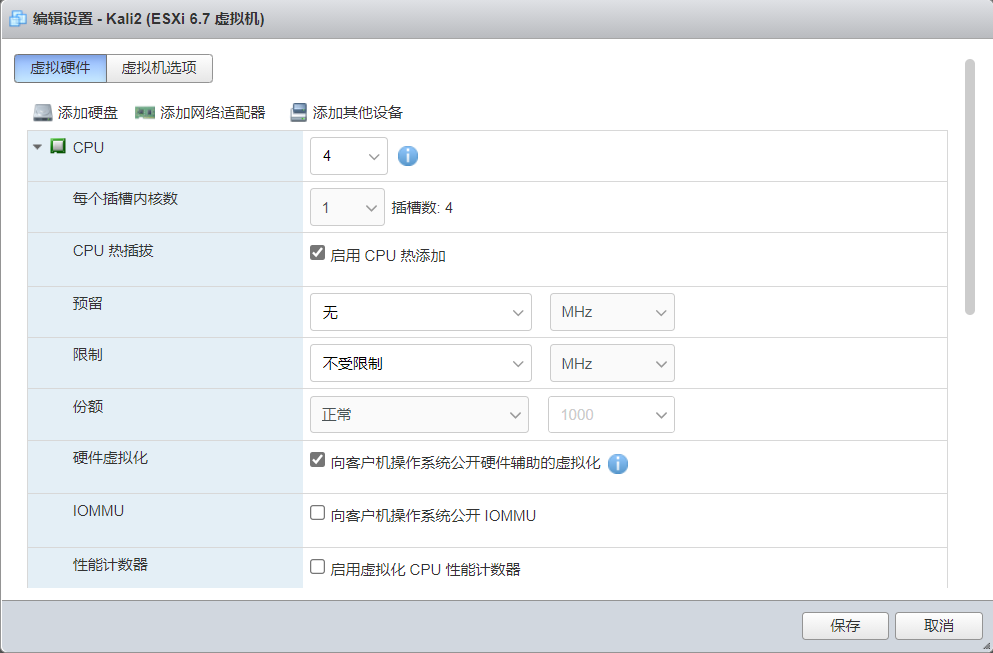
这里Kali本身是运行在Esxi上,需要开启硬件虚拟化嵌套,这个是前提条件,务必开启,如图所示
安装依赖包前的一些系统环境配置
1,切换到root用户
新手才用sudo,老司机直接上root!
sudo用户在下面命令前自动添加sudo!
sudo passwd root	# 交互模式配置root密码

su - root		# 切换到root
2,更改shell环境
新版本的Kali默认使用zsh作为shell环境,zsh很优秀,但是习惯了bash环境的用起来多少有点不顺手,如果想适应zsh的也可以不换
切换后需要退出当前会话重新登录或者新建登录标签才能生效
chsh -s /bin/bash	# 切换bash

chsh -s /bin/zsh	# 切换zsh
3,更新source源
默认官方源慢的要死,虽然有CDN会自动适配国内源,但速度不稳定,直接更换aliyun源,速度原地飞起!
sed -i 's#deb http://http.kali.org/kali#deb https://mirrors.aliyun.com/kali#g' /etc/apt/sources.list
4,安装更新
升级安装包到最新版本
apt update

apt full-upgrade -y

[ -f /var/run/reboot-required ] && reboot -f	# 按需重启Kali
开始安装依赖包
如果按照rapid7官方Github说明安装依赖后直接启动Vagrant up,基本是不会成功的,下面是踩坑后的总结,希望可以帮助到新手朋友!
1,安装VirtualBox
这是Kali官方的文档发布的安装方式,务必按此方式安装,其它方式(比如默认源或deb包的方式)安装会出现各种问题!
apt update

wget -q https://www.virtualbox.org/download/oracle_vbox_2016.asc -O- | gpg --dearmor | tee /usr/share/keyrings/virtualbox-archive-keyring.gpg

# 上一条命令执行后可能会出现一堆乱码,正常!

echo "deb [arch=amd64 signed-by=/usr/share/keyrings/virtualbox-archive-keyring.gpg] http://download.virtualbox.org/virtualbox/debian buster contrib" | tee /etc/apt/sources.list.d/virtualbox.list

apt update && apt install -y dkms virtualbox virtualbox-ext-pack
查看VirtualBox版本,这里不报任何Warning信息说明可以正常使用!
┌──(rootkali)-[~]

└─# virtualbox -h

Oracle VM VirtualBox VM Selector v6.1.22_Debian

(C) 2005-2021 Oracle Corporation

......
2,安装Vagrant并加载插件
官方说明文档只加载vagrant-reload一个插件,这里是一个坑!若按他的说明文档,安装后会各种报错,这里整理好了所需的全部插件,全部安装后才可以正常构建虚拟机镜像!
apt update && apt -y install vagrant

vagrant plugin install vagrant-reload vagrant-vbguest winrm winrm-fs winrm-elevated
查看vagrant版本
┌──(rootkali)-[~]

└─# vagrant -v

Vagrant 2.2.14
3,安装Packer
Packer是一款构建镜像的工具,这里默认安装即可!
apt update && apt -y install packer
查看Packer版本
┌──(rootkali)-[~]

└─# packer -v

1.6.6
获取metasploitable3并创建虚机镜像
以上依赖包安装完成并没有报错信息后,可以执行安装命令
cd /opt && mkdir metasploitable3-workspace && cd metasploitable3-workspace

curl -O https://raw.githubusercontent.com/rapid7/metasploitable3/master/Vagrantfile && vagrant up
执行后会从网上下载文件并自动构建镜像,持续过程大概十几分钟,如图所示

执行完成后,生成的ubuntu1404镜像虚拟机自动导入到了VirtualBox并且是启动状态,图形界面打开VirtualBox可以看到,如文章最后一张图所示
至此ubuntu1404镜像自动构建完成,但是windows2008的镜像不会自动构建,若要构建windows2008还需要修改Vagrantfile配置文件
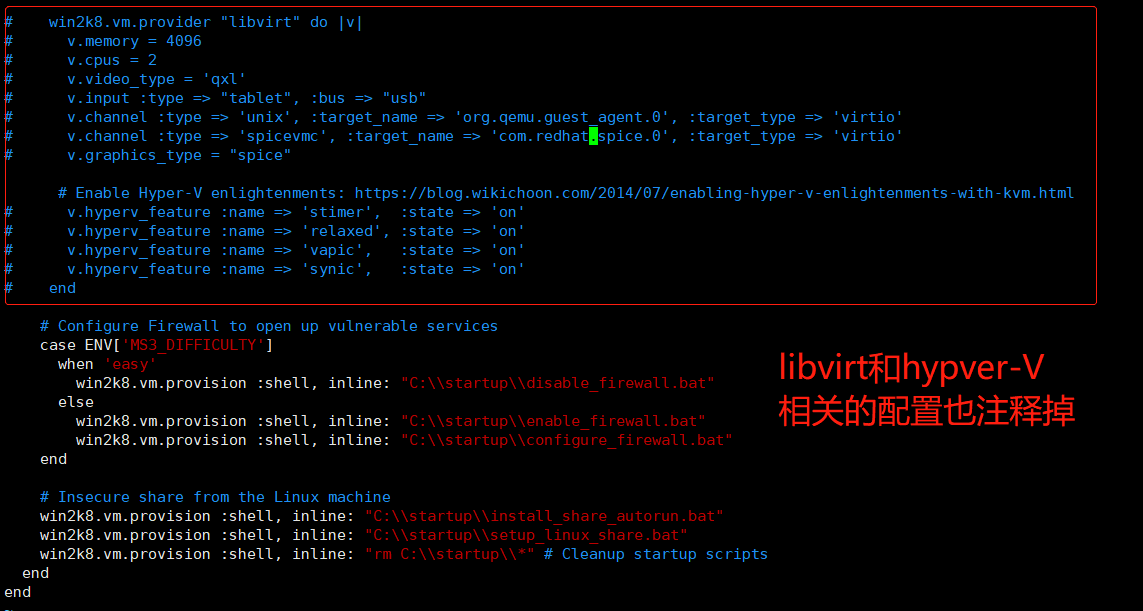
配置文件里支持windows2008的虚拟机除了VirtualBox还有libvirt和hyper-V,如果不注释掉会各种报错,这里又是一个坑!
我们需要把不相关的配置全部注释,如图所示

有效配置文件内容如下
┌──(root??kali)-[/opt/metasploitable3-workspace]

└─# cat Vagrantfile |grep -v "^#"                                                                                                             130 ?

Vagrant.configure("2") do |config|

  config.vm.synced_folder '.', '/vagrant', disabled: true

  config.vm.define "win2k8" do |win2k8|

    # Base configuration for the VM and provisioner

    win2k8.vm.box = "rapid7/metasploitable3-win2k8"

    win2k8.vm.hostname = "metasploitable3-win2k8"

    win2k8.vm.communicator = "winrm"

    win2k8.winrm.retry_limit = 60

    win2k8.winrm.retry_delay = 10

    win2k8.vm.network "private_network", type: "dhcp"

    # Configure Firewall to open up vulnerable services

    case ENV['MS3_DIFFICULTY']

      when 'easy'

        win2k8.vm.provision :shell, inline: "C:\\startup\\disable_firewall.bat"

      else

        win2k8.vm.provision :shell, inline: "C:\\startup\\enable_firewall.bat"

        win2k8.vm.provision :shell, inline: "C:\\startup\\configure_firewall.bat"

    end

    # Insecure share from the Linux machine

    win2k8.vm.provision :shell, inline: "C:\\startup\\install_share_autorun.bat"

    win2k8.vm.provision :shell, inline: "C:\\startup\\setup_linux_share.bat"

    win2k8.vm.provision :shell, inline: "rm C:\\startup\\*" # Cleanup startup scripts

  end

end
虚拟机登录的用户名和密码默认都是vagrant,至此ubuntu1404和windows2008全部构建完成!

#####################################分割线#########################################
使用vagrant up命令构建windows2008,到最后时可能有如下报错信息,还在研究原因,但目测不会影响使用
==> win2k8: Machine booted and ready!

[win2k8] GuestAdditions versions on your host (6.1.22) and guest (6.0.8) do not match.

Downloading VirtualBox Guest Additions ISO from https://download.virtualbox.org/virtualbox/6.1.22/VBoxGuestAdditions_6.1.22.iso

Copy iso file /root/.vagrant.d/tmp/VBoxGuestAdditions_6.1.22.iso into the box $env:TEMP/VBoxGuestAdditions.iso

The term 'Mount-DiskImage' is not recognized as the name of a cmdlet, function, script file, or operable program. Check the spelling of the name, or if a path was included, verify that the path is correct and try again.

At line:1 char:1

+ Mount-DiskImage -ImagePath $env:TEMP/VBoxGuestAdditions.iso

+ ~~~~~~~~~~~~~~~

    + CategoryInfo          : ObjectNotFound: (Mount-DiskImage:String) [], CommandNotFoundException

    + FullyQualifiedErrorId : CommandNotFoundException

Unmounting Virtualbox Guest Additions ISO from: The term 'Get-DiskImage' is not recognized as the name of a cmdlet, function, script file, or operable program. Check the spelling of the name, or if a path was included, verify that the path is correct and try again.

At line:2 char:11

+           Get-DiskImage -ImagePath $env:TEMP/VBoxGuestAdditions.iso

+           ~~~~~~~~~~~~~

    + CategoryInfo          : ObjectNotFound: (Get-DiskImage:String) [], CommandNotFoundException

    + FullyQualifiedErrorId : CommandNotFoundException

The term 'Dismount-DiskImage' is not recognized as the name of a cmdlet, function, script file, or operable program. Check the spelling of the name, or if a path was included, verify that the path is correct and try again.

At line:1 char:1

+ Dismount-DiskImage -ImagePath $env:TEMP/VBoxGuestAdditions.iso

+ ~~~~~~~~~~~~~~~~~~

    + CategoryInfo          : ObjectNotFound: (Dismount-DiskImage:String) [], CommandNotFoundException

    + FullyQualifiedErrorId : CommandNotFoundException

==> win2k8: Checking for guest additions in VM...

    win2k8: The guest additions on this VM do not match the installed version of

    win2k8: VirtualBox! In most cases this is fine, but in rare cases it can

    win2k8: prevent things such as shared folders from working properly. If you see

    win2k8: shared folder errors, please make sure the guest additions within the

    win2k8: virtual machine match the version of VirtualBox you have installed on

    win2k8: your host and reload your VM.

    win2k8:

    win2k8: Guest Additions Version: 6.0.8

    win2k8: VirtualBox Version: 6.1

The following WinRM command responded with a non-zero exit status.

Vagrant assumes that this means the command failed!

Dismount-DiskImage -ImagePath $env:TEMP/VBoxGuestAdditions.iso

Stdout from the command:

Stderr from the command:

The term 'Dismount-DiskImage' is not recognized as the name of a cmdlet, function, script file, or operable program. Check the spelling of the name, or if a path was included, verify that the path is correct and try again.

At line:1 char:1

+ Dismount-DiskImage -ImagePath $env:TEMP/VBoxGuestAdditions.iso

+ ~~~~~~~~~~~~~~~~~~

    + CategoryInfo          : ObjectNotFound: (Dismount-DiskImage:String) [], CommandNotFoundException

    + FullyQualifiedErrorId : CommandNotFoundException
参考文档
https://github.com/rapid7/metasploitable3
https://www.kali.org/docs/virtualization/install-virtualbox-host/
Kali2搭建Metasploitable3靶机的更多相关文章
- 2020我终于成功搭建了Metasploitable3靶机
0x00前言 在学习metasploit时我们往往需要一个靶场,下面为大家介绍一下如何在虚拟机中安装metasploitable 3靶场.Metasploitable3是Metasploitable2 ...
- XMAPP搭建DVWA靶机
1 环境搭建 XMAPP+DVWA (我在win10下搭的环境) 更改了xmapp中Apache的两个端口号: dvwa/config中密钥和端口号按自己情况填好: dvwa/config中文件改为 ...
- 如何搭建OWASP测试靶机
刚刚入门的新手都需要一个可以用来练习的环境,但是dvwa的搭建需要相关环境,所以这里推荐大家在虚拟机上搭建owasp靶机,里面集成了dvwa靶机. https://sourceforge.net/pr ...
- 网络对抗课题4.3.1 SQL注入原理与实践
网络对抗课题4.3.1 SQL注入原理与实践 原理 SQL注入漏洞是指在Web应用对后台数据库查询语句处理存在的安全漏洞.也就是,在输入字符串中嵌入SQL指令,在设计程序中忽略对可能构成攻击的特殊字符 ...
- struts2(s2-052)远程命令执行漏洞复现
漏洞描述: 2017年9月5日,Apache Struts发布最新安全公告,Apache Struts2的REST插件存在远程代码执行的高危漏洞,该漏洞由lgtm.com的安全研究员汇报,漏洞编号为C ...
- 【研究】CVE-2015-1635-HTTP.SYS远程执行代码漏洞(ms15-034)
1.1.1 漏洞描述 在2015年4月安全补丁日,微软发布的众多安全更新中,修复了HTTP.sys中一处允许远程执行代码漏洞,编号为:CVE-2015-1635(MS15-034 ).利用HTTP. ...
- 在Ubuntu16.04 TLS 安装LAMP
准备在虚拟机上搭建一个靶机系统(DoraBox),但是还不想使用一键搭建所以起了心思准备使用LAMP框架搭载这个靶机系统,于是有了以下文章,先从百度搜索一下,Ubuntu搭建LAMP. 然后点进去第一 ...
- JBOSS中间件漏洞总汇复现
JBOSS中间件漏洞总汇复现 JBoss JMXInvokerServlet 反序列化漏洞 漏洞复现 直接使用docker搭建的漏洞环境. 环境搭建完成后,直接使用工具检测即可:工具下载地址https ...
- 漏洞复现之JBoss 4.x JBossMQ JMS 反序列化漏洞(CVE-2017-7504)
前言: 序列化就是把对象转换成字节流,便于保存在内存.文件.数据库中:反序列化即逆过程,由字节流还原成对象. Java中的ObjectOutputStream类的writeObject()方法可以实现 ...
随机推荐
- 使用Oracle SQL Developer报错:Unable to find a Java Virtual Machine
1.环境 win7 x64,oracle 11g r2,jdk6 x64 2.问题 第一次启动Oracle SQL Developer的时候会让我们填写java.exe的路径,我在jdk安装目录下的b ...
- 使用gitlab自带的ci/cd实现.net core应用程序的部署
这两天在折腾持续集成和交付,公司考虑使用gitlab自带的ci/cd来处理,特此记下来整个流程步骤. 好记性不如一支烂笔头---尼古拉斯-古人言 第一步: 安装gitlab,这个自然不用多说 第二步: ...
- Vector ArrayList LinkedList
三者都实现了List接口! Vector与ArrayList:采用顺序存储的方式,但是Vector是线程安全的,ArrayList是线程不安全的,按需使用: 当存储空间不足的时候,ArrayList默 ...
- Acunetix与WAF集成:Acunetix和F5 BigIP ASM
该的Acunetix API让您有机会来实现任务自动化,从而提高效率-尤其是当你可以用加速您的工作流程的其他组件的功能整合.在此示例中,我们将在上一篇文章的基础上,向您展示如何在Bash脚本中使用Ac ...
- centos搭建dns服务器
前言:搭建dns服务器,dns服务器我就不多说什么了,大家都懂,就是域名解析,就将ip装换为域名,域名就可以理解为类似这样的www.baidu.com网址,接下来我就直接上图了.这里面最重要的是修改u ...
- python使用笔记17--异常处理
什么是异常? 异常即是一个事件,该事件会在程序执行过程中发生,影响了程序的正常执行. 一般情况下,在Python无法正常处理程序时就会发生一个异常. 异常是Python对象,表示一个错误. 当Pyth ...
- 二、从GitHub浏览Prism示例代码的方式入门WPF下的Prism之Modules的几种加载方式
这一篇梳理Prism中07示例Module的几种加载方式. 07示例分为了5个,有5种不同的Module加载方式. 我们开始学习加载Modules 观察07-Modules-Appconfig示例 分 ...
- k8s之deployment详解
Deployment介绍 为了更好地解决服务编排的问题,k8s在V1.2版本开始,引入了deployment控制器,值得一提的是,这种控制器并不直接管理pod, 而是通过管理replicaset来间接 ...
- 微信小程序云开发-数据库-商品列表数据显示N条数据
一.wxml文件 在wxml文件中,写页面和点击事件,添加绑定事件limitGoods 二.js文件 在js文件中写limitGoods(),使用.limit(3)表示只显示3条数据
- 深入GraphQL 的使用语法
深入GraphQL 的使用语法 对于GraphQL 的使用语法在上一节中已经大概介绍了基本的使用方式了,这一篇将会对上一篇入门做拓展,努力将所有的使用语法都覆盖到. 1. 终端语法 首先是介绍在前端查 ...