
mxgraph中mxStencil使用教程
官方文档:https://jgraph.github.io/mxgraph/docs/js-api/files/shape/mxStencil-js.html
标签嵌套关系
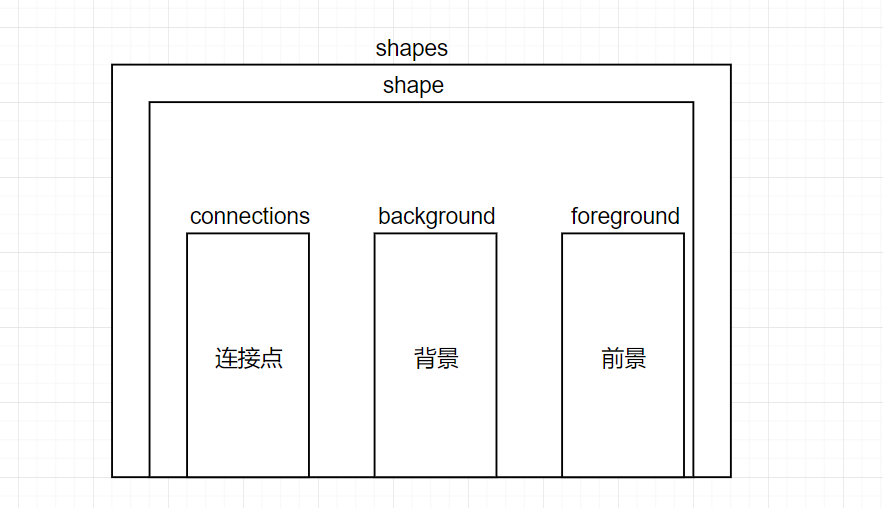
<!--基本结构-->

<shapes>

 <shape name="linearrow" h="1" w="4" aspect="variable" strokewidth="inherit">

     <!--连接点-->

    <connections>

      <constraint x="0.5" y="0" perimeter="1" name="A" />

      <constraint x="0.5" y="1" perimeter="1" name="B" />

    </connections>

    <!--背景-->

    <background>

    </background>

    <!--前景-->

    <foreground>

    </foreground>

 </shape>

</shapes>
Shapes
相当于一个集合,里面可以包含多个shape图形
shape
一个shape相当于一个图形,相关参数:
| 参数 | 解释 | 类型 | 值 |
|---|---|---|---|
| name | 图形名称 | string | 自定义 |
| w | 图形宽度 | string | 自定义,默认值为100 |
| h | 图形高度 | string | 自定义,默认值为100 |
| aspect | 图形比率 | string | 1.variable(默认值)表示调整大小图形会以比率缩放,缩放使图形宽高会改变 2.fixed(固定)图形默认比率大小不能改变,缩放不会改变图形的宽高 |
| strokewidth | 线条 | string | 默认值为1。"inherit"表示线条宽度仅在缩放时更改,而不是在调整大小时更改。如果使用数值,则在缩放和调整大小时都会改变线条宽度。这个参数要在后面每个线段前面加上strokewidth标签赋值配合使用才能有效果 |
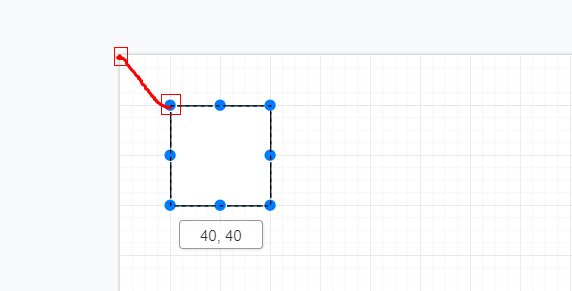
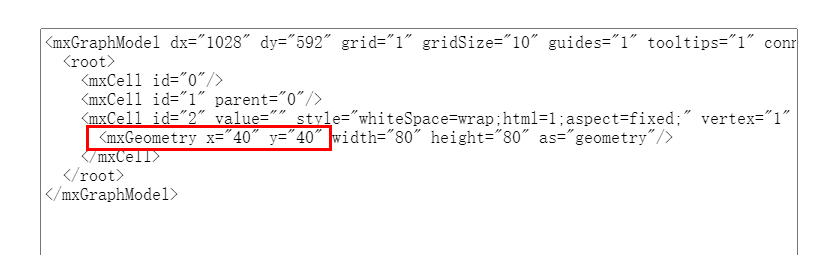
注意:mxStencil中图形的坐标不是按照普通x,y相对于原点来的,这里x、y坐标是以整个页面的左上角为原点,到图形的左上角的距离。
connections
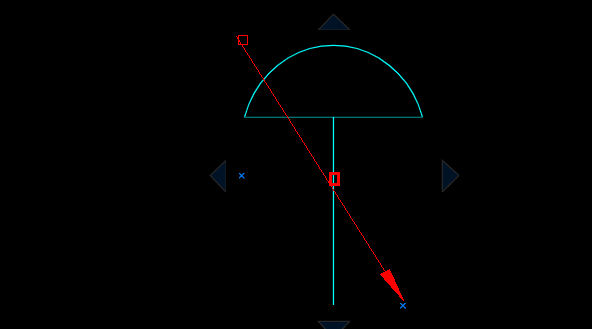
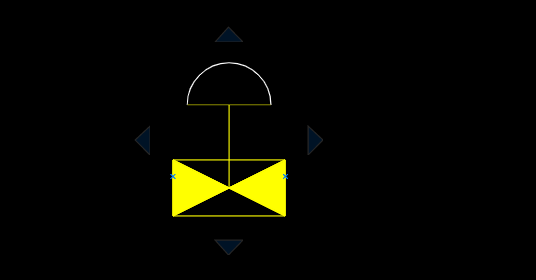
连接点是用于和其他图形建立连接的点,图下蓝色的小X

连接点的定义方式:
| 参数 | 解释 | 值 |
|---|---|---|
| perimeter | 周长 | 0表示由x、y指定的连接点,1表示使连接点的位置从形状左上角,通过x、y到与形状周长相交的点 |
| x、y | 连接点的位置 | 周长为0时,x、y是相对坐标最大值为1。周长为0时,由图形坐标点出发经过x、y坐标最后与边框相交 |
| name | 连接点的名称 | 形状上端口的唯一标识符 |
实验参数perimeter="0"的设置原理, 设置 两个连接点
<constraint x="0" y="0.5" perimeter="0" name="!" />

<constraint x="1" y="0.5" perimeter="0" name="!" />
以图形左上角为原点,(0,0)是左上角,(0,0.5)左边中心,(1,0.5)是右边界的中心,值可能小于0或大于1,以定位在形状外部。
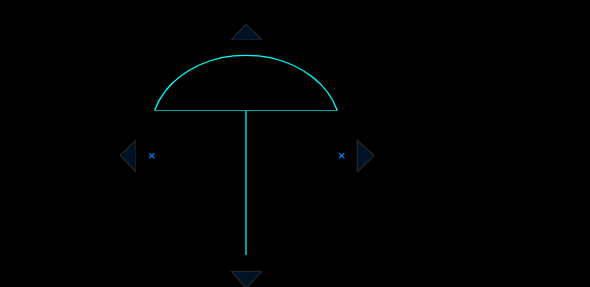
实验参数perimeter="1"的设置原理,设置x=2.5,y=3.7,已知图形的宽为5.7,高为7.5,那么x、y所处的位置就是红色方框标记,也就是改图形的中心点,两点连成一条线,由图形坐标点出发经过x、y坐标最后与边框相交的就是连接点的位置。
background
背景只能描绘轮廓(path),如果有填充图形颜色,或者阴影部分只能放置前景中。
背景只能包含:笔划(一条条的线)、矩形、圆矩形或椭圆元素。不能包括图像、文本或包含形状
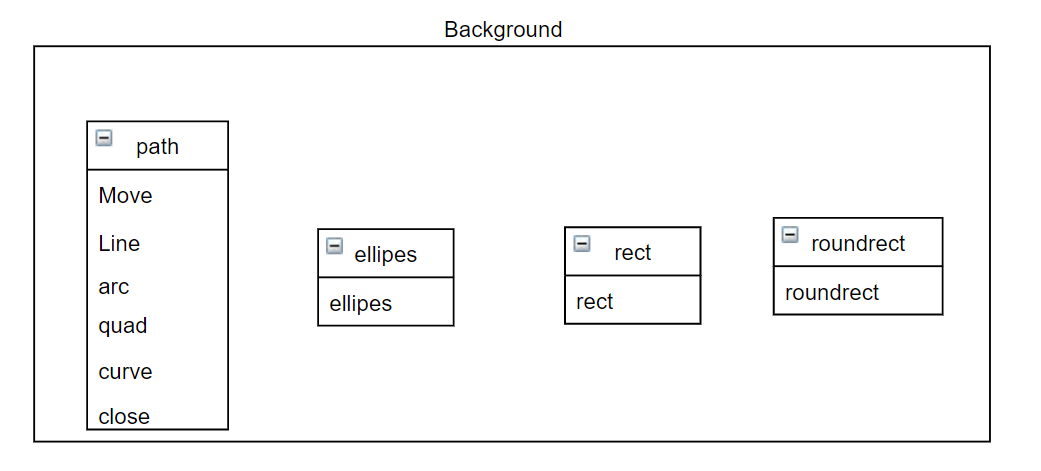
Move:用于绘制一个起点
line:用于描述终点,Move和line表示连成一条线,line的一直使用表示笔划不中断
 <path>

        <move x="0" y="10" />

        <line x="10" y="10" />

  </path>
  <path>

        <move x="2.79999999999991" y="0.700000000000114" />

        <line x="0.699999999999886" y="6.81676937119846E-14" />

        <line x="0.7" y="6.81676937119846E-14" />

        <line x="0.7" y="1.40000000000016" />

        <line x="0.699999999999886" y="1.40000000000016" />

        <line x="2.79999999999991" y="0.700000000000114" />

        <close />

  </path>
close:把起点和终点连起来闭合,常见于弧线,封闭图形里面
arc:
 <path>

        <move x="x1" y="y1" />

        <arc rx="0.7" ry="0.7" x-axis-rotation="" large-arc-flag="" sweep-flag="" x="x2" y="y2" />

</path>
x1、y1:起点
x2、y2:终点
rx、ry:中心点
x-axis-rotation:图形旋转角度(0~360)
sweep-flag:弧线方向 0表示逆时针 1表示顺时针
large-arc-flag:起点和终点连成一条线做这个线的中垂线,根据中心点,就有四段弧
这里要讲的参数是large-arc-flag(角度大小) 和sweep-flag(弧线方向),large-arc-flag决定弧线是大于还是小于180度,0表示小角度弧,1表示大角度弧。sweep-flag表示弧线的方向,0表示从起点到终点沿逆时针画弧,1表示从起点到终点沿顺时针画弧。下面的例子展示了这四种情况。

quad:二次贝塞尔曲线
curve:三次贝塞尔曲线
foreground
前景可以包含:封闭路径、文字等等
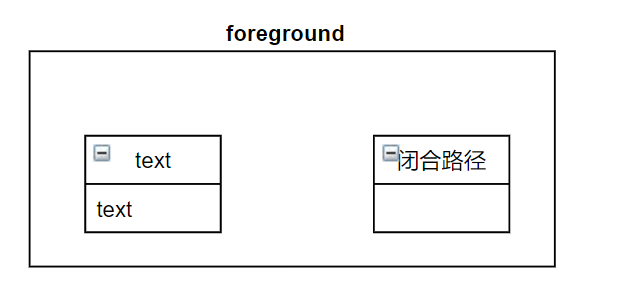
文字:
- str:需要显示的文本字符串。
- x、y:文本元素的十进制位置(x,y),必需。
- align:文本元素的水平对齐,可以是“left”、“center”或“right”。可选,默认为“左”。
- valign:文本元素的垂直对齐,可以是“top”、“middle”或“bottom”。可选,默认为“top”。
- localized:0或1,如果是1,“str”实际上包含一个键,用于从mxResources中获取值。可选,默认值为mxStencil.defaultLocalized。
- 垂直:0或1,如果为1,则垂直渲染标签(旋转90度)。可选,默认值为0。
- 旋转角度:单位为度(0到360)。旋转文本的角度。可选,默认值为0。
- 对齐形状:或1,如果0,则在设置文本旋转时忽略形状的旋转。可选,默认值为1。
其他样式
在当前状态中更改颜色的元素都采用哈希前缀的十六进制颜色代码(“ffae80”)
strokecolor,这将设置在发出笔划或圆角命令时图形路径将呈现的颜色。
fillcolor,这将设置在发出“填充”或“圆角笔划”命令时,闭合路径内部将呈现的颜色。
fontcolor,这设置了在绘制文本时字体渲染的颜色。
alpha定义了在1.0和0.0之间使用的完全不透明透明度程度,而完全透明时使用的透明度等级。
fillalpha定义了在1.0和0.0之间使用的完全不透明填充透明度的程度,以及完全透明的0.0。
Strokeapha定义了在1.0之间使用的完全不透明笔划透明度的程度,以及为完全透明而使用的0.0之间的笔划透明度。
strokewidth定义通过抚摸渲染的图形图元的整数厚度。使用fixed=“1”按原样应用该值,而不必缩放。
dashed 为“1”,表示启用破折号,“0”表示禁用。启用虚线时,当前的划线图案(由dashpattern定义)将用于笔划。dashpattern是一个间隔的“开,关”长度序列,定义绘制笔划的距离,dashpattern可以设置虚线的样式。例如:

字体样式:
- fontsize,整数,
- fontstyle,一个粗体(1)、斜体(2)和下划线(4)的ORed位模式,即粗体下划线为“5”
- fontfamily是一个字符串,定义要使用的字体
图形内部颜色绘制
在foreground前景中绘制一段路径path,在path前面加上fillcolor用于表示封闭路径的颜色,最后在path后面加上fillstroke表示这是填充笔画。
<foreground>

     <!--渲染图形路径的颜色-->

     <strokecolor color="#ffffff" />

     <!--填充的颜色-->

      <fillcolor color="#000000" />

      <path>

        <move x="0.61" y="1.69937846768753" />

        <arc rx="1.78938082222999" ry="1.78938082222999" x-axis-rotation="0" large-arc-flag="0" sweep-flag="1" x="4.19" y="1.69937846768753" />

      </path>

      <fillstroke />

</foreground>
封闭线段绘制
 <path>

        <move x="4.79999999999988" y="4.0998037856843" />

        <line x="2.4" y="5.26937846768752" />

        <line x="2.92038760422274" y="5.52297520382388" />

        <line x="4.79999999999988" y="6.43895314969076" />

        <line x="4.79999999999988" y="4.0998037856843" />

        <close />

  </path>
设置一条线的颜色大小
<background>

    <!--渲染图形路径的颜色-->

   <strokecolor color="#ffff00" />

     <!--渲染线的宽度-->

   <strokewidth width="0" />

     <!--设置线的样式-->

   <dashed dashed="0" />

    <path>

        <move x="1.04" y="2.1" />

        <line x="1.04" y="3.59" />

    </path>

    <stroke/>

</background>
样例
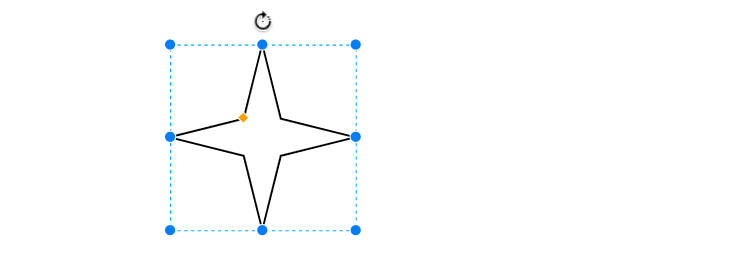
<shape aspect="variable" h="92" name="4 Point Star" strokewidth="inherit" w="92">

    <connections>

        <constraint name="N" perimeter="0" x="0.5" y="0"/>

        <constraint name="S" perimeter="0" x="0.5" y="1"/>

        <constraint name="W" perimeter="0" x="0" y="0.5"/>

        <constraint name="E" perimeter="0" x="1" y="0.5"/>

    </connections>

    <background>

        <path>

            <move x="46" y="0"/>

            <line x="56" y="36"/>

            <line x="92" y="46"/>

            <line x="56" y="56"/>

            <line x="46" y="92"/>

            <line x="36" y="56"/>

            <line x="0" y="46"/>

            <line x="36" y="36"/>

            <close/>

        </path>

    </background>

    <foreground>

        <fillstroke/>

    </foreground>

</shape>
<shape name="jcontvvncwd" h="6.46937846768753" w="4.8" aspect="variable" strokewidth="inherit">

    <connections>

      <constraint x="0" y="0.74" perimeter="1" name="!" />

      <constraint x="1" y="0.74" perimeter="1" name="!" />

    </connections>

    <background>

      <strokecolor color="#ffff00" />

      <strokewidth width="0" />

      <dashed dashed="0" />

      <path>

        <move x="0" y="6.46937846768753" />

        <line x="4.8" y="4.06937846768753" />

      </path>

      <stroke />

      <strokecolor color="#ffff00" />

      <strokewidth width="0" />

      <dashed dashed="0" />

      <path>

        <move x="4.8" y="6.46937846768753" />

        <line x="0" y="4.06937846768753" />

      </path>

      <stroke />

      <strokecolor color="#ffff00" />

      <strokewidth width="0.0200080032012812" />

      <dashed dashed="0" />

      <path>

        <move x="0" y="4.06937846768753" />

        <line x="0" y="6.46937846768753" />

      </path>

      <stroke />

      <strokecolor color="#ffff00" />

      <strokewidth width="0.0200080032012812" />

      <dashed dashed="0" />

      <path>

        <move x="0" y="4.06937846768753" />

        <line x="4.8" y="4.06937846768753" />

      </path>

      <stroke />

      <strokecolor color="#ffff00" />

      <strokewidth width="0.0200080032012812" />

      <dashed dashed="0" />

      <path>

        <move x="4.8" y="4.06937846768753" />

        <line x="4.8" y="6.46937846768753" />

      </path>

      <stroke />

      <strokecolor color="#ffff00" />

      <strokewidth width="0.0200080032012812" />

      <dashed dashed="0" />

      <path>

        <move x="0" y="6.46937846768753" />

        <line x="4.8" y="6.46937846768753" />

      </path>

      <stroke />

      <strokecolor color="#ffff00" />

      <strokewidth width="0.0200080032012812" />

      <dashed dashed="0" />

      <path>

        <move x="0" y="6.46937846768753" />

        <line x="4.8" y="4.06937846768753" />

      </path>

      <stroke />

      <strokecolor color="#ffff00" />

      <strokewidth width="0.0200080032012812" />

      <dashed dashed="0" />

      <path>

        <move x="4.8" y="4.06937846768753" />

        <line x="4.8" y="6.46937846768753" />

      </path>

      <stroke />

      <strokecolor color="#ffff00" />

      <strokewidth width="0.0200080032012812" />

      <dashed dashed="0" />

      <path>

        <move x="4.8" y="6.46937846768753" />

        <line x="0" y="4.06937846768753" />

      </path>

      <stroke />

      <strokecolor color="#ffff00" />

      <strokewidth width="0.0200080032012812" />

      <dashed dashed="0" />

      <path>

        <move x="0.61" y="1.69937846768753" />

        <line x="2.4" y="1.69937846768753" />

      </path>

      <stroke />

      <strokecolor color="#ffff00" />

      <strokewidth width="0.0200080032012812" />

      <dashed dashed="0" />

      <path>

        <move x="2.4" y="1.69937846768753" />

        <line x="4.19" y="1.69937846768753" />

      </path>

      <stroke />

      <strokecolor color="#ffff00" />

      <strokewidth width="0.0200080032012812" />

      <dashed dashed="0" />

      <path>

        <move x="2.4" y="1.69937846768753" />

        <line x="2.4" y="5.26937846768753" />

      </path>

      <stroke />

      <strokecolor color="#ffff00" />

      <strokewidth width="0" />

      <dashed dashed="0" />

      <path>

        <move x="4.8" y="4.09937846768753" />

        <line x="4.8" y="6.43937846768753" />

      </path>

      <stroke />

      <strokecolor color="#ffff00" />

      <strokewidth width="0" />

      <dashed dashed="0" />

      <path>

        <move x="0" y="4.09937846768753" />

        <line x="0" y="6.43937846768753" />

      </path>

      <stroke />

      <strokecolor color="#ffff00" />

      <strokewidth width="0" />

      <dashed dashed="0" />

      <path>

        <move x="0" y="4.09937846768753" />

        <line x="2.92" y="5.51937846768753" />

      </path>

      <stroke />

      <strokecolor color="#ffff00" />

      <strokewidth width="0" />

      <dashed dashed="0" />

      <path>

        <move x="4.8" y="4.09937846768753" />

        <line x="1.88" y="5.51937846768753" />

      </path>

      <stroke />

      <strokecolor color="#ffff00" />

      <strokewidth width="0" />

      <dashed dashed="0" />

      <path>

        <move x="2.92" y="5.51937846768753" />

        <line x="4.8" y="6.43937846768753" />

      </path>

      <stroke />

      <strokecolor color="#ffff00" />

      <strokewidth width="0" />

      <dashed dashed="0" />

      <path>

        <move x="1.88" y="5.51937846768753" />

        <line x="0" y="6.43937846768753" />

      </path>

      <stroke />

    </background>

    <foreground>

      <strokecolor color="#ffffff" />

      <fillcolor color="#000000" />

      <path>

        <move x="0.61" y="1.69937846768753" />

        <arc rx="1.78938082222999" ry="1.78938082222999" x-axis-rotation="0" large-arc-flag="0" sweep-flag="1" x="4.19" y="1.69937846768753" />

      </path>

      <fillstroke />

      <insert x="2.4" y="5.26937846768753">

      </insert>

      <fillcolor color="#ffff00" />

      <path>

        <move x="1.17239551400417E-13" y="4.0998037856843" />

        <line x="1.17239551400417E-13" y="6.43895314969076" />

        <line x="1.87961239577726" y="5.52297520382388" />

        <line x="2.4" y="5.26937846768752" />

        <line x="1.17239551400417E-13" y="4.0998037856843" />

        <close />

      </path>

      <fill />

      <fillcolor color="#ffff00" />

      <path>

        <move x="4.79999999999988" y="4.0998037856843" />

        <line x="2.4" y="5.26937846768752" />

        <line x="2.92038760422274" y="5.52297520382388" />

        <line x="4.79999999999988" y="6.43895314969076" />

        <line x="4.79999999999988" y="4.0998037856843" />

        <close />

      </path>

      <fill />

    </foreground>

</shape>
mxgraph中mxStencil使用教程的更多相关文章
- 在RedHat.Enterprise.Linux_v6.3系统中安装Oracle_11gR2教程
在RedHat.Enterprise.Linux_v6.3系统中安装Oracle_11gR2教程 本教程提供PDF格式下载: 在RedHat.Enterprise.Linux_v6.3系统中安装Ora ...
- XCode中使用SVN 教程
修改subversion.config方法: 可以直接在终端上输入:vi ~/.subversion/config来编辑. 也可以通过Finder搜索.subversion,点击下边的+号,进入高级搜 ...
- linux中RabbitMQ安装教程
linux中RabbitMQ安装教程 在做一个微服务项目时候用到消息队列,于是深入了解了消息队列知识,并在linux上安装了Rabbitmq,本博客介绍Rabbitmq的安装教程,想要深入了解消息队列 ...
- thymeleaf模板、thymeleaf语法相关中文文档教程
thymeleaf模板在SpringBoot中是默认的模范引擎技术,SpringBoot不推荐使用比较老旧的jsp.但如果您想使用jsp的话,当然也可以.我这里为您讲述thymeleaf模板的基本th ...
- MyBatis中的OGNL教程
MyBatis中的OGNL教程 有些人可能不知道MyBatis中使用了OGNL,有些人知道用到了OGNL却不知道在MyBatis中如何使用,本文就是讲如何在MyBatis中使用OGNL. 如果我们搜索 ...
- Bootstrap 中文文档教程
Bootstrap 中文文档教程 Bootstrap 中文文档教程 全局样式和grid布局—Bootstrap中文使用指南 全局样式1.要求html5文档类型 Bootstrap使用的css属性和ht ...
- 用Python的pandas框架操作Excel文件中的数据教程
用Python的pandas框架操作Excel文件中的数据教程 本文的目的,是向您展示如何使用pandas 来执行一些常见的Excel任务.有些例子比较琐碎,但我觉得展示这些简单的东西与那些你可以在其 ...
- git\CentOS6.5中gitlab安装教程
一.Git 起源: Git是一个开源的分布式版本控制系统,用于敏捷高效地处理任何或小或大的项目. Git 是 Linus Torvalds 为了帮助管理 Linux 内核开发而开发的一个开放源码的版本 ...
- 【设计经验】2、ISE中ChipScope使用教程
一.软件与硬件平台 软件平台: 操作系统:Windows 8.1 开发套件:ISE14.7 硬件平台: FPGA型号:XC6SLX45-CSG324 二.ChipScope介绍 ChipScope是X ...
随机推荐
- vim命令c编程
1.移动光标的常用命令 h--向左移动光标 l--向右移动光标 j--向下移动光标 k--向上移动光标 ^--将光标移动至该行的开头 $--将光标移动至该行的结尾 O--将光标移动至该行行首 G--将 ...
- C# 获取网页信息
获取网页源码 ///通过HttpWebResponse public string GetUrlHtml(string url) { string strHtml = string.Empty; Ht ...
- ASPOSE.Cells & ASPOSE.Words 操纵Excel和Word文档的 .NET Core 实例
Aspose.Total是Aspose公司旗下的最全的一套office文档管理方案,它提供的原生API可以对Word.Excel.PDF.Powerpoint.Outlook.CAD.图片.3D.ZI ...
- ElasticSearch实战系列十: ElasticSearch冷热分离架构
前言 本文主要介绍ElasticSearch冷热分离架构以及实现. 冷热分离架构介绍 冷热分离是目前ES非常火的一个架构,它充分的利用的集群机器的优劣来实现资源的调度分配.ES集群的索引写入及查询速度 ...
- vue 快速入门 系列 —— 侦测数据的变化 - [基本实现]
其他章节请看: vue 快速入门 系列 侦测数据的变化 - [基本实现] 在 初步认识 vue 这篇文章的 hello-world 示例中,我们通过修改数据(app.seen = false),页面中 ...
- k8s删除节点
k8s 删除节点 线上环境 # ctl get nodes NAME STATUS ROLES AGE VERSION 10.0.0.123 Ready <none> 104d v1.20 ...
- CSS3新增了哪些新特性
一.是什么 css,即层叠样式表(Cascading Style Sheets)的简称,是一种标记语言,由浏览器解释执行用来使页面变得更为美观 css3是css的最新标准,是向后兼容的,CSS1/2的 ...
- 死磕Spring之AOP篇 - Spring AOP自动代理(二)筛选合适的通知器
该系列文章是本人在学习 Spring 的过程中总结下来的,里面涉及到相关源码,可能对读者不太友好,请结合我的源码注释 Spring 源码分析 GitHub 地址 进行阅读. Spring 版本:5.1 ...
- Linux递归压缩图片脚本
1 压缩图片 使用ImageMagick的convert命令进行压缩图片,一般只需要一个指定压缩质量的参数,比如: convert -quality 75 1.jpg 1_compress.jpg 可 ...
- 详解Linux指令与文件的搜寻
我们在管理Linux服务器时通常会进行搜索文件及目录操作,下面我们就开始了解一下linux目录结构的相关知识. 博主再奉上一套零基础入门Linux视频,带你从入门到精通 https://www.bil ...