
python3 5月26日 time模块常用时间转换 &datetime()模块学习 random()
import time
获取当前时间:
指定字符串格式:time.strftime("%Y-%m-%d %H:%M:%S")
当前时间戳:time.time()
当前时间元组格式:time.localtime()默认为获取当前时间的格式,
可以计算任何一个时间戳的格式化结果。
字符串转时间格式
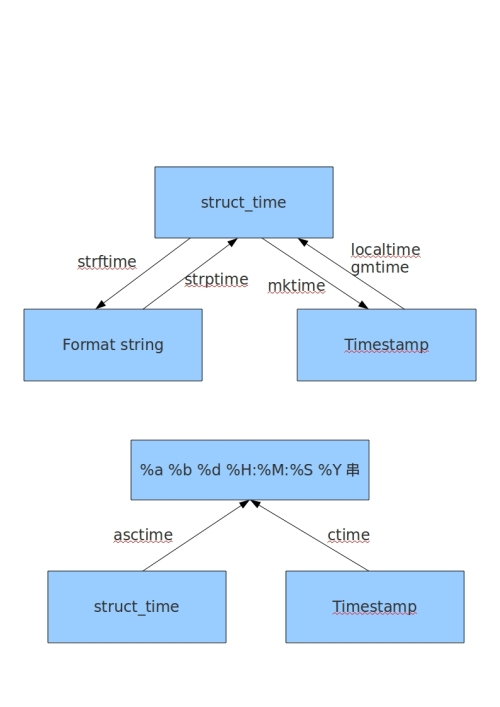
将时间字符串转按指定格式换为元组<class 'time.struct_time'>
time.strptime(“字符串”,format("%Y-%m-%dT%H:%M:%SZ"))
将时间格式转换为时间戳:
time.mktime(‘class 'time.struct_time’格式的元组) #将时间格式元组转换为时间戳 <class 'float'>
time.gmtime(时间戳)将时间戳转换为UTC时间元组
time.localtime(时间戳)将时间戳转换为本地时区的时间元组
time.ctime(‘时间戳’)将时间戳转换为字符串(本地时间) 如Sat May 26 21:11:24 2018
time.asctime(时间元组)将时间格式元组转换为 特定固定格式字符串 如Sat May 26 21:11:24 2018
time.timezone() 查看和UTC标准时间相差的秒数 -28800秒
time.daylight 查看是否使用了夏令时

转换代码示例:import time,datetime
'''
0、GMT 时间字符串转换为时间戳
'''
test_date_str = 'Mon, 07 Dec 2020 09:10:56 GMT'
test_struct_time = time.strptime(test_date_str,'%a, %d %b %Y %H:%M:%S GMT')
#time.struct_time(tm_year=2020, tm_mon=12, tm_mday=7, tm_hour=9, tm_min=10, tm_sec=56, tm_wday=0, tm_yday=342, tm_isdst=-1)
time_stamp = time.mktime(test_struct_time)
time_stamp
1607303456.0
'''

1、将字符串转换为时间戳

'''

str = '2019-10-29 17:54:26'

timestamp = time.mktime(time.strptime(str,'%Y-%m-%d %H:%M:%S'))

'''
2、datetime时间转换为时间戳
'''
datetime.datetime.now().timestamp()

'''

3、将时间戳数字转换为 日期时间字符串

'''

num_timestamp = time.time()

time_str = time.strftime('%Y-%m-%d %H:%M:%S',time.localtime(num_timestamp))

'''

4、将datetime时间转换为字符串

'''

datetime.datetime.now().strftime('%Y-%m-%d %H:%M:%S')

'''

5、把字符串转成datetime:

'''

str ='2019-10-29 17:54:26'

datetime.datetime.strptime(str, "%Y-%m-%d %H:%M:%S"))

'''

6、把字符串转成time:

'''

time.strptime(str,'%Y-%m-%d %H:%M:%S')
'''
7、获取当前UTC时间字符串
'''
#方法1、
utctime = time.gmtime()
utc_str = time.strftime("%Y-%m-%dT%H:%M:%SZ", utctime)
#方法2、
datetime.datetime.utcnow().strftime('%Y-%m-%dT%H:%M:%SZ')
格式参照
|
1
2
3
4
5
6
7
8
9
10
11
12
13
14
15
16
17
18
19
20
21
22
|
%a 本地(locale)简化星期名称 %A 本地完整星期名称 %b 本地简化月份名称 %B 本地完整月份名称 %c 本地相应的日期和时间表示 %d 一个月中的第几天(01 - 31) %H 一天中的第几个小时(24小时制,00 - 23) %I 第几个小时(12小时制,01 - 12) %j 一年中的第几天(001 - 366) %m 月份(01 - 12) %M 分钟数(00 - 59) %p 本地am或者pm的相应符 一 %S 秒(01 - 61) 二 %U 一年中的星期数。(00 - 53星期天是一个星期的开始。)第一个星期天之前的所有天数都放在第0周。 三 %w 一个星期中的第几天(0 - 6,0是星期天) 三 %W 和%U基本相同,不同的是%W以星期一为一个星期的开始。 %x 本地相应日期 %X 本地相应时间 %y 去掉世纪的年份(00 - 99) %Y 完整的年份 %Z 时区的名字(如果不存在为空字符) %% ‘%’字符 |
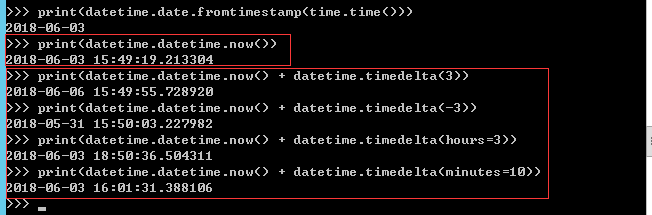
#时间加减import datetime# print(datetime.datetime.now()) #返回 2016-08-19 12:47:03.941925#print(datetime.date.fromtimestamp(time.time()) ) # 时间戳直接转成日期格式 2016-08-19# print(datetime.datetime.now() )# print(datetime.datetime.now() + datetime.timedelta(3)) #当前时间+3天# print(datetime.datetime.now() + datetime.timedelta(-3)) #当前时间-3天# print(datetime.datetime.now() + datetime.timedelta(hours=3)) #当前时间+3小时# print(datetime.datetime.now() + datetime.timedelta(minutes=30)) #当前时间+30分# c_time = datetime.datetime.now()# print(c_time.replace(minute=3,hour=2)) #时间替换random()
import random
#随机位数验证码
str_int = 'abcdefghigklmnopqrstuvwxyz1234567890'
check_code = ''
test_check = random.sample(str_int,4)
for i in test_check:
    check_code+=i
print(check_code)
#随机整数
print(random.randint(0,99))
#随机偶数(从0开始,步长为2)
print(random.randrange(0,100,2))
#随机奇数数(从1开始,步长为2)
print(random.randrange(1,100,2))
#随机浮点数
print(random.random()) #0-1之间
print(random.uniform(0,99))#指定范围之间
print(random.choice('agc')) #随机字符
#洗牌,打乱顺序功能
list1 = [1,2,3,4,5,6,7,8,9,0]
random.shuffle(list1)
print(list1)
python3 5月26日 time模块常用时间转换 &datetime()模块学习 random()的更多相关文章
- 10月26日 奥威Power-BI基于微软示例库(MSOLAP)快速制作管理驾驶舱 腾讯课堂开课啦
本次课是基于olap数据源的案例实操课,以微软olap示例库Adventure Works为数据基础. AdventureWorks示例数据库为一家虚拟公司的数据,公司背景为大型跨国生产 ...
- 2016年12月26日 星期一 --出埃及记 Exodus 21:21
2016年12月26日 星期一 --出埃及记 Exodus 21:21 but he is not to be punished if the slave gets up after a day or ...
- 2016年11月26日 星期六 --出埃及记 Exodus 20:17
2016年11月26日 星期六 --出埃及记 Exodus 20:17 "You shall not covet your neighbor's house. You shall not c ...
- 2016年10月26日 星期三 --出埃及记 Exodus 19:10-11
2016年10月26日 星期三 --出埃及记 Exodus 19:10-11 And the LORD said to Moses, "Go to the people and consec ...
- 2016年6月26日 星期日 --出埃及记 Exodus 14:23
2016年6月26日 星期日 --出埃及记 Exodus 14:23 The Egyptians pursued them, and all Pharaoh's horses and chariots ...
- GIS大讲堂内所有讲座的索引(更新至2008年6月26日)(转)
转自:http://www.cnblogs.com/xiexiaokui/archive/2008/11/20/1337934.html GIS大讲堂内所有讲座的索引(更新至2008年6月26日) ...
- 2013年12月26日 星期四 doxygen入门--很好
body{ font-family: "Microsoft YaHei UI","Microsoft YaHei",SimSun,"Segoe UI& ...
- 我的Python成长之路---第一天---Python基础(1)---2015年12月26日(雾霾)
2015年12月26日是个特别的日子,我的Python成之路迈出第一步.见到了心目中的Python大神(Alex),也认识到了新的志向相投的伙伴,非常开心. 尽管之前看过一些Python的视频.书,算 ...
- 下厨房6月26日数据丢失事故总结 MYSQL主分区被rm 命令误删除
下厨房6月26日数据丢失事故总结 MYSQL主分区被rm 命令误删除 http://tech.xiachufang.com/?p=18 在6月26日凌晨12点左右,我们在做线上数据库的备库时,误将线上 ...
随机推荐
- 数值分析:矩阵奇异值分解(Numpy实现)
1. 奇异值分解(SVD) (1)奇异值分解 已知矩阵\(\bm{A} \in \R^{m \times n}\), 其奇异值分解为: \[\bm{A} = \bm{U}\bm{S}\bm{V}^T ...
- 洛谷 P3215 [HNOI2011]括号修复 / [JSOI2011]括号序列(fhq-treap)
题目链接 题意:有一个长度为 \(n\) 的括号序列,你需要支持以下操作: 将 \([l,r]\) 中所有括号变为 \(c\) 将 \([l,r]\) 区间翻转 将 \([l,r]\) 区间中左括号变 ...
- 2021.9.30 Codeforces 中档题四道
Codeforces 1528D It's a bird! No, it's a plane! No, it's AaParsa!(*2500) 考虑以每个点为源点跑一遍最短路,每次取出当前距离最小的 ...
- Codeforces 1290F - Making Shapes(数位 dp)
Codeforces 题面传送门 & 洛谷题面传送门 数位 dp 好题. 首先,由于是凸包,一但向量集合确定,凸包的形态肯定就已经确定了.考虑什么样的向量集合能够组成符合条件的凸包,我们假设第 ...
- pycharm两个交互模式
- hive向mysql导入数据sqoop命令出错
报错信息: java.lang.Exception: java.io.IOException: java.lang.ClassNotFoundException: info at org.apache ...
- 巩固javaweb的第二十三天
巩固内容: 调用验证方法 验证通常在表单提交之前进行,可以通过按钮的 onClick 事件,也可以通过 form 表单 的 onSubmit 事件来完成. 本章实例是通过 form 表单的 onSub ...
- abandon, aboard, abolish
abandon Abandon is a 2002 American psychological thriller drama film [惊悚片] ... Waiting for Handler o ...
- HBase【操作Java api】
一.导入依赖 创建模块,导入以下依赖,maven默认编译版本是1.5,用1.8编译. pom.xml <dependencies> <dependency> <group ...
- 【转载】HBase基本数据操作详解【完整版,绝对精品】
转载自: http://blog.csdn.net/u010967382/article/details/37878701 概述 对于建表,和RDBMS类似,HBase也有namespace的概念,可 ...