
python-geopandas读取、创建shapefile文件
作者:fungis 描述:一个热带生活、乐于分享、努力搬砖的giser 交流邮箱:fungis@163.com
shapefile是GIS中非常重要的一种数据类型,在ArcGIS中被称为要素类(Feature Class),主要包括点(point)、线(polyline)和多边形(polygon)。作为一种十分常见的矢量文件格式,geopandas对shapefile提供了很好的读取和写出支持,其DataFrame结构相当于GIS数据中的一张属性表,使得可以直接操作矢量数据属性表,使得在python中操作地理数据更方便。本文给大家介绍下用Python脚本中对Shapefile文件(.shp,.shx,.dbf等格式)进行读写操作。
开发准备
由于geopandas有好几个依赖库,推荐大家使用 Miniconda或是 Anaconda来安装geopandas。
安装命令:
conda install -c conda-forge geopandas
国内镜像:
conda install -c https://mirrors.tuna.tsinghua.edu.cn/anaconda/cloud/conda-forge geopandas
使用导入:import geopandas
我这里用的是geopandas 0.7的版本,版本间差异是不太大,最新0.8版本新增了一些查询、入库方面的特性。
shapefile文件信息的读取
相比pyshp库,geopandas库的数据读取、展示、分析、拓展的效果要更好。它可以读取zip中的shapefile,还可以读取GeoJson、ArcGIS中地理数据库gdb,以及QGIS中GeoPackage 存放的矢量数据。
import geopandas as gpd

from matplotlib import pyplot as plt

data = gpd.read_file(r'E:\gisData\行政区划数据2019\省.shp')#读取磁盘上的矢量文件

#data = gpd.read_file('shapefile/china.gdb', layer='province')#读取gdb中的矢量数据

print(data.crs)  # 查看数据对应的投影信息

print(data.head())  # 查看前5行数据

data.plot()

plt.show()#简单展示
显示效果:
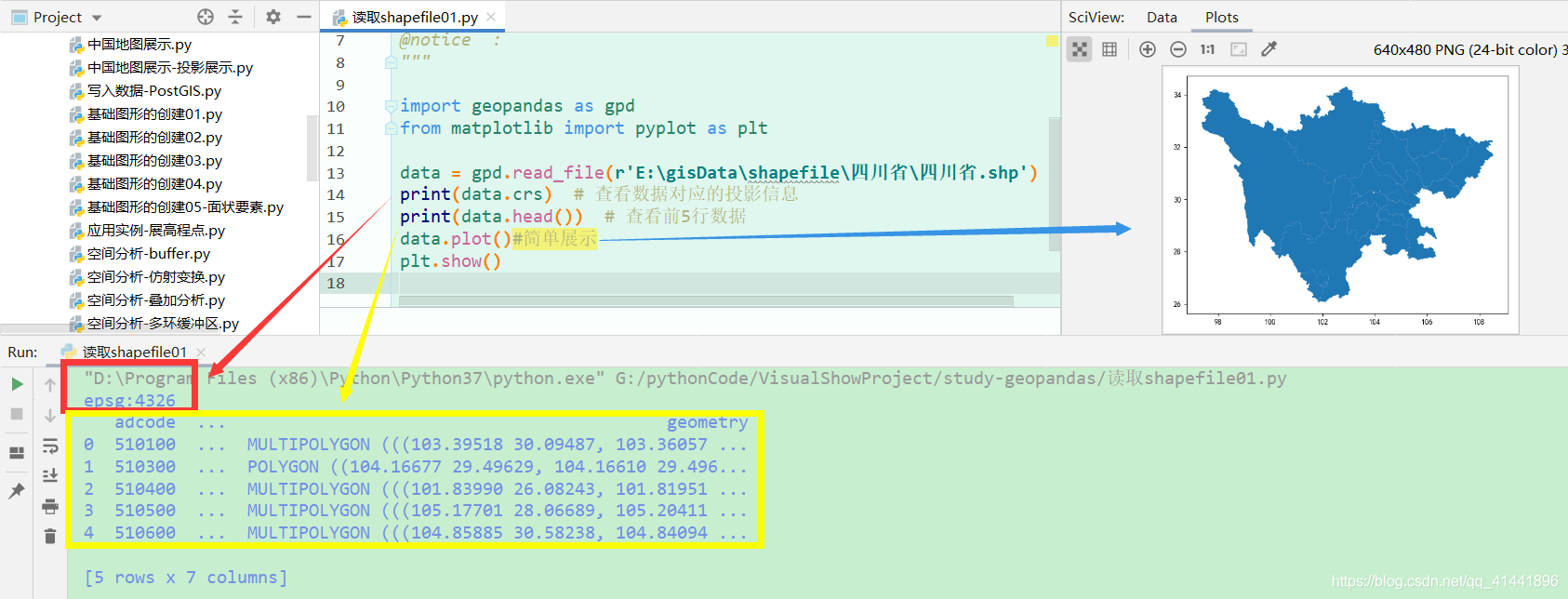
shapefile文件的创建
要素类的创建效率很高,既能创建要素实体,也能写入属性信息和定义投影。下面先简单介绍下三种要素类的创建方法。
点状要素类的创建
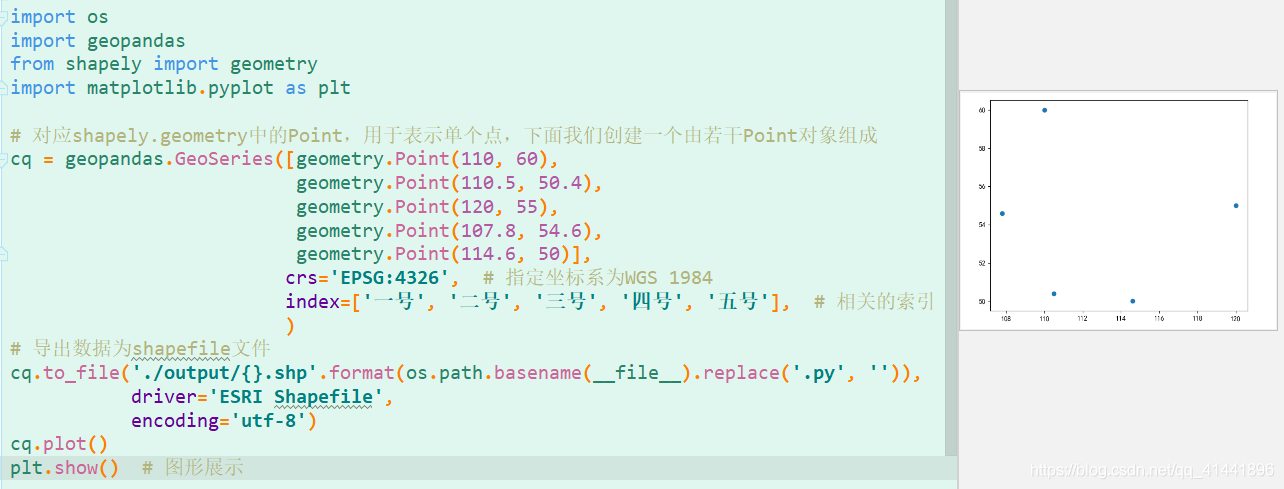
- 核心代码:
# 对应shapely.geometry中的Point,用于表示单个点,下面我们创建一个由若干Point对象组成

cq = geopandas.GeoSeries([geometry.Point(110, 60),

                          geometry.Point(110.5, 50.4),

                          geometry.Point(120, 55),

                          geometry.Point(107.8, 54.6),

                          geometry.Point(114.6, 50)],

                         crs='EPSG:4326',  # 指定坐标系为WGS 1984

                         index=['一号', '二号', '三号', '四号', '五号'],  # 相关的索引

                         )

# 导出数据为shapefile文件

cq.to_file('./output/{}.shp'.format(os.path.basename(__file__).replace('.py', '')),

           driver='ESRI Shapefile',

           encoding='utf-8')
线状要素类的创建
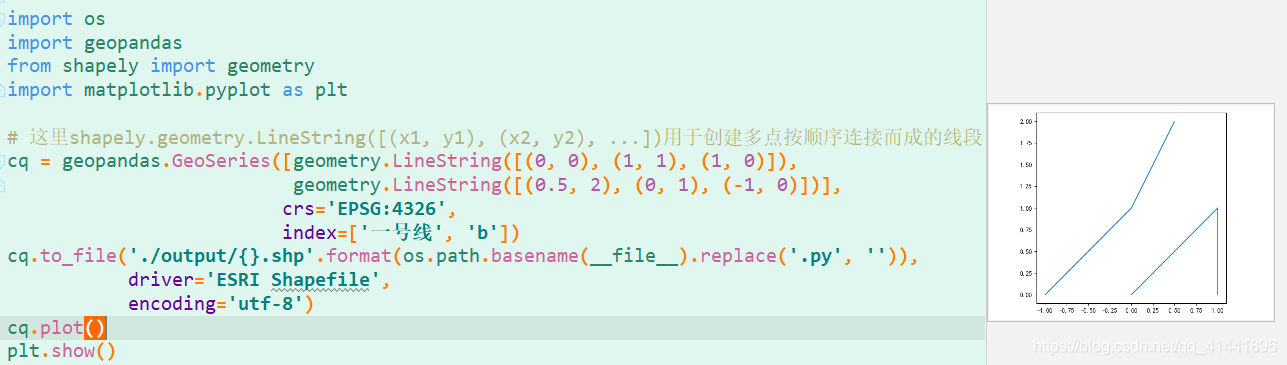
- 核心代码:
# 这里shapely.geometry.LineString([(x1, y1), (x2, y2), ...])用于创建多点按顺序连接而成的线段

cq = geopandas.GeoSeries([geometry.LineString([(0, 0), (1, 1), (1, 0)]),

                          geometry.LineString([(0.5, 2), (0, 1), (-1, 0)])],

                         crs='EPSG:4326',

                         index=['一号线', 'b'])

cq.to_file('./output/{}.shp'.format(os.path.basename(__file__).replace('.py', '')),

           driver='ESRI Shapefile',

           encoding='utf-8')
面状要素类的创建
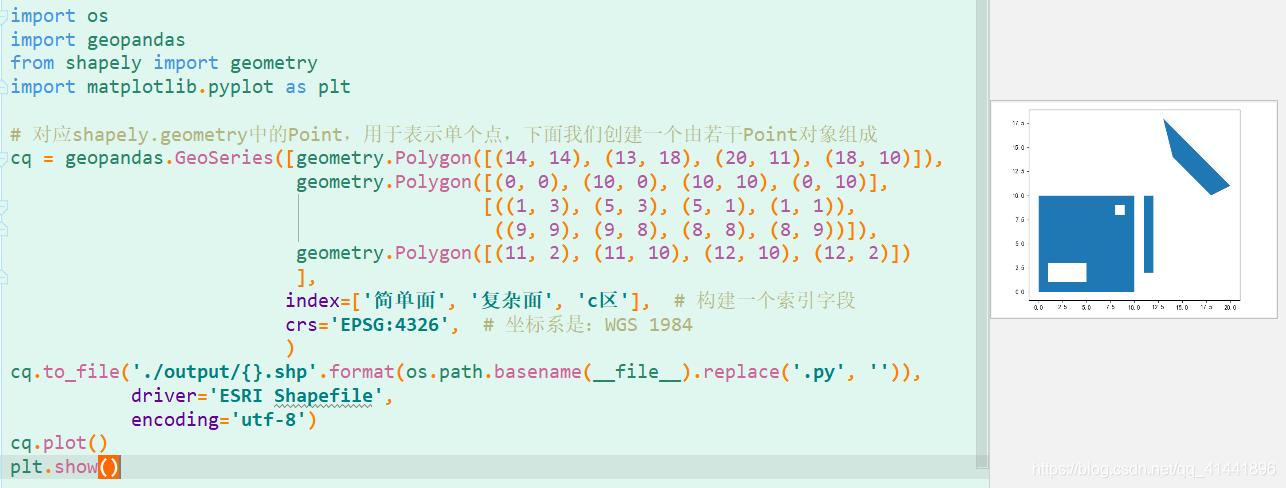
- 核心代码:
# 对应shapely.geometry中的Polygon,用于表示面,下面我们创建一个由若干Polygon对象组成

cq = geopandas.GeoSeries([geometry.Polygon([(14, 14), (13, 18), (20, 11), (18, 10)]),

                          geometry.Polygon([(0, 0), (10, 0), (10, 10), (0, 10)],

                                           [((1, 3), (5, 3), (5, 1), (1, 1)),

                                            ((9, 9), (9, 8), (8, 8), (8, 9))]),

                          geometry.Polygon([(11, 2), (11, 10), (12, 10), (12, 2)])

                          ],

                         index=['简单面', '复杂面', 'c区'],  # 构建一个索引字段

                         crs='EPSG:4326',  # 坐标系是:WGS 1984

                         )

cq.to_file('./output/{}.shp'.format(os.path.basename(__file__).replace('.py', '')),

           driver='ESRI Shapefile',

           encoding='utf-8')
拓展应用实例
展高程点
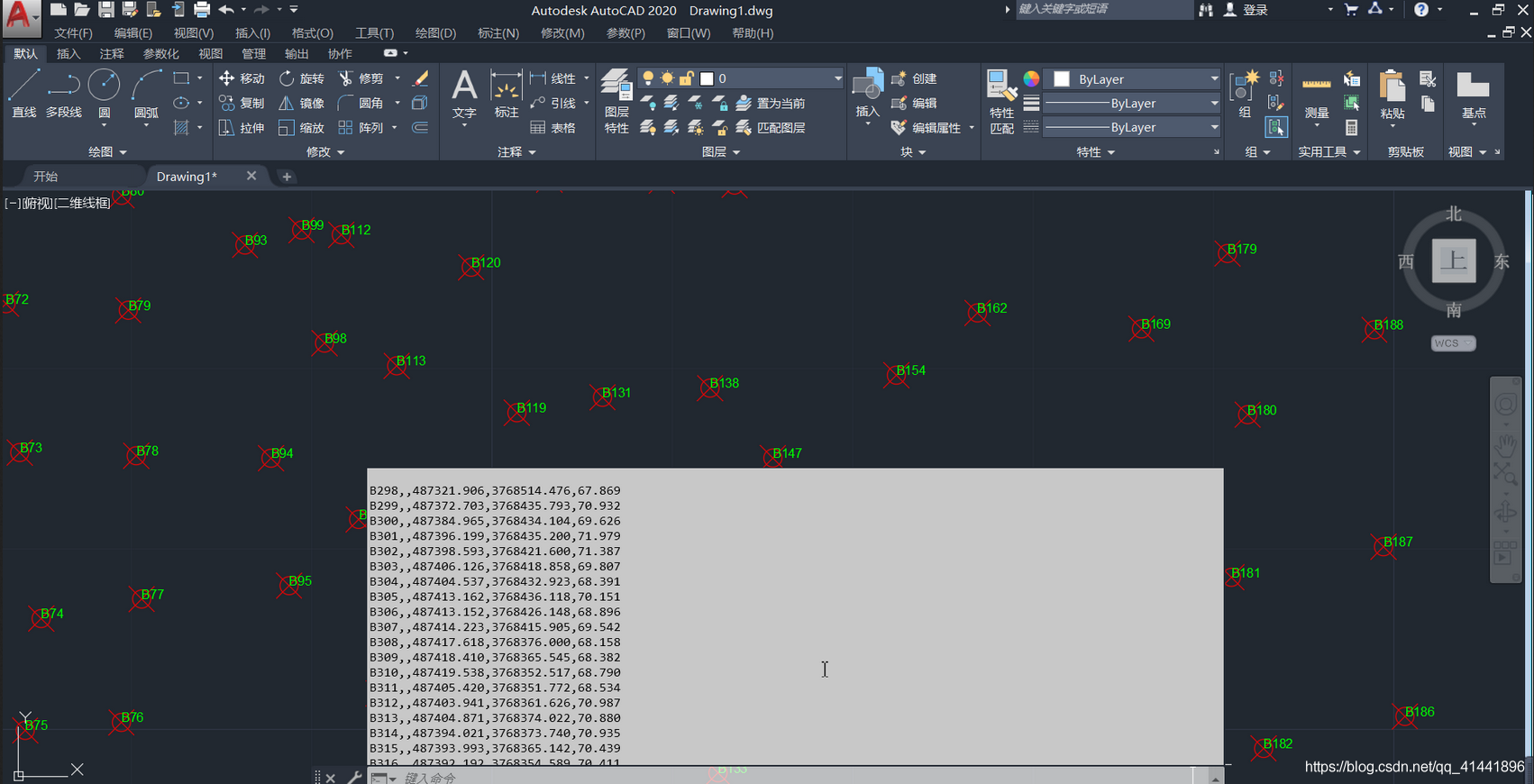
高程点文件存储格式与CASS中读取的DAT格式一致,示例:【1,ZDH ,450000.000,4100000,20002,DYG,450000.000,4100000,2000 】其中,“1”代表的是“点号”,“ZDH”代表的是“代码”,之后的分别是“东坐标、北坐标、高程值”即“Y、X、H ”或者是“X、Y、H ”
- AutoCAD中展点效果
- geopandas中展点效果
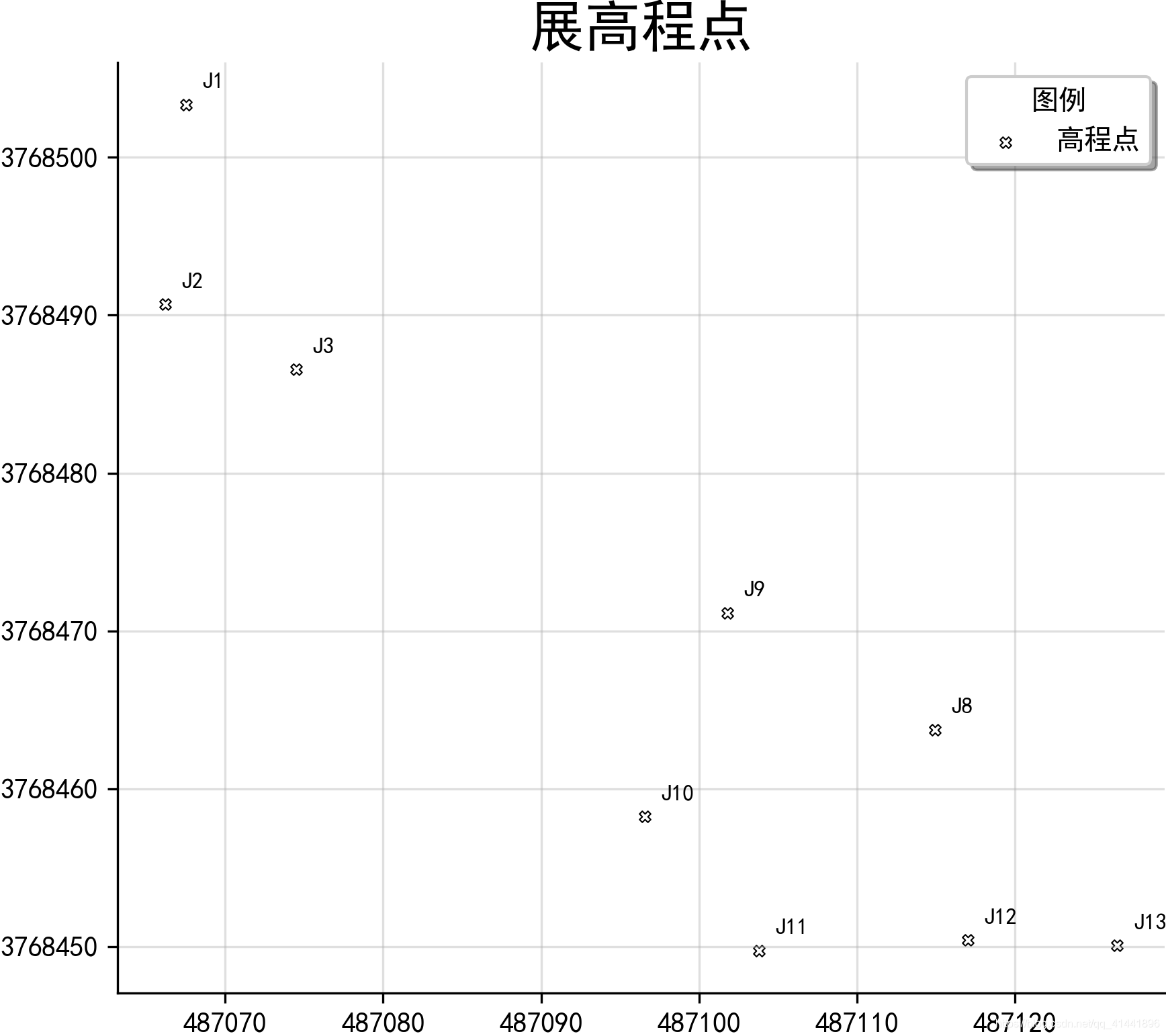
实现代码
# -*- coding: utf-8 -*-

import pandas as pd

import geopandas as gpd

from shapely.geometry import Point

from matplotlib import pyplot as plt

from matplotlib.ticker import FuncFormatter

# 读取数据

file_path = './data-use/高程数据.csv'

rankings_colname = ['name', 'mark', 'longitude', 'latitude', 'height'];

df = pd.read_csv(file_path, header=None, names=rankings_colname)

# print(df.head(5))#输出前五行数据查看

xy = [Point(xy) for xy in zip(df['longitude'], df['latitude'])]

pts = gpd.GeoSeries(xy)  # 创建点要素数据集

#保存为SHP文件

pts.to_file('./output/展高程点.shp', driver='ESRI Shapefile', encoding='utf-8')

"""fig是用来设置图像大小参数,ax是行列有多少个点"""

fig, ax = plt.subplots(figsize=(8, 6))  # 返回一个包含figure和axes对象的元组

ax = pts.plot(ax=ax,

              facecolor='white',

              edgecolor='black',

              marker='X',

              linewidth=0.5,  # 内外符号比例系数

              markersize=12,

              label='高程点')

# 地图标注

new_texts = [plt.text(x_ + 1, y_ + 1, text, fontsize=8) for x_, y_, text in

             zip(df['longitude'], df['latitude'], df['name'])]

# 设置坐标轴

def formatnum(x, pos):

    # return '$%.1f$x$10^{4}$' % (x / 10000)#科学计数法显示

    return int(x)  # 取整显示

formatter = FuncFormatter(formatnum)

ax.yaxis.set_major_formatter(formatter)

# 美观起见隐藏顶部与右侧边框线

ax.spines['right'].set_visible(False)

ax.spines['top'].set_visible(False)

plt.grid(True, alpha=0.4)  # 显示网格,透明度为50%

ax.legend(title="图例", loc='lower right', ncol=1, shadow=True) # 添加图例

plt.title('展高程点', fontdict={'weight': 'normal', 'size': 20}) # 设置图名&改变图标题字体

# 保存图片

plt.savefig('images/展高程点.png', dpi=300, bbox_inches='tight', pad_inches=0)

plt.show()
点集转面
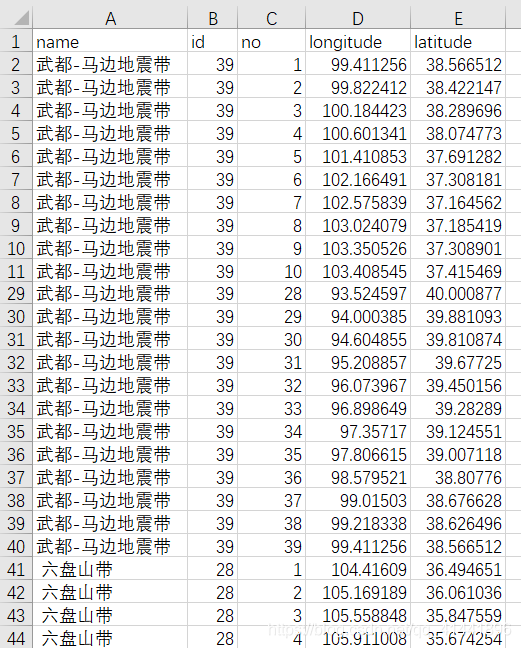
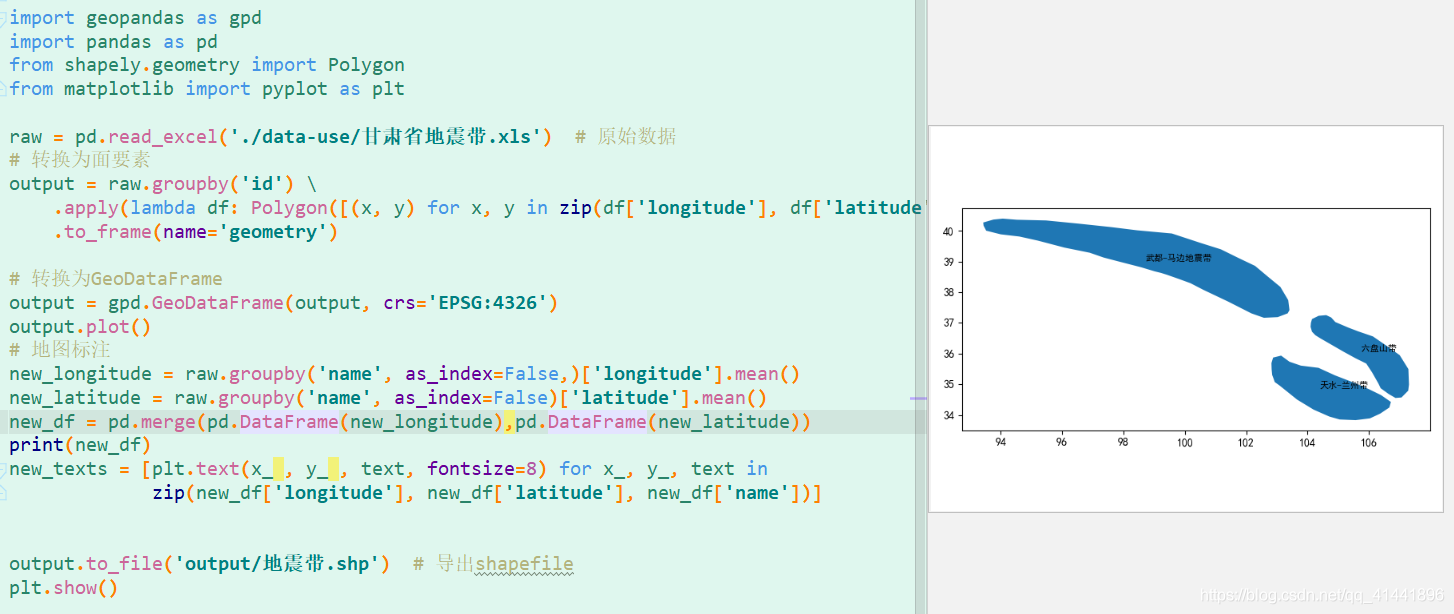
将一系列点的集合转为面状要素类,下面以甘肃省的地震带为例(字段对应:名称,面索引,点索引,经度,纬度)。
- 数据预览
- 效果预览
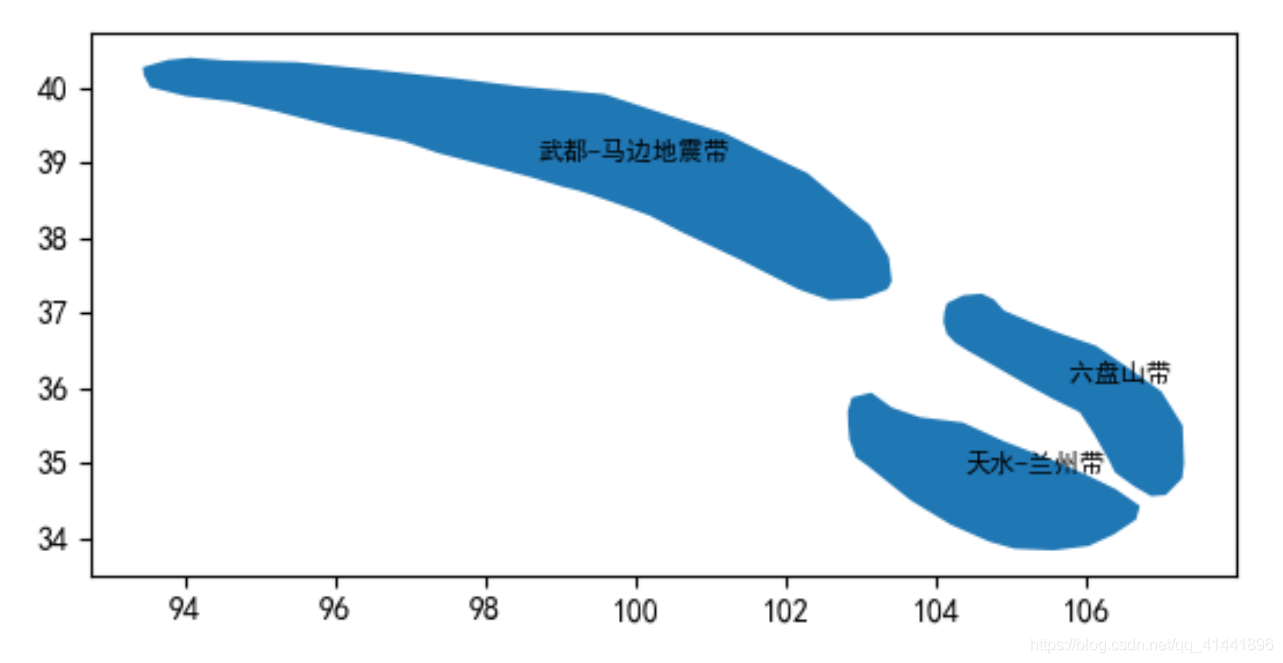
实现代码
import geopandas as gpd

import pandas as pd

from shapely.geometry import Polygon

from matplotlib import pyplot as plt

raw = pd.read_excel('./data-use/甘肃省地震带.xls')  # 原始数据

# 转换为面要素

output = raw.groupby('id') \

    .apply(lambda df: Polygon([(x, y) for x, y in zip(df['longitude'], df['latitude'])])) \

    .to_frame(name='geometry')

# 转换为GeoDataFrame

output = gpd.GeoDataFrame(output, crs='EPSG:4326')

output.plot()

# 地图标注

new_longitude = raw.groupby('name', as_index=False,)['longitude'].mean()

new_latitude = raw.groupby('name', as_index=False)['latitude'].mean()

new_df = pd.merge(pd.DataFrame(new_longitude),pd.DataFrame(new_latitude))

new_texts = [plt.text(x_ , y_ , text, fontsize=8) for x_, y_, text in

             zip(new_df['longitude'], new_df['latitude'], new_df['name'])]

# 导出shapefile

output.to_file('output/地震带.shp')

plt.show()
创建缓冲区、多环缓冲区
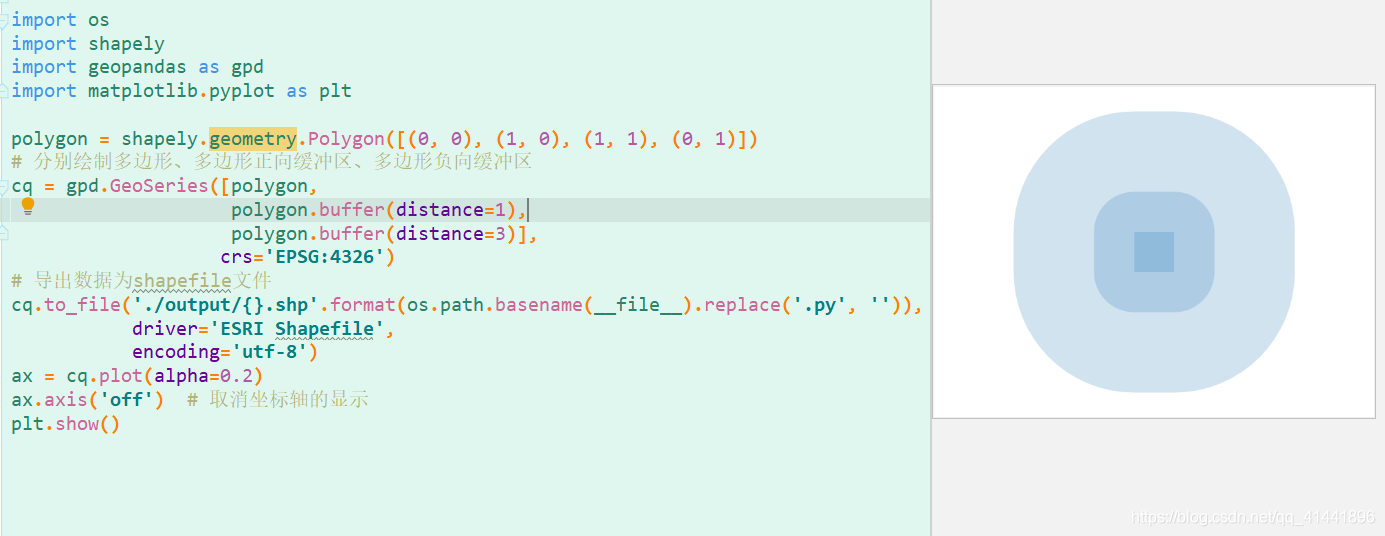
实现代码:
import os

import shapely

import geopandas as gpd

import matplotlib.pyplot as plt

polygon = shapely.geometry.Polygon([(0, 0), (1, 0), (1, 1), (0, 1)])

# 分别绘制多边形、多边形正向缓冲区,坐标系是WGS1984,单位是度

cq = gpd.GeoSeries([polygon,

                    polygon.buffer(distance=1),

                    polygon.buffer(distance=3)],

                   crs='EPSG:4326')

# 导出数据为shapefile文件

cq.to_file('./output/{}.shp'.format(os.path.basename(__file__).replace('.py', '')),

           driver='ESRI Shapefile',

           encoding='utf-8')

ax = cq.plot(alpha=0.2)

ax.axis('off')  # 取消坐标轴的显示

plt.show()
写在最后
附相关完整代码的下载,还有更多有趣的内容,感兴趣的朋友们可以自行实践。喜欢的朋友们可以点个关注,后续将持续更新,精彩无限^ - ^
提取码:bfrs
最后给大家强烈安利一个geopandas学习博客: https://www.cnblogs.com/feffery/tag/geopandas/
python-geopandas读取、创建shapefile文件的更多相关文章
- JS读取/创建本地文件及目录文件夹的方法
原文链接:http://www.cnblogs.com/ayan/archive/2013/04/22/3036072.html 注:以下操作只在IE下有效! Javascript是网页制作中离不开的 ...
- python从TXT创建PDF文件——reportlab
使用reportlab创建PDF文件电子书一般都是txt格式的,某些电子阅读器不能读取txt的文档,如DPT-RP1.因此本文从使用python实现txt到pdf的转换,并且支持生成目录,目录能够生成 ...
- python读取/创建XML文件
Python中定义了很多处理XML的函数,如xml.dom,它会在处理文件之前,将根据xml文件构建的树状数据存在内存.还有xml.sax,它实现了SAX API,这个模块牺牲了便捷性,换取了速度和减 ...
- C++、GDAL创建shapefile文件
源代码网址:http://download.csdn.net/detail/ivanljf/5834823 一.先贴出第一段代码: #include "ogrsf_frmts.h" ...
- python脚本 读取excel格式文件 并进行处理的方法
一.安装xlrd模块 pip install xlrd 二.读取excel文件 try: excel_obj = xlrd.open_workbook("文件路径") except ...
- [Python]PyCharm在创建py文件时自动添加头部注释
在Pycharm主界面找到 File ----->> Setting ----->> Editor ----->> File and Code Templates ...
- Python:批量创建py文件
import os filePrefix='Test' fileSuffix='.py' fileNum=7 #文件个数 for i in range(0,fileNum): filename=fil ...
- python 根据 数据库创建java 文件
#coding=utf-8 import pymysql import os import re # 包全路径 packagepath=r'E:\idea工程\dc-exam\dc-exam\src\ ...
- POI读取/写入Excel文件
import java.io.File; import java.io.FileInputStream; import java.io.FileOutputStream; import java.io ...
随机推荐
- 从 demo 到生产 - 手把手写出实战需求的 Flink 广播程序
Flink 广播变量在实时处理程序中扮演着很重要的角色,适当的使用广播变量会大大提升程序处理效率. 本文从简单的 demo 场景出发,引入生产中实际的需求并提出思路与部分示例代码,应对一般需求应该没有 ...
- 云服务器Apache+MySQL(远程连接)+PHP等环境安装2021.5.9号配置
云服务器Apache+MySQL(远程连接)+PHP等环境安装2021.5.9号配置 Linux版本:centos8.2 (其他版本提供适配) 安装方式:yum 今天使用centos8系统搭建了下云主 ...
- Linux性能监控与分析之--- CPU
Linux性能监控与分析之--- CPU 望月成三人关注 2016.07.25 18:16:12字数 1,576阅读 2,837 CPU性能指标 用户进程使用CPU的比率 系统进程使用CPU的比率 W ...
- 把采集到的数据发送到一个Google Docs或者Google Form上 这个网站提供了参考和例子
把采集到的数据发送到一个Google Docs或者Google Form上这个网站提供了参考和例子 http://www.instructables.com/id/Post-to-Google-Doc ...
- 10.1 ifconfig:配置或显示网络接口信息
ifconfig命令 用于配置网卡IP地址等网络参数或显示当前网络的接口状态,其类似于Windows下的ipconfig命令,这两个命令很容易混淆,读者需要区分一下.此外,ifconfig命令在配置网 ...
- HarmonyOS之DevEco2中真实手机调试应用
本文将带你了解如何在真机上调试HarmonyOS应用 本人按照官方文档执行,还是遇到几个问题,特此记录下 https://developer.harmonyos.com/cn/docs/documen ...
- MYSQL导入/迁移后事件不执行
mysql迁移后事件不执行 查看数据库是否开启事件支持 mysql> show variables like 'event_scheduler'; +-----------------+---- ...
- JavaSE-QuickStart
老话常说:基础不牢地动山摇,于是我在b站上看杨中科老师的课程脑补一下,便记录这岁月的点滴 1.什么是编程 ? 编程:编写能够控制计算机来执行特定任务的代码. 2.什么是编程语言 ? 编程语言:是指程序 ...
- 排查利器:Tcpdump抓包 & Wireshark解析
在工作这一块,免不了和其他开发人员打交道.比如,和其他部门 or 公司联调,甚至是和自己部门的人联调的时候.这时候,对接问题就很容易暴露出来,特别是Tcp/Udp会话的时候,很容易就会呈现出公说公有理 ...
- 出现异常org.yaml.snakeyaml.parser.ParserException: while parsing a block mapping
这是因为yaml的配置文件格式出错导致的异常 原代码,仔细看数据源的配置没有和type的路径一致,而是下一级的目录,所以导致出错 使用shift+tab快捷键向左移动改变下就好了 最后成功运行