
k8s全方位监控-prometheus部署
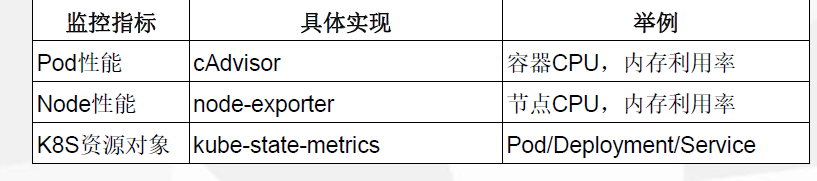
1、k8s 监控资源对象
2、 prometheus简单介绍。 https://github.com/prometheus
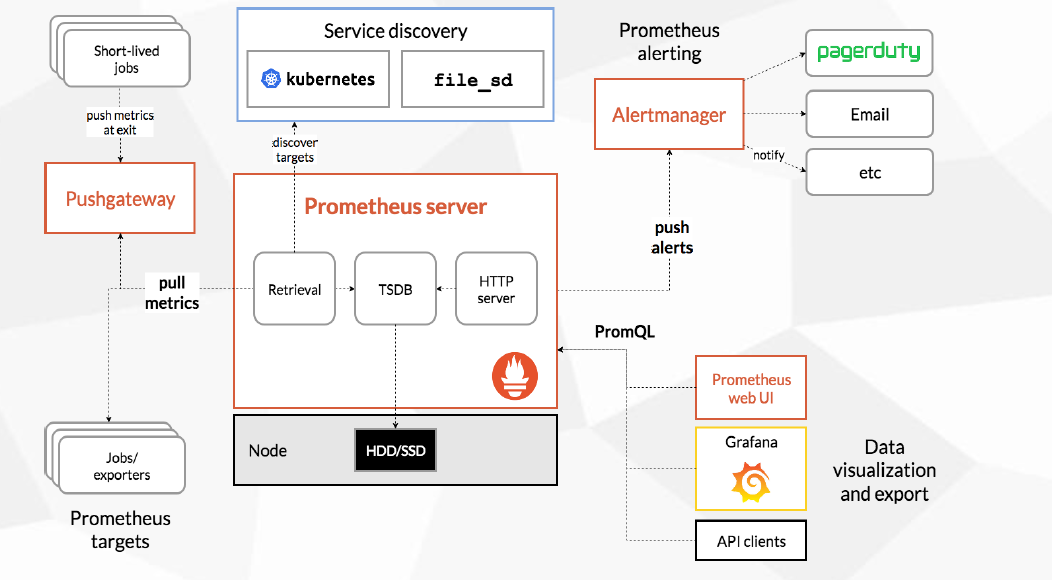
•多维数据模型:由度量名称和键值对标识的时间序列数据
•PromSQL:一种灵活的查询语言,可以利用多维数据完成复杂的查询
•不依赖分布式存储,单个服务器节点可直接工作
•基于HTTP的pull方式采集时间序列数据
•推送时间序列数据通过PushGateway组件支持
•通过服务发现或静态配置发现目标
•多种图形模式及仪表盘支持(grafana)
组件介绍:
3、prometheus 部署。
[root@VM_0_48_centos prometheus]# cat  prometheus-statefulset.yaml

apiVersion: apps/v1

kind: StatefulSet

metadata:

  name: prometheus

  namespace: kube-system

  labels:

    k8s-app: prometheus

    kubernetes.io/cluster-service: "true"

    addonmanager.kubernetes.io/mode: Reconcile

    version: v2.2.1

spec:

  serviceName: "prometheus"

  replicas: 1

  podManagementPolicy: "Parallel"

  updateStrategy:

   type: "RollingUpdate"

  selector:

    matchLabels:

      k8s-app: prometheus

  template:

    metadata:

      labels:

        k8s-app: prometheus

      annotations:

        scheduler.alpha.kubernetes.io/critical-pod: ''

    spec:

      priorityClassName: system-cluster-critical

      serviceAccountName: prometheus

      initContainers:

      - name: "init-chown-data"

        image: "busybox:latest"

        imagePullPolicy: "IfNotPresent"

        command: ["chown", "-R", "65534:65534", "/data"]

        volumeMounts:

        - name: prometheus-data

          mountPath: /data

          subPath: ""

      containers:

        - name: prometheus-server-configmap-reload

          image: "jimmidyson/configmap-reload:v0.1"

          imagePullPolicy: "IfNotPresent"

          args:

            - --volume-dir=/etc/config

            - --webhook-url=http://localhost:9090/-/reload

          volumeMounts:

            - name: config-volume

              mountPath: /etc/config

              readOnly: true

          resources:

            limits:

              cpu: 10m

              memory: 10Mi

            requests:

              cpu: 10m

              memory: 10Mi

        - name: prometheus-server

          image: "prom/prometheus:v2.2.1"

          imagePullPolicy: "IfNotPresent"

          args:

            - --config.file=/etc/config/prometheus.yml

            - --storage.tsdb.path=/data

            - --web.console.libraries=/etc/prometheus/console_libraries

            - --web.console.templates=/etc/prometheus/consoles

            - --web.enable-lifecycle

          ports:

            - containerPort: 9090

          readinessProbe:

            httpGet:

              path: /-/ready

              port: 9090

            initialDelaySeconds: 30

            timeoutSeconds: 30

          livenessProbe:

            httpGet:

              path: /-/healthy

              port: 9090

            initialDelaySeconds: 30

            timeoutSeconds: 30

          # based on 10 running nodes with 30 pods each

          resources:

            limits:

              cpu: 200m

              memory: 1000Mi

            requests:

              cpu: 200m

              memory: 1000Mi

          volumeMounts:

            - name: config-volume

              mountPath: /etc/config

            - name: prometheus-data

              mountPath: /data

              subPath: ""

      terminationGracePeriodSeconds: 300

      volumes:

        - name: config-volume

          configMap:

            name: prometheus-config

        - name: prometheus-data

          persistentVolumeClaim:

            claimName: prometheus-claim   #采用静态PV,必须现部署
[root@VM_0_48_centos prometheus]# cat   prometheus-service.yaml

kind: Service

apiVersion: v1

metadata:

  name: prometheus

  namespace: kube-system

  labels:

    kubernetes.io/name: "Prometheus"

    kubernetes.io/cluster-service: "true"

    addonmanager.kubernetes.io/mode: Reconcile

spec:

  type: NodePort  #使用NodePort  访问

  ports:

    - name: http

      port: 9090

      protocol: TCP

      targetPort: 9090

  selector:

    k8s-app: prometheus
[root@VM_0_48_centos ~]# kubectl  get svc  -n kube-system |grep prometheus

prometheus             NodePort    10.0.0.94    <none>        9090:48403/TCP           39h

k8s全方位监控-prometheus部署的更多相关文章
- k8s全方位监控 -prometheus实现短信告警接口编写(python)
1.prometheus短信告警接口实现(python)源码如下: import subprocess from flask import Flask from flask import reques ...
- k8s全方位监控-prometheus-alertmanager部署-配置第一条告警邮件
1.alertmanager告警插件部署 [root@VM_0_48_centos prometheus]# cat alertmanager-pvc.yaml apiVersion: v1 kind ...
- K8S(13)监控实战-部署prometheus
k8s监控实战-部署prometheus 目录 k8s监控实战-部署prometheus 1 prometheus前言相关 1.1 Prometheus的特点 1.2 基本原理 1.2.1 原理说明 ...
- k8s全方位监控-prometheus-配置文件介绍以及基于文件服务发现
1.scrape_configs 参数介绍 # 默认的全局配置 global: scrape_interval: 15s # 采集间隔15s,默认为1min一次 evaluation_interval ...
- k8s全方位监控中-常用rules配置
[root@VM_0_48_centos prometheus]# cat alertmanager-configmap.yaml apiVersion: v1 kind: ConfigMap met ...
- Prometheus 监控K8S Node监控
Prometheus 监控K8S Node监控 Prometheus社区提供的NodeExporter项目可以对主机的关键度量指标进行监控,通过Kubernetes的DeamonSet可以在各个主机节 ...
- K8S的Kafka监控(Prometheus+Grafana)
欢迎访问我的GitHub https://github.com/zq2599/blog_demos 内容:所有原创文章分类汇总及配套源码,涉及Java.Docker.Kubernetes.DevOPS ...
- k8s集群中部署prometheus server
1.概述 本文档主要介绍如何在k8s集群中部署prometheus server用来作为监控的数据采集服务器,这样做可以很方便的对k8s集群中的指标.pod的.节点的指标进行采集和监控. 2.下载镜像 ...
- Prometheus部署各服务的Node监控
1.部署监控主机 部署主机监控,需要安装node_exporter 1.1 下载node exporter wget https://github.com/prometheus/node_export ...
随机推荐
- python21day
内容回顾 re模块的常用方法 findall(正则,待匹配字符串,flag):返回所有匹配项的列表 search:返回一个变量,通过group取到第一个匹配项 match:从头开始找第一个,其他同se ...
- lambda表达式的学习
Lambda表达式 为什么使用lambda表达式 Lambda表达式可以简化我们的代码,使我们只需要关注主要的代码就可以. //测试用的实体类 public class Employee { priv ...
- plsql 视图中 为什么使用替代触发器
/* 什么是视图? 视图:数据库对象,存的是一个查询命令:当作一个虚拟的数据表来使用: 应用场景: 简化查询操作:不能直接在视图上进行create,insert,update操作: 创建视图? 需要管 ...
- JSP页面重定向与页面内容转发
重定向:属于两次请求+响应,客户端浏览器地址栏会改变. 转发:属于一次请求+一次响应,客户端浏览器地址栏不会改变. 重定向: response.setHeader("action" ...
- @property基本概念
1.什么是@property @property是编译器的指令 什么是编译器的指令 ? 编译器指令就是用来告诉编译器要做什么! @property会让编译器做什么呢? @property 用在声明文件 ...
- svn中.a文件无法上传解决方法
项目导入后总是缺少.a文件,如shareSDK.a,libPushSDK.a,libbaidumapapi.a等 解决方法 方法一.修改SVN配置文件 通过终端直接打开配置文件: open ~/.s ...
- 我的新书——《PHP程序员面试笔试宝典》
你好,是我琉忆. 一个文艺的PHP开发工程师. 很荣幸能够在这里带来我的第一本新书--<PHP程序员面试笔试宝典>. 一.创作过程 <PHP程序员面试笔试宝典>是我的第一本书, ...
- 2、Golang基础--包的使用、if-else语句、循环、switch语句、数组、切片、可变函数参数、map类型
1 包的使用 // 为了便于组织代码,同一种类型的代码,写在同一个包下,便于管理 // 定义包 -新建一个文件夹 -内部有很多go文件 -在每个go文件的第一行,都要声明包名,并且包名必须一致 -在一 ...
- 34、python并发编程之多进程(操作篇)
目录: 一 multiprocessing模块介绍 二 Process类的介绍 三 Process类的使用 四 守护进程 五 进程同步(锁) 六 队列(推荐使用) 七 管道 八 共享数据 九 信号量( ...
- 基于6U CPCIe的TMS320C6678+KU060的信号处理板卡
一.产品概述 基于6U CPCIe的C6678+KU060的信号处理板卡是新一代FPGA的高性能处理板卡.板卡采用一片TI DSP TMS320C6678和一片Xilinx公司 XCKU060-2FF ...