
SpringBoot | 3.2 整合MyBatis
前言
通过前一篇的学习,我们知道可以使用JDBC操作数据库,但在实际生产中,我们一般使用MyBatis。在本篇,可以学习到SpringBoot如何整合MyBatis框架,以及相关自动配置原理。
MyBatis是目前Java持久层最为主流的技术之一,它可以避免几乎所有的JDBC代码和手动设置参数以及获取结果集。同时,MyBatis是基于一种SQL到POJO的模型,需要我们提供SQL、映射关系以及POJO。由于本笔记为SpringBoot系列笔记,故重点放在SpringBoot整合使用MyBatis。
注:在说明注解时,第一点加粗为注解中文含义,第二点为一般加在哪身上,缩进或代码块为示例,如:
@注解
- 中文含义
- 加在哪
- 其他……
语句示例
//代码示例
1. 导入MyBatis场景
在SpringBoot中有两种导入场景方式,一种是初始化导向,另一种是手动导入。
*这里需要与前文的两种配置方式做区别:笔者的导入指往应用中添加相应场景,注重一个从0到1的过程;而前文Druid连接池的两种配置方式虽然也有导入的意思,但更加注重导入后的配置过程,是一个从1到2的过程。
1.1 初始化导向
初始化导向指在新建SpringBoot项目工程时进行导入:

1.2 手动导入
手动导入只需要在SpringBoot的pom.xml文件里添加下面场景即可:
<dependency>

    <groupId>org.mybatis.spring.boot</groupId>

    <artifactId>mybatis-spring-boot-starter</artifactId>

    <version>2.1.4</version>

</dependency>
2. *MyBatis自动配置原理
MyBatis的自动配置原理跟Druid差不多,我们可以通过源码分析得出可以自己配置哪些属性,以及配置这些属性时的前缀。
加入MyBatis场景后,我们可以发现该场景里有:

通过前面的文章,我们知道SpringBoot会先找到对应场景的自动配置类,在这里是MybatisAutoConfiguration
@Configuration

@ConditionalOnClass({ SqlSessionFactory.class, SqlSessionFactoryBean.class })

@ConditionalOnBean(DataSource.class)

@EnableConfigurationProperties(MybatisProperties.class) // MyBatis配置项绑定类

@AutoConfigureAfter({ DataSourceAutoConfiguration.class, MybatisLanguageDriverAutoConfiguration.class })

public class MybatisAutoConfiguration {

}
从源码中,我们可以得到以下信息:
跟
MybatisProperties配置类绑定,配置属性的前缀为
mybatis@ConfigurationProperties(prefix = "mybatis")
public class MybatisProperties
全局配置文件:使用Mybatis需要进行全局配置;
SqlSessionFactory: 用来生成
SqlSession;- SqlSession是MyBatis操作的核心,是一个功能性代码,通常使用单例模式(在MyBatis的生命周期中只存在一个
SqlSessionFactory);
- SqlSession是MyBatis操作的核心,是一个功能性代码,通常使用单例模式(在MyBatis的生命周期中只存在一个
SqlSession:自动配置了
SqlSessionTemplate,可以生成SqlSession;@Import(AutoConfiguredMapperScannerRegistrar.class):导入的类里有定义如何操作
@Mapper注解的接口;- @Mapper: 只要写的操作MyBatis的接口标注了
@Mapper就会被自动扫描进容器。
- @Mapper: 只要写的操作MyBatis的接口标注了
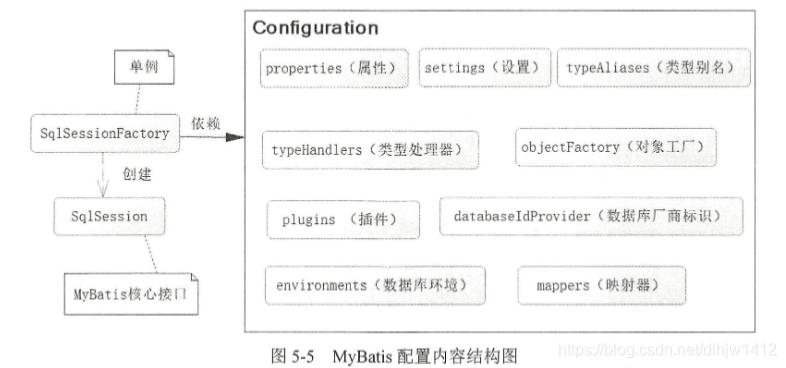
3. 全局配置文件
全局配置文件的书写方式有三种,分别是配置模式、注解模式以及混合模式。在配置之前,我们需要做些准备工作,让SpringBoot知道我们的配置文件写在哪里。
准备工作:
配置全局配置文件位置( 在
application.yaml中指定Mapper配置文件的位置,以及指定全局配置文件的信息,建议配置在mybatis.configuration);mybatis:
#全局配置文件位置
config-location: classpath:mybatis/mybatis-config.xml
#sql映射文件位置
mapper-locations: classpath:mybatis/mapper/*.xml #定义别名扫描的包,需要与@Alias联合使用
type-aliases-package: ……
#具体类需要与@MappedJdbcTypes联合使用
type-handlers-package: ……
#执行器(Executor),可以配置STMPLE、REUSE、BATCH、默认为STMPLE
executor-type: …… configuration:
#配置MyBatis插件(拦截器等)
interceptors: ……
#级联延迟加载配置属性
aggressive-lazy-loading: ……
- 注意
config-location与mapper-locations不能同在,理由如下: - 当需要使用mybatis-config.xml配置文件的时需要配置
config-location,config-location的作用是确定mybatis-config.xml文件位置;而mapper-locations是用来注册xxxmapper.xml文件。如果使用了mybatis-config.xml,并且里面配置了mapper,那就不需要mapper-locations。
- 注意
编写mapper接口,使用标准
@Mapper注解( 也可以在启动类上加上@MapperScan替换@Mapper )
@Mapper
映射配置;
用在接口类上
在接口类上添加了@Mapper,在编译之后会生成相应的接口实现类;
如果有多组接口需要编译成实现类,需要在每个接口上标注一个@Mapper;
@Mapper

public interface UserDAO {

   //代码

}
@MapperScan
映射扫描配置;
用在主启动类下;
指定要变成实现类的接口所在的包,然后包下面的所有接口在编译之后都会生成相应的实现类;
将MyBatis所需的对应接口扫描到Spring IOC容器中;
可以解决@Mapper标注过多问题,直接在主启动类上加上一个@MapperScan即可;
@SpringBootApplication

//@MapperScan("com.dlhjw.mapper")

@MapperScan(

    //指定扫描包

    basePackages = "com.dlhjw.mapper",

    //指定SqlSessionFactory,如果sqlSessionTemplate被指定,则作废

    sqlSessionFactoryRef = "sqlSessionFactory",

    //指定sqlSessionTemplate,将忽略sqlSessionFactory的配置(优先级高)

    sqlSessionTemplateRef = “sqlSessionTemplate”,

    //限制扫描接口,不常用

    //markerInterface = class.class,

    annotationClass = Repository.class

)

public class SpringbootMybatisDemoApplication {

    public static void main(String[] args) {

        SpringApplication.run(SpringbootMybatisDemoApplication.class, args);

    }

}
【以下不常用、不推荐】 上述两个接口都可以让SpringBoot知道用户配置的MyBatis映射关系在哪,除了用接口方式外,还可以:
- 通过
MapperFactoryBean装配MyBatis; - 使用
MapperScannerConfigurer; - 使用MyBatis接口(因为
SqlSessionFactory是SpringBoot自动生成好了,所以直接拿来使用);
上面两个接口可改成如下代码:(不常用、不推荐)
1. 通过MapperFactoryBean装配MyBatis:
@Autowired

SqlSessionFactory sqlSessionFactory = null;

//定义一个MyBatis的Mapper接口

@Bean

public MapperFactoryBean<MyBatisUserDao> initMyBatisUserDao(){

    MapperFactoryBean<MyBatisUserDao> bean = new MapperFactoryBean<>();

    bean.setMapperInterface(UserDAO.class);

    bean.setSessionFactory(sqlSessionFactory);

    return beam;

}
2. 使用MapperScannerConfigurer:
@Bean

public MapperScannerConfigurer mapperScannerConfig(){

    //定义扫描器实例

    MapperScannerConfigurer mapperScannerConfigurer = new MapperScannerConfigurer();

    //加载SqlSessionFactory,SpringBoot会自动生产,SqlSessionFactory实例

    mapperScannerConfigurer.setSqlSessionFactoryBeanName("sqlSessionFactory");

    //定义扫描的包

    mapperScannerConfigurer.setBeanPackage("com.dlhjw.mapper");

    //限定被标注@Repository的接口才被扫描

    mapperScannerConfigurer.setAnnotationClass(Repository.class);

    //通过继承某个接口限制扫描,一般使用不多

    //mapperScannerConfigurer.setMarkerInterface(....);

    return mapperScannerConfigurer;

}
3. 使用MyBatis接口:
public interface MyBatisUserService{

    public User getUser(Long id);

}
@Service

public class MyBatisUserServiceImpl implements MyBatisUserService{

    //因为在启动文件application.yaml配置了对应接口,所以直接依赖注入即可

    @Autowired

    private MyBatisUserDao myBatisUserDao = null;

    @Override

    public User getUser(Long id){

        return myBatisUserDao.getUser(id);

    }

}
3.1 配置模式
配置模式步骤如下。
1. 导入mybatis官方starter;
2. 编写mapper接口,使用@Mapper或@MapperScan注解;
3. 配置全局配置文件(springboot自动配置好了);
在resources/mybatis/mybatis-config.xml
<?xml version="1.0" encoding="UTF-8" ?>

<!DOCTYPE configuration

  PUBLIC "-//mybatis.org//DTD Config 3.0//EN"

  "http://mybatis.org/dtd/mybatis-3-config.dtd">

<configuration>

    <!-- 开启驼峰命名匹配,或者在配置文件中配置 -->

    <settings>

        <setting name="mapUnderscoreToCamelCase" value="true"/>

    </settings>

</configuration>
配置mybatis.configuration下面的所有,就是相当于改mybatis全局配置文件中的值;
mybatis:

#注意:只能有一个全局配置,下面语句不能存在

#  config-location: classpath:mybatis/mybatis-config.xml

  mapper-locations: classpath:mybatis/mapper/*.xml

  configuration:

    map-underscore-to-camel-case: true  #推荐
4. 配置映射文件(编写sql映射文件并绑定mapper接口);
使用Mapper接口绑定Xml
在resources/mybatis/mapper/AccountMapper.xml
<?xml version="1.0" encoding="UTF-8" ?>

<!DOCTYPE mapper

  PUBLIC "-//mybatis.org//DTD Mapper 3.0//EN"

  "http://mybatis.org/dtd/mybatis-3-mapper.dtd">

<mapper namespace="com.dlhjw.admin.mapper.AccountMapper">

<!-- public Account getAcct(Long id) -->

    <select id="getAcct" resultType="com.dlhjw.admin.bean.Account">

        select * from account_tbl where id=#{id}

    </select>

</mapper>
3.2 注解模式
注解模式步骤如下(自上而下分析,从数据层到表示层)。
@Select
- 选择;
- 标注在mapper接口上;
- 用来代替原来xml里的<select>标签,参数为原生的sql;
1. 导入mybatis官方starter;
2. 编写mapper接口,使用@Mapper或@MapperScan注解;
3. 接口的方法上标注@Select注解,代替原来xml里的<select>标签;
@Mapper

public interface CityMapper {

    @Select("select * from city where id=#{id}")

    public City getById(Long id);

}
4. 在service层里编写业务方法;
public interface CityService {

     City getById(Long id);

}
@Service

public class CityServiceImpl implements CityService {

    @Autowired

    CityMapper cityMapper;

    public City getById(Long id){

        return cityMapper.getById(id);

    }

}
5. 在Controller层里编写表示层相关方法;
*Controller相关知识参考下章。
@Controller

public class IndexController {

    @Autowired

    CityService cityService;

    @ResponseBody

    @GetMapping("/city")

    public City getCityById(@RequestParam("id") Long id){

        return cityService.getById(id);

    }

}
3.3 混合模式
混合模式步骤如下(自上而下分析,从数据层到表示层)。
1. 导入mybatis官方starter;
2. 编写mapper接口,使用@Mapper或@MapperScan注解;
@Mapper

public interface CityMapper {

    @Select("select * from city where id=#{id}")

    public City getById(Long id);

    public void insert(City city);

}
3. 为insert方法配置xml文件;
<mapper namespace="com.atguigu.admin.mapper.CityMapper">

<!--  useGeneratedKeys:使用自增主键,可以返回自增主键值   keyProperty:自增属性的id -->

   <insert id="insert" useGeneratedKeys="true" keyProperty="id">

        insert into  city(`name`,`state`,`country`) values(#{name},#{state},#{country})

   </insert>

</mapper>
4. 在service层里编写业务方法;
public interface CityService {

     City getById(Long id);

     void saveCity(City city);

}
@Service

public class CityServiceImpl implements CityService {

    @Autowired

    CityMapper cityMapper;

    public City getById(Long id){

        return cityMapper.getById(id);

    }

    public void saveCity(City city) {

        counter.increment();

        cityMapper.insert(city);

    }

}
5. 在Controller层里编写表示层相关方法;
*Controller相关知识参考下章。
@Controller

public class IndexController {

    @Autowired

    CityService cityService;

    @ResponseBody

    @PostMapping("/city")

    public City saveCity(City city){

        cityService.saveCity(city);

        return city;

    }

    @ResponseBody

    @GetMapping("/city")

    public City getCityById(@RequestParam("id") Long id){

        return cityService.getById(id);

    }

}
6. *将上述insert用注解方式改成注解模式
*此步骤不是必要的。
@Mapper

public interface CityMapper {

    @Insert("insert into  city(`name`,`state`,`country`) values(#{name},#{state},#{country})")

    @Options(useGeneratedKeys = true,keyProperty = "id")

    public void insert(City city);

}
@Insert
- 插入语句;
- 用在mapper接口上;
- 用来代替原来xml里的标签,参数为原生的插入insert相关的sql;
@Options
- 选择的参数;
- 用在mapper接口上;
- 用来代替原来xml里的标签的参数配置,参数为相关的配置属性;
useGeneratedKeys表示使用自增主键,可以返回自增主键值;keyProperty表示自增属性的id。
4 MyBatis的分页插件功能
SpringBoot可以集成MyBatis插件完成一些复杂的功能,分页插件相关配置如下。
1. 整合插件;
@Configuration

public class MyBatisConfig {

    @Bean

    public MybatisPlusInterceptor paginationInterceptor() {

        MybatisPlusInterceptor mybatisPlusInterceptor = new MybatisPlusInterceptor();

        // 设置请求的页面大于最大页后操作, true调回到首页,false 继续请求  默认false

        // paginationInterceptor.setOverflow(false);

        // 设置最大单页限制数量,默认 500 条,-1 不受限制

        // paginationInterceptor.setLimit(500);

        // 开启 count 的 join 优化,只针对部分 left join

        //这是分页拦截器

        PaginationInnerInterceptor paginationInnerInterceptor = new PaginationInnerInterceptor();

        paginationInnerInterceptor.setOverflow(true);

        paginationInnerInterceptor.setMaxLimit(500L);

        mybatisPlusInterceptor.addInnerInterceptor(paginationInnerInterceptor);

        return mybatisPlusInterceptor;

    }

}
2. 编写插件相关controller;
*Controller相关知识参考下章。
@GetMapping("/dynamic_table")

 public String dynamic_table(@RequestParam(value="pn",defaultValue = "1") Integer pn,Model model){

   //构造分页参数

    Page<User> page = new Page<>(pn, 2);

    //调用page进行分页

    Page<User> userPage = userService.page(page, null);

    model.addAttribute("users",userPage);

    //重定向

    return "table/dynamic_table";

}
5 总结
SpringBoot整合MyBatis的方法如下:
- 引入
mybatis-starter; - 配置
application.yaml中,指定mapper-location位置即可; - 编写
Mapper接口并标注@Mapper注解;- 简单方法直接注解方式;
- 复杂方法编写
mapper.xml进行绑定映射;
@MapperScan("com.dlhjw.admin.mapper")简化,其他的接口就可以不用标注@Mapper注解。
最后
新人制作,如有错误,欢迎指出,感激不尽!
欢迎关注公众号,会分享一些更日常的东西!
如需转载,请标注出处!

SpringBoot | 3.2 整合MyBatis的更多相关文章
- SpringBoot 2.X整合Mybatis
1.创建工程环境 勾选Web.Mybatis.MySQL,如下 依赖如下 <dependency> <groupId>org.springframework.boot</ ...
- 【springboot spring mybatis】看我怎么将springboot与spring整合mybatis与druid数据源
目录 概述 1.mybatis 2.druid 壹:spring整合 2.jdbc.properties 3.mybatis-config.xml 二:java代码 1.mapper 2.servic ...
- SpringBoot当中如何整合mybatis和注入
[学习笔记] 6.整合mybatis和注入: 马克-to-win@马克java社区: 根据第3部分的helloworld例子,用那个项目做底子.pom.xml只需要加入mybatis和mysql的部分 ...
- springboot笔记07——整合MyBatis
前言 Springboot 整合 MyBatis 有两种方式,分别是:"全注解版" 和 "注解.xml混合版". 创建项目 创建Springboot项目,选择依 ...
- springboot学习2 整合mybatis
springboot整合mybatis 一.添加mybatis和数据库连接的依赖 <!--整合mybatis--> <dependency> <groupId>or ...
- SpringBoot学习之整合Mybatis
本博客使用IDEA开发工具,通过Maven构建SpringBoot项目,初始化项目添加的依赖有:spring-boot-starter-jdbc.spring-boot-starter-web.mys ...
- 利用IDEA搭建SpringBoot项目,整合mybatis
一.配置文件.启动项目 生成之后这几个文件可以删掉的 配置application spring.datasource.url=jdbc:mysql://localhost:3306/test?serv ...
- SpringBoot入门篇--整合mybatis+generator自动生成代码+druid连接池+PageHelper分页插件
原文链接 我们这一篇博客讲的是如何整合Springboot和Mybatis框架,然后使用generator自动生成mapper,pojo等文件.然后再使用阿里巴巴提供的开源连接池druid,这个连接池 ...
- SpringBoot学习:整合Mybatis,使用HikariCP超高性能数据源
一.添加pom依赖jar包: <!--整合mybatis--> <dependency> <groupId>org.mybatis.spring.boot</ ...
随机推荐
- Golang写文件的坑
Golang写文件一般使用os.OpenFile返回文件指针的Write方法或者WriteString或者WriteAt方法,但是在使用这三个方法时候经常会遇到写入的内容和实际内容有出入,因为这几个函 ...
- Springboot下载Excel的3种方式
Springboot下载Excel的3种方式 汇总一下浏览器下载和代码本地下载实现的3种方式. (其实一般都是在代码生成excel,然后上传到oss,然后传链接给前台,但是我好像没有实现过直接点击就能 ...
- .Net Core:限流
一.环境 1.vs2019 2..Net Core 3.1 3.引用 AspNetCoreRateLimit 4.0.1 二.基础使用 1.设置 在Startup文件中配置如下,把配置项都放在前面: ...
- .net core AES加密解密及RSA 签名验签
引用 using Org.BouncyCastle.Crypto.Parameters; using Org.BouncyCastle.Security; using System; using Sy ...
- 第8章:深入理解Service
8.1 Service存在的意义 防止Pod失联(服务发现) 定义一组Pod的访问策略(负载均衡) 8.2 为什么要使用Service Kubernetes Pod`是平凡的,由`Deployment ...
- 关于PHP导出数据超时的优化
一般情况下,导出超时可能都是以下三种情况: 一.sql语句复杂,查询时间过长: 二.处理查询后数据逻辑冗余: 三.数据量过大导致响应超时. 接下来分别给出这三种情况的优化建议. 一.sql语句复杂,查 ...
- php加密压缩文件
前言 近几日,用爬虫采集的了一些数据,存放到硬盘中,随着数据量越来越多,所以想上传到网盘当中,可是不加下密又觉得不放心, 所以开始用PHP的zip模块进行压缩加密. 开始 $zipArc = new ...
- mysql中的条件语句case when/if函数
主要知识点为case函数,if函数,ifnull函数,elt函数几部分,主要用于mysql语句中的逻辑判断 待操作的表如下: p.p1 { margin: 0; font: 16px Menlo; c ...
- PHPCMSV9版本代码审计学习
学习代码审计,自己简单记录一下.如有错误望师傅斧正. PHPCMS预备知识 PHPCMS是采用MVC设计模式开发,基于模块和操作的方式进行访问,采用单一入口模式进行项目部署和访问,无论访问任何一个模块 ...
- python chrome
from selenium.webdriver.chrome.options import Options from selenium import webdriver wd = webdriver. ...