
SQLServer数据库查询语法
SQLServer数据库查询语法
前言:
SQLServer数据库介绍:
SQLServer数据库是微软公司推出的一款关系型数据库系统,SQL Server是一个可扩展的、高性能的、为分布式客户机/服务器计算所设计的数据库管理系统,实现了与WindowsNT的有机结合,提供了基于事务的企业级信息管理系统方案。
重要的SQL命令
备注:
数据库不区分大小写 所以这里用了全小写
- select --从数据库中提取数据
- update --更新数据库中的数据
- delete --删除数据库中的数据
- insert into --向数据库中插入数据
- create database --创建数据库
- alert database --修改数据库
- crete table --创建数据表
- alert table --修改数据表
- drop table --删除数据表
- create index --创建索引
- drop index --修改索引
创建数据表
语法
	craete table [创建表名称](

			[列名] [数据类型] [约束],

			[列名] [数据类型] [约束]

		)
创建学生表(student)
		create table student(

		id int identity(1,1) primary key, --设置id为主键,并为标识列自增1

		sex bit not null, --学员性别 0:女  1:男

		name varchar(50) not null, --学员姓名

		age int not null,	--学员年龄

		classId int references Class(id) --ClassId为外键指向Class表

	)
创建班级表(class)
		create table class(

			id int identity(1,1) primary key,

			name varchar(50) --班级名称

		)
向表中插入数据
由于学生表(student)引用了班级表(class)表所以我们先插入班级表中的数据
向表中插入数据的语法为
insert into [表名]([列名1],[列名2],[列名3]) values([数据1],[数据2],[数据3]) --插入数据项应与列明一一对应
向班级表(class)插入数据
	insert into class(name) values('大一') --由于id为标识列有自增属性这里不用插入自增列的信息

	--象征性的多插入几条

	insert into class(name) values('大二')

	insert into class(name) values('大三')

	insert into class(name) values('大四')
向学生表(student)中插入数据
	insert into student (name, sex,age,classId) values('小明',1,18,1)

	insert into student (name, sex,age,classId) values('小红',0,18,1)

	insert into student (name, sex,age,classId) values('小蓝',1,17,1)

	insert into student (name, sex,age,classId) values('小绿',1,19,2)

	insert into student (name, sex,age,classId) values('小紫',0,18,1)

	insert into student (name, sex,age,classId) values('小张',1,20,2)

	insert into student (name, sex,age,classId) values('小李',1,18,1)

	insert into student (name, sex,age,classId) values('小王',0,21,3)

	insert into student (name, sex,age,classId) values('小钱',1,18,1)

	insert into student (name, sex,age,classId) values('小赵',0,19,2)

	insert into student (name, sex,age,classId) values('小周',1,18,1)

	insert into student (name, sex,age,classId) values('小丽',0,20,2)

	insert into student (name, sex,age,classId) values('小聪',1,18,1)

	insert into student (name, sex,age,classId) values('小慧',0,19,3)

	insert into student (name, sex,age,classId) values('小星',1,21,1)

	insert into student (name, sex,age,classId) values('小思',1,20,4)
查询表中数据
select 查询
 	select [查询列名称],[查询列名称] from [表名]

 	select * from student --查询student表中所有列信息
where 条件查询
select name,age from student where age>19 --查询年龄大于19学生的姓名和年龄
order by 排序
     select * from student where age>19 order by age asc --按年龄升序

 select * from student where age>19 order by age desc --按年龄降序
group by 分组,查询全部学生男女生各多少人
     select  case when sex=1 then '男'

        when sex=0 then '女' end as 性别 --这里使用了case when than的语法,相当于编程语言中if else 判断条件

     ,COUNT(name) as 总数  --count()函数返回总计数

     from student  group by sex
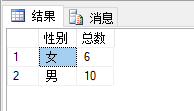
注意:
在group by 后不能使用where条件语句,group by 语句后可以使用having 进行条件约束 ,
后面也可以可以使用 order by进行排序
修改表数据
修改数据表中的数据使用Update
语法
update [表名] set [列名]=[修改的值] where [列名] = [条件]
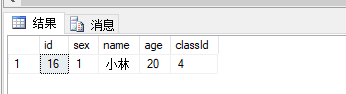
下面修改id=16 同学的姓名:

		update student set name='小林' where id=16

		select * from student where id=16
修改之后的数据为 小思的名字就改成了小林
注意:
如果不给定条件会修改表中所有的数据
删除表中数据
*删除表中数据Delete
语法
delete [表名] where [条件]
下面删除id=16的小林的信息
delete student where id=16
执行结果:可以清楚的看到id=16小林的数据就没有了,

总结:
修改和删除要谨慎使用,使用时一定要给定条件,不然就会修改、删除整张表中的数据。格外注意
SQLServer数据库查询语法的更多相关文章
- 基于Winform框架DataGridView控件的SqlServer数据库查询展示功能的实现
关键词:Winform.DataGridView.SqlServer 一个基于winform框架的C/S软件,主要实现对SqlServer数据库数据表的实时查询. 一.为DataGridView添加数 ...
- Mysql数据库查询语法详解
数据库的完整查询语法 在平常的工作中经常需要与数据库打交道 , 虽然大多时间都是简单的查询抑或使用框架封装好的ORM的查询方法 , 但是还是要对数据库的完整查询语法做一个加深理解 数据库完整查询语法框 ...
- sqlserver数据库查询
帮助类 using System; using System.Collections.Generic; using System.Data; using System.Data.SqlClient; ...
- sqlserver数据库查询,在数据类型不一致时容易出错
1. 如此句sql: select SysNo from User_MainInfo where Ouid=@Ouid 在 User_MainInfo表中Ouid是nvarchar类型,但当我们传入的 ...
- Yii2数据库查询语法
一: $con = Yii::$app->db; $rel = $con->createCommand("select * from user");//预处理对象 $r ...
- sqlserver数据库查询语句
--数据库所有表select * from sysobjects where type='u'; --指定表的所有列select name from syscolumns where id=(sele ...
- 查询Sqlserver数据库死锁的一个存储过程(转)
使用sqlserver作为数据库的应用系统,都避免不了有时候会产生死锁, 死锁出现以后,维护人员或者开发人员大多只会通过sp_who来查找死锁的进程,然后用sp_kill杀掉.利用sp_who ...
- SQLServer数据库之连接查询
SQLServer数据库之连接查询 表的连接查询的几种方法介绍: inner join on内连接,left join on 左连接 , rigth join on 右连接, full join on ...
- Sqlserver数据库分页查询
Sqlserver数据库分页查询一直是Sqlserver的短板,闲来无事,想出几种方法,假设有表ARTICLE,字段ID.YEAR...(其他省略),数据53210条(客户真实数据,量不大),分页查询 ...
随机推荐
- noi linux 2.0 体验
一.起因 下午,我打开 noi 官网准备报名 csp j/s,一看官网展板:"noi linux 2.0 发布" 我就兴奋了起来.(9 月 1 日起开始使用, 也就意味着 csp ...
- 时间-i春秋
记一道跑脚本的题 进入页面拿到一段代码. <?php header("content-type:text/html;charset=utf-8"); '天下武功唯快不破'; ...
- RHCAS_DAY06
vi/vim文本编辑器 Vim是从 vi 发展出来的一个文本编辑器,vim 具有程序编辑的能力,可以主动的以字体颜色辨别语法的正确性 vi/vim 共分为三种模式:命令模式.输入模式.底线命令模式(末 ...
- Linux命令(九)之安装mysql
.personSunflowerP { background: rgba(51, 153, 0, 0.66); border-bottom: 1px solid rgba(0, 102, 0, 1); ...
- Linux中配置ftp传输
.personSunflowerP { background: rgba(51, 153, 0, 0.66); border-bottom: 1px solid rgba(0, 102, 0, 1); ...
- SpringMVC项目部署到CentOS7虚拟机问题及解决办法记录
1.前言 计划将之前在Windows系统上练手做的项目部署到云服务器上,想先在本地虚拟机上测试一下是否可行,过程中发现很多问题,特此记录.还有问题未能解决,希望后面能有思路. 突然想到是否和数据库有关 ...
- Git (10)-- 打标签(git tag)
@ 目录 1.列出标签 2.创建标签 2.1.附注标签 2.2.轻量标签 3.后期打标签 4.共享标签 5.删除标签 6.检出标签 超详细 Git 图文版小白教程(持续更新) 像其他版本控制系统(VC ...
- IOC概念和原理:BeanFactory 接口与ApplicationContext
IOC(概念和原理)1.什么是 IOC(1)控制反转,把对象创建和对象之间的调用过程,交给 Spring 进行管理(2)使用 IOC 目的:为了耦合度降低(3)做入门案例就是 IOC 实现2.IOC ...
- NOIP 模拟 $21\; \rm Median$
题解 \(by\;zj\varphi\) 对于这个序列,可以近似得把它看成随机的,而对于随机数列,每个数的分布都是均匀的,所以中位数的变化可以看作是常数 那么可以维护一个指向中位数的指针,同时维护有多 ...
- java使用wol远程开机
param类 package com.meeno.framework.wol.params; import lombok.Getter; import lombok.NoArgsConstructor ...