
springboot+mybatis+mysql 利用mybatis自动生成sql语句
工具和环境
idea,mysql,JDK1.8
效果图如下

结构图如下
java

resources
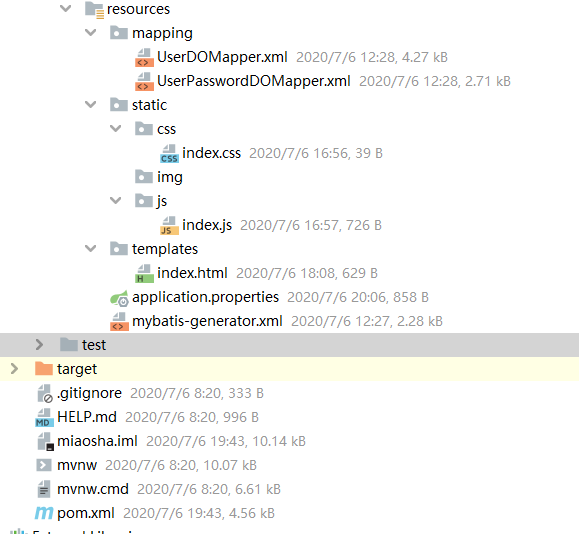
sql文件
/*

Navicat MySQL Data Transfer

Source Server         : localhost_3306

Source Server Version : 50562

Source Host           : localhost:3306

Source Database       : miaosha

Target Server Type    : MYSQL

Target Server Version : 50562

File Encoding         : 65001

Date: 2020-07-06 20:34:49

*/

SET FOREIGN_KEY_CHECKS=0;

-- ----------------------------

-- Table structure for user_info

-- ----------------------------

DROP TABLE IF EXISTS `user_info`;

CREATE TABLE `user_info` (

  `id` int(11) NOT NULL AUTO_INCREMENT,

  `name` varchar(64) NOT NULL DEFAULT '',

  `gender` int(11) NOT NULL DEFAULT '0' COMMENT '//1代表男性,2代表女性',

  `age` int(11) NOT NULL,

  `telphone` varchar(0) NOT NULL DEFAULT '',

  `register_mode` varchar(0) NOT NULL DEFAULT '' COMMENT '//byphone,bywechat,byalipay',

  `third_party_id` varchar(64) NOT NULL DEFAULT '',

  PRIMARY KEY (`id`) USING BTREE

) ENGINE=InnoDB AUTO_INCREMENT=3 DEFAULT CHARSET=utf8 ROW_FORMAT=DYNAMIC;

-- ----------------------------

-- Records of user_info

-- ----------------------------

INSERT INTO `user_info` VALUES ('1', '王王', '1', '12', '', '', '');

INSERT INTO `user_info` VALUES ('2', 'ww', '0', '21', '', '', '');

-- ----------------------------

-- Table structure for user_password

-- ----------------------------

DROP TABLE IF EXISTS `user_password`;

CREATE TABLE `user_password` (

  `id` int(11) NOT NULL AUTO_INCREMENT,

  `encrpt_password` varchar(128) NOT NULL DEFAULT '',

  `user_id` int(11) NOT NULL DEFAULT '0',

  PRIMARY KEY (`id`) USING BTREE

) ENGINE=InnoDB DEFAULT CHARSET=utf8 ROW_FORMAT=DYNAMIC;

-- ----------------------------

-- Records of user_password

-- ----------------------------
pom.xml
<?xml version="1.0" encoding="UTF-8"?>

<project xmlns="http://maven.apache.org/POM/4.0.0" xmlns:xsi="http://www.w3.org/2001/XMLSchema-instance"

         xsi:schemaLocation="http://maven.apache.org/POM/4.0.0 https://maven.apache.org/xsd/maven-4.0.0.xsd">

    <modelVersion>4.0.0</modelVersion>

    <parent>

        <groupId>org.springframework.boot</groupId>

        <artifactId>spring-boot-starter-parent</artifactId>

        <version>2.3.1.RELEASE</version>

        <relativePath/> <!-- lookup parent from repository -->

    </parent>

    <groupId>com.example</groupId>

    <artifactId>demo</artifactId>

    <version>0.0.1-SNAPSHOT</version>

    <name>miaosha</name>

    <description>Demo project for Spring Boot</description>

    <properties>

        <java.version>1.8</java.version>

    </properties>

    <dependencies>

        <dependency>

            <groupId>org.springframework.boot</groupId>

            <artifactId>spring-boot-starter-web</artifactId>

        </dependency>

        <dependency>

            <groupId>org.springframework.boot</groupId>

            <artifactId>spring-boot-starter-thymeleaf</artifactId>

            <version>2.1.0.RELEASE</version>

        </dependency>

        <!--热部署-->

        <dependency>

            <groupId>org.springframework.boot</groupId>

            <artifactId>spring-boot-devtools</artifactId>

            <optional>true</optional>

        </dependency>

        <dependency>

            <groupId>mysql</groupId>

            <artifactId>mysql-connector-java</artifactId>

            <version>5.1.38</version>

        </dependency>

        <!--连接池-->

        <dependency>

            <groupId>com.alibaba</groupId>

            <artifactId>druid</artifactId>

            <version>1.1.10</version>

        </dependency>

        <dependency>

            <groupId>org.mybatis.spring.boot</groupId>

            <artifactId>mybatis-spring-boot-starter</artifactId>

            <version>1.3.5</version>

        </dependency>

        <dependency>

            <groupId>org.springframework.boot</groupId>

            <artifactId>spring-boot-starter-test</artifactId>

            <scope>test</scope>

            <exclusions>

                <exclusion>

                    <groupId>org.junit.vintage</groupId>

                    <artifactId>junit-vintage-engine</artifactId>

                </exclusion>

            </exclusions>

        </dependency>

    </dependencies>

    <build>

        <plugins>

            <plugin>

                <groupId>org.springframework.boot</groupId>

                <artifactId>spring-boot-maven-plugin</artifactId>

            </plugin>

            <plugin>

                <groupId>org.mybatis.generator</groupId>

                <artifactId>mybatis-generator-maven-plugin</artifactId>

                <version>1.3.5</version>

                <dependencies>

                    <dependency>

                        <groupId>mysql</groupId>

                        <artifactId>mysql-connector-java</artifactId>

                        <version>5.1.39</version>

                    </dependency>

                    <dependency>

                        <groupId>org.mybatis.generator</groupId>

                        <artifactId>mybatis-generator-core</artifactId>

                        <version>1.3.5</version>

                    </dependency>

                </dependencies>

                <executions>

                    <execution>

                        <id>Generate MyBatis Artifacts</id>

                        <phase>package</phase>

                        <goals>

                            <goal>generate</goal>

                        </goals>

                    </execution>

                </executions>

                <configuration>

                    <!--允许移动生成的文件 -->

                    <verbose>true</verbose>

                    <!-- 是否覆盖 -->

                    <overwrite>true</overwrite>

                    <!-- 自动生成的配置 -->

                    <configurationFile>

                        src/main/resources/mybatis-generator.xml

                    </configurationFile>

                </configuration>

            </plugin>

        </plugins>

    </build>

</project>
自动生成映射关系的mybatis-generator.xml
<?xml version="1.0" encoding="UTF-8"?>

<!DOCTYPE generatorConfiguration

        PUBLIC "-//mybatis.org//DTD MyBatis Generator Configuration 1.0//EN"

        "http://mybatis.org/dtd/mybatis-generator-config_1_0.dtd">

<generatorConfiguration>

    <context id="DB2Tables" targetRuntime="MyBatis3">

        <commentGenerator>

            <property name="suppressDate"  value="true"/>

            <property name="suppressAllComments" value="true"/>

        </commentGenerator>

        <jdbcConnection driverClass="com.mysql.jdbc.Driver" connectionURL="jdbc:mysql://127.0.0.1:3306/miaosha" userId="root" password="magicimage"></jdbcConnection>

        <javaTypeResolver>

            <property name="forceBigDecimals" value="false"/>

        </javaTypeResolver>

        <!-- 生成dataObject的包名和位置 -->

        <javaModelGenerator targetPackage="com.miaoshaproject.dataobject" targetProject="src/main/java">

            <property name="enableSbuPackages" value="true"/>

            <property name="trimStrings" value="true"/>

        </javaModelGenerator>

        <!-- 映射文件生成所在的目录为每一个数据库的表生成对应的SqlMap文件 -->

        <sqlMapGenerator targetPackage="mapping" targetProject="src/main/resources">

            <property name="enableSubPackages" value="true"/>

        </sqlMapGenerator>

        <!-- 生成DAO的包名和位置 -->

        <javaClientGenerator type="XMLMAPPER" targetPackage="com.miaoshaproject.dao" targetProject="src/main/java">

            <property name="enableSubPackages" value="true"/>

        </javaClientGenerator>

        <!--tableName是数据库中表的名字,domainObjectName是实体的名字-->

        <table tableName="user_info" domainObjectName="UserDO" enableCountByExample="false"

               enableUpdateByExample="false" enableDeleteByExample="false"

               enableSelectByExample="false" selectByExampleQueryId="false"></table>

        <table tableName="user_password" domainObjectName="UserPasswordDO" enableCountByExample="false"

               enableUpdateByExample="false" enableDeleteByExample="false"

               enableSelectByExample="false" selectByExampleQueryId="false"></table>

    </context>

</generatorConfiguration>
application.properties文件
server.port=8090

#数据库

spring.datasouce.name=miaosha

spring.datasource.url=jdbc:mysql://127.0.0.1:3306/miaosha?useUnicode=true&characterEncoding=utf-8

spring.datasource.username=root

spring.datasource.password=magicimage

#druid

spring.datasource.type=com.alibaba.druid.pool.DruidDataSource

spring.datasource.driverClassName=com.mysql.jdbc.Driver

#mybatis

mybatis.mapper-locations=classpath:mapping/*.xml

mybatis.type-aliases-package=com.miaoshaproject.dataobject

#模板

spring.thymeleaf.cache=false

spring.thymeleaf.encoding=utf-8

spring.thymeleaf.mode=HTML5

spring.thymeleaf.prefix=classpath:/templates/

spring.thymeleaf.suffix=.html

#指定某些文件不进行监听,即不会进行热加载

spring.devtools.restart.exclude=application.properties

spring.devtools.restart.enabled=true

spring.devtools.restart.additional-paths=src/main/java
MiaoshaApplication
@SpringBootApplication(scanBasePackages={"com.miaoshaproject.*"})

@MapperScan("com.miaoshaproject.dao")

public class MiaoshaApplication {

    public static void main(String[] args) {

        SpringApplication.run(MiaoshaApplication.class, args);

    }

}
controller
@Controller

@RequestMapping("/")

public class Forward {

    @RequestMapping("/index")

    public String index() {

        return "/index";

    }

}
@RestController

public class UserController {

    @Autowired

    private UserService userService;

    @RequestMapping("/getUser")

     public UserDO getName(Integer id) {

          UserDO user = userService.getName(id);

              System.out.println(user.getName());

              return user;

        }

}
service
public interface  UserService {

    UserDO getName(Integer id);

}
serviceImpl
@Service

public class UserServiceImpl implements UserService {

    @Autowired

    private UserDOMapper userDOMapper;

    @Override

    public UserDO getName(Integer id) {

        return userDOMapper.selectByPrimaryKey(id);

    }

}
dao
public interface UserDOMapper {

    int deleteByPrimaryKey(Integer id);

    int insert(UserDO record);

    int insertSelective(UserDO record);

    UserDO selectByPrimaryKey(Integer id);

    int updateByPrimaryKeySelective(UserDO record);

    int updateByPrimaryKey(UserDO record);

}
dataobject
package com.miaoshaproject.dataobject;

public class UserDO {

    private Integer id;

    private String name;

    private Integer gender;

    private Integer age;

    private String telphone;

    private String registerMode;

    private String thirdPartyId;

    public Integer getId() {

        return id;

    }

    public void setId(Integer id) {

        this.id = id;

    }

    public String getName() {

        return name;

    }

    public void setName(String name) {

        this.name = name == null ? null : name.trim();

    }

    public Integer getGender() {

        return gender;

    }

    public void setGender(Integer gender) {

        this.gender = gender;

    }

    public Integer getAge() {

        return age;

    }

    public void setAge(Integer age) {

        this.age = age;

    }

    public String getTelphone() {

        return telphone;

    }

    public void setTelphone(String telphone) {

        this.telphone = telphone == null ? null : telphone.trim();

    }

    public String getRegisterMode() {

        return registerMode;

    }

    public void setRegisterMode(String registerMode) {

        this.registerMode = registerMode == null ? null : registerMode.trim();

    }

    public String getThirdPartyId() {

        return thirdPartyId;

    }

    public void setThirdPartyId(String thirdPartyId) {

        this.thirdPartyId = thirdPartyId == null ? null : thirdPartyId.trim();

    }

}
mapping
<?xml version="1.0" encoding="UTF-8"?>

<!DOCTYPE mapper PUBLIC "-//mybatis.org//DTD Mapper 3.0//EN" "http://mybatis.org/dtd/mybatis-3-mapper.dtd">

<mapper namespace="com.miaoshaproject.dao.UserDOMapper">

  <resultMap id="BaseResultMap" type="com.miaoshaproject.dataobject.UserDO">

    <id column="id" jdbcType="INTEGER" property="id" />

    <result column="name" jdbcType="VARCHAR" property="name" />

    <result column="gender" jdbcType="INTEGER" property="gender" />

    <result column="age" jdbcType="INTEGER" property="age" />

    <result column="telphone" jdbcType="VARCHAR" property="telphone" />

    <result column="register_mode" jdbcType="VARCHAR" property="registerMode" />

    <result column="third_party_id" jdbcType="VARCHAR" property="thirdPartyId" />

  </resultMap>

  <sql id="Base_Column_List">

    id, name, gender, age, telphone, register_mode, third_party_id

  </sql>

  <select id="selectByPrimaryKey" parameterType="java.lang.Integer" resultMap="BaseResultMap">

    select

    <include refid="Base_Column_List" />

    from user_info

    where id = #{id,jdbcType=INTEGER}

  </select>

  <delete id="deleteByPrimaryKey" parameterType="java.lang.Integer">

    delete from user_info

    where id = #{id,jdbcType=INTEGER}

  </delete>

  <insert id="insert" parameterType="com.miaoshaproject.dataobject.UserDO">

    insert into user_info (id, name, gender,

      age, telphone, register_mode,

      third_party_id)

    values (#{id,jdbcType=INTEGER}, #{name,jdbcType=VARCHAR}, #{gender,jdbcType=INTEGER},

      #{age,jdbcType=INTEGER}, #{telphone,jdbcType=VARCHAR}, #{registerMode,jdbcType=VARCHAR},

      #{thirdPartyId,jdbcType=VARCHAR})

  </insert>

  <insert id="insertSelective" parameterType="com.miaoshaproject.dataobject.UserDO">

    insert into user_info

    <trim prefix="(" suffix=")" suffixOverrides=",">

      <if test="id != null">

        id,

      </if>

      <if test="name != null">

        name,

      </if>

      <if test="gender != null">

        gender,

      </if>

      <if test="age != null">

        age,

      </if>

      <if test="telphone != null">

        telphone,

      </if>

      <if test="registerMode != null">

        register_mode,

      </if>

      <if test="thirdPartyId != null">

        third_party_id,

      </if>

    </trim>

    <trim prefix="values (" suffix=")" suffixOverrides=",">

      <if test="id != null">

        #{id,jdbcType=INTEGER},

      </if>

      <if test="name != null">

        #{name,jdbcType=VARCHAR},

      </if>

      <if test="gender != null">

        #{gender,jdbcType=INTEGER},

      </if>

      <if test="age != null">

        #{age,jdbcType=INTEGER},

      </if>

      <if test="telphone != null">

        #{telphone,jdbcType=VARCHAR},

      </if>

      <if test="registerMode != null">

        #{registerMode,jdbcType=VARCHAR},

      </if>

      <if test="thirdPartyId != null">

        #{thirdPartyId,jdbcType=VARCHAR},

      </if>

    </trim>

  </insert>

  <update id="updateByPrimaryKeySelective" parameterType="com.miaoshaproject.dataobject.UserDO">

    update user_info

    <set>

      <if test="name != null">

        name = #{name,jdbcType=VARCHAR},

      </if>

      <if test="gender != null">

        gender = #{gender,jdbcType=INTEGER},

      </if>

      <if test="age != null">

        age = #{age,jdbcType=INTEGER},

      </if>

      <if test="telphone != null">

        telphone = #{telphone,jdbcType=VARCHAR},

      </if>

      <if test="registerMode != null">

        register_mode = #{registerMode,jdbcType=VARCHAR},

      </if>

      <if test="thirdPartyId != null">

        third_party_id = #{thirdPartyId,jdbcType=VARCHAR},

      </if>

    </set>

    where id = #{id,jdbcType=INTEGER}

  </update>

  <update id="updateByPrimaryKey" parameterType="com.miaoshaproject.dataobject.UserDO">

    update user_info

    set name = #{name,jdbcType=VARCHAR},

      gender = #{gender,jdbcType=INTEGER},

      age = #{age,jdbcType=INTEGER},

      telphone = #{telphone,jdbcType=VARCHAR},

      register_mode = #{registerMode,jdbcType=VARCHAR},

      third_party_id = #{thirdPartyId,jdbcType=VARCHAR}

    where id = #{id,jdbcType=INTEGER}

  </update>

</mapper>
css
p,label{

        color: green;

     }
js
$(document).ready(function(){

    $("button#aa").click(function(){

        //var jsonObj = {id: $("#id").val(),name:"abcd",age:"123"};

        $.ajax({

            async : false,

            url: "/getUser",

            data:{

                id:$("#id").val()

            },

            //data:JSON.stringify(jsonObj),  传入json数据

            type: "POST",

            dataType:"json",//返回数据类型

            //headers:{"Content-Type":"application/json"},  传入json数据时需设置请求头

            success:function(data){

                alert(data.name);

            },

            error:function(err){

                alert('连接失败');

            }

        });

    });

});
html
<!DOCTYPE HTML>

<html xmlns="http://www.w3.org/1999/xhtml"

      xmlns:th="http://www.thymeleaf.org">

<head>

    <meta charset="utf-8"/>

    <title>测试网站t</title>

    <link th:href="@{/css/index.css}" rel="stylesheet" type="text/css"/>

    <script type="text/javascript" src="https://cdn.staticfile.org/jquery/1.10.2/jquery.min.js"></script>

    <script type="text/javascript" th:src="@{/js/index.js}"></script>

</head>

<body>

<p>

    <label class="name">t用户id:</label>

    <input placeholder="输入id" type="text" class="text-box" id="id"/>

    <button id="aa">按钮</button>

</p>

</body>

</html>
springboot+mybatis+mysql 利用mybatis自动生成sql语句的更多相关文章
- 利用反射自动生成SQL语句(仿Linq)
转:http://www.cnblogs.com/the7stroke/archive/2012/04/22/2465597.html using System; using System.Colle ...
- 使用Excel自动生成sql语句
在近一段日子里,进入了新的项目组,由于项目需要,经常要将一些Excel表中的数据导入数据库中,以前并没有过多的接触过数据导入与数据处理,对于我来说比较痛苦,今天下午花了几个小时处理数据,但是同事给我提 ...
- 根据DELTA自动生成SQL语句
上传客户端的CLIENTDATASET.delta到服务器的clientdataset.data,服务端解析clientdataset的数据生成相应的SQL语句. 相对于直接调用datasetprov ...
- 城市联动 - 自动生成SQL语句
字段比较简单/ 如果有需要可以自己定制字段和排序/ 一共二级城市联动, 本人业务需要, 所以就两层, 网上关于三层的挺多, 有需要可以借鉴/ 废话不多说, 先看效果图, 代码在下面 <?php ...
- Excel 提供数据 更新或者插入数据 通过函数 自动生成SQL语句
excel 更新数据 ="UPDATE dbo.yt_vehicleExtensionBase SET yt_purchase_date='"&B2&"' ...
- 打开powerDesigner时,创建table对应的自动生成sql语句没有注释
在创建pdm时由于需要在name列填写的是以后要在表中创建的注释信息,comment中则写的说明信息字数比较多.默认情况下在生成建表sql时不能将name生成注释信息,进行如下设置可以讲name生成注 ...
- 使用Java注解开发自动生成SQL
使用注解开发的好处就是减少配置文件的使用.在实际过程中,随着项目越来越复杂,功能越来越多,会产生非常多的配置文件.但是,当配置文件过多,实际维护过程中产生的问题就不容易定位,这样就会徒劳的增加工作量. ...
- Excel表格生成sql语句
假如excel表格中有A.B.C三列数据,希望导入到数据库users表中,对应的字段分别是name,sex,age ,在你的excel表格中增加一列,利用excel的公式自动生成sql语句,方法如下: ...
- springboot整合mybatis,利用mybatis-genetor自动生成文件
springboot整合mybatis,利用mybatis-genetor自动生成文件 项目结构: xx 实现思路: 1.添加依赖 <?xml version="1.0" e ...
随机推荐
- csp-s模拟测试55(9.29)联「线段树」·赛「??」题「神仙DP」
T1 联 考试两个小时终于调过了,话说一个傻逼错最后还是静态查出错的..... 大概维护两个懒标记,一个区间覆盖,一个区间异或,然后保证每个区间只会存在一种懒标记. 然后维护区间0的个数,查询时查询那 ...
- RPM安装MySQL5.7并更改数据目录
RPM安装MySQL5.7并更改数据目录 文末附MySQL完整配置文件 官网地址:https://dev.mysql.com/downloads/mysql/5.7.html#downloads 注意 ...
- Mac nasm 汇编入门
下载 brew install nasm code SECTION .data msg: db "hello world", 0x0a len: equ $-msg SECTION ...
- AcWing 1143. 联络员
Tyvj已经一岁了,网站也由最初的几个用户增加到了上万个用户,随着Tyvj网站的逐步壮大,管理员的数目也越来越多,现在你身为Tyvj管理层的联络员,希望你找到一些通信渠道,使得管理员两两都可以联络(直 ...
- Nginx-多服务绑定80端口及映射域名
多服务绑定80端口及映射域名 说明:业务需要配置的样例模板,如需深入了解,请查看官方文档 1.Nginx配置文件nginx.conf(可拆分多台机器部署) worker_processes 1; e ...
- NoSql非关系型数据库之MongoDB应用(三):MongoDB在项目中的初步应用
业精于勤,荒于嬉:行成于思,毁于随. 我们可以结合相关的IDE做一个简单的增删改查了,实现MongoDB在项目中的初步应用. 前提是安装了MongoDB服务和MongoDB可视化工具,没有安装的可以点 ...
- 前端笔记:Html页面常用元素
Html页面由基本几个元素(标签)组成 html.head.body.foot(很少使用). html是整个页面的父级元素,内部包括head.body.foot子类标签. head是页头,及页面的头部 ...
- PO,VO,BO,POJO,DAO的区别
基本概念 PO:persistant object (持久化对象),可以看成是与数据库中的表相映射的java对象.最简单的PO就是对应数据库中某个表中的一条记录,多个记录可以用PO的集合.PO中应该不 ...
- fail-fast 与 fail-safe
fail-fast: fail-fast(快速失败),是Java集合的一种错误检测机制.当在遍历集合的过程中该集合在结构(改变集合大小)上发生变化时候,有可能发生fail-fast(快速失败行为不能得 ...
- MySQL 卡死的问题
1. 执行show full processlist观察state和info两列,查看有哪些线程在运行. 2.使用kill命令+对应线程前面id杀死卡死的线程. 其他的方式: -- 查询是否锁表 sh ...