
Swagger2常用注解解析(轻松构建Swagger)
Swagger2常用注解解析
一、SpringBoot集成Swagger2
- 引入相关jar包
<!-- swagger2 配置 -->

<dependency>

    <groupId>io.springfox</groupId>

    <artifactId>springfox-swagger2</artifactId>

    <version>2.4.0</version>

</dependency>

<!-- 官方UI -->

<dependency>

    <groupId>io.springfox</groupId>

    <artifactId>springfox-swagger-ui</artifactId>

    <version>2.4.0</version>

</dependency>

<!-- bootstrap-ui -->

<dependency>

    <groupId>com.github.xiaoymin</groupId>

    <artifactId>swagger-bootstrap-ui</artifactId>

    <version>1.6</version>

</dependency>
- 编写Swagger2文档
package com.zgx.config;

import org.springframework.context.annotation.Bean;

import org.springframework.context.annotation.Configuration;

import springfox.documentation.builders.ApiInfoBuilder;

import springfox.documentation.builders.PathSelectors;

import springfox.documentation.builders.RequestHandlerSelectors;

import springfox.documentation.service.ApiInfo;

import springfox.documentation.service.Contact;

import springfox.documentation.spi.DocumentationType;

import springfox.documentation.spring.web.plugins.Docket;

import springfox.documentation.swagger2.annotations.EnableSwagger2;

//使类被spring扫描到

@Configuration

//开启Swagger2

@EnableSwagger2

public class Swagger2 {

    //http://localhost:8088/swagger-ui.html    //简洁

    //http://localhost:8088/doc.html           //页面优化

    //配置Swagger2核心配置 docket

    @Bean

    public Docket createRestApi(){

        return new Docket(DocumentationType.SWAGGER_2) //指定api为Swagger2

                .apiInfo(apiInfo())                    //用于定义api汇总信息

                .select().apis(RequestHandlerSelectors.

                        basePackage("com.zgx.controller"))//指定controller包

                .paths(PathSelectors.any())             //所有controller

                .build();

    }

    private ApiInfo apiInfo(){

        return new ApiInfoBuilder()

                .title("基于可穿戴设备的医疗监护系统接口api")              //文档页标题

                .contact(new Contact("莫逸风",

                        "https://blog.csdn.net/qq_38723677",

                        "150****5317@163.com"))     //联系人信息

                .description("专为可穿戴设备的医疗监护系统提供的api文档")    //详细信息

                .version("0.0.1")                         //文档版本号

                .termsOfServiceUrl("")                    //网站地址

                .build();

    }

}
- 优化Swagger2显示
@ApiIgnore忽略该接口,或类

//类注释

@Api(value = "注册登录",tags = {"用于注册登录的相关接口"})

//方法注释

@ApiOperation(value = "用户名是否存在",notes = "用户名是否存在",httpMethod = "GET")

//BO实体类注释

@ApiModel(value = "用户对象BO", description = "从客户端,由用户传入的数据封装在此entity中")

//BO实体类变量注释

@ApiModelProperty(value = "用户名", name = "username", example = "moyifeng", required = true)
二、常用注解解析
@Api()用于类;
表示标识这个类是swagger的资源@ApiOperation()用于方法;
表示一个http请求的操作@ApiParam()用于方法,参数,字段说明;
表示对参数的添加元数据(说明或是否必填等)@ApiModel()用于类
表示对类进行说明,用于参数用实体类接收@ApiModelProperty()用于方法,字段
表示对model属性的说明或者数据操作更改@ApiIgnore()用于类,方法,方法参数
表示这个方法或者类被忽略@ApiImplicitParam() 用于方法
表示单独的请求参数@ApiImplicitParams() 用于方法;
包含多个 @ApiImplicitParam
具体使用举例说明:
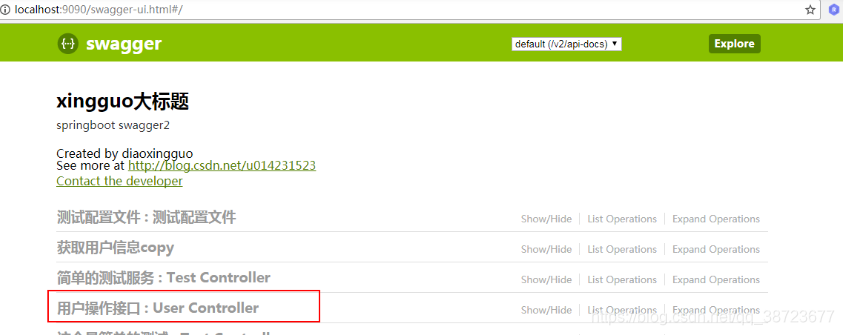
@Api()
用于类;表示标识这个类是swagger的资源
tags–表示说明
value–也是说明,可以使用tags替代
但是tags如果有多个值,会生成多个list
@Api(value="用户controller",tags={"用户操作接口"})

@RestController

public class UserController {

}
@ApiOperation() 用于方法;表示一个http请求的操作
value用于方法描述
notes用于提示内容
tags可以重新分组(视情况而用)
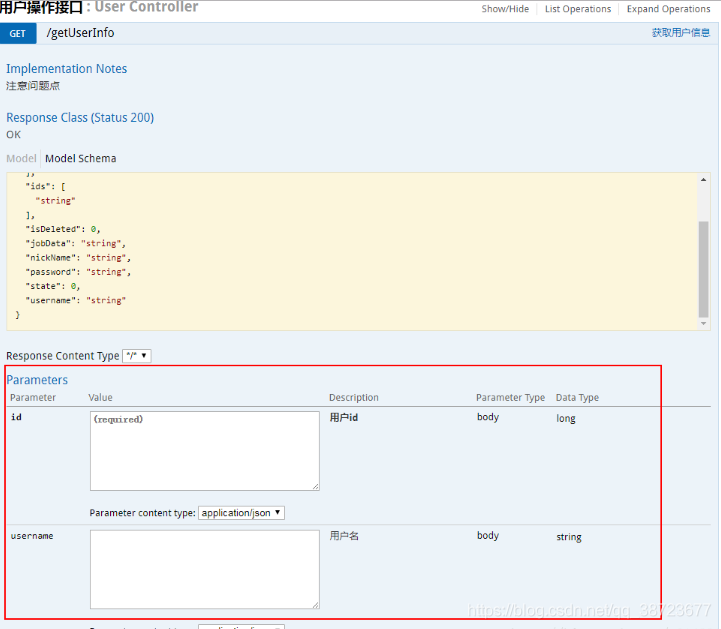
@ApiParam() 用于方法,参数,字段说明;表示对参数的添加元数据(说明或是否必填等)
name–参数名
value–参数说明
required–是否必填
@Api(value="用户controller",tags={"用户操作接口"})

@RestController

public class UserController {

     @ApiOperation(value="获取用户信息",tags={"获取用户信息copy"},notes="注意问题点")

     @GetMapping("/getUserInfo")

     public User getUserInfo(@ApiParam(name="id",value="用户id",required=true) Long id,@ApiParam(name="username",value="用户名") String username) {

     // userService可忽略,是业务逻辑

      User user = userService.getUserInfo();

      return user;

  }

}
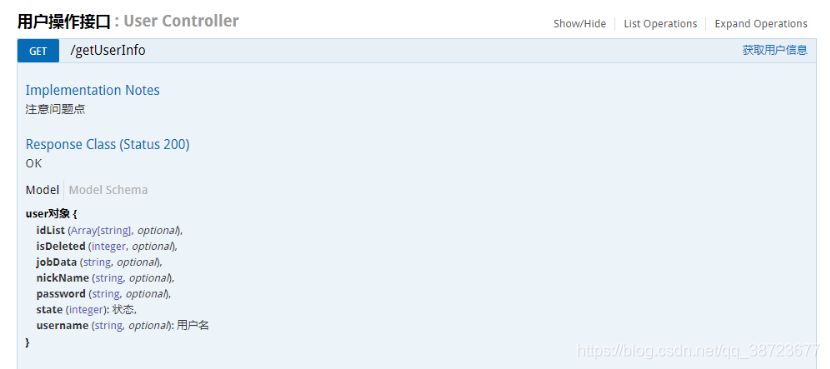
@ApiModel()用于类 ;表示对类进行说明,用于参数用实体类接收
value–表示对象名
description–描述
都可省略
@ApiModelProperty()用于方法,字段; 表示对model属性的说明或者数据操作更改
value–字段说明
name–重写属性名字
dataType–重写属性类型
required–是否必填
example–举例说明
hidden–隐藏
@ApiModel(value="user对象",description="用户对象user")

public class User implements Serializable{

     private static final long serialVersionUID = 1L;

     @ApiModelProperty(value="用户名",name="username",example="xingguo")

     private String username;

     @ApiModelProperty(value="状态",name="state",required=true)

      private Integer state;

      private String password;

      private String nickName;

      private Integer isDeleted;

      @ApiModelProperty(value="id数组",hidden=true)

      private String[] ids;

      private List<String> idList;

     //省略get/set

}
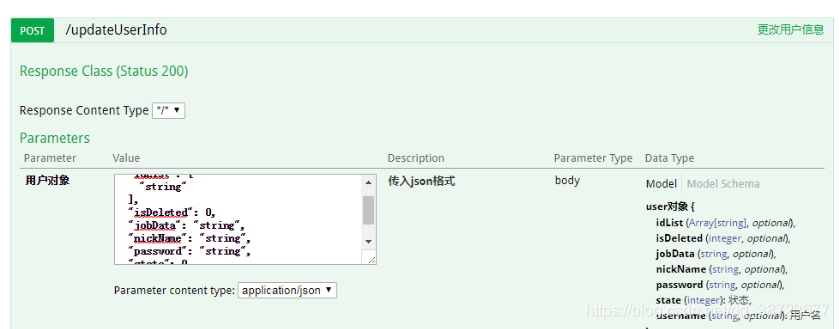
@ApiOperation("更改用户信息")

@PostMapping("/updateUserInfo")

public int updateUserInfo(@RequestBody @ApiParam(name="用户对象",value="传入json格式",required=true) User user){

     int num = userService.updateUserInfo(user);

     return num;

  }
@ApiIgnore()用于类或者方法上,可以不被swagger显示在页面上
比较简单, 这里不做举例
@ApiImplicitParam() 用于方法
表示单独的请求参数
@ApiImplicitParams() 用于方法,包含多个 @ApiImplicitParam
name–参数ming
value–参数说明
dataType–数据类型
paramType–参数类型
example–举例说明
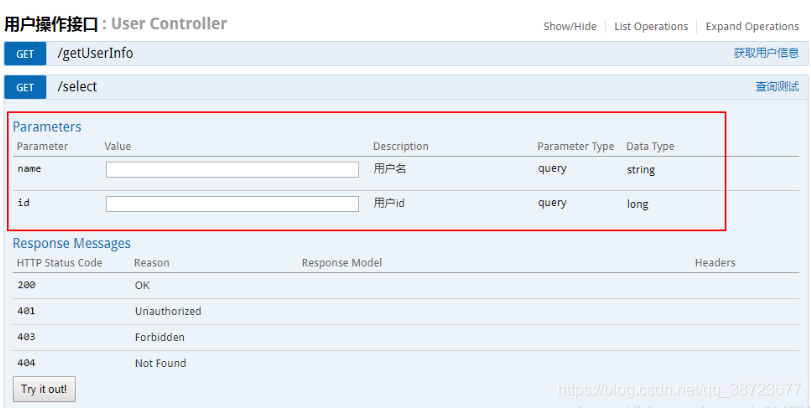
@ApiOperation("查询测试")

@GetMapping("select")

//@ApiImplicitParam(name="name",value="用户名",dataType="String", paramType = "query")

@ApiImplicitParams({

@ApiImplicitParam(name="name",value="用户名",dataType="string", paramType = "query",example="xingguo"),

@ApiImplicitParam(name="id",value="用户id",dataType="long", paramType = "query")})

public void select(){

}
本文参考CSDN博主「兴国First」的原创文章
原文链接:https://blog.csdn.net/u014231523/article/details/76522486
Swagger2常用注解解析(轻松构建Swagger)的更多相关文章
- swagger2常用注解
常用注解: @Api()用于类: 表示标识这个类是swagger的资源 @ApiOperation()用于方法: 表示一个http请求的操作 @ApiParam()用于方法,参数,字段说明: 表示对参 ...
- Swagger2常用注解和使用方法
一 引入maven依赖 <!--整合Swagger2--> <dependency> <groupId>com.spring4all</groupId&g ...
- swagger2常用注解说明
说明: 1.这里使用的版本:springfox-swagger2(2.4)springfox-swagger-ui (2.4) 2.这里是说明常用注解的含义和基本用法(也就是说已经对swagger进行 ...
- swagger2 常用注解的使用
一.@Api 效果: @Api注解放在类上面,这里的value是没用的,tags表示该controller的介绍. 二 .@ApiOperation 效果: @ApiOperation注解用于放在方法 ...
- swagger2 常用注解说明
常用到的注解有: Api ApiModel ApiModelProperty ApiOperation ApiParam ApiResponse ApiResponses ResponseHeader ...
- Swagger2常用注解及其说明 (转)
Api 用在Controller中,标记一个Controller作为swagger的文档资源 属性名称 说明 value Controller的注解 description 对api资源的描述 hid ...
- SpringBoot常用注解解析
@RestController 将返回的对象数据直接以 JSON 或 XML 形式写入 HTTP 响应(Response)中.绝大部分情况下都是直接以 JSON 形式返回给客户端,很少的情况下才会以 ...
- 常用注解解析(因为不太明白@component和@configuration写了)
1.@controller 控制器(注入服务) 用于标注控制层,相当于struts中的action层 2.@service 服务(注入dao) 用于标注服务层,主要用来进行业务的逻辑处理 3.@rep ...
- lombok --- 常用注解解析
@Data@Getter @Setter @ToString@Cleanup@NonNull@Builder@EqualsAndHashCode
随机推荐
- Leetcode春季活动打卡第三天:面试题 10.01. 合并排序的数组
Leetcode春季活动打卡第三天:面试题 10.01. 合并排序的数组 Leetcode春季活动打卡第三天:面试题 10.01. 合并排序的数组 思路 这道题,两个数组原本就有序.于是我们采用双指针 ...
- 如何在VeryCD中下载资源
这个方法也是百度来的,记在这里的目的不是为了显摆,主要是担心自己大脑记不住,用的时候又要重新找方法. 操作系统:Linux Mint 17 首先,在VeryCD中看好了某个资源,比如搜索的<哈利 ...
- 谷粒商城--分布式高级篇P102~P128
谷粒商城--分布式高级篇P102~P128 由于学习的时间也比较少,只有周六周末才有时间出来学习总结,所以一篇一篇慢慢更新吧,本次总结内容为Elasticsearch(相关内容:kibana,es,n ...
- SpringMVC中文乱码踩坑
问题 使用SpringMVC在返回一个字符串时发生了中文乱码问题.produces属性无效 @RequestMapping(value = "/nihao", produces = ...
- python3中的希尔排序
def shell_sort(alist): n = len(alist) # 初始步长 gap = round(n / 2) while gap > 0: # 按步长进行插入排序 for i ...
- vue 传参动态
方法一: router/index.js { path: '/src/views/activitiesDetails', name: activitiesDetails, component: act ...
- Solon 1.5.22 发布
Solon 是一个轻量的Java基础开发框架.强调,克制 + 简洁 + 开放的原则:力求,更小.更快.更自由的体验.支持:RPC.REST API.MVC.Job.Micro service.WebS ...
- JavaScript高级程序设计(第4版)-第一章学习
第一章 什么是Javascript 一.历史 JavaScript的名字怎么来的 首先,我们从javascript的历史开始了解,在以前的时候网页要验证某个必填字段是否填写,或者是判断输入的值的正确与 ...
- 靶机CH4INRULZ_v1.0.1
nmap开路. root@kali:~# nmap -sP 192.168.1.* //拿到靶机地址192.168.1.8 root@kali:~# nmap -p- -sS -v -sV 192.1 ...
- 我的大学Android开发学习之路——从开始到微信/支付宝/抖音Offer
前言 笔者2016年高考考入华中科技大学计算机科学与技术专业. 2017年底(大二寒假)拿到今日头条(字节跳动)深圳研发中心Android开发实习生Offer,在深圳研发中心实习至2018年3月. 2 ...