
wpf 中 theme 的使用 和 listview 模板的使用.
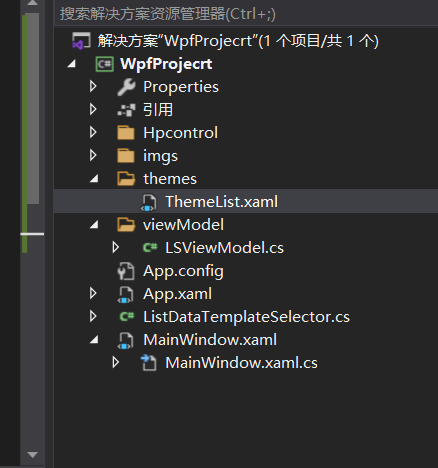
theme 文件
<ResourceDictionary xmlns="http://schemas.microsoft.com/winfx/2006/xaml/presentation"
xmlns:x="http://schemas.microsoft.com/winfx/2006/xaml"
xmlns:local="clr-namespace:WpfProjecrt.Hpcontrol">
<DataTemplate x:Key="HumanMessageDataTemplate">
<TextBlock Text="hello world"
Margin="0,0,0,0"
HorizontalAlignment="Right"
Foreground="#4d4d4d"
TextWrapping="Wrap"
FontSize="16"
FontFamily="楷体"/>
</DataTemplate>
<DataTemplate x:Key="DriverMessageDataTemplate">
<Grid HorizontalAlignment="Left">
<Grid Background="#ffffff">
<local:TestControl></local:TestControl>
</Grid>
</Grid>
</DataTemplate>
</ResourceDictionary>
2, 将theme 文件添加到App.xaml文件
<Application x:Class="WpfProjecrt.App"
xmlns="http://schemas.microsoft.com/winfx/2006/xaml/presentation"
xmlns:x="http://schemas.microsoft.com/winfx/2006/xaml"
xmlns:local="clr-namespace:WpfProjecrt"
StartupUri="MainWindow.xaml">
<Application.Resources>
<ResourceDictionary>
<ResourceDictionary.MergedDictionaries>
<ResourceDictionary Source="/themes/ThemeList.xaml"/>
</ResourceDictionary.MergedDictionaries>
</ResourceDictionary>
</Application.Resources>
</Application>
3, 添加listview 的选择器 ListDataTemplateSelector
public class ListDataTemplateSelector : DataTemplateSelector
{
public override DataTemplate SelectTemplate(object item, DependencyObject container)
{
DataTemplate dt= App.Current.Resources["DriverMessageDataTemplate"] as DataTemplate;
return dt;
// return App.Current.Resources["DriverMessageDataTemplate"] as DataTemplate;
}
}
4, 使用 现实的xml文件
<Window x:Class="WpfProjecrt.MainWindow"
xmlns="http://schemas.microsoft.com/winfx/2006/xaml/presentation"
xmlns:x="http://schemas.microsoft.com/winfx/2006/xaml"
xmlns:d="http://schemas.microsoft.com/expression/blend/2008"
xmlns:mc="http://schemas.openxmlformats.org/markup-compatibility/2006"
xmlns:local="clr-namespace:WpfProjecrt"
xmlns:local2="clr-namespace:WpfProjecrt.Hpcontrol"
mc:Ignorable="d"
Title="MainWindow" Height="450" Width="800">
<Grid>
<Grid>
<Grid.RowDefinitions>
<RowDefinition Height="auto"></RowDefinition>
<RowDefinition></RowDefinition>
</Grid.RowDefinitions>
<StackPanel Grid.Row="0">
<Image x:Name="mg" Height="100" Width="100"></Image>
<TextBlock Name="tb" >open web page</TextBlock>
<ComboBox x:Name="cb" DisplayMemberPath="name" ItemsSource="{Binding mm}"></ComboBox>
</StackPanel>
<ListView ItemsSource="{Binding mm}" ItemTemplateSelector="{Binding lss}" Grid.Row="1" x:Name="lw" Padding="0,16,0,0">
</ListView>
</Grid>
</Grid>
</Window>
对应后面的cs 文件
public class Meal
{
public string name
{
set;
get;
}
}
public partial class MainWindow : Window
{
public MainWindow()
{
InitializeComponent();
this.Loaded += MainWindow_Loaded;
this.DataContext = this;
// cb.ItemsSource = mcollection;
//lw.ItemsSource = mcollection;
//lw.ItemTemplateSelector = ListViewDataTemplateSelector;
}
private void MainWindow_Loaded(object sender, RoutedEventArgs e)
{
var link = new Hyperlink()
{
NavigateUri = new Uri("https://www.baidu.com"),
Inlines = { new Run() { Text = "baidu" } }
};
link.Click += Link_Click;
tb.Inlines.Add( link );
for(int i=0; i<100; i++)
{
Meal m = new Meal();
m.name = i.ToString();
mcollection.Add(m);
}
// mg.Source=new ImageSource()
BitmapImage image = new BitmapImage(new Uri("./imgs/123.jpg", UriKind.Relative));
mg.Source = image;
}
private ObservableCollection<Meal> mcollection = new ObservableCollection<Meal>();
public ObservableCollection<Meal> mm
{
get
{
return mcollection;
}
}
public ListDataTemplateSelector lss
{
get
{
return ls;
}
}
private ListDataTemplateSelector ls = new ListDataTemplateSelector();
private void Link_Click(object sender, RoutedEventArgs e)
{
System.Diagnostics.Process.Start(((Hyperlink)sender).NavigateUri.ToString());
}
}
总结, xml 文件绑定属性最好用CLR的包装器包装一下,
否则可能包装不上。
wpf 中 theme 的使用 和 listview 模板的使用.的更多相关文章
- 在WPF中自定义控件(3) CustomControl (上)
原文:在WPF中自定义控件(3) CustomControl (上) 在WPF中自定义控件(3) CustomControl (上) 周银辉 ...
- WPF 显示文件列表中使用 ListBox 变到ListView 最后使用DataGrid
WPF 显示文件列表中使用 ListBox 变到ListView 最后使用DataGrid 故事背景: 需要检索某目录下文件,并列出来,提供选择和其他功能. 第一版需求: 列出文件供选择即可,代码如下 ...
- WPF 中获取DataGrid 模板列中控件的对像
WPF 中获取DataGrid 模板列中控件的对像 #region 当前选定行的TextBox获得焦点 /// <summary> /// 当前选定行的TextBox获得焦点 /// &l ...
- WPF中的数据模板(DataTemplate)(转)
原文地址 http://www.cnblogs.com/zhouyinhui/archive/2007/03/30/694388.html WPF中的数据模板(DataTemplate) ...
- WPF中的ControlTemplate(控件模板)(转)
原文地址 http://www.cnblogs.com/zhouyinhui/archive/2007/03/28/690993.html WPF中的ControlTemplate(控件模板) ...
- WPF中通过代码定义模板
WPF中可以再XAML中定义模板,也可以通过C#代码定义模板,通过代码可能更清楚的看清其逻辑,而且代码的好处就是可以随时动态的去操作,而在XAML中定义的一般都是静态的. //控件呈现的显示内容1(这 ...
- wpf中的数据模板
wpf中的模板分为数据模板和控件模板,我们可以通过我们自己定制的数据模板来制定自己想要的数据表现形式.例如:时间的显示可以通过图片,也可以通过简单数字表现出来. 例如: (1)先在Demo这个命名空间 ...
- WPF中ListBox /ListView如何改变选中条背景颜色
适用ListBox /ListView WPF中LISTVIEW如何改变选中条背景颜色 https://www.cnblogs.com/sjqq/p/7828119.html
- WPF中的数据模板(DataTemplate)
原文:WPF中的数据模板(DataTemplate) WPF中的数据模板(DataTemplate) ...
随机推荐
- python使用笔记19--网络操作
1.get请求 1 import requests 2 import datetime 3 #get请求 4 url = 'http://api.nnzhp.cn/api/user/stu_info' ...
- Redis的持久化机制你学会了吗
大家都知道Redis经常被使用在缓存的场景中,那有没有想过这么一个问题,一旦服务器宕机,内存中的数据全部丢失,我们该如何进行恢复呢?如果直接从后端数据库恢复,不仅会给数据库带来巨大的压力,还会使上层应 ...
- Appium -- adb monkey操作(一)
1.Monkey简介在Android的官方自动化测试领域有一只非常著名的"猴子"叫Monkey,这只"猴子"一旦启动,就会让被测的Android应用程序像猴子一 ...
- PAT甲级:1124 Raffle for Weibo Followers (20分)
PAT甲级:1124 Raffle for Weibo Followers (20分) 题干 John got a full mark on PAT. He was so happy that he ...
- 【搜索】棋盘 luogu-3956
分析 按照这个题目随便写一个搜索就可以了 AC代码 #include <cstdio> #include <cstring> #include <algorithm> ...
- Lambda 方法引用 构造器引用 数组引用
一.方法引用 注意: 1.Lambda 体中调用方法的参数列表与返回值类型,要与函数式接口中的抽象方法的函数列表和返回值保持一致!2.若Lambda 参数列表中的第一个参数是实例方法的调用者,而第二个 ...
- like %和-的区别与使用
通配符的分类: %百分号通配符:表示任何字符出现任意次数(可以是0次). 下划线通配符:表示只能匹配单个字符,不能多也不能少,就是一个字符. like操作符: LIKE作用是指示mysql后面的搜索模 ...
- PostgreSQL数据库结构
PG数据存储结构分为:逻辑结构和物理存储. 一.逻辑存储结构是:内部的组织和管理数据的方式[逻辑存储结构适用于不同的操作系统和硬件平台] 二.物理存储结构是:操作系统中组织和管理数据的方式. 1.逻辑 ...
- odoo看板笔记
案例0001 odoo中看板使用 #其中一定要many2one阶段字段名称 stage_id <kanban default_group_by="stage_id"> ...
- Linux chgrp命令的使用
Linux chgrp(change group)命令用于变更文件或目录的所属群组. 语法 chgrp [-cfhRv][--help][--version][所属群组][文件或目录...] 或 ch ...