
Windows10 Dev - Background Execution
The Universal Windows Platform (UWP) introduces new mechanisms, which allow the applications to perform some functionality while the application is not running in the foreground. UWP also increases the ability of the applications to extend their execution time in the background for Background Tasks and Triggers. Background execution is the real complementary tail to the application lifecycle.
Important features of Background Tasks are −
A background task is triggered by a system or time event and can be constrained by one or more conditions.
When a background task is triggered, its associated handler runs and performs the work of the background task.
A background task can run even when the app that registered the background task is suspended.
They are part of the standard application platform and essentially provide an app with the ability to register for a system event (trigger). When that event occurs, they run a predefined block of code in the background. System triggers include events such as changes in network connectivity or the system time zone.
Background Execution is not guaranteed, so it is not suitable for critical functions and features.
The OS has a limitation as to how many background tasks can run at the same time. So even when trigger is fired and conditions are met, the task can still not run.
Create and Register Background Task
Create a background task class and register it to run when your app is not in the foreground. You can run code in the background by writing classes that implement the IBackgroundTask interface. The following sample code shows a very basic starting point for a background task class.
public sealed class MyBackgroundTask : IBackgroundTask {

   public void Run(IBackgroundTaskInstance taskInstance){

      // write code

   }

}
You can request access for background task as follows.
var access = await BackgroundExecutionManager.RequestAccessAsync();

switch (access) {

   case BackgroundAccessStatus.Unspecified:

      break;

   case BackgroundAccessStatus.AllowedMayUseActiveRealTimeConnectivity:

      break;

   case BackgroundAccessStatus.AllowedWithAlwaysOnRealTimeConnectivity:

      break;

   case BackgroundAccessStatus.Denied:

      break;

   default:

      break;

}
To build and register the background task, use the following code.
var task = new BackgroundTaskBuilder {

   Name = "My Task",

   TaskEntryPoint = typeof(BackgroundStuff.MyBackgroundTask).ToString()

};

var trigger = new ApplicationTrigger();

task.SetTrigger(trigger);

task.Register();

await trigger.RequestAsync();
Let us understand a simple example of background task by following all the below given steps.
Create a new blank UWP project ‘UWPBackgroundDemo’ and add one button in the XAML file.
<Page

   x:Class = "UWPBackgroundDemo.MainPage"

   xmlns = "http://schemas.microsoft.com/winfx/2006/xaml/presentation"

   xmlns:x = "http://schemas.microsoft.com/winfx/2006/xaml"

   xmlns:local = "using:UWPBackgroundDemo"

   xmlns:d = "http://schemas.microsoft.com/expression/blend/2008"

   xmlns:mc = "http://schemas.openxmlformats.org/markup-compatibility/2006"

   mc:Ignorable = "d">

   <Grid Background = "{ThemeResource ApplicationPageBackgroundThemeBrush}">

      <Button x:Name = "button" Content = "Button"

         HorizontalAlignment = "Left" Margin = "159,288,0,0"

         VerticalAlignment = "Top" Click = "button_Click"/>

   </Grid>

</Page>
Given below is the button click event implementation in which the background task is registered.
using System;

using Windows.ApplicationModel.Background;

using Windows.UI.Xaml;

using Windows.UI.Xaml.Controls;

// The Blank Page item template is documented at

   http://go.microsoft.com/fwlink/?LinkId=402352&clcid=0x409

namespace UWPBackgroundDemo {

   /// <summary>

      /// An empty page that can be used on its own or navigated to within a Frame.

   /// </summary>

   public sealed partial class MainPage : Page {

      public MainPage() {

         this.InitializeComponent();

      }

      private async void button_Click(object sender, RoutedEventArgs e) {

         var access = await BackgroundExecutionManager.RequestAccessAsync();

         switch (access){

            case BackgroundAccessStatus.Unspecified:

               break;

            case BackgroundAccessStatus.AllowedMayUseActiveRealTimeConnectivity:

               break;

            case BackgroundAccessStatus.AllowedWithAlwaysOnRealTimeConnectivity:

               break;

            case BackgroundAccessStatus.Denied:

               break;

            default:

               break;

         }

         var task = new BackgroundTaskBuilder {

            Name = "My Task",

            TaskEntryPoint = typeof(BackgroundStuff.MyBackgroundTask).ToString()

         };

         var trigger = new ApplicationTrigger();

         task.SetTrigger(trigger);

         var condition = new SystemCondition(SystemConditionType.InternetAvailable);

         task.Register();

         await trigger.RequestAsync();

      }

   }

}
Now create another project, but this time select Windows Runtime Component (Universal Windows) from the menu and give the name Background stuff to this project.
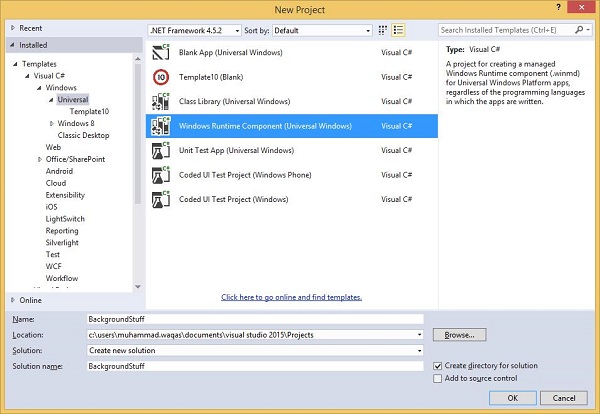
Given below is the C# code. which contains MyBackgroundTask class implantation and it will run the background task.
using Windows.ApplicationModel.Background;

using Windows.UI.Notifications;

namespace BackgroundStuff {

   public sealed class MyBackgroundTask : IBackgroundTask {

      public void Run(IBackgroundTaskInstance taskInstance) {

         SendToast("Hi this is background Task");

      }

      public static void SendToast(string message) {

         var template = ToastTemplateType.ToastText01;

         var xml = ToastNotificationManager.GetTemplateContent(template);

         var elements = xml.GetElementsByTagName("Test");

         var text = xml.CreateTextNode(message);

         elements[0].AppendChild(text);

         var toast = new ToastNotification(xml);

         ToastNotificationManager.CreateToastNotifier().Show(toast);

      }

   }

}
To make this project accessible in the UWPBackgroundDemo project, right click on References > Add References in Solution Explorer and add BackgroundStuff project.
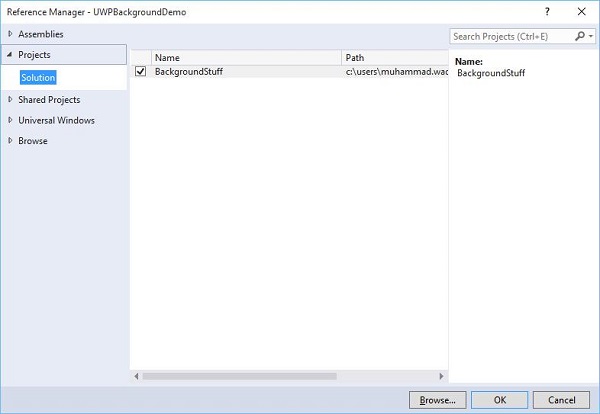
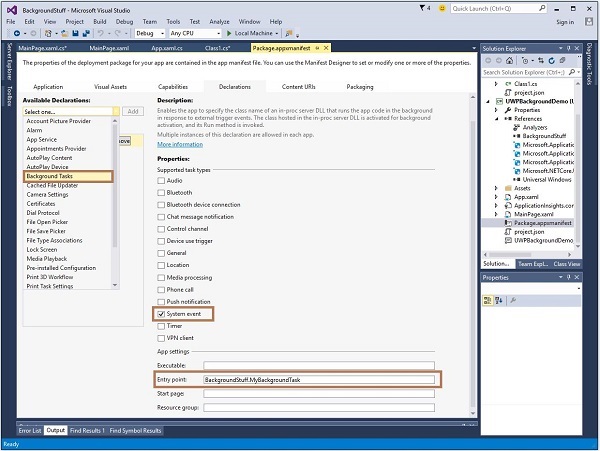
Now, let us go to the Package.appxmanifest file of UWPBackgroundDemo project and add the following information in Declarations tab.
First build the Background stuff project, then build and execute the UWPBackgroundDemo project.
When the above code is compiled and executed, you will see the following window.
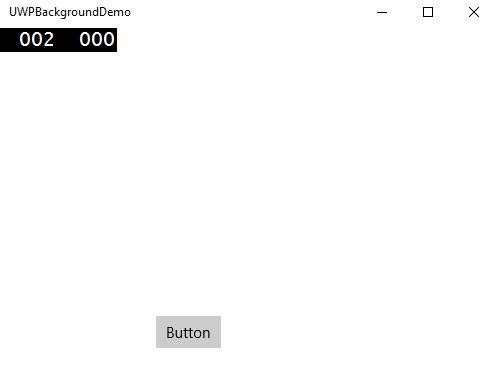
When you click the button, it will run the background task and will show a notification at the right end of your window.
Windows10 Dev - Background Execution的更多相关文章
- Executing a Finite-Length Task in the Background
[Executing a Finite-Length Task in the Background] Apps that are transitioning to the background can ...
- iOS之ShareSDK实现分享、第三方登录等功能
(1)官方下载ShareSDK iOS 2.8.8,地址:http://sharesdk.cn/ (2)根据实际情况,引入相关的库,参考官方文档. (3)在项目的AppDelegate中一般情况下有三 ...
- iOS开发---集成ShareSDK实现第三方登录、分享、关注等功能。
(1)官方下载ShareSDK IOS 2.9.6,地址:http://sharesdk.mob.com/Download (2)根据实际情况,引入相关的库,参考官方文档. (3)在项目的AppDel ...
- IOS项目集成ShareSDK实现第三方登录、分享、关注等功能。
(1)官方下载ShareSDK iOS 2.8.8,地址:http://sharesdk.cn/ (2)根据实际情况,引入相关的库,参考官方文档. (3)在项目的AppDelegate中一般情况下有三 ...
- iOS 和 Android 中的后台运行问题
后台机制的不同,算是iOS 和 Android的一大区别了,最近发布的iOS7又对后台处理做了一定的更改,找时间总结一下编码上的区别,先做个记录. 先看看iOS的把,首先需要仔细阅读一下Apple的官 ...
- oc常见误区
1.同步请求可以从因特网请求数据,一旦发送同步请求,程序将停止用户交互,直至服务器返回数据完成,才可以进行下一步操作, 2.异步请求不会阻塞主线程,而会建立一个新的线程来操作,用户发出异步请求后,依然 ...
- IOS项目集成ShareSDK实现第三方登录、分享、关注等功能(备用)
(1)官方下载ShareSDK iOS 2.8.8,地址:http://sharesdk.cn/ (2)根据实际情况,引入相关的库,参考官方文档. (3)在项目的AppDelegate中一般情况下有三 ...
- iOS极光推送
昨天花了一下午的时间研究了下极光推送,也前也是没做过,不知道从何下手!才开始的时候一看官方的SDK感觉好难,不过经过一系列的捣鼓之后,手机收到了推送信息,感觉其实并没有那么难! 1.配置开发证书(得有 ...
- iOS极光推送的基本使用
昨天花了一下午的时间研究了下极光推送,也前也是没做过,不知道从何下手!才开始的时候一看官方的SDK感觉好难,不过经过一系列的捣鼓之后,手机收到了推送信息,感觉其实并没有那么难! 1.配置开发证书(得有 ...
随机推荐
- 使用jquery的on方法注册事件遇到的坑
1,使用on注册事件 $(selector).on(event,childSelector,data,function) 2,$(selector)中的selector可以是document,那么意味 ...
- springMVC-3-获取参数
RequestMapping修饰类 源码: 根据源码可以知道,requestmapping既可以修饰方法也可以修饰类 @Target({ElementType.METHOD, ElementType. ...
- spring-2-AOP
AOP(面向切面编程) 面向切面编程, 即利用AOP可以对业务逻辑的各个部分进行隔离, 从而使得业务逻辑各个部分之间的耦合度降低, 提高程序的可重用性, 同时提高了开发的效率. 不通过修改源代码,通过 ...
- PAT甲级:1124 Raffle for Weibo Followers (20分)
PAT甲级:1124 Raffle for Weibo Followers (20分) 题干 John got a full mark on PAT. He was so happy that he ...
- Github上比较全的学习路线
github地址:https://github.com/kamranahmedse/developer-roadmap/blob/master/translations/chinese
- C++第四十九篇 -- 将一个项目Copy到另一台电脑
最近写项目,由于设备原因,需要将一台电脑的项目拷贝到另一台电脑上,在另一个电脑上继续编写.由于配置属性原因,最终还是在另一台电脑上创建了新项目,只是把这些cpp文件都复制过去了,然后重新部署属性. 背 ...
- Intouch 制作自定义登录弹窗
在新的自动化项目中,因为业主对设计审美要求比较高,对Intouch自带脚本呼出登录窗体不满意,故而制作自定义登录弹窗来满足其审美需求.在寻求自控群前辈的经验下,将其整理成博客,供大家参考. 1.登录窗 ...
- 计算距离2020年圣诞节还有x天x时x分x秒
//计算两者相差毫秒数 //创建当前时间和圣诞节时间的Date对象 var d1=new Date(); var d2=new Date('2020/12/25'); //计算相差的毫秒 var d= ...
- 攻防世界pwn高手区——pwn1
攻防世界 -- pwn1 攻防世界的一道pwn题,也有一段时间没有做pwn了,找了一道栈题热身,发现还是有些生疏了. 题目流程 拖入IDA中,题目流程如图所示,当v0为1时,存在栈溢出漏洞.在gdb中 ...
- 方法对了,你做1年Android开发能顶别人做10年
前几天后台有读者问我这样的问题.他在一家互联网公司工作3年了,每天都很忙,事情又多又杂. 本想着学习多一些东西也不是坏事,可到头来一无所获,什么都没学会,满腔的热情也被消磨得差不多. 三天两头动辞职的 ...