
Windows10 Dev - Background Execution
The Universal Windows Platform (UWP) introduces new mechanisms, which allow the applications to perform some functionality while the application is not running in the foreground. UWP also increases the ability of the applications to extend their execution time in the background for Background Tasks and Triggers. Background execution is the real complementary tail to the application lifecycle.
Important features of Background Tasks are −
A background task is triggered by a system or time event and can be constrained by one or more conditions.
When a background task is triggered, its associated handler runs and performs the work of the background task.
A background task can run even when the app that registered the background task is suspended.
They are part of the standard application platform and essentially provide an app with the ability to register for a system event (trigger). When that event occurs, they run a predefined block of code in the background. System triggers include events such as changes in network connectivity or the system time zone.
Background Execution is not guaranteed, so it is not suitable for critical functions and features.
The OS has a limitation as to how many background tasks can run at the same time. So even when trigger is fired and conditions are met, the task can still not run.
Create and Register Background Task
Create a background task class and register it to run when your app is not in the foreground. You can run code in the background by writing classes that implement the IBackgroundTask interface. The following sample code shows a very basic starting point for a background task class.
public sealed class MyBackgroundTask : IBackgroundTask {

   public void Run(IBackgroundTaskInstance taskInstance){

      // write code

   }

}
You can request access for background task as follows.
var access = await BackgroundExecutionManager.RequestAccessAsync();

switch (access) {

   case BackgroundAccessStatus.Unspecified:

      break;

   case BackgroundAccessStatus.AllowedMayUseActiveRealTimeConnectivity:

      break;

   case BackgroundAccessStatus.AllowedWithAlwaysOnRealTimeConnectivity:

      break;

   case BackgroundAccessStatus.Denied:

      break;

   default:

      break;

}
To build and register the background task, use the following code.
var task = new BackgroundTaskBuilder {

   Name = "My Task",

   TaskEntryPoint = typeof(BackgroundStuff.MyBackgroundTask).ToString()

};

var trigger = new ApplicationTrigger();

task.SetTrigger(trigger);

task.Register();

await trigger.RequestAsync();
Let us understand a simple example of background task by following all the below given steps.
Create a new blank UWP project ‘UWPBackgroundDemo’ and add one button in the XAML file.
<Page

   x:Class = "UWPBackgroundDemo.MainPage"

   xmlns = "http://schemas.microsoft.com/winfx/2006/xaml/presentation"

   xmlns:x = "http://schemas.microsoft.com/winfx/2006/xaml"

   xmlns:local = "using:UWPBackgroundDemo"

   xmlns:d = "http://schemas.microsoft.com/expression/blend/2008"

   xmlns:mc = "http://schemas.openxmlformats.org/markup-compatibility/2006"

   mc:Ignorable = "d">

   <Grid Background = "{ThemeResource ApplicationPageBackgroundThemeBrush}">

      <Button x:Name = "button" Content = "Button"

         HorizontalAlignment = "Left" Margin = "159,288,0,0"

         VerticalAlignment = "Top" Click = "button_Click"/>

   </Grid>

</Page>
Given below is the button click event implementation in which the background task is registered.
using System;

using Windows.ApplicationModel.Background;

using Windows.UI.Xaml;

using Windows.UI.Xaml.Controls;

// The Blank Page item template is documented at

   http://go.microsoft.com/fwlink/?LinkId=402352&clcid=0x409

namespace UWPBackgroundDemo {

   /// <summary>

      /// An empty page that can be used on its own or navigated to within a Frame.

   /// </summary>

   public sealed partial class MainPage : Page {

      public MainPage() {

         this.InitializeComponent();

      }

      private async void button_Click(object sender, RoutedEventArgs e) {

         var access = await BackgroundExecutionManager.RequestAccessAsync();

         switch (access){

            case BackgroundAccessStatus.Unspecified:

               break;

            case BackgroundAccessStatus.AllowedMayUseActiveRealTimeConnectivity:

               break;

            case BackgroundAccessStatus.AllowedWithAlwaysOnRealTimeConnectivity:

               break;

            case BackgroundAccessStatus.Denied:

               break;

            default:

               break;

         }

         var task = new BackgroundTaskBuilder {

            Name = "My Task",

            TaskEntryPoint = typeof(BackgroundStuff.MyBackgroundTask).ToString()

         };

         var trigger = new ApplicationTrigger();

         task.SetTrigger(trigger);

         var condition = new SystemCondition(SystemConditionType.InternetAvailable);

         task.Register();

         await trigger.RequestAsync();

      }

   }

}
Now create another project, but this time select Windows Runtime Component (Universal Windows) from the menu and give the name Background stuff to this project.
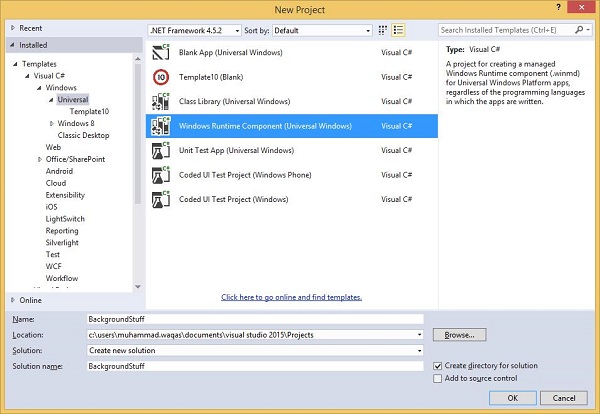
Given below is the C# code. which contains MyBackgroundTask class implantation and it will run the background task.
using Windows.ApplicationModel.Background;

using Windows.UI.Notifications;

namespace BackgroundStuff {

   public sealed class MyBackgroundTask : IBackgroundTask {

      public void Run(IBackgroundTaskInstance taskInstance) {

         SendToast("Hi this is background Task");

      }

      public static void SendToast(string message) {

         var template = ToastTemplateType.ToastText01;

         var xml = ToastNotificationManager.GetTemplateContent(template);

         var elements = xml.GetElementsByTagName("Test");

         var text = xml.CreateTextNode(message);

         elements[0].AppendChild(text);

         var toast = new ToastNotification(xml);

         ToastNotificationManager.CreateToastNotifier().Show(toast);

      }

   }

}
To make this project accessible in the UWPBackgroundDemo project, right click on References > Add References in Solution Explorer and add BackgroundStuff project.
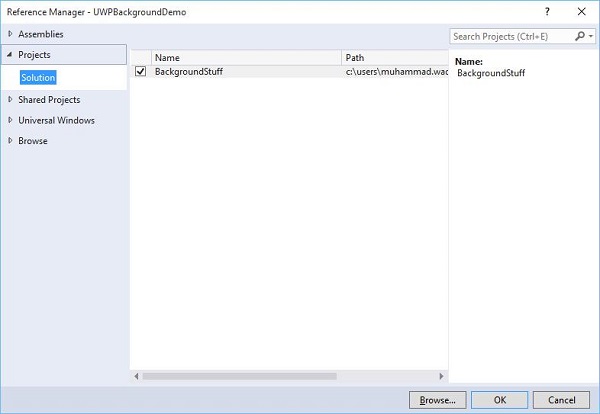
Now, let us go to the Package.appxmanifest file of UWPBackgroundDemo project and add the following information in Declarations tab.
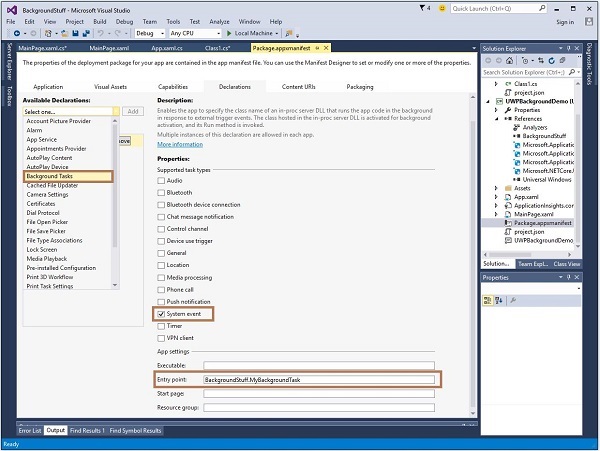
First build the Background stuff project, then build and execute the UWPBackgroundDemo project.
When the above code is compiled and executed, you will see the following window.
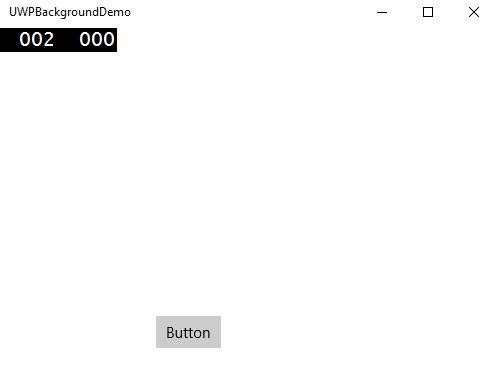
When you click the button, it will run the background task and will show a notification at the right end of your window.
Windows10 Dev - Background Execution的更多相关文章
- Executing a Finite-Length Task in the Background
[Executing a Finite-Length Task in the Background] Apps that are transitioning to the background can ...
- iOS之ShareSDK实现分享、第三方登录等功能
(1)官方下载ShareSDK iOS 2.8.8,地址:http://sharesdk.cn/ (2)根据实际情况,引入相关的库,参考官方文档. (3)在项目的AppDelegate中一般情况下有三 ...
- iOS开发---集成ShareSDK实现第三方登录、分享、关注等功能。
(1)官方下载ShareSDK IOS 2.9.6,地址:http://sharesdk.mob.com/Download (2)根据实际情况,引入相关的库,参考官方文档. (3)在项目的AppDel ...
- IOS项目集成ShareSDK实现第三方登录、分享、关注等功能。
(1)官方下载ShareSDK iOS 2.8.8,地址:http://sharesdk.cn/ (2)根据实际情况,引入相关的库,参考官方文档. (3)在项目的AppDelegate中一般情况下有三 ...
- iOS 和 Android 中的后台运行问题
后台机制的不同,算是iOS 和 Android的一大区别了,最近发布的iOS7又对后台处理做了一定的更改,找时间总结一下编码上的区别,先做个记录. 先看看iOS的把,首先需要仔细阅读一下Apple的官 ...
- oc常见误区
1.同步请求可以从因特网请求数据,一旦发送同步请求,程序将停止用户交互,直至服务器返回数据完成,才可以进行下一步操作, 2.异步请求不会阻塞主线程,而会建立一个新的线程来操作,用户发出异步请求后,依然 ...
- IOS项目集成ShareSDK实现第三方登录、分享、关注等功能(备用)
(1)官方下载ShareSDK iOS 2.8.8,地址:http://sharesdk.cn/ (2)根据实际情况,引入相关的库,参考官方文档. (3)在项目的AppDelegate中一般情况下有三 ...
- iOS极光推送
昨天花了一下午的时间研究了下极光推送,也前也是没做过,不知道从何下手!才开始的时候一看官方的SDK感觉好难,不过经过一系列的捣鼓之后,手机收到了推送信息,感觉其实并没有那么难! 1.配置开发证书(得有 ...
- iOS极光推送的基本使用
昨天花了一下午的时间研究了下极光推送,也前也是没做过,不知道从何下手!才开始的时候一看官方的SDK感觉好难,不过经过一系列的捣鼓之后,手机收到了推送信息,感觉其实并没有那么难! 1.配置开发证书(得有 ...
随机推荐
- C语言:赋值
#include <stdio.h> //=赋值运算符 //具有方向性,只能将赋值号右边的表达式的值给左边的变量 //赋值语句具有计算功能,赋值号右边可以是常量,变量或表达式都可以 //赋 ...
- Odoo ORM研究2 - BaseModel中的常用方法分析
今天继续研究ORM的BaseModel,昨天研究了一下所有常用属性的具体用法,那么今天研究一下BaseModel中一些常用的方法,我们学会它们并灵活的应用它们,可以为我们开发解决很多的问题. odoo ...
- 排列组合的实现(js描述)
组合的实现 排列组合描述和公式 犹记得高中数学,组合表示C(m, n),意思为从集合m,选出n个数生成一项,总共有多少个项的可能?组合是无序的,排列是有序的.所以排列的项数量多于组合 排列A(n,m) ...
- 【排序+模拟】谁拿了最多奖学金 luogu-1051
题目描述 某校的惯例是在每学期的期末考试之后发放奖学金.发放的奖学金共有五种,获取的条件各自不同: 院士奖学金,每人$ 8000 $元,期末平均成绩高于\(80\)分(\(>80\)),并且在本 ...
- git教程和命令集合
详细教程可参考 git community book中文版 git教程(廖雪峰) 安装 官网下载git安装包,进行安装即可: 打开cmd终端,输入 "git --version", ...
- dva的effect那么难用,自己造一个轮子吧
背景 对于dva这个开发框架,国内从事react的前端工程师多半不会感到陌生,dva完善的开发体系和简单的api,让其被广泛运用到实际工作中.我所在的公司也是长期使用dva作为基础的开发框架,虽然好用 ...
- java try_catch 分析
1.若一段代码前有异常抛出,并且这个异常没有被捕获,这段代码将产生编译时错误「无法访问的语句」.如 public class try_catch_Demo { public static void m ...
- Linux 基础指令初识
Linux 基础指令初识 01. ls 指令 语法: ls [选项] [目录或文件] 功能:对于目录,该命令列出该目录下的所有子目录与文件.对于文件,将列出文件名以及其他信息 -a 列出目录下的所有文 ...
- 简单的Postman,还能玩出花?
Postman是一款我们在工作中使用频率非常高的API调试工具,估计很多童鞋在使用它时也比较粗暴,填好接口地址.参数,直接send就完事了,估计大家要说了,这么简单的东西还能玩出什么花来.今天就和大家 ...
- 文本生成器(AC自动机+dp)
F. 文本生成器 内存限制:512 MiB 时间限制:1000 ms 标准输入输出 题目类型:传统 评测方式:文本比较 题目描述 原题来自:JSOI 2007 JSOI 交给队员 ZYX 一个任务,编 ...