
android学习2——RelativeLayout
相对布局管理器,一个View的位置是相对于另外一个View定义的.
<?xml version="1.0" encoding="utf-8"?>

<RelativeLayout xmlns:android="http://schemas.android.com/apk/res/android"

              android:orientation="vertical"

              android:layout_width="fill_parent"

              android:layout_height="fill_parent"

        >

    <Button

            android:layout_width="wrap_content"

            android:layout_height="wrap_content"

            android:text="Button1"

            android:id="@+id/btn1"/>

</RelativeLayout>
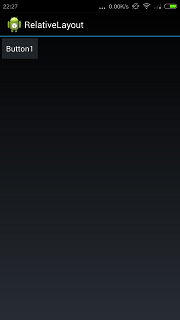
当只有一个按钮的时候,位置和线性布局管理器一样.在左上角.如下图所示:
android:layout_below用于指定当前的View在指定view的下面.代码如下:
<?xml version="1.0" encoding="utf-8"?>

<RelativeLayout xmlns:android="http://schemas.android.com/apk/res/android"

              android:orientation="vertical"

              android:layout_width="fill_parent"

              android:layout_height="fill_parent"

        >

    <Button

            android:layout_width="wrap_content"

            android:layout_height="wrap_content"

            android:text="Button1"

            android:id="@+id/btn1"/>

    <Button

            android:layout_width="fill_parent"

            android:layout_height="wrap_content"

            android:text="Button2"

            android:id="@+id/btn2"

            android:layout_below="@id/btn1"/>

</RelativeLayout>
效果如下所示:
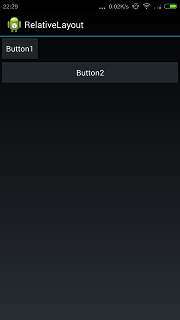
android:layout_alignRight用于表示和指定view右对齐.代码如下:
<?xml version="1.0" encoding="utf-8"?>

<RelativeLayout xmlns:android="http://schemas.android.com/apk/res/android"

              android:orientation="vertical"

              android:layout_width="fill_parent"

              android:layout_height="fill_parent"

        >

    <Button

            android:layout_width="wrap_content"

            android:layout_height="wrap_content"

            android:text="Button1"

            android:id="@+id/btn1"/>

    <Button

            android:layout_width="fill_parent"

            android:layout_height="wrap_content"

            android:text="Button2"

            android:id="@+id/btn2"

            android:layout_below="@id/btn1"/>

    <Button

            android:layout_width="wrap_content"

            android:layout_height="wrap_content"

            android:text="Button3"

            android:id="@+id/btn3"

            android:layout_below="@id/btn2"

            android:layout_alignRight="@id/btn2"/>

</RelativeLayout>
右对齐的效果如下所示:
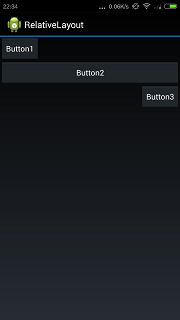
layout_alignParentRight表示和父组件的右边缘对齐.代码如下所示:
<?xml version="1.0" encoding="utf-8"?>

<RelativeLayout xmlns:android="http://schemas.android.com/apk/res/android"

              android:orientation="vertical"

              android:layout_width="fill_parent"

              android:layout_height="fill_parent"

        >

    <Button

            android:layout_width="wrap_content"

            android:layout_height="wrap_content"

            android:text="Button1"

            android:id="@+id/btn1"/>

    <Button

            android:layout_width="fill_parent"

            android:layout_height="wrap_content"

            android:text="Button2"

            android:id="@+id/btn2"

            android:layout_below="@id/btn1"/>

    <Button

        android:layout_width="wrap_content"

        android:layout_height="wrap_content"

        android:text="Button3"

        android:id="@+id/btn3"

        android:layout_below="@id/btn2"

        android:layout_alignRight="@id/btn2"/>

    <Button

            android:layout_width="wrap_content"

            android:layout_height="wrap_content"

            android:text="Button4"

            android:id="@+id/btn4"

            android:layout_below="@id/btn3"

            android:layout_alignParentRight="true"/>

</RelativeLayout>
代码产生的效果如下所示:
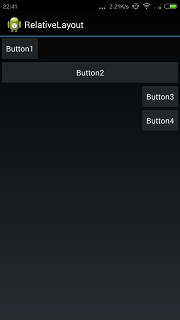
android:layout_centerHorizontal表示水平方向居中,代码如下所示:
<?xml version="1.0" encoding="utf-8"?>

<RelativeLayout xmlns:android="http://schemas.android.com/apk/res/android"

              android:orientation="vertical"

              android:layout_width="fill_parent"

              android:layout_height="fill_parent"

        >

    <Button

            android:layout_width="wrap_content"

            android:layout_height="wrap_content"

            android:text="Button1"

            android:id="@+id/btn1"/>

    <Button

            android:layout_width="fill_parent"

            android:layout_height="wrap_content"

            android:text="Button2"

            android:id="@+id/btn2"

            android:layout_below="@id/btn1"/>

    <Button

        android:layout_width="wrap_content"

        android:layout_height="wrap_content"

        android:text="Button3"

        android:id="@+id/btn3"

        android:layout_below="@id/btn2"

        android:layout_alignRight="@id/btn2"/>

    <Button

            android:layout_width="wrap_content"

            android:layout_height="wrap_content"

            android:text="Button4"

            android:id="@+id/btn4"

            android:layout_below="@id/btn3"

            android:layout_alignParentRight="true"/>

    <Button

            android:layout_width="wrap_content"

            android:layout_height="wrap_content"

            android:text="Button5"

            android:id="@+id/btn5"

            android:layout_below="@id/btn4"

            android:layout_centerHorizontal="true"/>

</RelativeLayout>
代码产生的效果如下所示:
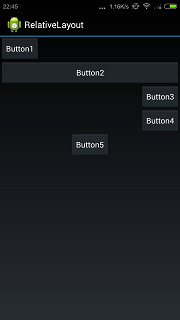
另外注意相对布局管理器默认是以左上为参照排列的.看下面的代码:
<?xml version="1.0" encoding="utf-8"?>

<RelativeLayout xmlns:android="http://schemas.android.com/apk/res/android"

              android:orientation="vertical"

              android:layout_width="fill_parent"

              android:layout_height="fill_parent"

        >

    <Button

            android:layout_width="wrap_content"

            android:layout_height="wrap_content"

            android:text="Button1"

            android:id="@+id/button1"/>

    <Button

            android:layout_width="wrap_content"

            android:layout_height="wrap_content"

            android:text="Button2"

            android:id="@+id/button2"

            android:layout_toRightOf="@id/button1"/>

    <Button

        android:layout_width="wrap_content"

        android:layout_height="wrap_content"

        android:text="Button3"

        android:id="@+id/button3"

        android:layout_below="@id/button1"/>

</RelativeLayout>
代码的效果如下所示:
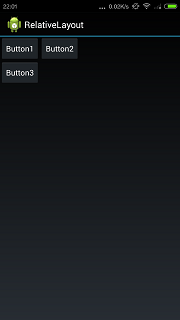
android:layout_toRightOf表示在view的右边.现在加一个按钮,代码如下:
<?xml version="1.0" encoding="utf-8"?>

<RelativeLayout xmlns:android="http://schemas.android.com/apk/res/android"

              android:orientation="vertical"

              android:layout_width="fill_parent"

              android:layout_height="fill_parent"

        >

    <Button

            android:layout_width="wrap_content"

            android:layout_height="wrap_content"

            android:text="Button1"

            android:id="@+id/button1"/>

    <Button

            android:layout_width="wrap_content"

            android:layout_height="wrap_content"

            android:text="Button2"

            android:id="@+id/button2"

            android:layout_toRightOf="@id/button1"/>

    <Button

        android:layout_width="wrap_content"

        android:layout_height="wrap_content"

        android:text="Button3"

        android:id="@+id/button3"

        android:layout_below="@id/button1"/>

    <Button

            android:layout_width="wrap_content"

            android:layout_height="wrap_content"

            android:text="Button4"

            android:layout_toRightOf="@id/button3"

            />

</RelativeLayout>
直观感觉按钮4应该在按钮3的右边.但实际上的效果如下所示:
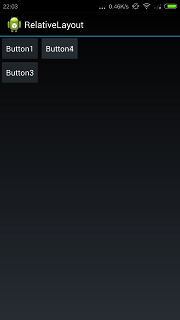
按钮4把按钮2遮住了.为什么?因为只指定了按钮4在按钮3的右边,没有指定上面的位置.默认是尽量向左上排,所以按钮4把按钮2遮住了.
所以想得到按钮4在按钮3右边的效果,要再指定上下的位置,代码如下:
<?xml version="1.0" encoding="utf-8"?>

<RelativeLayout xmlns:android="http://schemas.android.com/apk/res/android"

              android:orientation="vertical"

              android:layout_width="fill_parent"

              android:layout_height="fill_parent"

        >

    <Button

            android:layout_width="wrap_content"

            android:layout_height="wrap_content"

            android:text="Button1"

            android:id="@+id/button1"/>

    <Button

            android:layout_width="wrap_content"

            android:layout_height="wrap_content"

            android:text="Button2"

            android:id="@+id/button2"

            android:layout_toRightOf="@id/button1"/>

    <Button

        android:layout_width="wrap_content"

        android:layout_height="wrap_content"

        android:text="Button3"

        android:id="@+id/button3"

        android:layout_below="@id/button1"/>

    <Button

            android:layout_width="wrap_content"

            android:layout_height="wrap_content"

            android:text="Button4"

            android:layout_toRightOf="@id/button3"

            android:layout_below="@+id/button2"/>

</RelativeLayout>
效果如下所示:
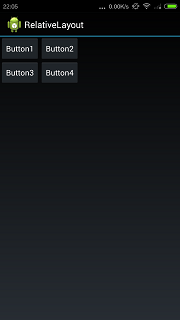
android学习2——RelativeLayout的更多相关文章
- [Android学习笔记]RelativeLayout的使用
RelativeLayout是相对布局控件,在屏幕适配的时候非常有用,在此记录一些它的常用属性 第一类:属性值为true或falseandroid:layout_centerHrizontal ...
- Android学习笔记(九) 视图的应用布局效果
最近少了写博客,可能最近忙吧,工作上忙,因为工作原因也忙于学习,也没记录什么了,也没有按照之前的计划去学习了.现在就记录一下最近学到的. 要做Android应用,界面设计少不了,可惜之前一直在用Win ...
- 三、Android学习第三天——Activity的布局初步介绍(转)
(转自:http://wenku.baidu.com/view/af39b3164431b90d6c85c72f.html) 三.Android学习第三天——Activity的布局初步介绍 今天总结下 ...
- Android – 学习操作NFC – 2
在<Android – 学习操作NFC – 1>说明了Android在处理NFC tag的机制.tag dispatch system的运作流程,以及三种ACTION_NDEF_DISCO ...
- Android 学习笔记之如何实现简单相机功能
PS:看来算法和数据结构还是非常有用的,以后每天都练习两道算法题目...这次忘了对代码进行折叠了..导致篇幅过长... 学习内容: 1.Android如何实现相机功能... 2.如何实现音频的录制.. ...
- Android 学习笔记之SurfaceView的使用+如何实现视频播放...
学习内容: 1.掌握Surface的使用... 2.Android中如何实现视频播放... 1.SurfaceView类的使用 在Android中,一般播放音频时我们可以去使用Android提供的 ...
- Android学习随笔--ListView的分页功能
第一次写博客,可能格式,排版什么的会非常不美观,不过我主要是为了记录自己的Android学习之路,为了以后能有些东西回顾.既然是为了学习,那我肯定会吸收各位大大们的知道经验,有不足的地方请指出. 通过 ...
- Android学习系列(23)--App主界面实现
在上篇文章<Android学习系列(22)--App主界面比较>中我们浅略的分析了几个主界面布局,选了一个最大众化的经典布局.今天我们就这个经典布局,用代码具体的实现它. 1.预览图先看下 ...
- android学习日记03--常用控件button/imagebutton
常用控件 控件是对数据和方法的封装.控件可以有自己的属性和方法.属性是控件数据的简单访问者.方法则是控件的一些简单而可见的功能.所有控件都是继承View类 介绍android原生提供几种常用的控件bu ...
随机推荐
- HDU 3264 Open-air shopping malls ——(二分+圆交)
纯粹是为了改进牛吃草里的两圆交模板= =. 代码如下: #include <stdio.h> #include <algorithm> #include <string. ...
- java实现——005从尾到头打印链表
import java.util.Stack; public class T005 { public static void main(String[] args){ Node n1 = new No ...
- CocoaPods 更新慢&swift版本适配
一.更新慢的问题 使用CocoaPods来添加第三方类库,无论是执行pod install还是pod update都卡在了Analyzing dependencies不动 原因在于当执行以上两个命令的 ...
- Git Flow——Git团队协作最佳实践
规范的Git使用 Git是一个很好的版本管理工具,不过相比于传统的版本管理工具,学习成本比较高. 实际开发中,如果团队成员比较多,开发迭代频繁,对Git的应用比较混乱,会产生很多不必要的冲突或者代码丢 ...
- Grid (read-only) objects and methods (client-side reference)获取子表单对象的一些方法 Crm 2016
https://msdn.microsoft.com/en-us/library/dn932126.aspx#BKMK_GridControl Updated: November 29, 2016 A ...
- debugger 调试的一些经验
1. 如果没有firebug , 可以用firebug-lite.js 内嵌的调试方式. 2. console.log 不是所有浏览器都支持console.log 在IE或者没有调试窗口的浏览器中,c ...
- FarPoint Spread ChildView子视图
有一种需求场景在很多地方都会用到,就是父子关系(头表和子表的关系),比如订单和订单明细. 做过winform的朋友第spread控件应该比较熟悉,或者了解.他的展示方式就通过一个关联关系就可以了,下面 ...
- violin 结构介绍
参考:http://www.iqiyi.com/w_19rt9yvv9p.html 主要结构有:琴身.指板.腮托.琴马.琴弦.琴轴
- php 常用代码段
1.写文件 $fp = fopen("jsapi_ticket.json", "w+"); fwrite($fp, $str); fclose($fp); 2. ...
- html标签默认样式整理
引:http://www.jb51.net/web/94964.html 文为大家整理了html标签默认样式属性及浏览器默认样式等等,喜欢css布局的朋友们可以学下,希望对大家有所帮助 html, a ...