
分布式缓存HttpRuntime.cache应用到单点登陆中_优化登陆
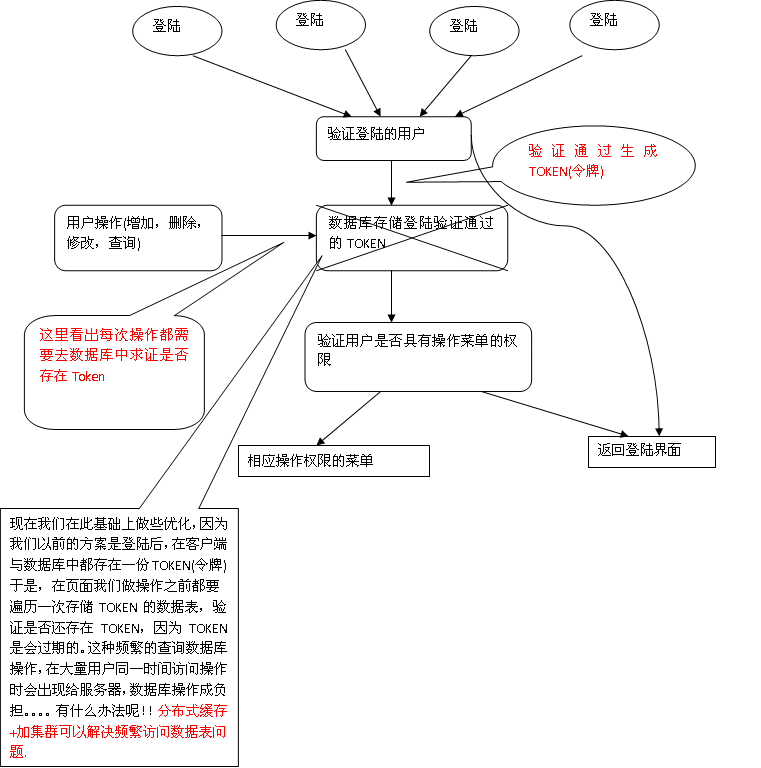
以前的设计方案,是我们在数据库中放一个表,用作存储验证登陆成功的用户,并且生成用户TOKEN(令牌)
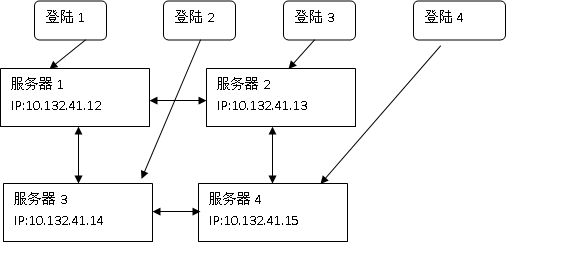
分布式缓存+集群的解决方案图:
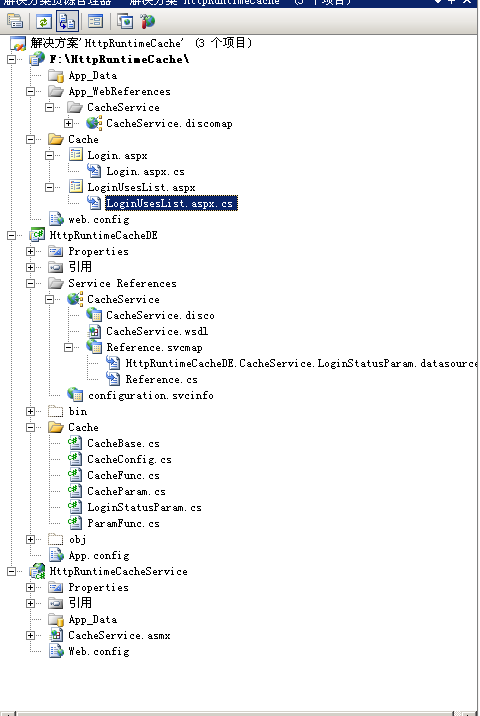
相应的代码:
DE层中配置文件:
receiveTimeout="00:10:00" sendTimeout="00:01:00" allowCookies="false"
bypassProxyOnLocal="false" hostNameComparisonMode="StrongWildcard"
maxBufferSize="65536" maxBufferPoolSize="524288" maxReceivedMessageSize="65536"
messageEncoding="Text" textEncoding="utf-8" transferMode="Buffered"
useDefaultWebProxy="true">
maxBytesPerRead="4096" maxNameTableCharCount="16384" />
realm="" />
binding="basicHttpBinding" bindingConfiguration="CacheServiceSoap"
contract="CacheService.CacheServiceSoap" name="CacheServiceSoap" />
CacheBase.cs 缓存基类
using System;

using System.Collections.Generic;

using System.Linq;

using System.Text;

using System.Runtime.Serialization.Formatters.Binary;

using System.Security;

using System.Web.Caching;

using System.Web;

using System.ServiceModel;

using System.Reflection;

using HttpRuntimeCacheDE.CacheService;
namespace HttpRuntimeCacheDE.Cache
{
public class CacheBase
{
private CacheServiceSoapClient client = null;
private CacheService.LoginStatusParam cParam = new CacheService.LoginStatusParam();
private CacheService.CacheOperation cOperation = new CacheService.CacheOperation();
///
/// 发送用于同步集群中的Cache数据

///
/// Cache数据

public void SendCacheData(CacheParam param, CacheOperation operation)

{
string[] ips = CacheConfig.ClusterGroupAddr;
foreach (string ip in ips)
{
try
{
client = new CacheService.CacheServiceSoapClient();
EndpointAddress address = new EndpointAddress("http://" + ip + @"/" + CacheConfig.WebSiteName + "/CacheService.asmx");
client.Endpoint.Address = address;
RemoteParamConvert(cParam, param);
switch (operation)
{
case CacheOperation.Add:
cOperation = CacheService.CacheOperation.Add;
break;
case CacheOperation.Edit:
cOperation = CacheService.CacheOperation.Edit;
break;
case CacheOperation.Delete:
cOperation = CacheService.CacheOperation.Delete;
break;
default:
break;
}
client.GetCacheData(cParam, cOperation);
}
catch
{
continue;
}
}
}
///
/// 用于同步集群中的Cache数据
///
/// Cache数据
/// Cache操作类型
public void SyncCacheData(CacheParam param, CacheOperation operation)
{
switch (operation)
{
case CacheOperation.Add:
AddCache(param);
break;
case CacheOperation.Edit:
EditCache(param);
break;
case CacheOperation.Delete:
DeleteCache(param);
break;
default:
break;
}
}
// 增加Cache数据
protected virtual void AddCache(CacheParam param)
{
string key = BuildCacheKey(param);
HttpRuntime.Cache.Add(key, param, null, DateTime.Now.AddHours(1),
System.Web.Caching.Cache.NoSlidingExpiration, CacheItemPriority.High,
null);
}
// 修改Cache数据
protected virtual void EditCache(CacheParam param)
{
string key = BuildCacheKey(param);
HttpRuntime.Cache.Remove(key);
AddCache(param);
}
// 删除Cache数据
protected virtual void DeleteCache(CacheParam param)
{
string key = BuildCacheKey(param);
HttpRuntime.Cache.Remove(key);
}
// 生成在线的Cache Key
protected virtual string BuildCacheKey(CacheParam param)
{
return "";
}
// 将本地参数转换成远程调用的参数
private void RemoteParamConvert(object sourceObj, object targetObj)
{
try
{
PropertyInfo[] sourceInfo = sourceObj.GetType().GetProperties();
PropertyInfo[] targetInfo = targetObj.GetType().GetProperties();
for (int i = 0; i < sourceInfo.Length; i++)
{
if (sourceInfo[i].Name == targetInfo[i].Name)
{
object targetValue = targetInfo[i].GetValue(targetObj, null);
if (!ParamFunc.Judgement(targetValue))
continue;
sourceInfo[i].SetValue(sourceObj, targetValue, null);
}
}
}
catch (Exception ex)
{
throw ex;
}
}
}
///
/// Cache同步操作类型
///
public enum CacheOperation
{
Add,
Edit,
Delete
}
}
CacheFunc.cs 缓存操作函数
using System;

using System.Collections;

using System.Collections.Generic;

using System.Linq;

using System.Text;

using System.Web;

using System.Web.Caching;
namespace HttpRuntimeCacheDE.Cache
{
public class CacheFunc:CacheBase
{
protected override string BuildCacheKey(CacheParam param)
{
LoginStatusParam lsparam = param as LoginStatusParam;
return param.GetType().Name.ToString() + "&" + lsparam.SysLoginStatusID + "&" + lsparam.LoginName;
}
///
/// 在Cache中查询在线用户

///
/// 在线用户参数

public List QueryLoginStatus(LoginStatusParam param)

{

List result = new List();
List plist = ConvertCacheItem();
var loginResult = from c in plist
where 1 == 1
&& (!Judgement(param.SysLoginStatusID) ? true : c.SysLoginStatusID == param.SysLoginStatusID)
&& (!Judgement(param.SysOrganizationID) ? true : c.SysOrganizationID == param.SysOrganizationID)
&& (!Judgement(param.SysServiceCenterID) ? true : c.SysServiceCenterID == param.SysServiceCenterID)
&& (!Judgement(param.LoginName) ? true : c.LoginName == param.LoginName)
&& (!Judgement(param.LoginTime) ? true : c.LoginTime == param.LoginTime)
&& (!Judgement(param.LastHandleTime) ? true : c.LastHandleTime == param.LastHandleTime)
&& (!Judgement(param.FullName) ? true : c.FullName == param.FullName)
&& (!Judgement(param.LoginToken) ? true : c.LoginToken == param.LoginToken)
select c;
result = loginResult.ToList();
return result;
}
// 将Cache中的项转换成List
private List ConvertCacheItem()
{
List plist = new List();
IDictionaryEnumerator CacheEnum = HttpRuntime.Cache.GetEnumerator();
while (CacheEnum.MoveNext())
{
if (CacheEnum.Value is LoginStatusParam)
plist.Add(CacheEnum.Value as LoginStatusParam);
}
return plist;
}
public string SysUserLogin(LoginStatusParam param)
{
AddLoginStatus(param);
param = QueryLoginStatus(param).First();
return param.LoginToken;
}
#region AddMethod
///
/// 在Cache中增加在线用户
///
/// 在线用户参数
public void AddLoginStatus(LoginStatusParam param)
{
Random random = new Random();
param.SysLoginStatusID = random.Next().ToString();
SyncCacheData(param, CacheOperation.Add);
SendCacheData(param, CacheOperation.Add);
}
#endregion
private bool Judgement(object obj)
{
try
{
if (obj != null && obj != DBNull.Value)
{
return true;
}
else
{
return false;
}
}
catch (Exception ex)
{
throw ex;
}
}
}
}
分布式缓存HttpRuntime.cache应用到单点登陆中_优化登陆的更多相关文章
- 服务端缓存HttpRuntime.Cache的使用
HttpRuntime.Cache.Insert("缓存key", "缓存content", null, DateTime.Now.AddMinutes(3), ...
- Asp.Net framework 类库 自带的缓存 HttpRuntime.Cache HttpContext.Cache
两个Cache 在.NET运用中经常用到缓存(Cache)对象.有HttpContext.Current.Cache以及HttpRuntime.Cache,HttpRuntime.Cache是应用程序 ...
- Flink分布式缓存Distributed Cache
1 分布式缓存 Flink提供了一个分布式缓存,类似于hadoop,可以使用户在并行函数中很方便的读取本地文件,并把它放在taskmanager节点中,防止task重复拉取. 此缓存的工作机制如下:程 ...
- 分布式缓存(Cache)
1. 单层分布式cache. 如memcache. 2. 多层分布式cache. 服务端和调用者本地都存放cache, 使用udp组播解决cache同步更新问题,但不可靠. 3. 改进的多层分布式ca ...
- SharePoint 2013混合模式登陆中 使用 自定义登陆页
接前一篇博客<SharePoint 2013自定义Providers在基于表单的身份验证(Forms-Based-Authentication)中的应用>,当实现混合模式登陆后,接着我们就 ...
- [.NET领域驱动设计实战系列]专题八:DDD案例:网上书店分布式消息队列和分布式缓存的实现
一.引言 在上一专题中,商家发货和用户确认收货功能引入了消息队列来实现的,引入消息队列的好处可以保证消息的顺序处理,并且具有良好的可扩展性.但是上一专题消息队列是基于内存中队列对象来实现,这样实现有一 ...
- 5个强大的Java分布式缓存框架推荐
在开发中大型Java软件项目时,很多Java架构师都会遇到数据库读写瓶颈,如果你在系统架构时并没有将缓存策略考虑进去,或者并没有选择更优的 缓存策略,那么到时候重构起来将会是一个噩梦.本文主要是分享了 ...
- 第八章 企业项目开发--分布式缓存memcached
注意:本节代码基于<第七章 企业项目开发--本地缓存guava cache> 1.本地缓存的问题 本地缓存速度一开始高于分布式缓存,但是随着其缓存数量的增加,所占内存越来越大,系统运行内存 ...
- j2ee分布式缓存同步实现方案dlcache v1.0.0
现成的分布式K/V缓存已经有很多的实现,最主要的比如redis,memcached,couchbase.那为什么我们还要自己去实现呢,在我们解决了分布式系统下大量rpc调用导致的高延时后,我们发现很多 ...
随机推荐
- Oracle体系结构及备份(十七)——bg-others
一 其他进程 Archiver (ARCn) Oneor more archiver processes copy the redo log files to archival storage whe ...
- Big Data Ingestion and streaming product introduction
Flume Flume isdistributed system for collecting log data from many sources, aggregating it,and writi ...
- C# 数据库连接测试以及备份
现在我们要做一个如图5.1的数据库连接配置,从界面上看有三个功能需要实现:从配置文件中读取数据库连接的相关属性.备份数据库.测试连接. 现在我们就一个一个开始讲解. 图5.1 1.从配置文件中读取数据 ...
- 开发团队在TFS中使用Git Repository (一)
在研发团队中,代码版本管理是最为基础的必要工具.个人使用过的版本管理工具有SVN.VSS.ClearCase.TFS.Git,从团队的角度和使用角度来说,个人倾向于与使用TFS作为团队的基础工具.首先 ...
- 基于Azure blob storage T级别HBase表恢复
为减少Hbase集群压力,提高性能,我们将HBase库中的数据移到另外的存储,下面记录当我需要对数据进行计算时,数据恢复的过程 目录: Azure storage explorer 工具 数据复制 元 ...
- Python_web框架解析
这一阵正在学习廖雪峰老师的实战课程,这里对其中web.py框架进行一些分析,总结一下学到的东西. 这一部分的课程网站:http://www.liaoxuefeng.com/wiki/001374738 ...
- 巧用ajax请求服务器加载数据列表时提示loading
我们利用weui.js中的weui.loading为效果,ajax的beforeSend与complete方法,做一个加载数据时会有几秒的 loading... 要在页面需要加载的JS文件: < ...
- Maven之(四)Maven命令
常用命令 从某种意义上来说,软件是帮助不懂程序的人来操作计算机的,图形化界面尤其如此.在上个世纪,比尔盖茨之所以成为世界首富,微软之所以IT界的巨鳄,就是因为Windows开图形化操作之先河,并抢先占 ...
- kmp//呵呵!看毛片算法
以前刚学的时候迷迷糊糊的,一看就懵圈,前几天捡起来的时候 发现还不会 于是研究了两天,自尊心严重受挫,今天的时候 突然一道灵光迸发,居然 感觉好像懂了,于是又琢磨起来 终于 我懂了 呵呵! ...
- html5的navigator调用手机震动
navigator.vibrate(s) 或 navigator.webkitVibrate(s),不过该属性只在安卓系统有效.