
google多语言通信框架gRPC
google多语言通信框架gRPC系列(一)概述
gRPC概述
3/26/2016 9:16:08 AM
目录
一直在寻找多平台多语言的通信框架,微软的WCF框架很强大和灵活,虽然也能通过自定义绑定和其他技术的客户端通信,但是始终没有实现多平台的技术框架的统一。google的gRPC是一个不错的选择,相比于类似框架Thrift等,google的解决方案更成熟和通用。不足的是由于刚刚开源,使用范围有限,国内资料更少。例如仅仅编译C++的gRPC,花了我两天的时间。在这个系列中,我会逐一介绍各个语言使用gRPC的细节。
gRPC是google2015年初开源的通信框架。
使用gRPC可以在客户端调用不同机器上的服务端的方法,而客户端和服务端的开发语言和运行环境可以有很多种,基本涵盖了主流语言和平台。双方交互的协议可以在proto文件中定义,客户端和服务端可以很方便的通过工具生成协议和代理代码。而消息的编码是采用google protocol buffer,数据量小、速度快。
下图是一个简单的gRPC使用的场景,服务端采用C++开发,客户端可以是anroid,和ruby。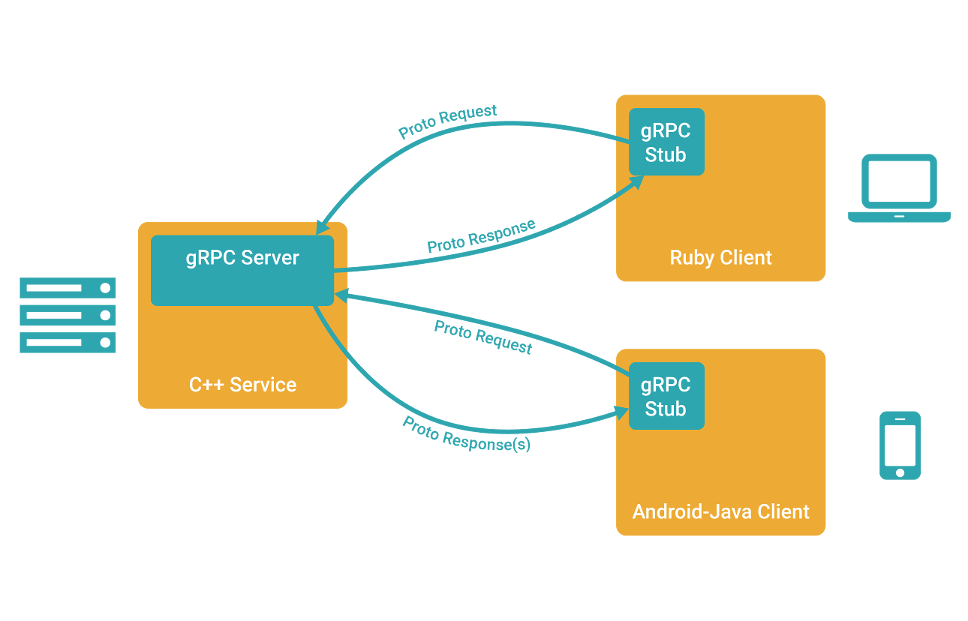
gRPC具有以下特点:
- 基于 HTTP/2, 继而提供了连接多路复用、Body 和 Header 压缩等机制。可以节省带宽、降低TCP链接次数、节省CPU使用和延长电池寿命等。
- 支持主流开发语言(C, C++, Python, PHP, Ruby, NodeJS, C#, Objective-C、Golang、Java)
- IDL (Interface Definition Language) 层使用了 Protocol Buffers, 非常适合团队的接口设计
下面是C#、C++、java的客户端和服务端的例子,这些客户端都向服务端传递一个姓名XXX,服务端返回 hello XXX字符串。
作为通信协议的proto文件
无论使用何种语言创建客户端和服务端,都依照相同的proto文件。proto文件定义了协议接口和数据格式。不同的语言都依照proto文件生成服务端的接口和服务类、客户端的服务代理,只是生成工具的命令不同。
proto文件如下:
syntax = "proto3";

option java_multiple_files = true;

option java_package = "io.grpc.examples.helloworld";

option java_outer_classname = "HelloWorldProto";

option objc_class_prefix = "HLW";

package helloworld;

// The greeting service definition.

service Greeter {

  // Sends a greeting

  rpc SayHello (HelloRequest) returns (HelloReply) {}

}

// The request message containing the user's name.

message HelloRequest {

  string name = 1;

}

// The response message containing the greetings

message HelloReply {

  string message = 1;

}
C#服务端和客户端代码
C#的客户端代理是由工具生成的,所以很简单。
客户端
public static void Main(string[] args)

{

    Channel channel = new Channel("127.0.0.1:50051", ChannelCredentials.Insecure);

    var client = Greeter.NewClient(channel);

    String user = "paul";

    var reply = client.SayHello(new HelloRequest { Name = user });

    Console.WriteLine("Greeting: " + reply.Message);

    channel.ShutdownAsync().Wait();

    Console.WriteLine("Press any key to exit...");

    Console.ReadKey();

}
服务端
class GreeterImpl : Greeter.IGreeter

{

    // Server side handler of the SayHello RPC

    public Task<HelloReply> SayHello(HelloRequest request, ServerCallContext context)

    {

        return Task.FromResult(new HelloReply { Message = "Hello " + request.Name });

    }

}

class Program

{

    const int Port = 50051;

    public static void Main(string[] args)

    {

        Server server = new Server

        {

            Services = { Greeter.BindService(new GreeterImpl()) },

            Ports = { new ServerPort("localhost", Port, ServerCredentials.Insecure) }

        };

        server.Start();

        Console.WriteLine("Greeter server listening on port " + Port);

        Console.WriteLine("Press any key to stop the server...");

        Console.ReadKey();

        server.ShutdownAsync().Wait();

    }

}
C++的服务端和客户端代码
C++的客户端代理无法通过工具生成,需要手动编写。
//C++客户端

class GreeterClient {

 public:

  GreeterClient(std::shared_ptr<Channel> channel)

      : stub_(Greeter::NewStub(channel)) {}

  // Assambles the client's payload, sends it and presents the response back

  // from the server.

  std::string SayHello(const std::string& user) {

    // Data we are sending to the server.

    HelloRequest request;

    request.set_name(user);

    // Container for the data we expect from the server.

    HelloReply reply;

    // Context for the client. It could be used to convey extra information to

    // the server and/or tweak certain RPC behaviors.

    ClientContext context;

    // The actual RPC.

    Status status = stub_->SayHello(&context, request, &reply);

    // Act upon its status.

    if (status.ok()) {

      return reply.message();

    } else {

      return "RPC failed";

    }

  }

 private:

  std::unique_ptr<Greeter::Stub> stub_;

};

int main(int argc, char** argv) {

  // Instantiate the client. It requires a channel, out of which the actual RPCs

  // are created. This channel models a connection to an endpoint (in this case,

  // localhost at port 50051). We indicate that the channel isn't authenticated

  // (use of InsecureChannelCredentials()).

  GreeterClient greeter(grpc::CreateChannel(

      "localhost:50051", grpc::InsecureChannelCredentials()));

  std::string user("world");

  std::string reply = greeter.SayHello(user);

  std::cout << "Greeter received: " << reply << std::endl;

  return 0;

}

//C++服务端

// Logic and data behind the server's behavior.

class GreeterServiceImpl final : public Greeter::Service {

  Status SayHello(ServerContext* context, const HelloRequest* request,

                  HelloReply* reply) override {

    std::string prefix("Hello ");

    reply->set_message(prefix + request->name());

    return Status::OK;

  }

};

void RunServer() {

  std::string server_address("0.0.0.0:50051");

  GreeterServiceImpl service;

  ServerBuilder builder;

  // Listen on the given address without any authentication mechanism.

  builder.AddListeningPort(server_address, grpc::InsecureServerCredentials());

  // Register "service" as the instance through which we'll communicate with

  // clients. In this case it corresponds to an *synchronous* service.

  builder.RegisterService(&service);

  // Finally assemble the server.

  std::unique_ptr<Server> server(builder.BuildAndStart());

  std::cout << "Server listening on " << server_address << std::endl;

  // Wait for the server to shutdown. Note that some other thread must be

  // responsible for shutting down the server for this call to ever return.

  server->Wait();

}

int main(int argc, char** argv) {

  RunServer();

  return 0;

}
java的服务端和客户端代码
gRPC本身不支持java语言,但是使用java实现了gRPC,框架是gRPC-java。使用gRPC-java一样可以与gRPC的客户端和服务端进行交互。
java客户端代码:
和C++一样,java的客户端仍然不能直接自动生成服务代理类,需要手动创建。
package io.grpc.examples.helloworld;

import io.grpc.ManagedChannel;

import io.grpc.ManagedChannelBuilder;

import io.grpc.StatusRuntimeException;

import java.util.concurrent.TimeUnit;

import java.util.logging.Level;

import java.util.logging.Logger;

/**

 * A simple client that requests a greeting from the {@link HelloWorldServer}.

 */

public class HelloWorldClient {

  private static final Logger logger = Logger.getLogger(HelloWorldClient.class.getName());

  private final ManagedChannel channel;

  private final GreeterGrpc.GreeterBlockingStub blockingStub;

  /** Construct client connecting to HelloWorld server at {@code host:port}. */

  public HelloWorldClient(String host, int port) {

    channel = ManagedChannelBuilder.forAddress(host, port)

        .usePlaintext(true)

        .build();

    blockingStub = GreeterGrpc.newBlockingStub(channel);

  }

  public void shutdown() throws InterruptedException {

    channel.shutdown().awaitTermination(5, TimeUnit.SECONDS);

  }

  /** Say hello to server. */

  public void greet(String name) {

    logger.info("Will try to greet " + name + " ...");

    HelloRequest request = HelloRequest.newBuilder().setName(name).build();

    HelloReply response;

    try {

      response = blockingStub.sayHello(request);

    } catch (StatusRuntimeException e) {

      logger.log(Level.WARNING, "RPC failed: {0}", e.getStatus());

      return;

    }

    logger.info("Greeting: " + response.getMessage());

  }

  /**

   * Greet server. If provided, the first element of {@code args} is the name to use in the

   * greeting.

   */

  public static void main(String[] args) throws Exception {

    HelloWorldClient client = new HelloWorldClient("localhost", 50051);

    try {

      /* Access a service running on the local machine on port 50051 */

      String user = "world";

      if (args.length > 0) {

        user = args[0]; /* Use the arg as the name to greet if provided */

      }

      client.greet(user);

    } finally {

      client.shutdown();

    }

  }

}
java服务端代码:
package io.grpc.examples.helloworld;

import io.grpc.Server;

import io.grpc.ServerBuilder;

import io.grpc.stub.StreamObserver;

import java.io.IOException;

import java.util.logging.Logger;

/**

 * Server that manages startup/shutdown of a {@code Greeter} server.

 */

public class HelloWorldServer {

  private static final Logger logger = Logger.getLogger(HelloWorldServer.class.getName());

  /* The port on which the server should run */

  private int port = 50051;

  private Server server;

  private void start() throws IOException {

    server = ServerBuilder.forPort(port)

        .addService(GreeterGrpc.bindService(new GreeterImpl()))

        .build()

        .start();

    logger.info("Server started, listening on " + port);

    Runtime.getRuntime().addShutdownHook(new Thread() {

      @Override

      public void run() {

        // Use stderr here since the logger may have been reset by its JVM shutdown hook.

        System.err.println("*** shutting down gRPC server since JVM is shutting down");

        HelloWorldServer.this.stop();

        System.err.println("*** server shut down");

      }

    });

  }

  private void stop() {

    if (server != null) {

      server.shutdown();

    }

  }

  /**

   * Await termination on the main thread since the grpc library uses daemon threads.

   */

  private void blockUntilShutdown() throws InterruptedException {

    if (server != null) {

      server.awaitTermination();

    }

  }

  /**

   * Main launches the server from the command line.

   */

  public static void main(String[] args) throws IOException, InterruptedException {

    final HelloWorldServer server = new HelloWorldServer();

    server.start();

    server.blockUntilShutdown();

  }

  private class GreeterImpl implements GreeterGrpc.Greeter {

    @Override

    public void sayHello(HelloRequest req, StreamObserver<HelloReply> responseObserver) {

      HelloReply reply = HelloReply.newBuilder().setMessage("Hello " + req.getName()).build();

      responseObserver.onNext(reply);

      responseObserver.onCompleted();

    }

  }

}google多语言通信框架gRPC的更多相关文章
- 初识google多语言通信框架gRPC系列(一)概述
gRPC概述 3/26/2016 9:16:08 AM 目录 一.概述 二.编译gRPC 三.C#中使用gRPC 四.C++中使用gRPC 一直在寻找多平台多语言的通信框架,微软的WCF框架很强大和灵 ...
- 初识google多语言通信框架gRPC系列(三)C#中使用gRPC
我的这几篇文章都是使用gRPC的example,不是直接编译example,而是新建一个项目,从添加依赖,编译example代码,执行example.这样做可以为我们创建自己的项目提供借鉴.如果对gR ...
- 初识google多语言通信框架gRPC系列(二)编译gRPC
目录 一.概述 二.编译gRPC 三.C#中使用gRPC 四.C++中使用gRPC 无论通过哪种语言调用gRPC,都必须要编译gRPC,因为生成proto访问类时,除了产生标准的数据定义类之外,还需要 ...
- 初识google多语言通信框架gRPC系列(四)C++中使用gRPC
我的这几篇文章都是使用gRPC的example,不是直接编译example,而是新建一个项目,从添加依赖,编译example代码,执行example.这样做可以为我们创建自己的项目提供借鉴.如果对gR ...
- Google 高性能 RPC 框架 gRPC 1.0.0 发布(附精彩评论)
gRPC是一个高性能.开源.通用的RPC框架,面向移动和HTTP/2设计,是由谷歌发布的首款基于Protocol Buffers的RPC框架. gRPC基于HTTP/2标准设计,带来诸如双向流.流控. ...
- 远程过程调用框架——gRPC
gRPC是一款基于http协议的远程过程调用(RPC)框架.出自google.这个框架可以用来相对简单的完成如跨进程service这样的需求开发. 资料参考: https://blog.csdn.ne ...
- Google C++单元测试框架GoogleTest(总)
之前一个月都在学习googletest框架,对googletest的文档都翻译了一遍,也都发在了之前的博客里,另外其实还有一部分的文档我没有发,就是GMock的CookBook部分:https://g ...
- Google C++单元测试框架GoogleTest---GMock的CheatSheet文档
CheatSheet文档中包含了GMock所有常用的东西,看了这个基本上就可以用它了,本文接上篇博文:Google C++单元测试框架GoogleTest---Google Mock简介--概念及基础 ...
- Google C++单元测试框架GoogleTest---Google Mock简介--概念及基础语法
就在昨天终于做了gtest的分享,我的预研工作终于结束了,感觉离我辞职的日子不远了,毕竟是专注java二百年啊,要告别实习啦.. 这篇是GoogleMock的简介文档,会在后边附带一个自己的例子. 一 ...
随机推荐
- SPOJ375(树链剖分)
题目:Query on a tree 题意:给定一棵树,告诉了每条边的权值,然后给出两种操作: (1)把第i条边的权值改为val (2)询问a,b路径上权值最大的边 分析:本题与HDU3966差不多, ...
- android在假设绘制自己定义的bitmap,然后返回给ImageView
先来说一下FontMetrics这个类.这个类是关于字符属性和測量的类 用图能够更精确的知道各个属性的含义: 我们在Layout中有一个ImageView,我们能够通过: <span style ...
- iOS 开发学习35 本地化
增新语言 打开Project-Info-Localizations 点击Localization下的+ 新增语言 定义多语言文件 新增String Files 在Supporting Files上.新 ...
- codeforces 598D Igor In the Museum
题目链接:http://codeforces.com/problemset/problem/598/D 题目分类:dfs 题目分析:处理的时候一次处理一片而不是一个,不然会超时 代码: #includ ...
- [Android学习笔记]LinearLayout布局,剩余空间的使用
转自:http://segmentfault.com/q/1010000000095725 如果使得一个View占用其父View的剩余空间? 答案是使用:android:layout_weight = ...
- [Android学习笔记]LayoutParams的使用
LayoutParams的使用: 什么时候会用到此对象?动态布局,动态向ViewGroup中添加子view时,为子view设置此对象,目的是告诉父容器以何种方式呈现此子view LayoutParam ...
- DataGirdView 设置单元格居中
设置标题行居中: dgvShow.ColumnHeadersDefaultCellStyle.Alignment = DataGridViewContentAlignment.MiddleCenter ...
- JMX操作ActiveMQ(1)
我们知道ActiveMQ broker的管理接口是通过JMX方式提供的. 一个简单的访问方式就是通过jconsole,输入 service:jmx:rmi:///jndi/rmi://localhos ...
- 【瞎搞】 HDU 3101 The Heart of the Country
比赛时愣是没读懂 题意:有N 个城市 每一个城市都有 val 个 士兵 , 有几条路连接 当敌方攻击你的某个城市时 该城市以及与该城市相连接的城市的士兵总数 要大于 K 不大于 K 该城市就被攻陷.士 ...
- .Net程序猿乐Android开发---(4)注册页面布局
接下来我们介绍的登陆页面布局,在本节中,我们看一下注册页面布局,页面布局大同小异,来一起熟悉下基本控件的使用方法. 效果图: 1.加入注冊页面 右键选中layout目录,加入注冊页面.例如以下图 点击 ...