2013-01-01 wcdj
新年第一天,和lydia一起去了仙湖植物园,在弘法寺许了新年心愿,祝福爱我的人和我爱的人,新的一年梦想成真。
下文是对MacVim的使用总结,特别推荐一个印度男孩(Swaroop C H)写的《byte of vim》的manual,正在阅读中。
一些参考:
http://code.google.com/p/macvim/
https://github.com/b4winckler/macvim/wiki
https://github.com/b4winckler/macvim/wiki/FAQ
http://www.vim.org/docs.php
http://www.swaroopch.com/notes/Vim_en-Table_of_Contents/
http://www.swaroopch.com/notes/Vim/
http://files.swaroopch.com/vim/byte_of_vim_v051.pdf
http://www.truth.sk/vim/vimbook-OPL.pdf
https://www.packtpub.com/sites/default/files/0509-chapter-2-personalizing-vim.pdf
http://www.douban.com/group/vim/
http://www.vimer.cn
http://lilydjwg.is-programmer.com
https://groups.google.com/forum/?fromgroups#!forum/vim_mac (vim_mac常见问题)
0 什么是MacVim?
MacVim is the text editor Vim for Mac OS X. MacVim brings you the full power of Vim 7.3 to Mac OS X.
Mac OS X,Vim Installation
If you use Mac OS X, then you already have the terminal version of Vim installed. Run the menu command Finder -> Applications -> Utilities -> Terminal. In the terminal, run the command vim and press enter, you should now see the Vim welcome screen.
If you want to use a graphical version of Vim, download the latest version of the Cocoa-based MacVim project(http://code.google.com/p/macvim/). Double-click the file, it will be unarchived and a directory called MacVimxxx will be created. Open the directory, and copy the MacVim app to your Applications directory.
For more details MacVim differences, including how to run MacVim form the terminal see the macvim reference:
1. Click on Finder -> Applications -> MacVIm
2. Type :help macvim and press the Enter key.
在Mac上配置MacVim为后续写代码做准备。
首先需要将系统默认的Vi/Vim替换为我们下载的MacVim,方法如下:
1,在home目录下,创建.bashrc文件并添加如下内容;
2,然后使.bashrc文件生效,在终端type命令,source .bashrc即可;
之后我们就可以使用最新版本的MacVim了。
1 Vim的三种模式
There are three basic modes in Vim - normal, insert and visual.
[1] Normal mode is where you can run commands. This is the default mode in which Vim starts up.
[2] Insert mode is where you insert i.e. write the text.
[3] Visual mode is where you visually select a bunch of text so that you can run a command/operation only on that part of the text.
Command Action
i insert text just before the cursor
I insert text at the start of the line
a append text just after the cursor
A append text at the end of the line
o open a new line below
O open a new line above
s substitute the current character
S substitute the current line
r replace the current character
R replace continuous characters

2 光标的移动
在Vim中完全使用快捷键来实现光标的移动,下面总结常用的shortcut keys:
[1] 两个位置的切换
``
[2] 多个光标位置切换,Jump around
You want to jump back to the previous location?
Press ctrl-o
to jump forward to the next location?
Press ctrl-i
[3] 行首和行末
^ key moves to the start of the line
$ key moves to the end of the line
[4] 跳转到某行、行首、行末
If you know the absolute line number that you want to jump to, say line 50, press 50G and Vim will jump to the 50th line. If no number is specified, G will take you to the last line of the file. How do you get to the top of the file? Simple, press 1G. (或者gg)
[5] 上页和下页
ctrl-b which means move one screen 'b'ackward
ctrl-f which means move one screen 'f'orward
[6] 窗口内跳转,上、中、下
What if you wanted to the middle of the text that is currently being shown in the window?
Press H to jump as 'h'igh as possible (first line of the window)
Press M to jump to the 'm'iddle of the window
Press L to jump as 'l'ow as possible (last line being displayed)
[7] Word, Sentences, Paragraphs的移动
w, move to the next 'w'ord
e, move to the 'e'nd of the next word
b, move one word 'b'ackward
), move to the next sentence
(, move to the previous sentence
}, move to the next paragraph
{, move to the previous paragraph
[8] 设定自己的mark,方便跳转(my favorite)
Use ma to create a mark named 'a'. Move the cursor to wherever you want. Press 'a (i.e. single quote followed by the name of the mark) , Vim jumps (back) to the line where that mark was located.
You can use any alphabet (a-zA-Z) to name a mark which means you can have up to 26*2=52 named marks for each file.
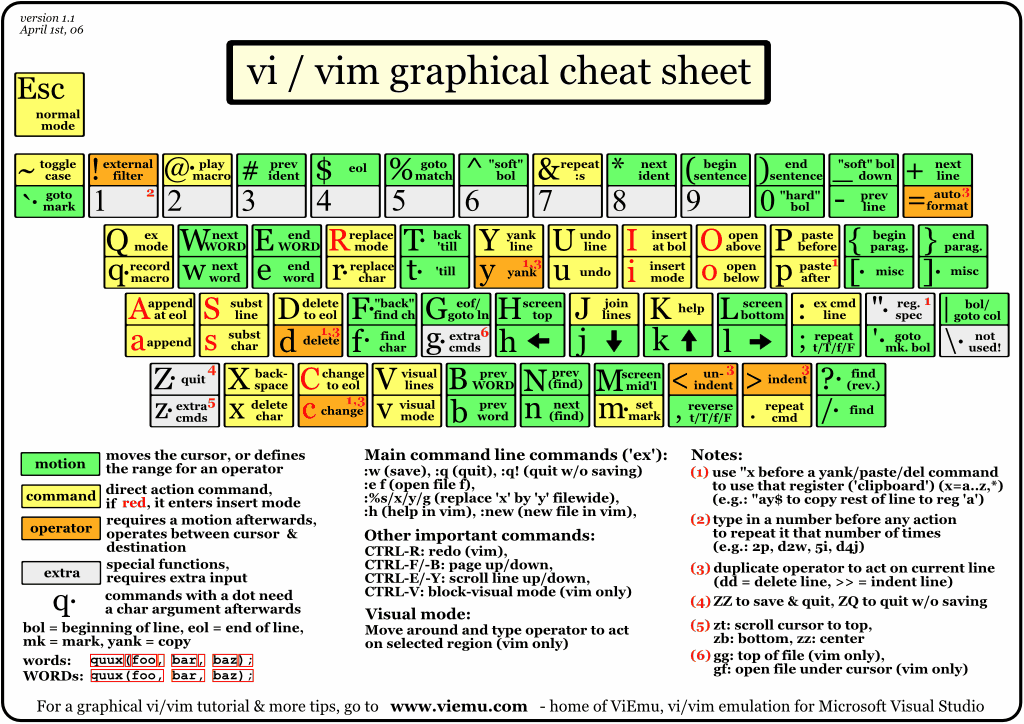
3 Vim graphical keyboard cheat sheet
http://www.viemu.com/a_vi_vim_graphical_cheat_sheet_tutorial.html
Summary:
Notice that our efficiency in using Vim is directly proportional to the efficiency of using the keyboard.
下面就是对MacVim进行一些个性化的设置了。
4 Vim个性化设置
1,如何对安装好的MacVim进行配置?
How do I save configuration settings?
Type :h vimrc-intro for more information on Vim configuration files.
You probably got tired of typing commands that you use very often. To start Vim with all your favorite option settings and mappings, you write them in what is called the vimdc file. Vim executes the commands in this file when it starts up.
the :version command mentions the name of the "user vimrc file" Vim looks for.
知道了配置文件的位置,然后就开始动手配置吧。
touch ~/.vimrc
vim ~/.vimrc
例如,(注释行使用双引号标示)
" 显示行号
se nu
2,修改MacVim的字体,选择一种自己喜欢的字体,下面使用Mac的Monaco等宽字体(Monospaced Font)
How can I change the default font?
Add the line set guifont=Monaco:h14 to your .vimrc to set Monaco as the default font with a size of 14.
通过命令,:se guifont=* 可以查看可以选择的字体。
3,设置默认MacVim打开时默认窗口的大小
How can I set the default size of new windows?
Add the line set lines=40 to your .vimrc to make 40 the default number of rows.
se lines=30 columns=80
4,设置搜索高亮
Searching Options——Highlighting
The following command causes Vim to highlight any strings found matching search pattern:
:se hlsearch
To turn off search highlighting, use:
:se nohlsearch
5,代码对齐功能
方案1:(代码多层次时,看起来会比较乱)
若用tab缩进,可以:set list lcs=tab:\|\ (此处是个空格);
方案2:(感觉线条比较粗)
vim-indent-guides,Vim 7.2+
Indent Guides is a plugin for visually displaying indent levels in Vim.
https://github.com/nathanaelkane/vim-indent-guides
方案3:(对于Python的强制对齐会比较方便)
设置某列高亮,此功能非常适合Pythoner,Vim 7.3+
se cc=80
方案4:(这个Plugin非常不错,节省人肉劳动,正在使用中)
Vim 插件
Tabular 允许你在 Vim 中按等号、冒号、表格等来对齐文本,对于经常写代码的朋友来说,有 Tabular 将会非常方便。
http://linuxtoy.org/archives/tabular.html
https://github.com/godlygeek/tabular
http://vimcasts.org/episodes/aligning-text-with-tabular-vim/
http://www.vim.org/scripts/script.php?script_id=3464
Can't install vim Tabular Plugin
IIRC, Tabular comes with an after directory which contains a plugin in its own directory, an autoload directory, a doc directory & a plugin directory.
So just copy the contents of those directories to their counterparts in $HOME/.vim/ (making any directory that does not already exist) & you're good to go.
使用方法:
Visual模式,vi} :Tab/=
或者,指定要格式化的范围,:100,200 Tab/=
或者,再省事点儿直接映射为快捷键:
" Tabular codes, '='
map <F1> :Tab/= <CR>
" Tabular codes, ',' (http://vimdoc.sourceforge.net/htmldoc/pattern.html#/\zs)
map <F2> :Tab/,\zs <CR>
方案5:(还没有使用,暂时记录下)
Align : Help folks to align text, eqns, declarations, tables, etc
http://www.vim.org/scripts/script.php?script_id=294

6,语法高亮
What if you wanted to see colors for different parts of your code?
Run :syntax on. If it doesn't recognize the language properly, use :set filetype=Wikipadia, for example.
7,设置代码折叠
What if you wanted different parts of your file to be folded so that you can concentrate on only one part at a time?
Run :set foldmethod=indent assuming your file is properly indented. There are other methods of folding as well.
8,多tabs编辑
What is you wanted to open multiple files in tabs?
Use :tabedit <file> to open multiple files in "tabs" (just like browser tabs), and use gt to switch between the tabs.
9, 自动补齐功能
You use some words frequently in your document and wish there was a way that it could be quickly filled in the next time you use the same word?
While in insert mode, press ctrl-x ctrl-n to see the list of "completions" for the current word, based on all the words that you have used in the current document. Switch between possibilities with ctrl-next and ctrl-previous Alternatively, use :ab mas Maslow's hierarchy of needs to expand the abbreviation automatically when you type mas <space>.
10,按列选择文本
You have some data where only the first 10 characters in each line are useful and the rest is no longer useful for you. How do you get only that data?
Press ctrl-v, select the text and press y to copy the selected rows and columns of text.
11, 将文本的内容从小写全部转换为大写
What if you received a document from someone which is in all caps, find it irritating and want to convert it to lower case?
In Vim, run the following:
: for i in range(0, line('$'))
: call set line(i, to lower(get line(i)))
:endfor
更简单的方法是:
There is an even simpler method of selecting all the text (ggVG) and using the u operator to convert to lowercase.
12,打开文档中的文件
What if you wanted to open a file whose name is in the current document and the cursor is placed on that name?
Press gf (which means 'g'o to this 'f'ile)
13,多视图编辑
What if you wanted to view two different parts of the same file simultaneously?
Run :sp to 'split' the view
14,文本中寻找某个关键字
How do you search the file for the current word that the cursor is currently placed on?
Press *
15,文本替换
How to do a find and replace only in lines 50-100?
Run :50,100 s/old/new/g
16,设置配色方案
What if you wanted to choose a better color scheme for the display?
Run :colorscheme desert to choose the 'desert' color scheme (my favorite)
17,创建快捷键
What if you wanted to map the keyboard shortcut ctrl-s to save the file?
Run :mmap <c-s>:w<CR>. Note that <CR> means a 'c'arriage 'r'eturn, i.e., the enter key.
18,快速使用历史命令
q: 和 q/
打开一个最近使用命令的小窗口;后一个为打开最近搜索指令的小窗口在小窗口敲RETURN键会执行所在行的命令。使用:q退出小窗口。
- " MacVim configuration settings
- " 2013-01-16 gerryyang
- " -------------
- " 基本设置
- " -------------
- " 启用vim高级特性(置于配置最前)
- se nocompatible
- " 设置文件编码
- set encoding=utf-8
- set fenc=cp936
- set fileencodings=ucs-bom,utf-8,cp936,gb2312,gb18030,big5
- " 显示行号
- se nu
- " 设置默认字体
- se guifont=Monaco:h14
- " 设置默认窗口大小
- se lines=30 columns=80
- " 设置当前行高亮, cursorline
- se cul
- " 将当前光标下的列高亮, cursorcolumn
- " 对于Pythoner比较有用
- "se cuc
- " 显示光标位置
- se ruler
- " 记录上次打开的位置
- if has("autocmd")
- autocmd BufRead *.txt set tw=78
- autocmd BufReadPost *
- \ if line("'\"") > 0 && line ("'\"") <= line("$") |
- \ exe "normal g'\"" |
- \ endif
- endif
- " -------------
- " 搜索设置
- " -------------
- " enable magic matching
- set magic
- " show matching bracets
- set showmatch
- " highlight search things
- set hlsearch
- " ignore case when searching
- set smartcase
- set ignorecase
- " incremental match when searching
- set incsearch
- " -------------
- " 代码设置
- " -------------
- " 设置语法高亮
- syntax enable
- syntax on
- " 显示缩进tab线
- se list lcs=tab:\|\
- " 设置代码折叠
- set foldenable
- set foldnestmax=1
- set foldmethod=syntax
- " -------------
- " 缩进设置
- " -------------
- " auto indent
- set autoindent
- " c indent
- set cindent
- " smart indet
- set smartindent
- " use hard tabs
- set tabstop=4
- " 将空格转换为tab, :%retab
- set noexpandtab
- set shiftwidth=4
- " 自动换行
- " break long lines
- set textwidth=1000
- " 设置某列高亮
- "se cc=+1
- " config C-indenting
- set cinoptions=:0,l1,t0,g0
- " enable filetype plugin
- filetype plugin indent on
- " use soft tabs for python
- autocmd Filetype python set et sta ts=4 sw=4
- " -------------
- " 快捷键设置
- " -------------
- " format codes
- map <F8> ggVG= <CR>
- " open multiple files in tabs
- map <F0> :tabedit <CR>
后续补充