
apache commons-configuration包读取配置文件
1、pom依赖添加
<!-- 配置文件读取 -->

<dependency>

    <groupId>commons-configuration</groupId>

    <artifactId>commons-configuration</artifactId>

    <version>1.10</version>

</dependency>
2、读取.properties文件
使用PropertiesConfiguration配置类,主要示例代码如下:
public static final String fileName = "test.properties";

public static PropertiesConfiguration cfg = null;

    static {

        try {

            cfg = new PropertiesConfiguration(fileName);

        } catch (ConfigurationException e) {

            e.printStackTrace();

        }

        // 当文件的内容发生改变时,配置对象也会刷新

        cfg.setReloadingStrategy(new FileChangedReloadingStrategy());

    }

    /**

     * 读String

     * @param key

     * @return

     */

    public static String getStringValue(String key) {

        return cfg.getString(key);

    }

    /**

     * 读int

      * @param key

     * @return

     */

    public static int getIntValue(String key) {

        return cfg.getInt(key);

    }

    /**

     * 读boolean

      * @param key

     * @return

     */

    public static boolean getBooleanValue(String key) {

      return cfg.getBoolean(key);

    }

    /**

     * 读List

     */

    public static List<?> getListValue(String key) {

        return cfg.getList(key);

    }

    /**

     * 读数组

     */

    public static String[] getArrayValue(String key) {

        return cfg.getStringArray(key);

    }
test.properties可以如下定义:
name=king

port=21

flag=true

interest=guitar,piano
之后就可以用给定的一些读取方法操作了
String name = CGPropetiesUtil.getStringValue("name");

System.out.println("String:" + name);
3、读取.xml文件
使用XMLConfiguration配置类
主要代码
  public static final String fileName = "test.xml";

    public static XMLConfiguration cfg = null;

    static {

        try {

            cfg = new XMLConfiguration(fileName);

        } catch (Exception e) {

            e.printStackTrace();

        }

        // 配置文件 发生变化就重新加载

        cfg.setReloadingStrategy(new FileChangedReloadingStrategy());

    }

    public static String getStringValue(String key) {

        return cfg.getString(key);

    }

    public static int getIntValue(String key) {

        return cfg.getInt(key);

    }
test.xml定义如下:
<?xml version="1.0" encoding="UTF-8"?>

<config>

    <database>

        <url>127.0.0.1</url>

        <port>1521</port>

        <login>admin</login>

        <password>admin</password>

    </database>

</config>
测试操作同上。
4、对于一个文件来说,他的操作就对应一个配置类,而不能使用同一个配置类操作多个文件,否则它只以读取的第一个为操作对象。针对这种情况,可以写成一个通用的读取工具,简单示例如下:
public class CGCommonUtil {

    /**

     * 一个文件对应一个Configuration

     */

    public static Map<String, Configuration> configMap = new ConcurrentHashMap<String, Configuration>();

    /**

     * 文件后缀

     */

    private static final String SUFFIX_PROPERTIES = ".properties";

    private static final String SUFFIX_XML = ".xml";

    public static Configuration getConfig(String fileName) {

        if (!configMap.containsKey(fileName)) {

            CGCommonUtil.initConfig(fileName);

        }

        Configuration cfg = configMap.get(fileName);

        if (null == cfg) {

            throw new IllegalArgumentException("cfg is null");

        }

        return cfg;

    }

    private static void initConfig(String fileName) {

        Configuration cfg = null;

        try {

            if (fileName.endsWith(SUFFIX_XML)) {

                cfg = new XMLConfiguration(fileName);

            } else if (fileName.endsWith(SUFFIX_PROPERTIES)) {

                cfg = new PropertiesConfiguration(fileName);

            }

        } catch (ConfigurationException e) {

            e.printStackTrace();

        }

        if (null != cfg) {

            configMap.put(fileName, cfg);

        } else {

            System.out.println("cfg is null");

        }

    }

    /**

     * 读String

     * @param key

     * @return

     */

    public static String getStringValue(Configuration cfg, String key) {

        return cfg.getString(key);

    }

    /**

     * 读int

     * @param key

     * @return

     */

    public static int getIntValue(Configuration cfg, String key) {

        return cfg.getInt(key);

    }

    /**

     * 读boolean

     * @param key

     * @return

     */

    public static boolean getBooleanValue(Configuration cfg, String key) {

        return cfg.getBoolean(key);

    }

    /**

     * 读List

     */

    public static List<?> getListValue(Configuration cfg, String key) {

        return cfg.getList(key);

    }

    /**

     * 读数组

     */

    public static String[] getArrayValue(Configuration cfg, String key) {

        return cfg.getStringArray(key);

    }

    public static void main(String[] args) {

        Configuration config = getConfig("test.properties");

        String name1 = getStringValue(config, "name");

    }

}
以上可以作为一个通用的读取工具,为每一个文件都设置了一个相应的配置操作类,如果考虑本地缓存影响会影响内存的话可以考虑定时删除缓存数据操作
5、Configuration读取文件源原
入口类ConfigurationUtils
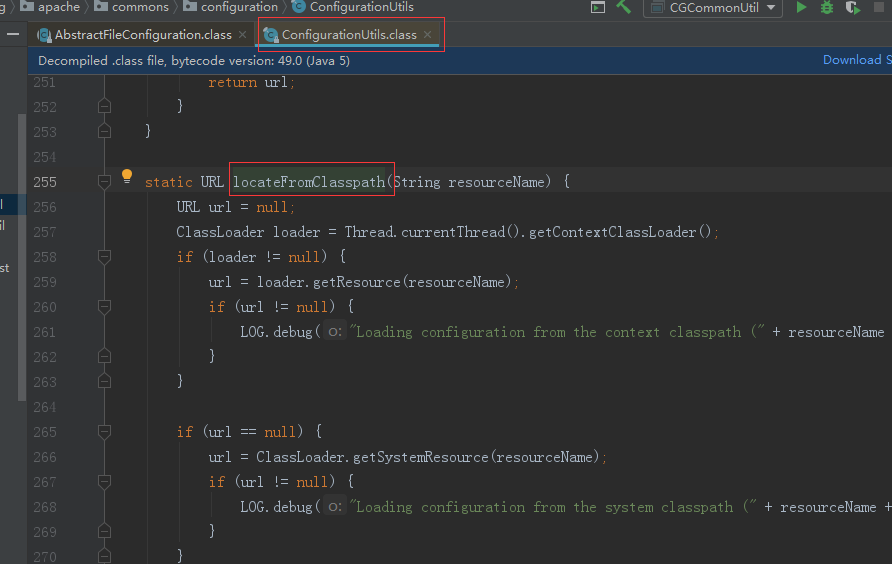
主要涉及的方法如下:
locateFromClasspath方法:
static URL locateFromClasspath(String resourceName) {

    URL url = null;

    ClassLoader loader = Thread.currentThread().getContextClassLoader();

    if (loader != null) {

        url = loader.getResource(resourceName);

        if (url != null) {

            LOG.debug("Loading configuration from the context classpath (" + resourceName + ")");

        }

    }

    if (url == null) {

        url = ClassLoader.getSystemResource(resourceName);

        if (url != null) {

            LOG.debug("Loading configuration from the system classpath (" + resourceName + ")");

        }

    }

    return url;

}
首先它通过获取了当前线程的一个类加载器,通过加载器的getResouce方法去类加载器找到resourceName这个文件
getResouce方法:
public URL getResource(String name) {

    URL url;

    if (parent != null) {

        url = parent.getResource(name);

    } else {

        url = getBootstrapResource(name);

    }

    if (url == null) {

        url = findResource(name);

    }

    return url;

}
先去父节点的loader去加载资源文件,如果找不到,则会去BootstrapLoader中去找,如果还是找不到,才调用当前类的classLoader去找。这也就是JDK类加载的双亲委派模型。
getInputStream方法:
public InputStream getInputStream(URL url) throws ConfigurationException {

    File file = ConfigurationUtils.fileFromURL(url);

    if (file != null && file.isDirectory()) {

        throw new ConfigurationException("Cannot load a configuration from a directory");

    } else {

        try {

            return url.openStream();

        } catch (Exception var4) {

            throw new ConfigurationException("Unable to load the configuration from the URL " + url, var4);

        }

    }

}
调用url的openStream()方法去获得此文件的输入流
GItHub源码参照
apache commons-configuration包读取配置文件的更多相关文章
- Apache Commons Configuration的应用
Apache Commons Configuration的应用 Commons Configuration是一个java应用程序的配置管理工具.可以从properties或者xml文件中加载软件的配置 ...
- Apache Commons Configuration读取xml配置
近期项目自己手写一个字符串连接池.因为环境不同有开发版本.测试版本.上线版本.每一个版本用到的数据库也是不一样的.所以需要能灵活的切换数据库连接.当然这个用maven就解决了.Apache Commo ...
- 使用Apache Commons Configuration读取配置信息
在项目中使用一些比较新的库总会给你带来很多快乐,在这篇文章中,我将会给你介绍一个在Java中读取配置文件的框架——Apache Commons Configuration framework. 你会了 ...
- apache commons io包基本功能
1. http://jackyrong.iteye.com/blog/2153812 2. http://www.javacodegeeks.com/2014/10/apache-commons-io ...
- apache commons lang包中的StringUtils
计算一个字符串某个字符的出现次数 a, 使用charAt方法截取之后,循环判断. b, 使用apache commons lang包中的StringUtils: int n = StringUtils ...
- apache commons Java包简介
更多信息,请参考:http://commons.apache.org/ 一.Commons BeanUtils说明:针对Bean的一个工具集.由于Bean往往是有一堆get和set组成,所以BeanU ...
- Apache Commons configuration使用入门
使用Commons Configuration可以很好的管理我们的配置文件的读写, 官网:http://commons.apache.org/configuration 需要用到commons-la ...
- IO与文件读写---使用Apache commons IO包提高读写效率
觉得很不错,就转载了, 作者: Paul Lin 首先贴一段Apache commons IO官网上的介绍,来对这个著名的开源包有一个基本的了解:Commons IO is a library of ...
- jar包读取配置文件
读取jar包内配置文件: Properties config = new Properties(); InputStream in = this.getClass().getClassLoader() ...
- 使用Apache Commons IO组件读取大文件
Apache Commons IO读取文件代码如下: Files.readLines(new File(path), Charsets.UTF_8); FileUtils.readLines(new ...
随机推荐
- 挂载一个NFS共享
在 system2 上挂载一个来自 system1.group8.example.com 的NFS共享,并符合下列要求: 1./public 挂载在下面的目录上 /mnt/nfsmount 2./pr ...
- [UOJ #393]【NOI2018】归程
题目大意:有一张$n$个点$m$条边的图,每个边有两个属性$a_i,b_i$.有$Q$个询问,每个询问给出$v,p$,表示所有边中$b_i\leqslant p$的边会被标记,在点$v$,可以通过不被 ...
- Vue 项目 VSCode 调试
调试Vue搭建的前端项目 在项目根目录下的vue.config.js中添加: module.exports = { lintOnSave: false, //关闭eslint语法校验 //填写这部分 ...
- SpringBoot的入门程序
1. 创建一个springboot工程 可以参考springboot入门程序 2. 创建一个实体类 @Data //想相当于@Setter.@Getter和@ToString替代了setter.get ...
- Mybatis中使用collection进行多对多双向关联示例(含XML版与注解版)
Mybatis中使用collection进行多对多双向关联示例(含XML版与注解版) XML版本: 实体类: @Data @NoArgsConstructor public class Course ...
- js运算符及数据类型转换(二)
1.一元运算符+.-[将其它类型转化为number类型,相当于调用了Number()函数]var num = +('hello') NaN typeof num->numbernum = + ...
- select_region_point和select_region_spatial
一.select_region_point select_region_point(Regions:DestRegions:row,column:) 算子含义:选择包含给定像素的所有区域. Regio ...
- nginx-1.12.0安装
1.配置相关环境: yum install -y gcc glibc gcc-c++ zlib pcre-devel openssl-devel rewrite模块需要pcre库 ssl功能需要ope ...
- Fluxay流光使用
扫描IPC主机 填写扫描地址.扫描类型为NT/98 显示如下,扫描成功 扫描用户列表 显示如下,扫描成功 下面想怎么做就怎么做 IPC连接失败原因 对方未打开IPC共享 对方未开启139或445端口 ...
- 源码解析-url状态检测神器ping-url
前言 ping-url是我最近开源的一个小工具,这篇文章也是专门写它设计理念的科普文. 为什么会做这个ping-url开源工具呢? 起因是:本小哥在某天接到一个特殊的需求,要用前端的方式判断任意一个u ...