
用js写的简单的下拉菜单
<!DOCTYPE html PUBLIC "-//W3C//DTD XHTML 1.0 Transitional//EN" "http://www.w3.org/TR/xhtml1/DTD/xhtml1-transitional.dtd">

<html xmlns="http://www.w3.org/1999/xhtml">

<head>

<meta http-equiv="Content-Type" content="text/html; charset=utf-8" />

<title>无标题文档</title>

<style type="text/css">

*{ margin:0px auto; padding:0px }

#xianshi{

    width:130px;

    height:30px;

    border:1px solid #666;

    margin-left:400px;

    text-align:center;

    vertical-align:middle;

    line-height:30px;

    position:relative;

    z-index:999;}

#xianshi:hover{cursor:pointer}

.xiang{ width:130px;

        height:30px;

        border:1px solid #666;

        text-align:center;

        margin-left:400px;

        line-height:30px;

        vertical-align:middle;

        z-index:998;

        position:relative;}

.xiang:hover{cursor:pointer;

        background-color:#93F}

</style>

</head>

<body>

<div style="width:100%; height:30px; background-color:#F00;margin-top:50px;"></div>

<div style="width:100%; height:30px;">

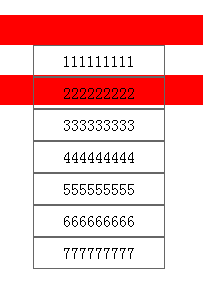
    <div id="xianshi" onclick="xian()">111111111</div>

    <div class="xiang" style=" display:none" onclick="huan(this)">111111111</div>

    <div class="xiang" style=" display:none" onclick="huan(this)">222222222</div>

    <div class="xiang" style=" display:none" onclick="huan(this)">333333333</div>

    <div class="xiang" style=" display:none" onclick="huan(this)">444444444</div>

    <div class="xiang" style=" display:none" onclick="huan(this)">555555555</div>

    <div class="xiang" style=" display:none" onclick="huan(this)">666666666</div>

    <div class="xiang" style=" display:none" onclick="huan(this)">777777777</div>

</div>

<div style="width:100%; height:30px; background-color:#F00; z-index:-10; position:relative;"></div>

</body>

<script type="text/javascript">

function xian()

{

  var s = document.getElementsByClassName("xiang")

  var a = document.getElementById("xianshi")

  var nr = a.innerHTML


  for(i=0;i<s.length;i++)

  {

    if(s[i].style.display == "none")

    {

      s[i].style.display = "block"

      if(s[i].innerHTML == nr)

      {

        s[i].style.display = "none"

      }

    }

    else

    {

      s[i].style.display = "none"

    }

  }

}

function huan(a)

{

  var nr = a.innerHTML

  document.getElementById("xianshi").innerHTML = nr

  var s = document.getElementsByClassName("xiang")

  for(i=0;i<s.length;i++)

  {

    s[i].style.display = "none"

  }

}

</script>

</html>
效果如下:

<!DOCTYPE html PUBLIC "-//W3C//DTD XHTML 1.0 Transitional//EN" "http://www.w3.org/TR/xhtml1/DTD/xhtml1-transitional.dtd">

<html xmlns="http://www.w3.org/1999/xhtml">

<head>

<meta http-equiv="Content-Type" content="text/html; charset=utf-8" />

<title>无标题文档</title>

<style type="text/css">

*{ margin:0px auto; padding:0px }

#xianshi{

    width:130px;

    height:30px;

    border:1px solid #666;

    margin-left:400px;

    text-align:center;

    vertical-align:middle;

    line-height:30px;

    position:relative;

    z-index:999;}

#xianshi:hover{cursor:pointer}

.xiang{ width:130px;

        height:30px;

        border:1px solid #666;

        text-align:center;

        margin-left:400px;

        line-height:30px;

        vertical-align:middle;

        z-index:998;

        position:relative;}

.xiang:hover{cursor:pointer;

        background-color:#93F}

</style>

</head>

<body>

<div style="width:100%; height:30px; background-color:#F00;margin-top:50px;"></div>

<div style="width:100%; height:30px;">

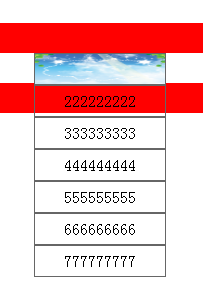
    <div id="xianshi" onclick="xian()"><img src="1.jpg" height="30px" width="130px" /></div>

    <div class="xiang" style=" display:none">222222222</div>

    <div class="xiang" style=" display:none">333333333</div>

    <div class="xiang" style=" display:none">444444444</div>

    <div class="xiang" style=" display:none">555555555</div>

    <div class="xiang" style=" display:none">666666666</div>

    <div class="xiang" style=" display:none">777777777</div>

</div>

<div style="width:100%; height:30px; background-color:#F00; z-index:-10; position:relative;"></div>

</body>

<script type="text/javascript">

function xian()

{

  var s = document.getElementsByClassName("xiang");

  var a = document.getElementById("xianshi");

  var nr = a.innerHTML;

  for(i=0;i<s.length;i++)

  {

    if(s[i].style.display == "none")

    {

      s[i].style.display = "block";

          document.getElementById("xianshi").innerHTML = '<img src="3.jpg" height="30px" width="130px" />';

    }

    else

    {

      s[i].style.display = "none";

          document.getElementById("xianshi").innerHTML = '<img src="1.jpg" height="30px" width="130px" />';

    }

  }

}

</script>

</html>

用js写的简单的下拉菜单的更多相关文章
- JQuery -> 超级简单的下拉菜单
使用jquery实现一个超级简单的下拉菜单. 效果图 最初的效果 watermark/2/text/aHR0cDovL2Jsb2cuY3Nkbi5uZXQvRmVlTGFuZw==/font/5a6L ...
- 在AJAX里 使用【 XML 】 返回数据类型 实现简单的下拉菜单数据
在AJAX里 使用XML返回数据类型 实现简单的下拉菜单数据 <!DOCTYPE html PUBLIC "-//W3C//DTD XHTML 1.0 Transitional//EN ...
- 在AJAX里 使用【 JSON 】 返回数据类型 实现简单的下拉菜单数据
在AJAX里 使用JSON返回数据类型 实现简单的下拉菜单数据 <!DOCTYPE html PUBLIC "-//W3C//DTD XHTML 1.0 Transitional//E ...
- 仿新浪游戏频道js多栏目全屏下拉菜单导航条
仿新浪游戏频道js多栏目全屏下拉菜单导航条,新浪,游戏频道,js组件,多栏目,全屏下拉,下拉菜单,导航条.代码下载地址:http://www.huiyi8.com/sc/26765.html更多请访问 ...
- 用原生JS实现的一个导航下拉菜单,下拉菜单的宽度与浏览器视口的宽度一样(js+html+css)
这个导航下拉菜单需要实现的功能是:下拉菜单的宽度与浏览器视口的宽度一样宽:一级导航只有两项,当鼠标移到一级导航上的导航项时,相应的二级导航出现.在本案例中通过改变二级导航的高度来实现二级导航的显示和消 ...
- js原生实现三级联动下拉菜单
js代码: <!doctype html> <html> <head> <meta charset="utf-8"> <tit ...
- html简单实现下拉菜单
主要用到的知识ul和li标签 ul li 是一个组合:是无序列表标签,在实际中用的非常多,与之对应的是有序列表:ol lili是不能单独使用,必须在于ul之中的ul是块级元素,能直接定义宽高,而li是 ...
- jquery实现最简单的下拉菜单
<!doctype html> <html> <head> <meta charset="utf-8"> <title> ...
- js 点击按钮显示下拉菜单
<li> <a id = "rank" onclick="showGroup()"></a></li><l ...
随机推荐
- 升级pip后,出现ImportError:cannot import name main
升级pip后,出现ImportError错误,如下图: 解决方法: sudo gedit /usr/bin/pip 进去后修改为 from pip import __main__ if __name_ ...
- axios 文件下载代码 片段
<script type="text/javascript"> axios({ method:'post', url: 'url', // 最好qs.stringify ...
- 解决Ubuntu系统“无法修正错误,因为您要求某些软件包保持现状,就是它们破坏了软件包间的依赖关系”的有效方法
ubuntu系统下安装东西,很多时候会出现版本冲突的情况: 有效的解决方法是使用aptitude来帮助降级. 首先安装aptitude 而后使用aptitude来安装前面有冲突的构建,同样也是要使用r ...
- <div> <p> <span>的用法和区别
<div> 标签可以把文档分割为独立的.不同的部分.它可以用作严格的组织工具,并且不使用任何格式与其关联. 更重要的意义是在网页的动态实现过程中,对划分的区域统一处理,例如换背景色.字体等 ...
- Robotics Education and Research at Scale - A Remotely Accessible Robotics Development Platform
张宁 Robotics Education and Research at Scale - A Remotely Accessible Robotics Development Platform链接 ...
- Js ascii 16进制 url-encode
function fixedEncodeURIComponent (str) { return str.replace(/./g, function(c) { return '%' + c.charC ...
- oracle的merge语法
merge into trade.ttradeseat ausing trade.bs_zrt_tradeseat bon (a.L_FUND_ID = b.l_Fund_Id and a.l_bas ...
- Thread 设置 IsBackground true false 的 运行差别
1.这是一个 后台线程,IsBackground=true, 主线程完成后,后台子线程也停止了,即使 子线程 还有没运行完,也要停止 class Program { static void Main ...
- 第7/7Beta冲刺
1.团队成员 成员姓名 成员学号 秦裕航 201731062432(组长) 刘东 201731062227 张旭 201731062129 王伟 201731062214 2.SCRU部分 2.1各成 ...
- String字符串相关操作
.length 字符串长度.equals 比较字符串.equalIgnoreCase 比较字符串不区别大小写.charAt 获取字符串指定下标位置的字符.contains 判断字符串内是否包含某字符串 ...