
Netty Socket编程
工程结构图

一、Socket服务端
1、创建MyServer 类
public class MyServer {

    public static void main(String[] args) throws  Exception{

        EventLoopGroup bossGroup = new NioEventLoopGroup();

        EventLoopGroup worderGroup = new NioEventLoopGroup();

        try{

            ServerBootstrap serverBootstrap = new ServerBootstrap();

            serverBootstrap.group(bossGroup,worderGroup).channel(NioServerSocketChannel.class)

                    .childHandler(new MyServerinitializer());

            ChannelFuture channelFuture = serverBootstrap.bind(8899).sync();

            channelFuture.channel().closeFuture().sync();

        }finally {

            bossGroup.shutdownGracefully();

            worderGroup.shutdownGracefully();

        }

    }

}
2、服务端处理器类MyServerHandle
public class MyServerHandle  extends SimpleChannelInboundHandler<String>{

    protected void channelRead0(ChannelHandlerContext ctx, String msg) throws Exception {

        CommonUtil.println(ctx.channel().remoteAddress() + ", " + msg);

        ctx.channel().writeAndFlush("from server: " + UUID.randomUUID());

    }

    @Override

    public void exceptionCaught(ChannelHandlerContext ctx, Throwable cause) throws Exception {

        cause.printStackTrace();;

        ctx.close();

    }

}
当接收到请求后,向客户端写数据。
3、创建MyServerinitializer类
public class MyServerinitializer  extends ChannelInitializer<SocketChannel>{

    protected void initChannel(SocketChannel socketChannel) throws Exception {

        ChannelPipeline pipeline = socketChannel.pipeline();

        pipeline.addLast(new LengthFieldBasedFrameDecoder(Integer.MAX_VALUE,0, 4, 0, 4));

        pipeline.addLast(new LengthFieldPrepender(4));

        pipeline.addLast(new StringDecoder(CharsetUtil.UTF_8));

        pipeline.addLast(new StringEncoder(CharsetUtil.UTF_8));

        pipeline.addLast(new MyServerHandle());

    }

}
二、客户端
1、MyClient 类
public class MyClient {

    public static void main(String[] args) throws  Exception{

        EventLoopGroup eventLoopGroup = new NioEventLoopGroup();

        try {

            Bootstrap bootstrap = new Bootstrap();

            bootstrap.group(eventLoopGroup).channel(NioSocketChannel.class)

                    .handler(new MyClientInitializer());

            ChannelFuture channelFuture = bootstrap.connect("localhost",8899).sync();

            channelFuture.channel().closeFuture().sync();

        }finally {

            eventLoopGroup.shutdownGracefully();

        }

    }

}
2、客户端处理器MyClientHandle
public class MyClientHandle extends SimpleChannelInboundHandler<String> {

    //服务端向客户端发送消息时,该方法会被调用

    @Override

    protected void channelRead0(ChannelHandlerContext ctx, String msg) throws Exception {

        CommonUtil.println(ctx.channel().remoteAddress());

        CommonUtil.println("client output:" + msg);

        ctx.writeAndFlush("from client: " + LocalDateTime.now());

    }

    @Override

    public void channelActive(ChannelHandlerContext ctx) throws Exception {

        ctx.writeAndFlush("来自客户端的消息");

    }

    @Override

    public void exceptionCaught(ChannelHandlerContext ctx, Throwable cause) throws Exception {

       cause.printStackTrace();

       ctx.close();

    }

}
客户端channel active后,向服务端发送消息
3、MyClientInitializer类
public class MyClientInitializer  extends ChannelInitializer<SocketChannel> {

    protected void initChannel(SocketChannel ch) throws Exception {

        ChannelPipeline pipeline = ch.pipeline();

        pipeline.addLast(new LengthFieldBasedFrameDecoder(Integer.MAX_VALUE,0, 4, 0, 4));

        pipeline.addLast(new LengthFieldPrepender(4));

        pipeline.addLast(new StringDecoder(CharsetUtil.UTF_8));

        pipeline.addLast(new StringEncoder(CharsetUtil.UTF_8));

        pipeline.addLast(new MyClientHandle());

    }

}
三、测试
1、启动服务端
2、启动客户端(可以启动多个)
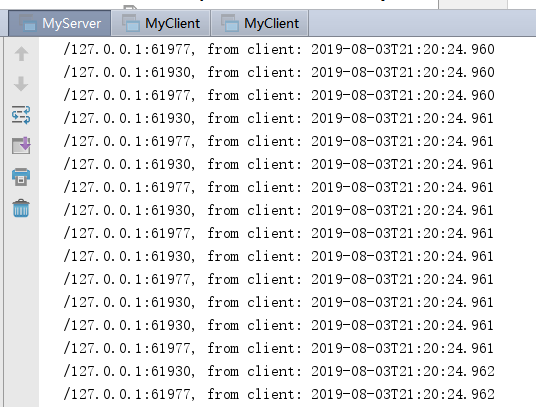
服务端输出结果
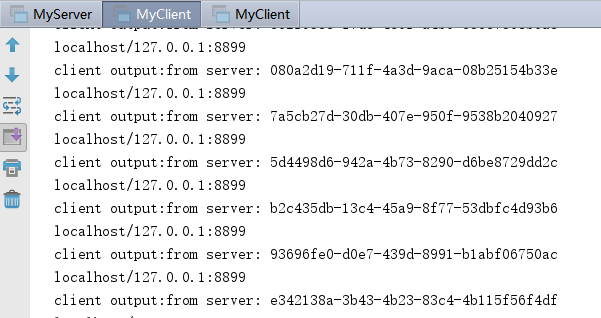
客户端1输出
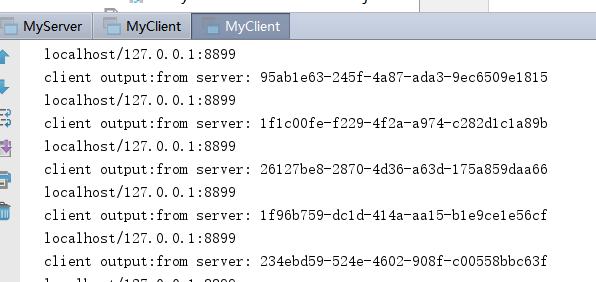
客户端2输出
Netty Socket编程的更多相关文章
- IO和socket编程
五一假期结束了,突然想到3周前去上班的路上看到槐花开的正好.放假也没能采些做槐花糕,到下周肯定就老了.一年就开一次的东西,比如牡丹,花期也就一周.而花开之时,玫瑰和月季无法与之相比.明日黄花蝶也愁.想 ...
- Netty高性能编程备忘录(上)
http://calvin1978.blogcn.com/articles/netty-performance.html 网上赞扬Netty高性能的文章不要太多,但如何利用Netty写出高性能网络应用 ...
- Linux下的C Socket编程 -- server端的继续研究
Linux下的C Socket编程(四) 延长server的生命周期 在前面的一个个例子中,server在处理完一个连接后便会立即结束掉自己,然而这种server并不科学啊,server应该是能够一直 ...
- java socket编程(li)
一.网络编程中两个主要的问题 一个是如何准确的定位网络上一台或多台主机,另一个就是找到主机后如何可靠高效的进行数据传输.在TCP/IP协议中IP层主要负责网络主机的定位,数据传输的路由,由IP地址可以 ...
- Python Socket 编程——聊天室示例程序
上一篇 我们学习了简单的 Python TCP Socket 编程,通过分别写服务端和客户端的代码了解基本的 Python Socket 编程模型.本文再通过一个例子来加强一下对 Socket 编程的 ...
- Linux下的C Socket编程 -- server端的简单示例
Linux下的C Socket编程(三) server端的简单示例 经过前面的client端的学习,我们已经知道了如何创建socket,所以接下来就是去绑定他到具体的一个端口上面去. 绑定socket ...
- Linux下的C Socket编程 -- 获取对方IP地址
Linux下的C Socket编程(二) 获取域名对应的IP地址 经过上面的讨论,如果我们想要连接到远程的服务器,我们需要知道对方的IP地址,系统函数gethostbyname便能够实现这个目的.它能 ...
- Linux下的C Socket编程 -- 简介与client端的处理
Linux下的C Socket编程(一) 介绍 Socket是进程间通信的方式之一,是进程间的通信.这里说的进程并不一定是在同一台机器上也有可能是通过网络连接的不同机器上.只要他们之间建立起了sock ...
- python网络编程-socket编程
一.服务端和客户端 BS架构 (腾讯通软件:server+client) CS架构 (web网站) C/S架构与socket的关系: 我们学习socket就是为了完成C/S架构的开发 二.OSI七层 ...
随机推荐
- ECharts快速入门
一.简介 ECharts,一个使用 JavaScript 实现的开源可视化库,可以流畅的运行在 PC 和移动设备上,兼容当前绝大部分浏览器(IE8/9/10/11,Chrome,Firefox,Saf ...
- PHP实现微信退款功能
最近在调微信退款接口,发现有许多坑,更大家分享一下 ① 要是在测试的时候,网页提示 curl 58 说明 证书的路径出现问题(这里要填物理路径,也就是绝对路径) ②网页提示curl 52 说明你的证书 ...
- idea中flink启动报错org.apache.flink.api.common.ExecutionConfig$GlobalJobParameters
启动时出现如下报错: Caused by: java.lang.ClassNotFoundException: org.apache.flink.api.common.ExecutionConfig$ ...
- ubuntu18上解决Qt无法输入中文
系统:Ubuntu 18.04.3 64bit 软件: QtCreator 4.8 安装Ubuntu18.04 时已经安装fcitx框架的搜狗输入法,在此不再安装fcitx及搜狗输入法 只需要安装fc ...
- Linux_安装maven
安装maven 1.首先要已经安装JDK 2.下载安装包,可以安装包下: 下载地址:https://mirrors.cnnic.cn/apache/maven/ wget https://mirror ...
- Java中线程池,你真的会用吗?ExecutorService ThreadPoolExcutor
原文:https://www.hollischuang.com/archives/2888 在<深入源码分析Java线程池的实现原理>这篇文章中,我们介绍过了Java中线程池的常见用法以及 ...
- 使用Arduino和LED光柱显示器件轻松制作电池电压指示器
电池有一定的电压限制,如果电压在充电或放电时超出规定的限制,电池的使用寿命就会受到影响或降低.每当我们使用电池供电的项目,有时我们需要检查电池电压电量,确定是否需要充电或更换.本电路将帮助您监测电池电 ...
- [Reprint] Difference Between Job, Work, And Career
https://www.espressoenglish.net/difference-between-job-work-and-career/ A lot of English learners co ...
- An exception has occurred, use %tb to see the full traceback.----parser.parse_args()报错
一.报错: 原因: 由于在jupyter notebook中,args不为空. 二.问题解决 改成args = parser.parse_args(args=[])
- Apache虚拟主机&伪静态配置
Apache基本操作 安装:yum install httpd 启动:systemctl start httpd 查看进程:ps -ef | grep httpd 查看端口:sudo netstat ...