
C# 获取文件扩展信息-应用名称/作者等
方案一:使用微乳封装的Shell包
添加nuget包:Microsoft.WindowsAPICodePack.Shell
using Microsoft.WindowsAPICodePack.Shell;

using Microsoft.WindowsAPICodePack.Shell.PropertySystem;
1 string filePath = Path.Combine(AppDomain.CurrentDomain.BaseDirectory, "需求文档_迭代版_036.docx");
var file = ShellFile.FromFilePath(filePath); //Read and Write: string[] oldAuthors = file.Properties.System.Author.Value;
string oldTitle = file.Properties.System.Title.Value;
var orgAppName = file.Properties.System.ApplicationName; file.Properties.System.Author.Value = new string[] { "Author #1", "Author #2" };
file.Properties.System.Title.Value = "Example Title"; // Alternate way to Write: ShellPropertyWriter propertyWriter = file.Properties.GetPropertyWriter();
propertyWriter.WriteProperty(SystemProperties.System.Author, new string[] { "Author" });
propertyWriter.Close();
2 直接使用Shell32交互
添加Com组件引用:
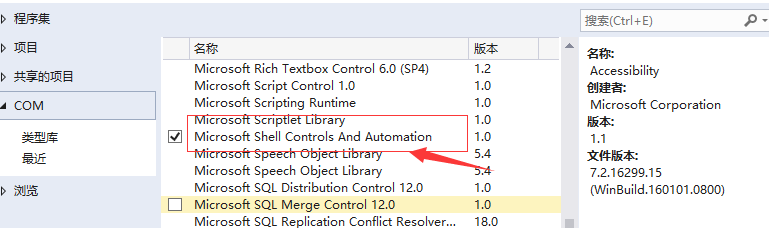
             List<string> arrHeaders = new List<string>();

             List<Tuple<int, string, string>> attributes = new List<Tuple<int, string, string>>();

             Shell32.Shell shell = new Shell32.Shell();

             var strFileName = Path.Combine(AppDomain.CurrentDomain.BaseDirectory, "需求文档_迭代版_036.docx");

             Shell32.Folder objFolder = shell.NameSpace(System.IO.Path.GetDirectoryName(strFileName));

             Shell32.FolderItem folderItem = objFolder.ParseName(System.IO.Path.GetFileName(strFileName));

             for (int i = ; i < short.MaxValue; i++)

             {

                 string header = objFolder.GetDetailsOf(null, i);

                 if (String.IsNullOrEmpty(header))

                     break;

                 arrHeaders.Add(header);

             }

             // The attributes list below will contain a tuple with attribute index, name and value

             // Once you know the index of the attribute you want to get,

             // you can get it directly without looping, like this:

             var Authors = objFolder.GetDetailsOf(folderItem, );

             for (int i = ; i < arrHeaders.Count; i++)

             {

                 var attrName = arrHeaders[i];

                 var attrValue = objFolder.GetDetailsOf(folderItem, i);

                 var attrIdx = i;

                 attributes.Add(new Tuple<int, string, string>(attrIdx, attrName, attrValue));

                 Debug.WriteLine("{0}\t{1}: {2}", i, attrName, attrValue);

             }

             Console.ReadLine();
参考资料:
https://stackoverflow.com/questions/37869388/how-to-read-extended-file-properties-file-metadata
https://stackoverflow.com/questions/220097/read-write-extended-file-properties-c/2096315#2096315
https://stackoverflow.com/questions/24081665/windows-api-code-pack-where-is-it
https://www.codeproject.com/Articles/5036/ID3-Tag-Reader-Using-Shell-Functions
Windows API Code Pack 1.1.zip
https://github.com/jamie-pate/KeepSync/blob/master/contrib/Windows%20API%20Code%20Pack%201.1.zip
C# 获取文件扩展信息-应用名称/作者等的更多相关文章
- Web 在线文件管理器学习笔记与总结(11)获取文件夹信息 (12)返回上一级操作
(11)获取文件夹信息 文件夹没有修改操作. index.php: <?php require 'dir.func.php'; require 'file.func.php'; require ...
- PHP获取文件扩展名的多种方法
PHP获取文件扩展名的N种方法. 第1种方法: function get_extension($file) { substr(strrchr($file, '.'), 1): } 第2种方法: fun ...
- python获取文件扩展名的方法(转)
主要介绍了python获取文件扩展名的方法,涉及Python针对文件路径的相关操作技巧.具体实现方法如下: 1 2 3 4 import os.path def file_extension(path ...
- python获取文件扩展名的方法
主要介绍了python获取文件扩展名的方法,涉及Python针对文件路径的相关操作技巧 import os.path def file_extension(path): ] print file_ex ...
- 如何去掉drwxr-xr-x@中的@符号Linux文件扩展信息
如何去掉drwxr-xr-x@中的@符号Linux文件扩展信息ls -lart drwxrwxrwx@ 10 rlanffy staff 340B 3 6 2015 files-rwxrwxrwx@ ...
- Powershell 获取文件版本信息
获取文件版本信息,通过FileVersionInfo::GetVersioninfo(file) 来获取信息 function Check-DdpstoreFileVersion{ $Ddpstore ...
- PHP中获取文件扩展名的N种方法
PHP中获取文件扩展名的N种方法 从网上收罗的,基本上就以下这几种方式: 第1种方法:function get_extension($file){substr(strrchr($file, '.'), ...
- os.path.join合并 os.path.dirname返回上一级目录 os.path.exists(path) os.stat('path/filename')获取文件/目录信息
import os str1 = "grsdgfd" str2 = "wddf" str3 = "gddgs" # print(str1 + ...
- PHP获取文件扩展名五种以上的方法和注释
在PHP面试中或者考试中会有很大几率碰到写出五种获取文件扩展名的方法,下面是我自己总结的一些方法 $file = ‘需要进行获取扩展名的文件.php’; //第一种,根据.拆分,获取最后一个元素的值f ...
随机推荐
- EFCore 中执行存储过程返回DataSet DataTable
在项目中由于需求,需要返回复杂的数据,需要执行存储过程,但是在DONETCORE2.0中,看官网文档执行的sql的有点操蛋,满足不了需求,就想到了ADO.NET 于是找资料,也没有合适的,就动手自己封 ...
- Xmind8安装和破解(Windows下)
如果本文对你有用,请爱心点个赞,提高排名,帮助更多的人.谢谢大家!❤ 如果解决不了,可以在文末进群交流. 一.准备工作:软件.补丁下载及安装 Xmind8官方下载地址:https://www.xmi ...
- springboot+druid+mybatis
pom.xml <dependency> <groupId>com.microsoft.sqlserver</groupId> <artifactId> ...
- 云计算与大数据实验:Hbase shell基本命令操作
[实验目的] 1)了解hbase服务 2)学会启动和停止服务 3)学会进入hbase shell环境 [实验原理] HBase是一个分布式的.面向列的开源数据库,它利用Hadoop HDFS作为其文件 ...
- Replication Controller 和 Replica Set
使用Replication Controller . Replica Set管理Pod Replication Controller (RC) 简写为RC,可以使用rc作为kubectl工具的快速管理 ...
- SpringCloud2.0 Hystrix Ribbon 基于Ribbon实现断路器 基础教程(六)
1.启动[服务中心]集群,工程名:springcloud-eureka-server 参考 SpringCloud2.0 Eureka Server 服务中心 基础教程(二) 2.启动[服务提供者]集 ...
- git上传者姓名修改
只需要两个指令 git config user.name 和 git config –global user.name 在控制台中输入git config user.name获取当前的操作名称 修改名 ...
- es6 添加事件监听
//定义被侦听的目标对象 }; //定义处理程序 var interceptor = { set: function (receiver, property, value) { console.log ...
- django-用户认证模型
django本身会在mysql里存储一个user数据库 为了和django本身的user表区分 要在第一次迁移数据库前配置认证系统使用的用户模型 settings.py # django认证系统使用的 ...
- sass变量的作用域
嵌套规则内定义的变量只能在嵌套规则内使用(局部变量),不在嵌套规则内定义的变量则可在任何地方使用(全局变量). <div class="test">111111111& ...