
phpstudy(小皮面板)和phpstudy2018 配置php的区别
phpstudy(小皮面板)和phpstudy2018 配置php的区别
一、总结
一句话总结:
phpstudy(小皮面板) 和 phpstudy2018 只是引入的php的位置不同,但是核心代码还是一样的
1、apache中配置php的核心代码?
分别设置FcgidInitialEnv、AddHandler和FcgidWrapper
FcgidInitialEnv PHPRC "D:/software/coding/php/phpstudy_191125/phpstudy_pro/Extensions/php/php7.3.4nts"

AddHandler fcgid-script .php

FcgidWrapper "D:/software/coding/php/phpstudy_191125/phpstudy_pro/Extensions/php/php7.3.4nts/php-cgi.exe" .php
二、phpstudy2018中:apache配置文件中怎么配置php
这是在phpstudy2018中
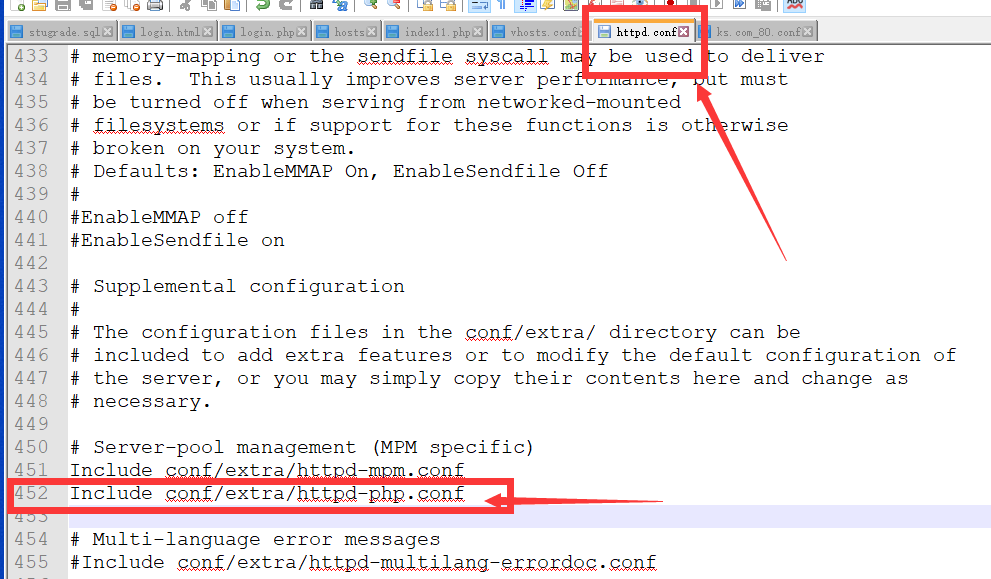
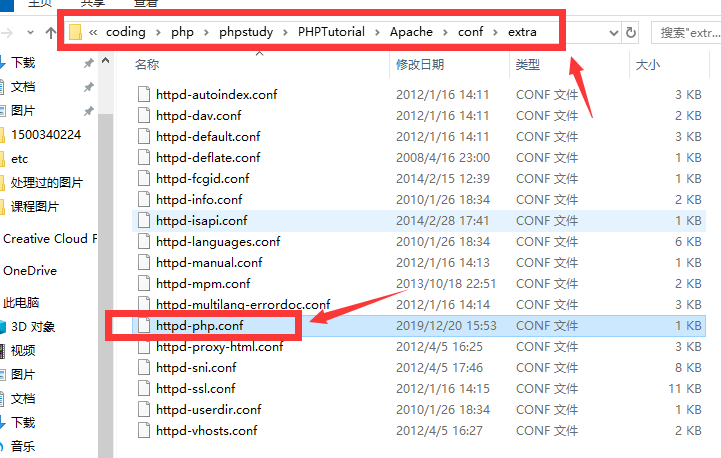

LoadModule fcgid_module modules/mod_fcgid.so

<IfModule fcgid_module>

Include conf/extra/httpd-fcgid.conf

FcgidInitialEnv PHPRC "D:/software/coding/php/phpstudy/PHPTutorial/php/php-7.2.1-nts/"

AddHandler fcgid-script .php

FcgidWrapper "D:/software/coding/php/phpstudy/PHPTutorial/php/php-7.2.1-nts/php-cgi.exe" .php

</IfModule>
最后配置域名的时候:
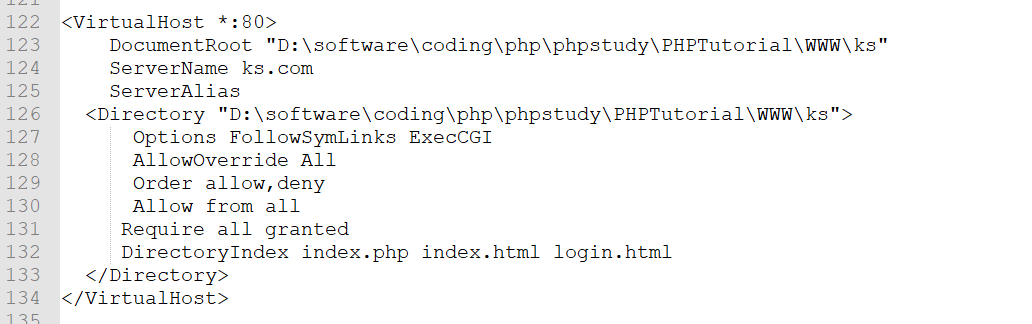
<VirtualHost *:>

    DocumentRoot "D:\software\coding\php\phpstudy\PHPTutorial\WWW\ks"

    ServerName ks.com

    ServerAlias

  <Directory "D:\software\coding\php\phpstudy\PHPTutorial\WWW\ks">

      Options FollowSymLinks ExecCGI

      AllowOverride All

      Order allow,deny

      Allow from all

     Require all granted

     DirectoryIndex index.php index.html login.html

  </Directory>

</VirtualHost>
phpstudy2018 配置php核心代码:
FcgidInitialEnv PHPRC "D:/software/coding/php/phpstudy/PHPTutorial/php/php-7.2.1-nts/"

AddHandler fcgid-script .php

FcgidWrapper "D:/software/coding/php/phpstudy/PHPTutorial/php/php-7.2.1-nts/php-cgi.exe" .php
三、phpstudy小皮面板中:apache配置文件中怎么配置php
直接在配置域名的时候指定了php
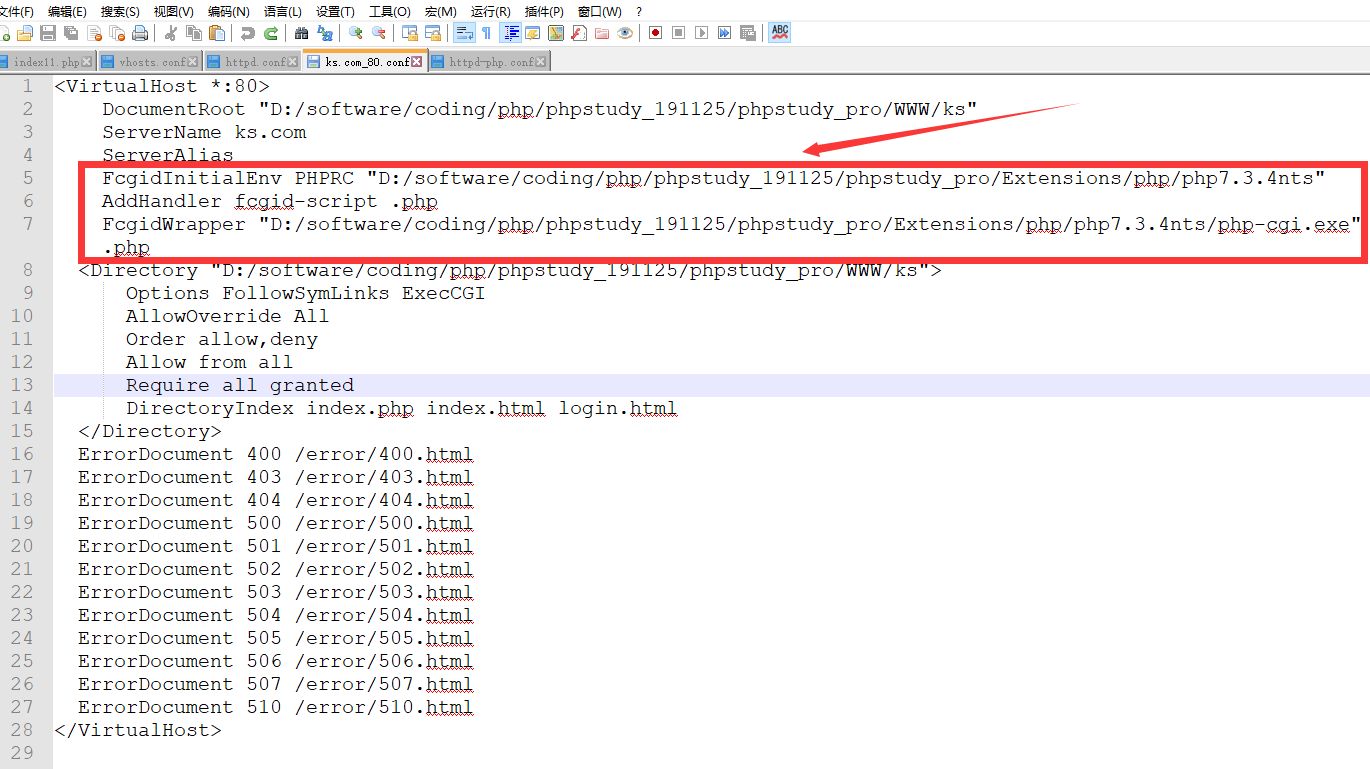
 <VirtualHost *:>

     DocumentRoot "D:/software/coding/php/phpstudy_191125/phpstudy_pro/WWW/ks"

     ServerName ks.com

     ServerAlias

     FcgidInitialEnv PHPRC "D:/software/coding/php/phpstudy_191125/phpstudy_pro/Extensions/php/php7.3.4nts"

     AddHandler fcgid-script .php

     FcgidWrapper "D:/software/coding/php/phpstudy_191125/phpstudy_pro/Extensions/php/php7.3.4nts/php-cgi.exe" .php

   <Directory "D:/software/coding/php/phpstudy_191125/phpstudy_pro/WWW/ks">

       Options FollowSymLinks ExecCGI

       AllowOverride All

       Order allow,deny

       Allow from all

       Require all granted

       DirectoryIndex index.php index.html login.html

   </Directory>

   ErrorDocument  /error/.html

   ErrorDocument  /error/.html

   ErrorDocument  /error/.html

   ErrorDocument  /error/.html

   ErrorDocument  /error/.html

   ErrorDocument  /error/.html

   ErrorDocument  /error/.html

   ErrorDocument  /error/.html

   ErrorDocument  /error/.html

   ErrorDocument  /error/.html

   ErrorDocument  /error/.html

   ErrorDocument  /error/.html

 </VirtualHost>
phpstudy(小皮面板) 配置php核心代码:
FcgidInitialEnv PHPRC "D:/software/coding/php/phpstudy_191125/phpstudy_pro/Extensions/php/php7.3.4nts"

AddHandler fcgid-script .php

FcgidWrapper "D:/software/coding/php/phpstudy_191125/phpstudy_pro/Extensions/php/php7.3.4nts/php-cgi.exe" .php
四、总结
phpstudy2018 配置php核心代码:
FcgidInitialEnv PHPRC "D:/software/coding/php/phpstudy/PHPTutorial/php/php-7.2.1-nts/"

AddHandler fcgid-script .php

FcgidWrapper "D:/software/coding/php/phpstudy/PHPTutorial/php/php-7.2.1-nts/php-cgi.exe" .php
phpstudy(小皮面板) 配置php核心代码:
FcgidInitialEnv PHPRC "D:/software/coding/php/phpstudy_191125/phpstudy_pro/Extensions/php/php7.3.4nts"

AddHandler fcgid-script .php

FcgidWrapper "D:/software/coding/php/phpstudy_191125/phpstudy_pro/Extensions/php/php7.3.4nts/php-cgi.exe" .php
phpstudy(小皮面板)和phpstudy2018只是引入的php的位置不同,但是核心代码还是一样的
五、参考资料
1、apache配置文件中怎么配置php
yum安装的话配置文件/etc/httpd/conf.d/php.conf
<IfModule prefork.c>
LoadModule php5_module modules/libphp5.so
</IfModule>
<IfModule worker.c>
LoadModule php5_module modules/libphp5-zts.so
</IfModule>
phpstudy(小皮面板)和phpstudy2018 配置php的区别的更多相关文章
- linuxWeb环境安装——小皮面板不错的面板
安装环境为最新的:CentOS8.1.1911 linux的web环境安装,说白了,弄明白了就不难.为此阅读了多部文献,最先的是linux教程,重理论轻实践:之后,看了鸟哥的私房菜,有2本,每本都8 ...
- 微信小程序--代码构成---JSON 配置
在上一章中,我们通过开发者工具快速创建了一个 QuickStart 项目.你可以留意到这个项目里边生成了不同类型的文件: .json 后缀的 JSON 配置文件 .wxml 后缀的 WXML 模板文件 ...
- 【微信小程序开发】页面配置
app下的app.json文件是全局配置. app下的每一个page中,也可以配置.json文件. page中配置的内容是对应app中window配置项下的内容. page中的配置将覆盖window中 ...
- 微信小程序--消息推送配置Token令牌错误校验失败如何解决
微信开放第三方API接口, 申请地址: https://mp.weixin.qq.com/advanced/advanced?action=interface&t=advanced/inter ...
- 微信小程序目录结构与配置介绍
一.小程序结构目录 小程序框架提供了自己的视图层描述语言 WXML 和 WXSS,以及 JavaScript,并在视图层与逻辑层间提供了数据传输和事件系统,让开发者能够专注于数据与逻辑. 官网 1.1 ...
- 小程序的目录结构/配置介绍/视图层wxml数据绑定/双线程模型/小程序的启动流程
安装好微信小程序开发软件,创建项目 小程序文件结构和传统web对比 结构 传统web 微信小程序 结构 HTML WXML 样式 CSS WXSS 逻辑 Javascript Javascript 配 ...
- 微信小程序结构目录、配置介绍、视图层(数据绑定,运算,列表渲染,条件渲染)
目录 一.小程序结构目录 1.1 小程序文件结构和传统web对比 1.2 基本的项目目录 二.配置介绍 2.1 配置介绍 2.2 全局配置app.json 2.3 page.json 三.视图层 3. ...
- Linux小知识:sudo su和su的区别
Linux小知识:sudo su和su的区别 本文是学习笔记,视频地址:https://www.bilibili.com/video/av62836363 su是申请切换root用户,需要申请root ...
- 警惕phpstudy等开发神器使用默认配置可能带来的危险
0x00 前言 其实这个点早在之前,我就已经想到了,当时也觉得没啥就记在了我的印象笔记里. 而今天重新把这个点拿出来讲,主要是因为今天早上在温习nmap的时候,一不小心利用这个点,拿下了一位同事的电脑 ...
随机推荐
- 如何检测Windows中的横向渗透攻击
一.前言 横向渗透攻击技术是复杂网络攻击中广泛使用的一种技术,特别是在高级持续威胁(Advanced Persistent Threats,APT)中更加热衷于使用这种攻击方法.攻击者可以利用这些技术 ...
- WDA演练一:用户登陆界面设计(一)
一,新建用户表: 用户和密码参考标准的.这里给用户分了几个维度,以便后面进行接下来的业务设定. 二,新建ZLY_PORTAL 程序. 除了MAIN视图外,在添加LOGON视图. 1.导入预先做好的主页 ...
- Spark排序方式集锦
一.简介 spark中的排序一般可以使用orderBy或sort算子,可以结合负号.ASC/DESC和col进行简单排序.二次排序等情况 二.代码实现 package big.data.analyse ...
- mybatis批量新增报错 BadSqlGrammarException
org.springframework.jdbc.BadSqlGrammarException: ### Error updating database. Cause: com.mysql.jdbc. ...
- Prometheus学习笔记(3)什么是node_exporter???
目录 Node_exporter安装配置启动 Node_exporter安装配置启动 node_exporter安装在被监控端,安装方式也比较简单,直接下载解压安装即可,默认启动后监听9100端口. ...
- 转:spring mvc 设置@Scope("prototype")
spring中bean的scope属性,有如下5种类型: singleton 表示在spring容器中的单例,通过spring容器获得该bean时总是返回唯一的实例prototype表示每次获得bea ...
- nginx centos7 出现403 403 Forbidden
nginx访问时报403, 于是查看nginx日志,路径为/var/log/nginx/error.log.打开日志发现报错Permission denied,详细报错如下: 1. open() ...
- Java精通并发-Lock与synchronized关键字在底层的区别及实例分析
在上两次中已经将Lock这个接口的整个官方说明进行了阅读,这次来了解一下它的一个非常重要的实现类: 啥叫“可重入”呢?其实是指一个线程已经拿到了锁,然后该线程还能再次获取这把锁,接下来在了解它之前先用 ...
- reset.css文件下载及剖析
@charset "utf-8"; /* http://meyerweb.com/eric/tools/css/reset/ v2.0-modified | 20110126 Li ...
- Python bytes类型及用法
bytes 类型 Python 3 新增了 bytes 类型,用于代表字节串,是一个类型,不是C#中的列表. 字符串(str)由多个字符组成,以字符为单位进行操作: 字节串(bytes)由多个字节组成 ...