
python输出带颜色字体
方法1:
(参考https://suixinblog.cn/2019/01/print-colorful.html)
使用Python中自带的print输出带有颜色或者背景的字符串
书写语法
print(\033[显示方式;前景色;背景色m输出内容\033[0m)
其中,显示方式、前景色、背景色都是可选参数(可缺省一个或多个)。
参数
显示方式
| 显示方式 | 效果 |
|---|---|
| 0 | 默认 |
| 1 | 粗体 |
| 4 | 下划线 |
| 5 | 闪烁 |
| 7 | 反白显示 |
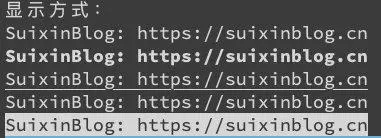
print("显示方式:")

print("\033[0mSuixinBlog: https://suixinblog.cn\033[0m")

print("\033[1mSuixinBlog: https://suixinblog.cn\033[0m")

print("\033[4mSuixinBlog: https://suixinblog.cn\033[0m")

print("\033[5mSuixinBlog: https://suixinblog.cn\033[0m")

print("\033[7mSuixinBlog: https://suixinblog.cn\033[0m")
颜色
| 字体色编号 | 背景色编号 | 颜色 |
|---|---|---|
| 30 | 40 | 黑色 |
| 31 | 41 | 红色 |
| 32 | 42 | 绿色 |
| 33 | 43 | 黄色 |
| 34 | 44 | 蓝色 |
| 35 | 45 | 紫色 |
| 36 | 46 | 青色 |
| 37 | 47 | 白色 |
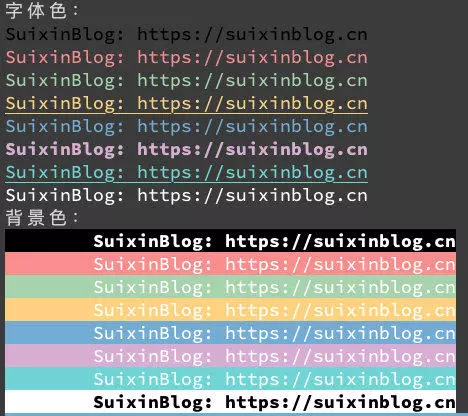
print("字体色:")

print("\033[30mSuixinBlog: https://suixinblog.cn\033[0m")

print("\033[31mSuixinBlog: https://suixinblog.cn\033[0m")

print("\033[32mSuixinBlog: https://suixinblog.cn\033[0m")

print("\033[4;33mSuixinBlog: https://suixinblog.cn\033[0m")

print("\033[34mSuixinBlog: https://suixinblog.cn\033[0m")

print("\033[1;35mSuixinBlog: https://suixinblog.cn\033[0m")

print("\033[4;36mSuixinBlog: https://suixinblog.cn\033[0m")

print("\033[37mSuixinBlog: https://suixinblog.cn\033[0m")

print("背景色:")

print("\033[1;37;40m\tSuixinBlog: https://suixinblog.cn\033[0m")

print("\033[37;41m\tSuixinBlog: https://suixinblog.cn\033[0m")

print("\033[37;42m\tSuixinBlog: https://suixinblog.cn\033[0m")

print("\033[37;43m\tSuixinBlog: https://suixinblog.cn\033[0m")

print("\033[37;44m\tSuixinBlog: https://suixinblog.cn\033[0m")

print("\033[37;45m\tSuixinBlog: https://suixinblog.cn\033[0m")

print("\033[37;46m\tSuixinBlog: https://suixinblog.cn\033[0m")

print("\033[1;30;47m\tSuixinBlog: https://suixinblog.cn\033[0m")
方法2:
colorama是一个python专门用来在控制台、命令行输出彩色文字的模块,可以跨平台使用。
1. 安装colorama模块
pip install colorama
可用格式常数:
Fore: BLACK, RED, GREEN, YELLOW, BLUE, MAGENTA, CYAN, WHITE, RESET.

Back: BLACK, RED, GREEN, YELLOW, BLUE, MAGENTA, CYAN, WHITE, RESET.

Style: DIM, NORMAL, BRIGHT, RESET_ALL
跨平台印刷彩色文本可以使用彩色光的常数简称ANSI转义序列:
from colorama import Fore,Back,Style

print (Fore.RED + "some red text")

print (Back.GREEN + "and with a green background")

print (Style.DIM + "and in dim text")

print (Style.RESET_ALL)

print ("back to normal now!!")
Init关键字参数:
init()接受一些* * kwargs覆盖缺省行为
init(autoreset = False):
如果你发现自己一再发送重置序列结束时关闭颜色变化每一个打印,然后init(autoreset = True)将自动化
示例:
from colorama import init,Fore

init(autoreset=True)

print (Fore.RED + "welcome to python !!")

print ("automatically back to default color again")
python输出带颜色字体的更多相关文章
- python输出带颜色字体详解
在python开发的过程中,经常会遇到需要打印各种信息.海量的信息堆砌在控制台中,就会导致信息都混在一起,降低了重要信息的可读性.这时候,如果能给重要的信息加上字体颜色,那么就会更加方便用户阅读了. ...
- (转)shell脚本输出带颜色字体
shell脚本输出带颜色字体 原文:http://blog.csdn.net/andylauren/article/details/60873400 输出特效格式控制:\033[0m 关闭所有属性 ...
- Python3使用Print输出带颜色字体
Phton3使用print输出带颜色的彩色字体 实现过程: 终端的字符颜色是用转义序列控制的,是文本模式下的系统显示功能,和具体的语言无关. 转义序列是以ESC开头,即用\03 ...
- SHELL输出带颜色字体
输出特效格式控制:\033[0m 关闭所有属性 \033[1m 设置高亮度 \03[4m 下划线 \033[5m 闪烁 \033[7m 反显 \033[8m 消隐 \ ...
- shell脚本输出带颜色字体
#!/bin/bash # #下面是字体输出颜色及终端格式控制 #字体色范围:30-37 echo -e "\033[30m 黑色字 \033[0m" echo -e " ...
- shell 输出带颜色字体
输出特效格式控制:\033[0m 关闭所有属性 \033[1m 设置高亮度 \03[4m 下划线 \033[5m 闪烁 \033[7m 反显 \033[8m 消隐 \ ...
- Python 输出带颜色的文字方法
输出文字带颜色 书写格式,和相关说明如下: #格式: 设置颜色: \033[显示方式;前景色;背景色m \033[0m 方法: 字体色 背景色 颜色 -------------------- ...
- python输出带颜色详解
书写格式: 开头部分:\033[显示方式;前景色;背景色m + 结尾部分:\033[0m 注意:开头部分的三个参数:显示方式,前景色,背景色是可选参数,可以只写其中的某一个:另外由于 ...
- jenkins调用shell脚本 输出带颜色字体
jenkins需要安装AnsiColor插件在构建环境项选择“color ansi console output” 安装插件AnsiColor shell 脚本相关颜色设置 echo -e " ...
随机推荐
- QuantLib 金融计算——收益率曲线之构建曲线(3)
目录 QuantLib 金融计算--收益率曲线之构建曲线(3) 概述 估算期限结构的步骤 读取样本券数据 一些基本配置 配置 *Helper 对象 配置期限结构 估算期限结构 汇总结果 当前实现存在的 ...
- python做一个简易图片下载工具
代码有点乱,先这样 # -*- coding:utf-8 -*- #__author__ :kusy #__content__:文件说明 #__date__:2018/11/01 11:01 impo ...
- idea类存在找不到解决办法
清除idea缓存,
- 全链路追踪技术选型:pinpoint vs skywalking
目前分布式链路追踪系统基本都是根据谷歌的<Dapper大规模分布式系统的跟踪系统>这篇论文发展而来,主流的有zipkin,pinpoint,skywalking,cat,jaeger等. ...
- Sitecore性化 - 您需要了解的4件事
Sitecore非常强大,是一个数字体验平台.它可以帮助您取悦并留住客户.它可以帮助您衡量和评估广告系列.它使你成为一个更好的营销人员.它可以帮助您获得结果! 它结合了易于使用的网站内容管理系统和数字 ...
- Flink DataStream 编程入门
流处理是 Flink 的核心,流处理的数据集用 DataStream 表示.数据流从可以从各种各样的数据源中创建(消息队列.Socket 和 文件等),经过 DataStream 的各种 transf ...
- javascript中的异步操作以及Promise和异步的关系
https://segmentfault.com/a/1190000004322358 Promise是异步编程的一种解决方案,比传统的解决方案--回调函数和事件--更合理和强大 https://se ...
- c#小知识点总结
实例化实例化就是将抽象变为具体,只说猫是抽象的,但是我要具体到一只单独的老猫A,那么这只猫被实例化.实例化就是一个抽象变具体的过程,也可以说为声明一个变量声明变量. int a=1,这其实也是一个实例 ...
- 《Real World Haskell》内容脉络整理
p.s. 其实就是28–(6入门[1~4,6])-(10暂不用[17,20~28])=13网页啊! 1~ 6 章: 语法入门 (类型,函数,表达式语法糖,typeclass) 7~13章: 熟练/ ...
- 10. Javascript 前后端数据加密
为了加强项目的接口安全程度,需求如下 var options = { // 前端需要传送的数据加密 data: { abc: 123, bcd: 123, cds: '撒旦教付货款12313', }, ...