
python输出带颜色字体
方法1:
(参考https://suixinblog.cn/2019/01/print-colorful.html)
使用Python中自带的print输出带有颜色或者背景的字符串
书写语法
print(\033[显示方式;前景色;背景色m输出内容\033[0m)
其中,显示方式、前景色、背景色都是可选参数(可缺省一个或多个)。
参数
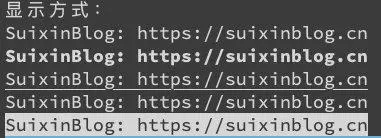
显示方式
| 显示方式 | 效果 |
|---|---|
| 0 | 默认 |
| 1 | 粗体 |
| 4 | 下划线 |
| 5 | 闪烁 |
| 7 | 反白显示 |
print("显示方式:")

print("\033[0mSuixinBlog: https://suixinblog.cn\033[0m")

print("\033[1mSuixinBlog: https://suixinblog.cn\033[0m")

print("\033[4mSuixinBlog: https://suixinblog.cn\033[0m")

print("\033[5mSuixinBlog: https://suixinblog.cn\033[0m")

print("\033[7mSuixinBlog: https://suixinblog.cn\033[0m")
颜色
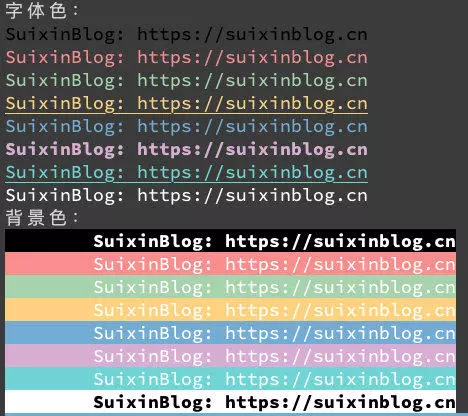
| 字体色编号 | 背景色编号 | 颜色 |
|---|---|---|
| 30 | 40 | 黑色 |
| 31 | 41 | 红色 |
| 32 | 42 | 绿色 |
| 33 | 43 | 黄色 |
| 34 | 44 | 蓝色 |
| 35 | 45 | 紫色 |
| 36 | 46 | 青色 |
| 37 | 47 | 白色 |
print("字体色:")

print("\033[30mSuixinBlog: https://suixinblog.cn\033[0m")

print("\033[31mSuixinBlog: https://suixinblog.cn\033[0m")

print("\033[32mSuixinBlog: https://suixinblog.cn\033[0m")

print("\033[4;33mSuixinBlog: https://suixinblog.cn\033[0m")

print("\033[34mSuixinBlog: https://suixinblog.cn\033[0m")

print("\033[1;35mSuixinBlog: https://suixinblog.cn\033[0m")

print("\033[4;36mSuixinBlog: https://suixinblog.cn\033[0m")

print("\033[37mSuixinBlog: https://suixinblog.cn\033[0m")

print("背景色:")

print("\033[1;37;40m\tSuixinBlog: https://suixinblog.cn\033[0m")

print("\033[37;41m\tSuixinBlog: https://suixinblog.cn\033[0m")

print("\033[37;42m\tSuixinBlog: https://suixinblog.cn\033[0m")

print("\033[37;43m\tSuixinBlog: https://suixinblog.cn\033[0m")

print("\033[37;44m\tSuixinBlog: https://suixinblog.cn\033[0m")

print("\033[37;45m\tSuixinBlog: https://suixinblog.cn\033[0m")

print("\033[37;46m\tSuixinBlog: https://suixinblog.cn\033[0m")

print("\033[1;30;47m\tSuixinBlog: https://suixinblog.cn\033[0m")
方法2:
colorama是一个python专门用来在控制台、命令行输出彩色文字的模块,可以跨平台使用。
1. 安装colorama模块
pip install colorama
可用格式常数:
Fore: BLACK, RED, GREEN, YELLOW, BLUE, MAGENTA, CYAN, WHITE, RESET.

Back: BLACK, RED, GREEN, YELLOW, BLUE, MAGENTA, CYAN, WHITE, RESET.

Style: DIM, NORMAL, BRIGHT, RESET_ALL
跨平台印刷彩色文本可以使用彩色光的常数简称ANSI转义序列:
from colorama import Fore,Back,Style

print (Fore.RED + "some red text")

print (Back.GREEN + "and with a green background")

print (Style.DIM + "and in dim text")

print (Style.RESET_ALL)

print ("back to normal now!!")
Init关键字参数:
init()接受一些* * kwargs覆盖缺省行为
init(autoreset = False):
如果你发现自己一再发送重置序列结束时关闭颜色变化每一个打印,然后init(autoreset = True)将自动化
示例:
from colorama import init,Fore

init(autoreset=True)

print (Fore.RED + "welcome to python !!")

print ("automatically back to default color again")
python输出带颜色字体的更多相关文章
- python输出带颜色字体详解
在python开发的过程中,经常会遇到需要打印各种信息.海量的信息堆砌在控制台中,就会导致信息都混在一起,降低了重要信息的可读性.这时候,如果能给重要的信息加上字体颜色,那么就会更加方便用户阅读了. ...
- (转)shell脚本输出带颜色字体
shell脚本输出带颜色字体 原文:http://blog.csdn.net/andylauren/article/details/60873400 输出特效格式控制:\033[0m 关闭所有属性 ...
- Python3使用Print输出带颜色字体
Phton3使用print输出带颜色的彩色字体 实现过程: 终端的字符颜色是用转义序列控制的,是文本模式下的系统显示功能,和具体的语言无关. 转义序列是以ESC开头,即用\03 ...
- SHELL输出带颜色字体
输出特效格式控制:\033[0m 关闭所有属性 \033[1m 设置高亮度 \03[4m 下划线 \033[5m 闪烁 \033[7m 反显 \033[8m 消隐 \ ...
- shell脚本输出带颜色字体
#!/bin/bash # #下面是字体输出颜色及终端格式控制 #字体色范围:30-37 echo -e "\033[30m 黑色字 \033[0m" echo -e " ...
- shell 输出带颜色字体
输出特效格式控制:\033[0m 关闭所有属性 \033[1m 设置高亮度 \03[4m 下划线 \033[5m 闪烁 \033[7m 反显 \033[8m 消隐 \ ...
- Python 输出带颜色的文字方法
输出文字带颜色 书写格式,和相关说明如下: #格式: 设置颜色: \033[显示方式;前景色;背景色m \033[0m 方法: 字体色 背景色 颜色 -------------------- ...
- python输出带颜色详解
书写格式: 开头部分:\033[显示方式;前景色;背景色m + 结尾部分:\033[0m 注意:开头部分的三个参数:显示方式,前景色,背景色是可选参数,可以只写其中的某一个:另外由于 ...
- jenkins调用shell脚本 输出带颜色字体
jenkins需要安装AnsiColor插件在构建环境项选择“color ansi console output” 安装插件AnsiColor shell 脚本相关颜色设置 echo -e " ...
随机推荐
- linux写shell注意的问题
linux写shell注意的问题一定要vi crontab.sh来写 ps:在windows系统中编辑过这个文件,就会出现类似的换行符 这样导致linux系统中运行sh报错 比如会出现$MQ字符 如果 ...
- PHP 函数禁用设置方法
PHP 函数禁用设置方法先找到php.ini 然后搜索disable_function 直接在上面添加你要禁用的函数就可以了 然后记得重启php-fpm(如果装了php-fpm)
- Java8 新特性 Optional 类
Optional 类的简介 Optional类的是来自谷歌Guava的启发,然后就加入到Java8新特性中去了.Optional类主要就是为子决解价值亿万的错误,空指针异常. Optional ...
- JS比较软件版本号
JS比较软件版本号 版本号格式为:a.b.c 1.获取版本号中的数字 function toNumber(n) { // 使用正则表达式,截取字符串为数组,字符串中包含非数值型,如字母,则数组元素中会 ...
- SSL保护 C/S 、B/S 通信安全
转:https://blog.csdn.net/GitChat/article/details/78431275 网络安全是一个永恒的话题,保护网络安全有很多方法,其中应用最为广泛的就是使用 SSL ...
- 《 .NET并发编程实战》阅读指南 - 第12章
先发表生成URL以印在书里面.等书籍正式出版销售后会公开内容.
- 官方elasticsearch-certutiledit命令
地址:https://www.elastic.co/guide/en/elasticsearch/reference/7.5/certutil.html 语法: bin/elasticsearch-c ...
- 2019-11-29-C#-性能分析-反射-VS-配置文件-VS-预编译
原文:2019-11-29-C#-性能分析-反射-VS-配置文件-VS-预编译 title author date CreateTime categories C# 性能分析 反射 VS 配置文件 V ...
- css权重等级
1.问题起因(在一次偶然编写css发现的,.div2 p>.div1 p>.p1,然后做了测试并找查相关资料) 2.解决方案 首先看哪一级的权重高 1.!important,加在样式属性值 ...
- C# ??(两个问号)的表达式使用详解
今天有人问我C#中两个问号是什么意思,怎么使用,于是乎有了这篇随笔 有时候我们需要判断某个对象是否为null,一般的做法是 if(x=null){....} 若想让自己的代码更简洁,可以这样写: st ...