
Eclipse 搭建Struts2
Eclipse版本 Mars Release (4.5.0)
Struts版本 struts-2.5.20 下载地址:https://struts.apache.org/download.cgi#struts2520
一、创建web项目
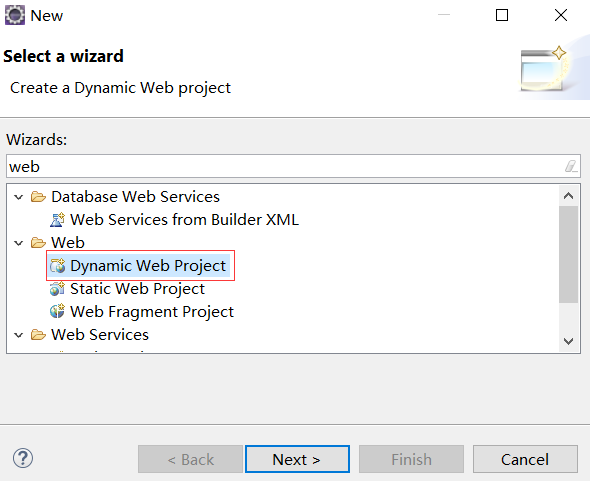
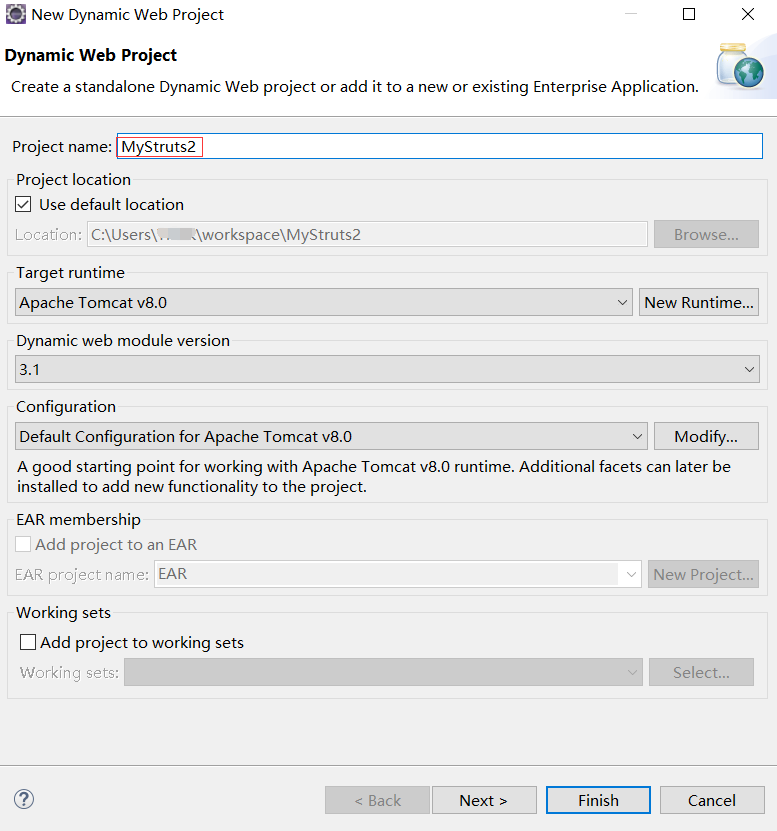
命名为MyStruts2
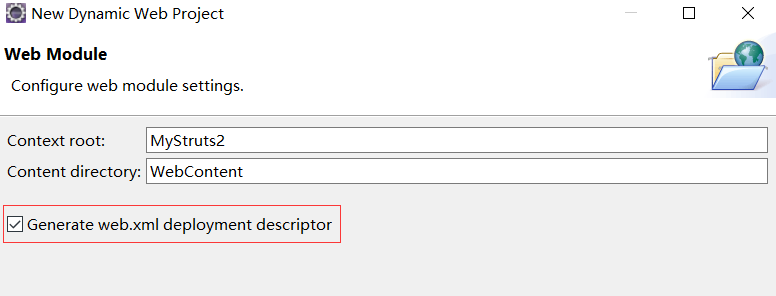
勾选web.xml
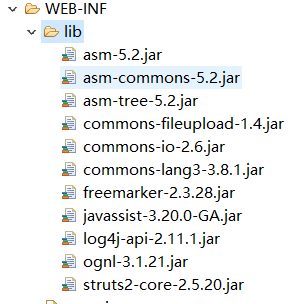
二、拷贝struts的jar包
从struts-2.5.20-all\struts-2.5.20\lib拷贝jar文件,复制到WEB-INF\lib文件夹下
然后配置web.xml
<?xml version="1.0" encoding="UTF-8"?>

<web-app xmlns:xsi="http://www.w3.org/2001/XMLSchema-instance"

xmlns="http://xmlns.jcp.org/xml/ns/javaee"

 xsi:schemaLocation="http://xmlns.jcp.org/xml/ns/javaee http://xmlns.jcp.org/xml/ns/javaee/web-app_3_1.xsd"

 id="WebApp_ID" version="3.1">

  <display-name>MyStruts2</display-name>

  <filter>

  	<filter-name>struts2</filter-name>

  	<filter-class>org.apache.struts2.dispatcher.filter.StrutsPrepareAndExecuteFilter</filter-class>

  </filter>

  <filter-mapping>

  	<filter-name>struts2</filter-name>

  	<url-pattern>/*</url-pattern>

  </filter-mapping>

  <welcome-file-list>

    <welcome-file>index.html</welcome-file>

    <welcome-file>index.htm</welcome-file>

    <welcome-file>index.jsp</welcome-file>

    <welcome-file>default.html</welcome-file>

    <welcome-file>default.htm</welcome-file>

    <welcome-file>default.jsp</welcome-file>

  </welcome-file-list>

</web-app>
路径为:
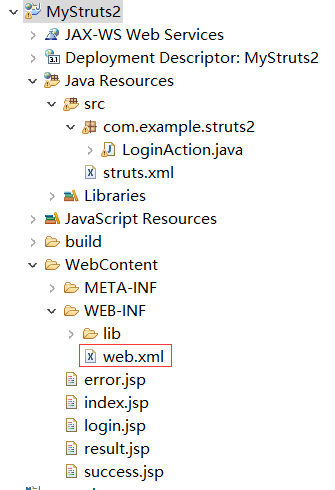
然后创建struts.xml, 路径为src/struts.xml
<?xml version="1.0" encoding="UTF-8"?>

<!DOCTYPE struts PUBLIC

	"-//Apache Software Foundation//DTD Struts Configuration 2.5//EN"

	"http://struts.apache.org/dtds/struts-2.5.dtd">

<!-- START SNIPPET: xworkSample -->

<struts>

   <!-- 是否开启动态方法调用 -->

    <constant name="struts.enable.DynamicMethodInvocation" value="true" />

	<package name="default" namespace="/" extends="struts-default">

		 <action name="login" class="com.example.struts2.LoginAction" method="login">

			<result name="success">/success.jsp</result>

			<result name="error">/error.jsp</result>

		</action>

	</package>

</struts>
三、进行测试
1、创建index.jsp
<%@ page language="java" contentType="text/html;charset=UTF-8" pageEncoding="UTF-8"%>

<!DOCTYPE html PUBLIC "-//W3C//DTD HTML 4.01 Transitional//EN" "http://www.w3.org/TR/html4/loose.dtd">

<html>

<head>

<meta http-equiv="Content-Type" content="text/html;charset=UTF-8">

<title>Insert title here</title>

</head>

<body>

    <form action="login.action" method="post">

        用户名:<input type="text" name="username">

        密码:<input type="text" name="password">

        <input type="submit" value="提交">

    </form>

</body>

</html>
2、创建error.jsp
<%@ page language="java" contentType="text/html;charset=UTF-8"  pageEncoding="UTF-8"%>

<!DOCTYPE html PUBLIC "-//W3C//DTD HTML 4.01 Transitional//EN" "http://www.w3.org/TR/html4/loose.dtd">

<html>

<head>

<meta http-equiv="Content-Type" content="text/html;charset=UTF-8">

<title>Insert title here</title>

</head>

<body>

    Error!

</body>

</html>
3、创建success.jsp
<%@ page language="java" contentType="text/html;charset=UTF-8" pageEncoding="UTF-8" %>

<!DOCTYPE html PUBLIC "-//W3C//DTD HTML 4.01 Transitional//EN" "http://www.w3.org/TR/html4/loose.dtd">

<html>

<head>

<meta http-equiv="Content-Type" content="text/html;charset=UTF-8">

<title>Insert title here</title>

</head>

<body>

    Success!

</body>

</html>
4、新建一个Servlet类,用来将输入的用户名和密码进行测试,使用户名如果正确跳转到success页面,否则到error页面(继承ActionSupport与否都可以)
package com.example.struts2;

import com.opensymphony.xwork2.ActionSupport;

import javax.servlet.http.HttpServletRequest;

import org.apache.struts2.ServletActionContext;

public class LoginAction extends ActionSupport {

	HttpServletRequest req = ServletActionContext.getRequest();

	String username = req.getParameter("username");

	String password = req.getParameter("password");

	public String getUsername() {

		return username;

	}

	public void setUsername(String username) {

		this.username = username;

	}

	public String getPassword() {

		return password;

	}

	public void setPassword(String password) {

		this.password = password;

	}

	public String login(){

		if("Larry".equals(username)

				&& "123456".equals(password)){

			return "result";

		}else{

			return "error";

		}

	}

}
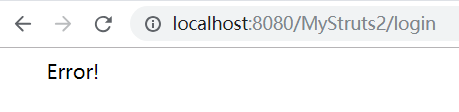
5、测试接口
1) Success

2)Error
参考:
Eclipse 搭建Struts2的更多相关文章
- Eclipse搭建struts2环境
搭建struts2环境 大的方面分为三步: 1. 加入jar包 2. 在web.xml中配置struts2 3. 添加struts2的配置文件struts.xml 下面是详细步骤: 1. 新建一个Dy ...
- eclipse搭建struts2环境及所遇到的问题
最近几天一直在搭建struts2框架,本身struts2框架的搭建是非常简单的,但不知道为什么最近就是总是报错,报了一大串的错 首先就是每次在类的根路径下创建struts.xml时,就报错,也不知道为 ...
- 用eclipse 搭建struts2环境
一,下载struts2对应的jar包,(http://struts.apache.org/download.cgi#struts2514.1),我一般下载struts2.3版本的 二,打开eclips ...
- Eclipse 搭建struts2 spring3 hibernate3环境实战 待完善
1.struts2 目前是2.3版本,下载地址http://struts.apache.org/download.cgi struts2包 struts2-core-2.3.16.3.jar stru ...
- Eclipse添加struts2
参照:http://jingyan.baidu.com/article/915fc414fd94fb51394b208e.html 一.插件下载:http://struts.apache.org/do ...
- Eclipse搭建SSH(Struts2+Spring+Hibernate)框架教程
| 版权声明:本文为博主原创文章,未经博主允许不得转载. 前言 确实,刚创博客,对于这个陌生的东西还是有些许淡然.这是我的第一篇博文,希望能给你们有帮助,这就是我最大的乐趣! 好了下面进入正题: SS ...
- 使用maven+eclipse搭建最简单的struts2的helloworld
使用maven+eclipse搭建最简单的struts2的helloworld 一.web分层结构简介 1.web[细]粒度分层结构: 按细粒度分层可以分为以下6种: 1).表现层:html/css/ ...
- 用Eclipse搭建ssh框架
问:ssh是哪三大框架,以及他们的作用是什么? 答:分别是struts,spring,hibernate. struts的作用是:是web层,其核心是mvc模式,他可以自动获取参数,自动类型转换,自动 ...
- struts2系列(一):struts2入门(struts2的产生、struts2的工作流程、搭建struts2开发环境)
一. struts2的产生 struts1的缺点: 1. ActionForm过多,而且这个ActionForm在很大程度上又和VO(POJO)重复 ...
随机推荐
- Python学习日记(十九) 模块导入
模块导入 当文件夹中有这样一个自定义的command模块 在它的内部写下下列代码: print('这个py文件被调用!') def fuc(): print('这个函数被调用!') 然后我们在comm ...
- python(字符串函数)
一.字符串函数 1.首字母大小写 capitalize() title() name = "xinfangshuo" print (name.capitalize()) print ...
- ISM无需授权使用的无线频率
- Linux之redis-sentinel
一,Redis-Sentinel介绍 Redis-Sentinel是redis官方推荐的高可用性解决方案,当用redis作master-slave的高可用时,如果master本身宕机,redis本身或 ...
- Virtualization and Performance: Understanding VM Exits
翻译自:Virtualization and Performance: Understanding VM Exits 出于对特定指令 或 特定事件(eg. page fault)的响应而导致的VM ...
- amazeui datepicker日历控件 设置默认当日
amazeui datepicker日历控件 设置默认当日 背景: 最近在做一个系统的时候,前台需要选择日期,传给后台进行处理,每次都需要通过手动点击组件,选择日期,这样子很不好,所以我想通过程序自动 ...
- epoll版http服务器
epoll是事件通知方式接收数据,效率比轮询要高 代码: import socket import re import select def client_server(new_client,recv ...
- 分段三次Hermite插值及其与三次样条的比较
分段三次 Hermite 插值多项式 (PCHIP) 语法 p = pchip(x,y,xq) pp = pchip(x,y) 说明 p = pchip(x,y,xq) 返回与 xq 中的查询点对 ...
- Linux - 简单设置 vim (tab, 行号, 换行)
# 进行这两步操作 cd /etc/ vim vimrc ## 将下面的设置直接添加到 vimrc 中 1. 设置 tab 四个空格:set tabstop=4 2. 显示行好set nu 3. 将下 ...
- Ubuntu18.04下安装Sublime Text3并解决不能输入中文
Ubuntu18.04下安装Sublime Text3并解决不能输入中文! 废话不多说,直接按顺序执行下面命令开始安装! wget -qO - https://download.sublimetext ...