
python-learning-第二季-数据处理numpy
https://www.bjsxt.com/down/8468.html
numpy-科学计算基础库
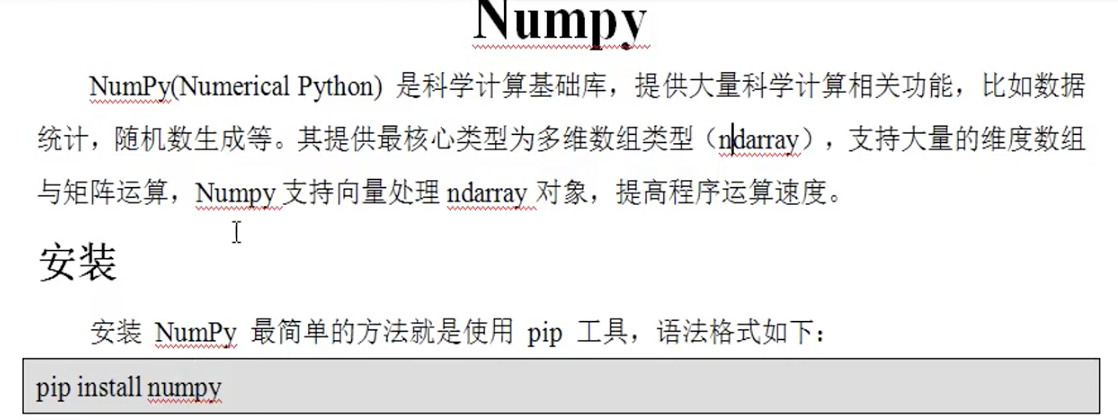
例子:
import numpy as np

#创建数组

a = np.arange()

print(a)

print(type(a))
返回:
/Users/user/PycharmProjects/python3/venv/bin/python /Users/user/PycharmProjects/python3/test.py

[         ]

<class 'numpy.ndarray'>

Process finished with exit code
对列表中的元素开平方
之前的方法为:
import math

b = [,,]

#定义存储开平方结果的列表

result = []

for i in b:

    result.append(math.sqrt(i))

print(result)
返回:
/Users/user/PycharmProjects/python3/venv/bin/python /Users/user/PycharmProjects/python3/test.py

[1.7320508075688772, 2.0, 3.0]

Process finished with exit code
现在使用numpy速度更快,更方便。对ndarray对象类型进行向量处理:
import numpy as np

b = np.array([,,])

print(np.sqrt(b))
返回:
/Users/user/PycharmProjects/python3/venv/bin/python /Users/user/PycharmProjects/python3/test.py

[1.73205081 .         .        ]

Process finished with exit code
array进行创建数组
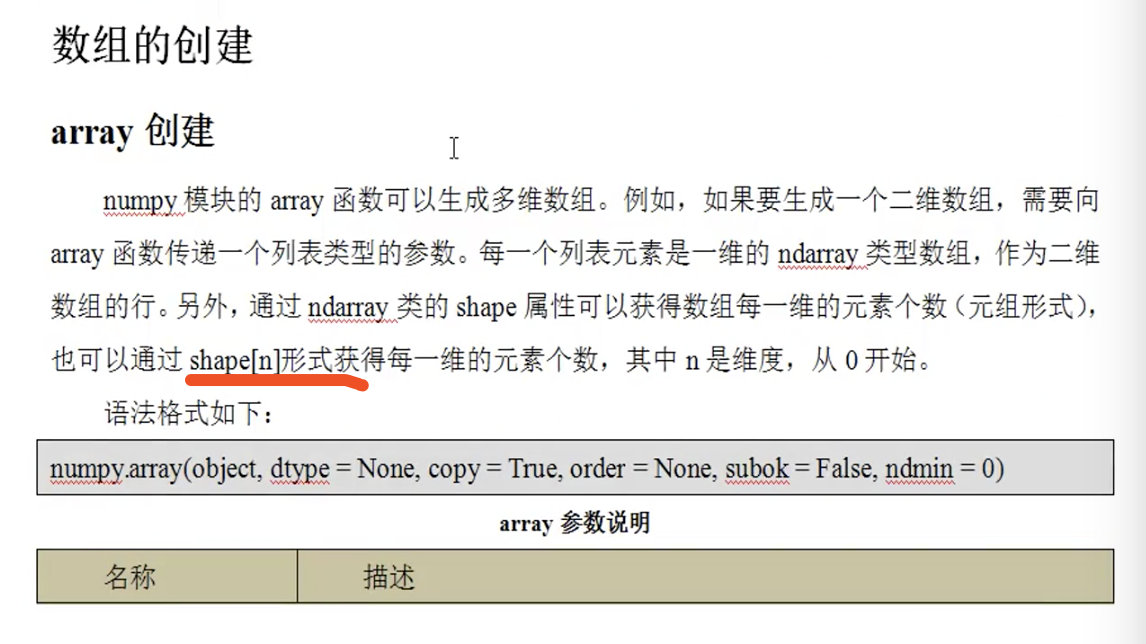
一维数组:
import numpy as np

a = np.array([,,])

print(a)

print(type(a))
返回:
/Users/user/PycharmProjects/python3/venv/bin/python /Users/user/PycharmProjects/python3/test.py

[  ]

<class 'numpy.ndarray'>

Process finished with exit code
a.shape 为(3,)
二维数组:
import numpy as np

a = np.array([[,,], [,,], [,,]])

print(a)

print(a.shape)

print(type(a))
返回:
/Users/user/PycharmProjects/python3/venv/bin/python /Users/user/PycharmProjects/python3/test.py

[[  ]

 [  ]

 [  ]]

(, )

<class 'numpy.ndarray'>

Process finished with exit code
三维数组:
import numpy as np

a = np.array([[[,,], [,,], [,,]]])

print(a)

print(a.shape)

print(type(a))
返回:
/Users/user/PycharmProjects/python3/venv/bin/python /Users/user/PycharmProjects/python3/test.py

[[[  ]

  [  ]

  [  ]]]

(, , )

<class 'numpy.ndarray'>

Process finished with exit code
array函数中dtype参数的使用,设置数组元素类型:
import numpy as np

a = np.array([,,], dtype=float)

print(a)

print(a.shape)

print(type(a))
返回:
/Users/user/PycharmProjects/python3/venv/bin/python /Users/user/PycharmProjects/python3/test.py

[. . .]

(,)

<class 'numpy.ndarray'>

Process finished with exit code
array函数中ndmin参数的使用,说明最小维度为几,传入的值如果维度不够,就会在前面加维度1:
import numpy as np

a = np.array([,,], dtype=float, ndmin=)

print(a)

print(a.shape)

print(type(a))
返回:
/Users/user/PycharmProjects/python3/venv/bin/python /Users/user/PycharmProjects/python3/test.py

[[[. . .]]]

(, , )

<class 'numpy.ndarray'>

Process finished with exit code
arange函数:

import numpy as np

a = np.arange(, , dtype=float)

print(a)

print(a.shape)

print(type(a))
返回:
/Users/user/PycharmProjects/python3/venv/bin/python /Users/user/PycharmProjects/python3/test.py

[. . . . . .]

(,)

<class 'numpy.ndarray'>

Process finished with exit code
随机创建数组
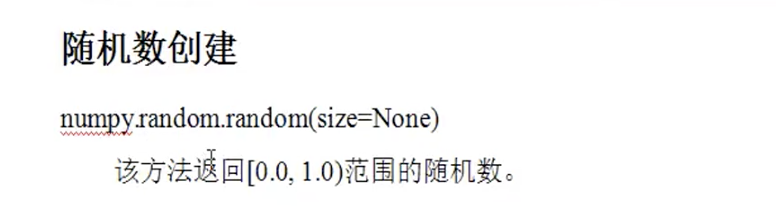
import numpy as np

a = np.random.random() #创建size=10的10个随机数[0.0, 1.0)

print(a)

print(a.shape)

print(type(a))
返回:
/Users/user/PycharmProjects/python3/venv/bin/python /Users/user/PycharmProjects/python3/test.py

[0.70224679 0.12333366 0.7615228  0.48488729 0.55049969 0.88189077

 0.88448342 0.6340702  0.55846358 0.03856909]

(,)

<class 'numpy.ndarray'>

Process finished with exit code
创建二维的:
import numpy as np

a = np.random.random(size=(,)) #3行4列

print(a)

print(a.shape)

print(type(a))
返回:
/Users/user/PycharmProjects/python3/venv/bin/python /Users/user/PycharmProjects/python3/test.py

[[0.75452762 0.06511761 0.28876795 0.33917503]

 [0.70055853 0.05899591 0.6951374  0.48631801]

 [0.79725514 0.52645849 0.60955185 0.94158767]]

(, )

<class 'numpy.ndarray'>

Process finished with exit code
三维的:
import numpy as np

a = np.random.random(size=(,,)) #3行4列

print(a)

print(a.shape)

print(type(a))
返回:
/Users/user/PycharmProjects/python3/venv/bin/python /Users/user/PycharmProjects/python3/test.py

[[[0.09459011 0.06400518]

  [0.63932067 0.90659996]

  [0.25010503 0.00512396]

  [0.93533579 0.15083294]]

 [[0.68609045 0.53156758]

  [0.71763029 0.43475711]

  [0.38447034 0.23069394]

  [0.48814115 0.65881832]]

 [[0.91488505 0.58573524]

  [0.73130286 0.89564597]

  [0.31657241 0.63555136]

  [0.60898115 0.71098613]]]

(, , )

<class 'numpy.ndarray'>

Process finished with exit code
随机整数:

dtype参数默认为np.int, 也可以设置为np.int64
import numpy as np

a = np.random.randint(, , )

print(a)

print(a.shape)

print(a.dtype)

print(type(a))
返回:
/Users/user/PycharmProjects/python3/venv/bin/python /Users/user/PycharmProjects/python3/test.py

[    ]

(,)

int64

<class 'numpy.ndarray'>

Process finished with exit code
发现实际默认的跟讲的相反
import numpy as np

a = np.random.randint(, , (,))

print(a)

print(a.shape)

print(type(a))
返回:
/Users/user/PycharmProjects/python3/venv/bin/python /Users/user/PycharmProjects/python3/test.py

[[  ]

 [  ]

 [  ]]

(, )

<class 'numpy.ndarray'>

Process finished with exit code
import numpy as np

a = np.random.randint(, , (,))

print(a)

print(a.shape)

print(type(a))
返回:
/Users/user/PycharmProjects/python3/venv/bin/python /Users/user/PycharmProjects/python3/test.py

[[   ]

 [   ]

 [   ]

 [   ]]

(, )

<class 'numpy.ndarray'>

Process finished with exit code
标准正态分布
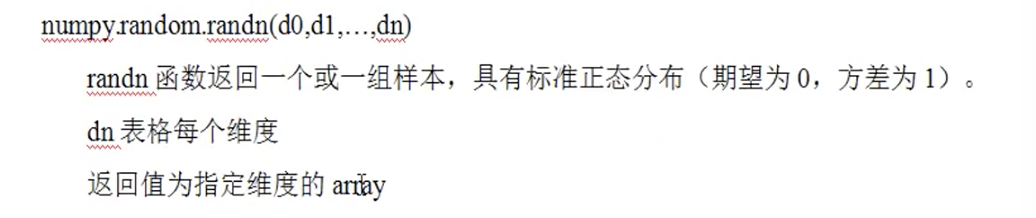
一维:
import numpy as np

a = np.random.randn()

print(a)

print(a.shape)

print(a.dtype)

print(type(a))
返回:
/Users/user/PycharmProjects/python3/venv/bin/python /Users/user/PycharmProjects/python3/test.py

[-0.07124224 -0.23748904 -0.66759342  0.78374469]

(,)

float64

<class 'numpy.ndarray'>

Process finished with exit code
二维:
import numpy as np

a = np.random.randn(,)

print(a)

print(a.shape)

print(a.dtype)

print(type(a))
返回:
/Users/user/PycharmProjects/python3/venv/bin/python /Users/user/PycharmProjects/python3/test.py

[[-1.01226872 -1.32755441 -2.26288293]

 [ 0.94123471  1.04692986  0.85342488]]

(, )

float64

<class 'numpy.ndarray'>

Process finished with exit code
三维:
import numpy as np

a = np.random.randn(,,)

print(a)

print(a.shape)

print(a.dtype)

print(type(a))
返回:
/Users/user/PycharmProjects/python3/venv/bin/python /Users/user/PycharmProjects/python3/test.py

[[[-0.10896308 -0.5064629 ]

  [-0.39916753  0.35598577]

  [-0.41677605 -0.41341541]]

 [[-1.12973198  0.26209766]

  [ 0.24671435 -0.2798904 ]

  [ 0.82366767  0.76207401]]]

(, , )

float64

<class 'numpy.ndarray'>

Process finished with exit code
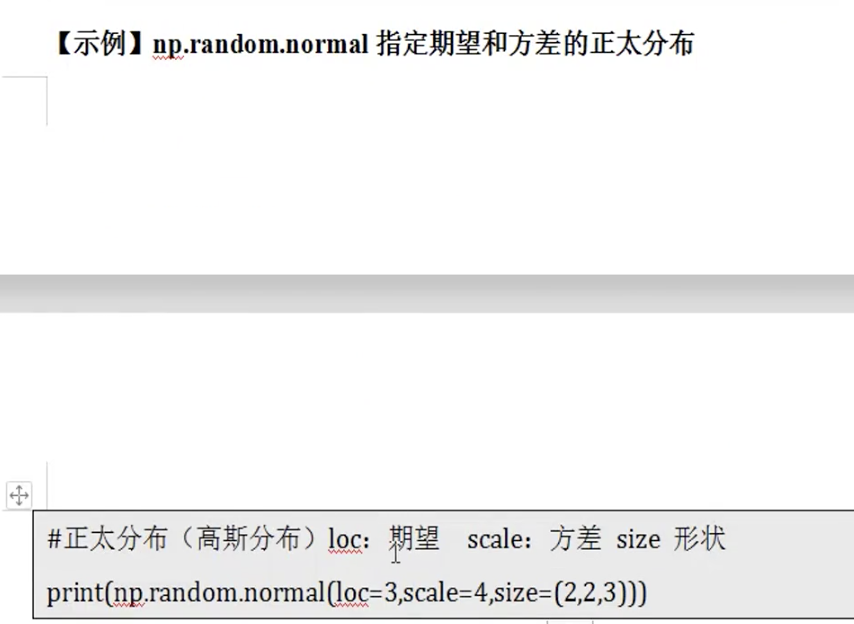
指定期望和方差的正太分布
默认期望为0.0,方差为1.0
import numpy as np

a = np.random.normal(loc=, scale=, size=(,))

print(a)

print(a.shape)

print(a.dtype)

print(type(a))
返回:
/Users/user/PycharmProjects/python3/venv/bin/python /Users/user/PycharmProjects/python3/test.py

[[-1.67615131  1.55790654  1.159349  ]

 [-0.84205285  3.53045653  1.2121123 ]]

(, )

float64

<class 'numpy.ndarray'>

Process finished with exit code
ndarray对象的属性


import numpy as np

a = np.random.normal(loc=, scale=, size=(,))

print(a)

print(a.ndim)

print(a.size)

print(a.dtype) #float64 = 8个字节

print(a.itemsize) #以字节为单位

print(a.shape)

print(type(a))
返回:
/Users/user/PycharmProjects/python3/venv/bin/python /Users/user/PycharmProjects/python3/test.py

[[ 5.34933995 -1.68167826  4.93713342]

 [ 4.68725164  5.71788803  5.41723111]]

float64

(, )

<class 'numpy.ndarray'>

Process finished with exit code
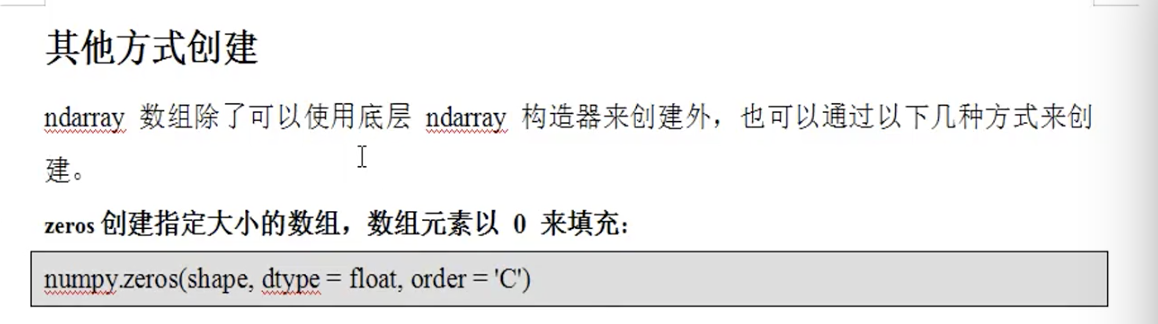
其他方式创建数组
import numpy as np

a = np.zeros((,))

#等价于a = np.zeros()

print(a)

print(a.ndim)

print(a.size)

print(a.dtype) #float64 = 8个字节

print(a.itemsize) #以字节为单位

print(a.shape)

print(type(a))
返回:
/Users/user/PycharmProjects/python3/venv/bin/python /Users/user/PycharmProjects/python3/test.py

[. . . . .]

float64

(,)

<class 'numpy.ndarray'>

Process finished with exit code

import numpy as np

a = np.ones((,))

print(a)

print(a.ndim)

print(a.size)

print(a.dtype) #float64 = 8个字节

print(a.itemsize) #以字节为单位

print(a.shape)

print(type(a))
返回:
/Users/user/PycharmProjects/python3/venv/bin/python /Users/user/PycharmProjects/python3/test.py

[[. . .]

 [. . .]]

float64

(, )

<class 'numpy.ndarray'>

Process finished with exit code

import numpy as np

a = np.empty((,))

print(a)

print(a.ndim)

print(a.size)

print(a.dtype) #float64 = 8个字节

print(a.itemsize) #以字节为单位

print(a.shape)

print(type(a))
返回:
/Users/user/PycharmProjects/python3/venv/bin/python /Users/user/PycharmProjects/python3/test.py

[[-3.10503618e+231 -2.32036278e+077  1.48219694e-323]

 [ 0.00000000e+000  0.00000000e+000  4.17201348e-309]]

float64

(, )

<class 'numpy.ndarray'>

Process finished with exit code
import numpy as np

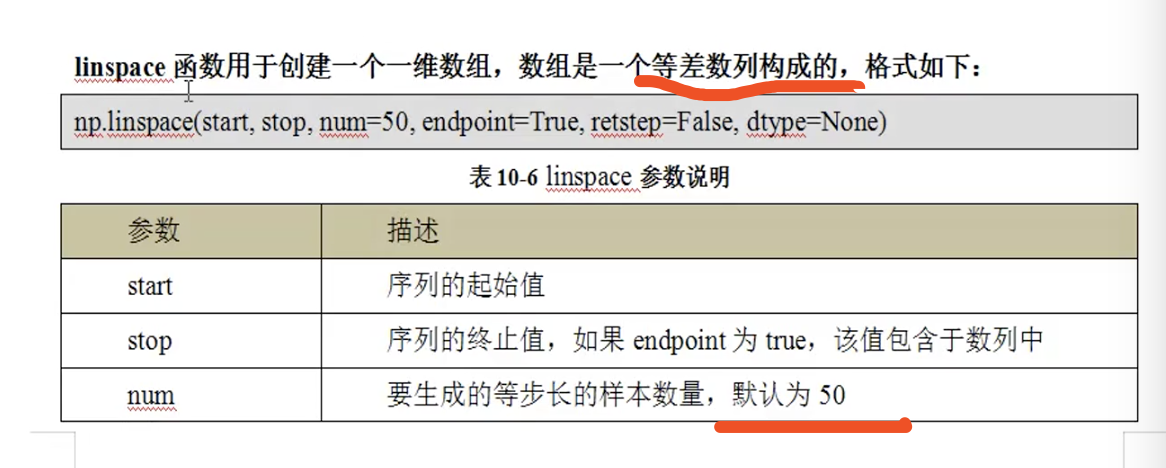
a = np.linspace(, )

print(a)

print(a.ndim)

print(a.size)

print(a.dtype) #float64 = 8个字节

print(a.itemsize) #以字节为单位

print(a.shape)

print(type(a))
返回:
/Users/user/PycharmProjects/python3/venv/bin/python /Users/user/PycharmProjects/python3/test.py

[ .          1.18367347  1.36734694  1.55102041  1.73469388  1.91836735

  2.10204082  2.28571429  2.46938776  2.65306122  2.83673469  3.02040816

  3.20408163  3.3877551   3.57142857  3.75510204  3.93877551  4.12244898

  4.30612245  4.48979592  4.67346939  4.85714286  5.04081633  5.2244898

  5.40816327  5.59183673  5.7755102   5.95918367  6.14285714  6.32653061

  6.51020408  6.69387755  6.87755102  7.06122449  7.24489796  7.42857143

  7.6122449   7.79591837  7.97959184  8.16326531  8.34693878  8.53061224

  8.71428571  8.89795918  9.08163265  9.26530612  9.44897959  9.63265306

  9.81632653 .        ]

float64

(,)

<class 'numpy.ndarray'>

Process finished with exit code

上面注释写错了,是底数为10,但是倍数就不一定了,比如下面的例子的意思就是在值范围[10,10^10]中间取20个数,使他们之间的倍数是相同的:
import numpy as np

a = np.logspace(, , , dtype=int)

print(a)

print(a.ndim)

print(a.size)

print(a.dtype) #float64 = 8个字节

print(a.itemsize) #以字节为单位

print(a.shape)

print(type(a))
返回:
/Users/user/PycharmProjects/python3/venv/bin/python /Users/user/PycharmProjects/python3/test.py

[

   ]

int64

(,)

<class 'numpy.ndarray'>

Process finished with exit code
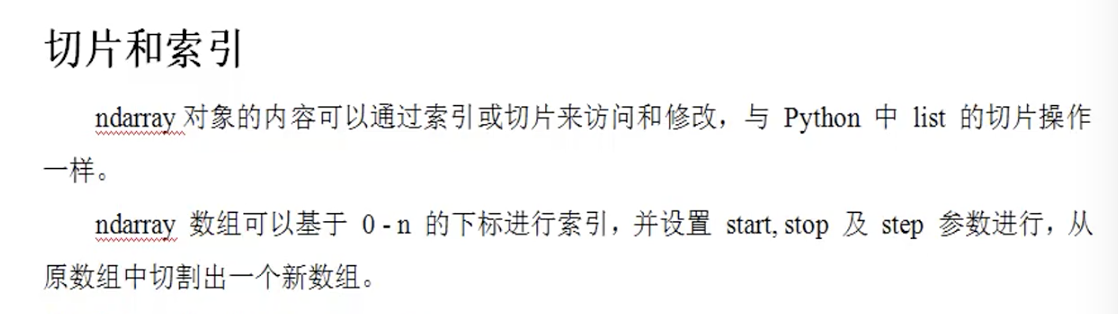
一维数组的切片索引:
import numpy as np

a = np.arange()

print(a)

print(a[])

print(a[-])

print(a[:])

print(a[::])

print(a[::-])

print(a[-:-:])

print(a[-:-:-])

print(a.ndim)

print(a.size)

print(a.dtype) #float64 = 8个字节

print(a.itemsize) #以字节为单位

print(a.shape)

print(type(a))
返回:
/Users/user/PycharmProjects/python3/venv/bin/python /Users/user/PycharmProjects/python3/test.py

[         ]

[         ]

[ ]

[         ]

[ ]

[ ]

int64

(,)

<class 'numpy.ndarray'>

Process finished with exit code
二维的切片和索引
[行的切片,列的切片 ] = [start:stop:step,start:stop:step]
import numpy as np

a = np.arange(, )

a = a.reshape(,)

print(a)

#等价于

print(a[:,:])

print()

print(a[])

print(a[][])

print(a[:][])

#得到第二行,等价于

print(a[])

#也等价于下面的写法

print(a[][:])

print()

#想要得到第二列为:

print(a[:,])

#得到二三行的一二列

print(a[:,:])

print(a.ndim)

print(a.size)

print(a.dtype) #float64 = 8个字节

print(a.itemsize) #以字节为单位

print(a.shape)

print(type(a))
返回:
/Users/user/PycharmProjects/python3/venv/bin/python /Users/user/PycharmProjects/python3/test.py

[[     ]

 [     ]

 [     ]

 [  ]]

[[     ]

 [     ]

 [     ]

 [  ]]

[  ]

[  ]

[  ]

[  ]

[      ]

[[   ]

 [ ]]

int64

(, )

<class 'numpy.ndarray'>

Process finished with exit code
使用坐标获取:
import numpy as np

a = np.arange(, )

a = a.reshape(,)

print(a)

#第三行第二列

print(a[,])

#等价于

print(a[][])

print()

#同时获得第三行第二列,第四行第一列

print(np.array((a[,],a[,])))

#等价于

print(a[(,),(,)])

print()

print(a.ndim)

print(a.size)

print(a.dtype) #float64 = 8个字节

print(a.itemsize) #以字节为单位

print(a.shape)

print(type(a))
返回:
/Users/user/PycharmProjects/python3/venv/bin/python /Users/user/PycharmProjects/python3/test.py

[[     ]

 [     ]

 [     ]

 [  ]]

[  ]

[  ]

int64

(, )

<class 'numpy.ndarray'>

Process finished with exit code
索引为负数:
import numpy as np

a = np.arange(, )

a = a.reshape(,)

print(a)

#获取最后一行

print(a[-])

#行进行倒序

print(a[::-, :])

#行列都倒序

print(a[::-, ::-])

print()

print(a.ndim)

print(a.size)

print(a.dtype) #float64 = 8个字节

print(a.itemsize) #以字节为单位

print(a.shape)

print(type(a))
返回:
/Users/user/PycharmProjects/python3/venv/bin/python /Users/user/PycharmProjects/python3/test.py

[[     ]

 [     ]

 [     ]

 [  ]]

[  ]

[[  ]

 [     ]

 [     ]

 [     ]]

[[  ]

 [     ]

 [     ]

 [     ]]

int64

(, )

<class 'numpy.ndarray'>

Process finished with exit code
数组的复制

浅拷贝:
import numpy as np

a = np.arange(, ).reshape(,)

print(a)

print(id(a))

#获取一二行一二列

sub_a = a[:,:]

print(sub_a)

print(id(sub_a))

#修改切片的值

sub_a[][] =

print(a)

print(sub_a)#结果可见会影响原来数组,浅拷贝

print(a.ndim)

print(a.size)

print(a.dtype) #float64 = 8个字节

print(a.itemsize) #以字节为单位

print(a.shape)

print(type(a))
返回:
/Users/user/PycharmProjects/python3/venv/bin/python /Users/user/PycharmProjects/python3/test.py

[[     ]

 [     ]

 [     ]

 [  ]]

[[ ]

 [ ]]

[[      ]

 [        ]

 [        ]

 [     ]]

[[   ]

 [     ]]

int64

(, )

<class 'numpy.ndarray'>

Process finished with exit code
深拷贝——copy方法
import numpy as np

a = np.arange(, ).reshape(,)

print(a)

print(id(a))

#获取一二行一二列

sub_a = np.copy(a[:,:])

print(sub_a)

print(id(sub_a))

#修改切片的值

sub_a[][] =

print(a)

print(sub_a)#结果可见不会影响原来数组,深拷贝

print(a.ndim)

print(a.size)

print(a.dtype) #float64 = 8个字节

print(a.itemsize) #以字节为单位

print(a.shape)

print(type(a))
返回:
/Users/user/PycharmProjects/python3/venv/bin/python /Users/user/PycharmProjects/python3/test.py

[[     ]

 [     ]

 [     ]

 [  ]]

[[ ]

 [ ]]

[[     ]

 [     ]

 [     ]

 [  ]]

[[   ]

 [     ]]

int64

(, )

<class 'numpy.ndarray'>

Process finished with exit code
修改数组的维度

import numpy as np

#一维成二维

a = np.arange(, ).reshape(,)

print(a)

#一维变三维

c = np.reshape(a, (,,))

print(c)

#多维成一维:

d = a.reshape()

print(d)

e = a.reshape(-)

print(e)

print()

f = c.ravel()

print(f)

g = c.flatten()

print(g)

print()
返回:
/Users/user/PycharmProjects/python3/venv/bin/python /Users/user/PycharmProjects/python3/test.py

[[     ]

 [     ]

 [     ]

 [  ]]

[[[     ]

  [     ]]

 [[     ]

  [  ]]]

[                    ]

[                    ]

[                    ]

[                    ]
数组的拼接

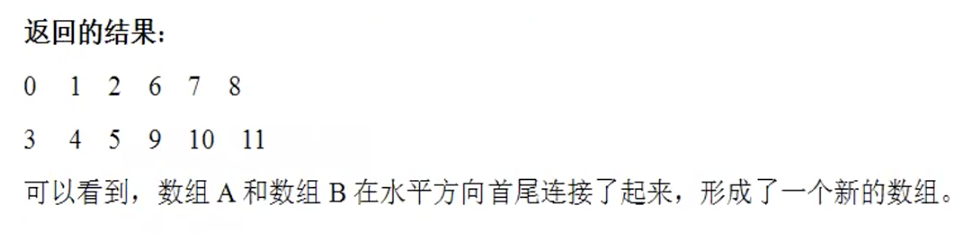
垂直的
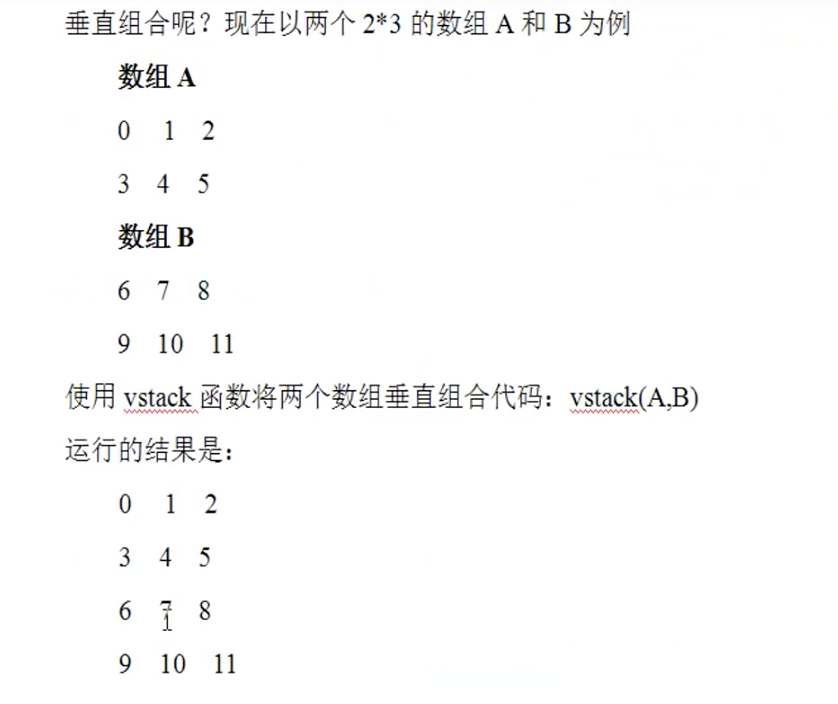
import numpy as np

#一维成二维

a = np.arange(, ).reshape(,)

b = np.arange(, ).reshape(,)

print(a)

print(b)

#水平拼接

c = np.hstack((a,b))

print(c)

#垂直拼接

d = np.vstack((a,b))

print(d)

print()
返回:
/Users/user/PycharmProjects/python3/venv/bin/python /Users/user/PycharmProjects/python3/test.py

[[  ]

 [  ]]

[[     ]

 [  ]]

[[           ]

 [        ]]

[[     ]

 [     ]

 [     ]

 [  ]]
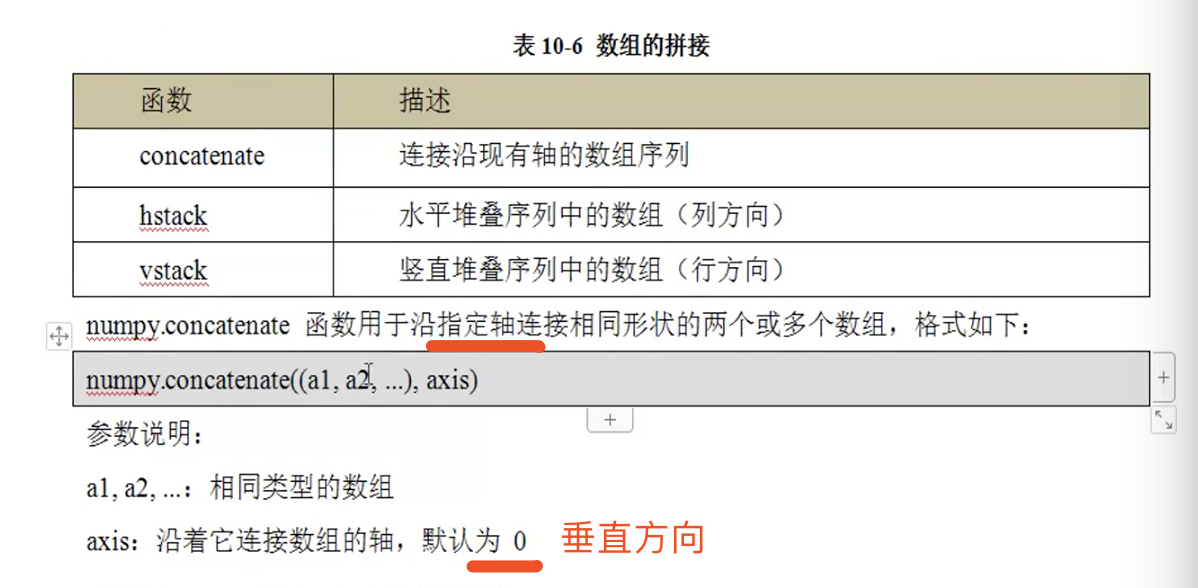
import numpy as np

#一维成二维

a = np.arange(, ).reshape(,)

b = np.arange(, ).reshape(,)

print(a)

print(b)

#垂直方向

e = np.concatenate((a,b))

print(e)

#水平方向

f = np.concatenate((a,b), axis=)

print(f)
返回:
/Users/user/PycharmProjects/python3/venv/bin/python /Users/user/PycharmProjects/python3/test.py

[[  ]

 [  ]]

[[     ]

 [  ]]

[[     ]

 [     ]

 [     ]

 [  ]]

[[           ]

 [        ]]
三维数组有三个轴=0,1,2
import numpy as np

#一维成二维

a = np.arange(, ).reshape(,,)

b = np.arange(, ).reshape(,,)

print(a)

print(b)

print()

#垂直方向

e = np.concatenate((a,b))

print(e)

print(e.shape)

#水平方向

f = np.concatenate((a,b), axis=)

print(f)

print(f.shape)

g = np.concatenate((a,b), axis=)

print(g)

print(g.shape)

print()
返回:
/Users/user/PycharmProjects/python3/venv/bin/python /Users/user/PycharmProjects/python3/test.py

[[[  ]

  [  ]]]

[[[     ]

  [  ]]]

[[[     ]

  [     ]]

 [[     ]

  [  ]]]

(, , )

[[[     ]

  [     ]

  [     ]

  [  ]]]

(, , )

[[[           ]

  [        ]]]

(, , )
数组的分隔

import numpy as np

#一维成二维

x = np.arange(, )

a = np.split(x,) #平均分割成3份,值个数够分隔成这么多,否则报错,返回一个列表对象

print(a)

print(a[])

print(type(a))

b = np.split(x,[,]) #以索引位置值3和值5作为分割线,按位置分割

print(b)

print(type(b))
返回:
/Users/user/PycharmProjects/python3/venv/bin/python /Users/user/PycharmProjects/python3/test.py

[array([, ]), array([, ]), array([, ])]

[ ]

<class 'list'>

[array([, , ]), array([, ]), array([])]

<class 'list'>

Process finished with exit code
二维数组:
import numpy as np

#一维成二维

x = np.arange(, ).reshape((,))

print(x)

print()

#垂直分隔,行分隔,平均分隔,

a = np.split(x, , axis=) #平均分割成2份,值个数够分隔成这么多,否则报错,返回一个列表对象

print(a)

print(a[])

print(type(a))

print()

#垂直分隔,行分隔,行索引位置分隔,

b = np.split(x,[,], axis=) #以值3和值5作为分割线

print(b)

print(type(b))

print()

#水平方向,列分隔,平均分隔

c = np.split(x, , axis=) #平均分割成2份,值个数够分隔成这么多,否则报错,返回一个列表对象

print(c)

print(type(c))

print()

#水平方向,列分隔,位置分隔

d = np.split(x,[,], axis=) #以列索引值3和值5作为分割线

print(d)

print(type(d))

print()
返回:
/Users/user/PycharmProjects/python3/venv/bin/python /Users/user/PycharmProjects/python3/test.py

[[       ]

 [       ]

 [    ]

 [   ]]

[array([[, , , ],

       [, , , ]]), array([[ , , , ],

       [, , , ]])]

[[   ]

 [   ]]

<class 'list'>

[array([[, , , ]]), array([[, , , ]]), array([[ , , , ],

       [, , , ]])]

<class 'list'>

[array([[ ,  ],

       [ ,  ],

       [ , ],

       [, ]]), array([[ ,  ],

       [ ,  ],

       [, ],

       [, ]])]

<class 'list'>

[array([[ ,  ],

       [ ,  ],

       [ , ],

       [, ]]), array([[ ],

       [ ],

       [],

       []]), array([[ ],

       [ ],

       [],

       []])]

<class 'list'>

Process finished with exit code
hsplit()方法
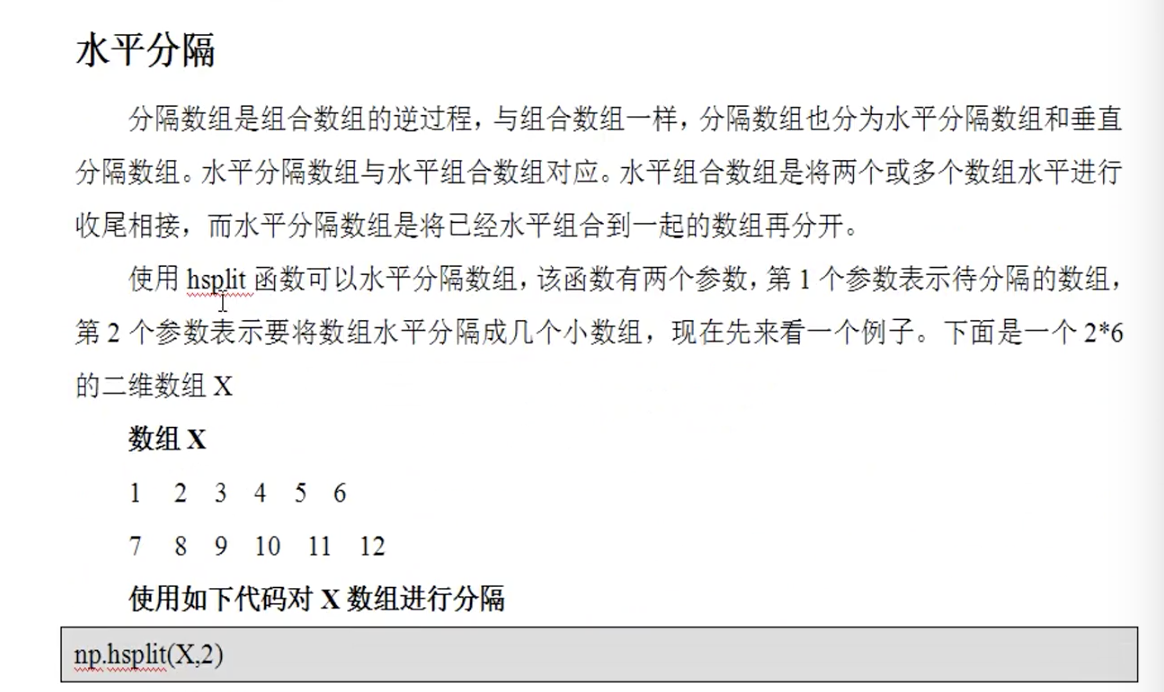
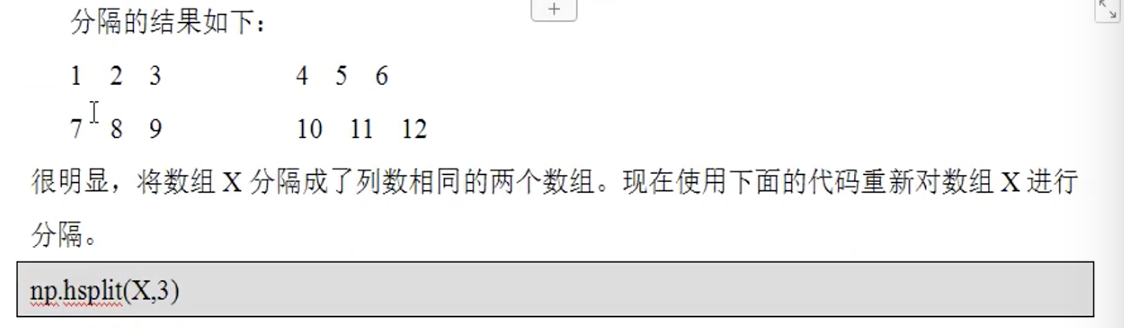
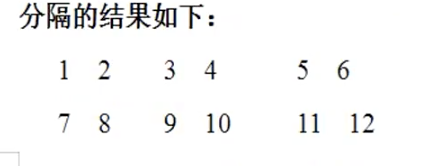

也可以按位置分割,就是省略了axis参数:
vsplit()方法

上面结果有错,应为:
上面的例子等价于:
import numpy as np

#一维成二维

x = np.arange(, ).reshape((,))

print(x)

print()

#垂直分隔,行分隔,平均分隔,

a = np.vsplit(x, ) #平均分割成2份,值个数够分隔成这么多,否则报错,返回一个列表对象

print(a)

print(a[])

print(type(a))

print()

#垂直分隔,行分隔,行索引位置分隔,

b = np.vsplit(x,[,]) #以值3和值5作为分割线

print(b)

print(type(b))

print()

#水平方向,列分隔,平均分隔

c = np.hsplit(x, ) #平均分割成2份,值个数够分隔成这么多,否则报错,返回一个列表对象

print(c)

print(type(c))

print()

#水平方向,列分隔,位置分隔

d = np.hsplit(x,[,]) #以列索引值3和值5作为分割线

print(d)

print(type(d))

print()
数组的转置——transpose
import numpy as np

a = np.arange(,).reshape((,))

print(a, a.shape)

print()

print('转置后a[i][j] -> a[j][i]')

b = a.transpose()

print(b, b.shape)

print()

#对二维来说,还可以使用.T

print(a.T)

print()

#numpy中的transpose方法

print(np.transpose(a))

print()

#多维数组进行转置

c = a.reshape((,,))

print(c, c.shape)

print()

print('a[i][j][k] -> a[k][j][i]')

d = np.transpose(c)

print(d, d.shape)

print()

#指定维度位置的变换

e = np.transpose(c, (,,)) #即a[i][j][k] -> a[j][i][k]

print(e, e.shape)

print()
返回:
/Users/user/PycharmProjects/python3/venv/bin/python /Users/user/PycharmProjects/python3/test.py

[[           ]

 [        ]

 [     ]

 [     ]] (, )

转置后a[i][j] -> a[j][i]

[[     ]

 [     ]

 [     ]

 [    ]

 [    ]

 [    ]] (, )

[[     ]

 [     ]

 [     ]

 [    ]

 [    ]

 [    ]]

[[     ]

 [     ]

 [     ]

 [    ]

 [    ]

 [    ]]

[[[       ]

  [       ]

  [    ]]

 [[   ]

  [   ]

  [   ]]] (, , )

a[i][j][k] -> a[k][j][i]

[[[  ]

  [  ]

  [  ]]

 [[  ]

  [  ]

  [ ]]

 [[  ]

  [  ]

  [ ]]

 [[  ]

  [  ]

  [ ]]] (, , )

[[[       ]

  [   ]]

 [[       ]

  [   ]]

 [[    ]

  [   ]]] (, , )

Process finished with exit code
函数1
算术函数-广播机制

import numpy as np

a = np.arange(, dtype=float).reshape(,)

b = np.array([,,])

print('加法')

print(np.add(a,b))

print(a+b)

print()

print('减法')

print(np.subtract(b,a))

print(b-a)

print()

print('乘法')

print(np.multiply(a,b))

print(a*b)

print()

print('除法')

print(np.divide(a,b))

print(a/b)
返回:
/Users/user/PycharmProjects/python3/venv/bin/python /Users/user/PycharmProjects/python3/test.py

加法

[[. . .]

 [. . .]

 [. . .]]

[[. . .]

 [. . .]

 [. . .]]

减法

[[.  .  .]

 [ .  .  .]

 [ .  .  .]]

[[.  .  .]

 [ .  .  .]

 [ .  .  .]]

乘法

[[ . . .]

 [. . .]

 [. . .]]

[[ . . .]

 [. . .]

 [. . .]]

除法

[[.  0.1 0.2]

 [0.3 0.4 0.5]

 [0.6 0.7 0.8]]

[[.  0.1 0.2]

 [0.3 0.4 0.5]

 [0.6 0.7 0.8]]

Process finished with exit code
使用函数的好处是可以指定输出结果
import numpy as np

a = np.arange(, dtype=float).reshape(,)

print(a)

y = np.empty((,))

print(y) #刚好保存的是之前的值

np.multiply(a,, out=y)

print(y)
返回:
/Users/user/PycharmProjects/python3/venv/bin/python /Users/user/PycharmProjects/python3/test.py

[[. . .]

 [. . .]

 [. . .]]

[[. . .]

 [. . .]

 [. . .]]

[[ . . .]

 [. . .]

 [. . .]]

Process finished with exit code
数学函数

import numpy as np

a = np.array([,,,,])

print(np.sin(a*np.pi/))
返回:
/Users/user/PycharmProjects/python3/venv/bin/python /Users/user/PycharmProjects/python3/test.py

[.         0.5        0.70710678 0.8660254  .        ]

Process finished with exit code
四舍五入:

import numpy as np

a = np.array([1.0, 4.55, , 0.567, 25.532])

print(np.around(a))

print(np.around(a, decimals=))

print(np.around(a, decimals=-))

print(np.floor(a))

print(np.ceil(a))
返回:
/Users/user/PycharmProjects/python3/venv/bin/python /Users/user/PycharmProjects/python3/test.py

[  .   . .   .  .]

[  .    4.6 .    0.6  25.5]

[  .   . .   .  .]

[  .   . .   .  .]

[  .   . .   .  .]

Process finished with exit code
统计函数

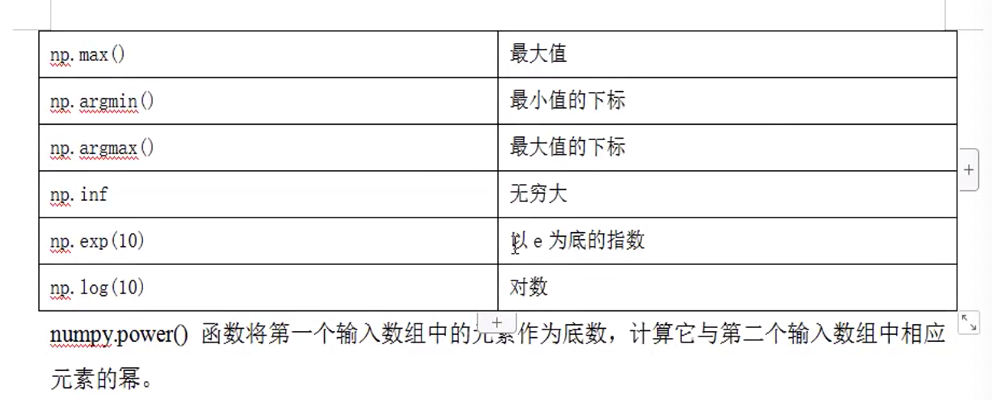
import numpy as np

a = np.array([,,,])

b = np.array([,,,])

print(np.sum(a))

print(np.prod(a))

print(np.mean(a))

print(np.std(a))

print(np.var(a))

print()

#多维的都可以指定轴

print(np.median(a)) #如果顺序是乱的,那么会自己排序

d = np.arange(,).reshape(,)

print(d)

print(np.median(d, axis=)) #垂直轴

print(np.median(d, axis=)) #水平轴

print()

print(np.power(a,b))

print(np.power(a,))

print(np.min(a))

print(np.max(a))

print(np.argmin(a))

print(np.argmax(a))

print(np.exp(a)) #e^a

c = np.array([,,np.e])

print(np.log(c)) #以e为底数的对数

print()

x = np.arange()

print(x)

y = np.zeros()

print(y)

np.power(x,, out=y[:]) #指明存放位置

print(y)
返回:
/Users/user/PycharmProjects/python3/venv/bin/python /Users/user/PycharmProjects/python3/test.py

3.5

1.118033988749895

1.25

3.5

[[       ]

 [       ]

 [    ]]

[. . . .]

[ 2.5  6.5 10.5]

[        ]

[     ]

[  7.3890561   20.08553692 148.4131591   54.59815003]

[2.30258509 2.30258509 .        ]

[    ]

[. . . . . . . . . .]

[ .  .  .  .  . .  .  .  .  .]

Process finished with exit code
python-learning-第二季-数据处理numpy的更多相关文章
- python数据分析第二版:numpy
一:Numpy # 数组和列表的效率问题,谁优谁劣 # 1.循环遍历 import numpy as np import time my_arr = np.arange(1000000) my_lis ...
- 一起做RGB-D SLAM 第二季 (一)
小萝卜:师兄!过年啦!是不是很无聊啊!普通人的生活就是赚钱花钱,实在是很没意思啊! 师兄:是啊…… 小萝卜:他们都不懂搞科研和码代码的乐趣呀! 师兄:可不是嘛…… 小萝卜:所以今年过年,我们再做一个S ...
- python数据分析---第04章 NumPy基础:数组和矢量计算
NumPy(Numerical Python的简称)是Python数值计算最重要的基础包.大多数提供科学计算的包都是用NumPy的数组作为构建基础. NumPy的部分功能如下: ndarray,一个具 ...
- 小象学院Python数据分析第二期【升级版】
点击了解更多Python课程>>> 小象学院Python数据分析第二期[升级版] 主讲老师: 梁斌 资深算法工程师 查尔斯特大学(Charles Sturt University)计 ...
- Python:机器学习三剑客之 NumPy
一.numpy简介 Numpy是高性能科学计算和数据分析的基础包,机器学习三剑客之一.Numpy库中最核心的部分是ndarray 对象,它封装了同构数据类型的n维数组.部分功能如下: ndarray, ...
- linux python 安装 nose lapack atlas numpy scipy
linux python 安装 nose lapack atlas numpy scipy --http://lib.csdn.net/article/python/1262 作者:maple1149 ...
- 《舌尖上的中国》第二季今日首播了,天猫食品也跟着首发,借力使力[bubuko.com]
天猫旗下的天猫食品与央视CCTV-1栏目<舌尖上的中国>第二季(以下简称“舌尖2”)达成合作,天猫食品成为舌尖2独家合作平台,同步首发每期 节目中的食材和美食菜谱,舌尖2摄制组还将为同步上 ...
- python课程第二周重点记录
python课程第二周重点记录 1.元组的元素不可被修改,元组的元素的元素可以被修改(字典在元组中,字典的值可以被修改) 2.个人感觉方便做加密解密 3.一些方法的使用 sb = "name ...
- JAVA入门第二季(mooc-笔记)
相关信息 /** * @subject <学习与创业>作业1 * @author 信管1142班 201411671210 赖俊杰 * @className <JAVA入门第二季&g ...
随机推荐
- 《你说对就队》第九次团队作业:Beta冲刺与验收准备
<你说对就队>第九次团队作业:Beta冲刺与验收准备 项目 内容 这个作业属于哪个课程 [教师博客主页链接] 这个作业的要求在哪里 [作业链接地址] 团队名称 <你说对就队> ...
- maven 热部署
在eclipse修改项目时,为了能在dos界面自动跟踪运行项目,可以进行热部署 需要安装热部署相关jre包的依赖,在pom.xml中添加以下依赖代码
- iota妙用
itoa可以套公式,下面的依旧会按照公式运算 package main import "fmt" func main() { const ( b = 1 << (10 ...
- codepush安装
https://github.com/lisong/code-push-server/blob/master/docs/README.md =====> 安装mysql下载mysql yum r ...
- Linux rpm安装指定安装路径
可以使用prefix参数. rpm -i –prefix=/home/gpadmin greenplum-db-6.0.0-rhel6-x86_64.rpm 将greenplum-db-6.0. ...
- 机器学习---用python实现最小二乘线性回归算法并用随机梯度下降法求解 (Machine Learning Least Squares Linear Regression Application SGD)
在<机器学习---线性回归(Machine Learning Linear Regression)>一文中,我们主要介绍了最小二乘线性回归算法以及简单地介绍了梯度下降法.现在,让我们来实践 ...
- git添加公钥后报错sign_and_send_pubkey: signing failed: agent refused operation的解决办法
在服务器添加完公钥后报错 sign_and_send_pubkey: signing failed: agent refused operation 这个时候我们只要执行下 eval "$( ...
- 7、CentOS6 编译安装
LAMP组合的编译安装: httpd*php modules:把php编译成httpd的DSO对象 prefork:libphp5 event,worker : libphp5-zts cgi fpm ...
- GO获取随机数
使用的"math/rand"包. 基本随机数 a := rand.Int() b := rand.Intn(100) //生成0-99之间的随机数 fmt.Println(a) f ...
- jQuery学习笔记——事件
何为事件 就是你的鼠标,键盘等对网页元素进行的操作. 常见事件 鼠标事件 键盘事件 表单事件 文档/窗口事件 click keypress submit load dblclick keydown c ...