
docker 启动 容器----bootstrap checks failed
错误信息:
bootstrap checks failed
解决方法:
1.修改elasticsearch.yml配置文件,允许外网访问。
vim config/elasticsearch.yml,增加 network.bind_host: 0.0.0.0 或者是 network.host: 0.0.0.0。
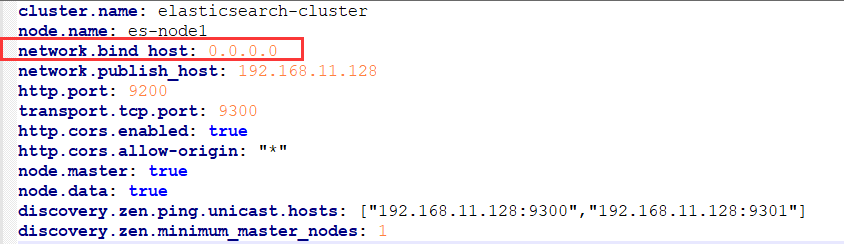
2.启动失败,检查没有通过,报错
[2019-07-14T17:44:59,658][INFO ][o.e.b.BootstrapChecks ] [gFOuNlS] bound or publishing to a non-loopback address, enforcing bootstrap checks
ERROR: [2] bootstrap checks failed
[1]: max file descriptors [4096] for elasticsearch process is too low, increase to at least [65536]
[2]: max virtual memory areas vm.max_map_count [65530] is too low, increase to at least [262144]
[1]: max file descriptors [4096] for elasticsearch process is too low, increase to at least [65536]
编辑 /etc/security/limits.conf,再配置文件下面追加以下内容;
* soft nofile 65536
* hard nofile 65536
此文件修改后需要重新登录用户,才会生效。
[2]: max virtual memory areas vm.max_map_count [65530] is too low, increase to at least [262144]
编辑 /etc/sysctl.conf,追加以下内容:
vm.max_map_count=655360
保存后,执行:
sysctl -p
重新启动容器,成功。
参考博客:https://www.cnblogs.com/yehui/p/9087845.html
docker 启动 容器----bootstrap checks failed的更多相关文章
- ElasticSearch启动报错,bootstrap checks failed
修改elasticsearch.yml配置文件,允许外网访问. vim config/elasticsearch.yml# 增加 network.host: 0.0.0.0 启动失败,检查没有通过,报 ...
- 启动Sonar报错,ERROR: [1] bootstrap checks failed [1]: system call filters failed to install
错误提示信息: ERROR: [1] bootstrap checks failed[1]: system call filters failed to install; check the logs ...
- 【已解决】ERROR: bootstrap checks failed memory locking requested for elasticsearch process but memory is not locked
官网说明: elasticsearch官网建议生产环境需要设置bootstrap.memory_lock: true 官网的解释 是:发生系统swapping的时候ES节点的性能会非常差,也会影响节点 ...
- ES解决bootstrap checks failed, memory locking requested for elasticsearch process but memory is not locked问题
问题描述: ERROR: [1] bootstrap checks failed[1]: memory locking requested for elasticsearch process but ...
- Error response from daemon ... no space left on device docker启动容器服务报错
docker 启动容器服务的时候,报错no space left on device 1. 检查磁盘是否用光 3.检查inode是否耗光,从截图看到是inode耗光导致出现问题: 进入到/run里面看 ...
- MySQL安装+Navicat_Premium(安装+破解)+Navicat_Premium中MySQL的localhost不能正常连接+不能连接Docker启动容器中的MySQL
MySQL安装 安装MySQL 我这里安装的是 MySQL 8.0 Command Line Client 下载+安装 详情见 https://www.cnblogs.com/taopanfeng/p ...
- docker启动容器报错:iptables failed
问题描述: 启动Docker容器的时候 Error response / --dport -j DNAT --to-destination ! -i docker0: iptables: No cha ...
- Centos 7 docker 启动容器 iptables 报 No chain/target/match by that name
我也遇到这个问题,原因时启动docker服务时没有启动iptables服务导致的(有些docker需要再iptables开放有些端口)解决方法1.启动iptables服务 CentOS 7 以下版本 ...
- docker启动报错iptables failed: -重建docker0网络恢复
# docker启动报错 [root@localhost mysqlconf]# docker run -d -p 8080:8080 --link zookeeper:zookeeper -e du ...
随机推荐
- ueditor百度编辑器上传图片出现后端未配置好,不能正常加载插件
- JVM 初始化阶段的重要意义分析
1.创建一个Mytest6类和Singleton类 public class MyTest6 { public static void main(String[] args) { Singleton ...
- for(auto i : v)遍历容器元素
c++11的新特性,v是一个可遍历的容器或流,比如vector类型,i就用来在遍历过程中获得容器里的每一个元素. for(auto i:v) for(auto &i:v) 代码1:#inclu ...
- springboot rabbitMQ 死信对列 实现消息的可靠消费
1 引入 maven 依赖 <dependency> <groupId>org.springframework.boot</groupId> <artifac ...
- flutter Tooltip轻量级操作提示
Tooltip是继承于StatefulWidget的一个Widget,它并不需要调出方法,当用户长按被Tooltip包裹的Widget时,会自动弹出相应的操作提示. import 'package:f ...
- 一、jenkins下载及安装
一.安装 官网地址:https://jenkins.io/zh/ 1.下载war包,放到tomcat——>webapps下,双击bin——>startup.bat启动 2.打开命令提示符. ...
- opencv图片旋转90度
#include<iostream> #include <opencv2/opencv.hpp> using namespace std; using namespace cv ...
- Spring cloud微服务安全实战_汇总
Spring cloud微服务安全实战 https://coding.imooc.com/class/chapter/379.html#Anchor Spring Cloud微服务安全实战-1-1 课 ...
- Spring 定时任务 注解版
Task类: ManageSql.Java对应代码: package com.axb.cheney.task; import java.sql.ResultSet; import java.sql.S ...
- 报错:(未解决)Opening socket connection to server master/192.168.52.26:2181. Will not attempt to authenticate using SASL (unknown error)
报错背景: CDH集群中,将kafka和Flume整合,将kafka的数据发送给Flume消费. 启动kafka的时候正常,但是启动Flume的时候出现了报错现象. 报错现象: DH--.cdh5./ ...