
docker 启动 容器----bootstrap checks failed
错误信息:
bootstrap checks failed
解决方法:
1.修改elasticsearch.yml配置文件,允许外网访问。
vim config/elasticsearch.yml,增加 network.bind_host: 0.0.0.0 或者是 network.host: 0.0.0.0。
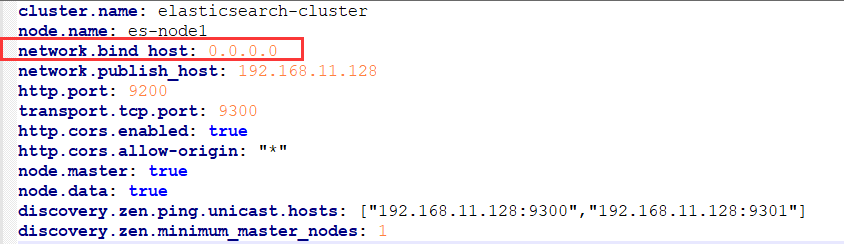
2.启动失败,检查没有通过,报错
[2019-07-14T17:44:59,658][INFO ][o.e.b.BootstrapChecks ] [gFOuNlS] bound or publishing to a non-loopback address, enforcing bootstrap checks
ERROR: [2] bootstrap checks failed
[1]: max file descriptors [4096] for elasticsearch process is too low, increase to at least [65536]
[2]: max virtual memory areas vm.max_map_count [65530] is too low, increase to at least [262144]
[1]: max file descriptors [4096] for elasticsearch process is too low, increase to at least [65536]
编辑 /etc/security/limits.conf,再配置文件下面追加以下内容;
* soft nofile 65536
* hard nofile 65536
此文件修改后需要重新登录用户,才会生效。
[2]: max virtual memory areas vm.max_map_count [65530] is too low, increase to at least [262144]
编辑 /etc/sysctl.conf,追加以下内容:
vm.max_map_count=655360
保存后,执行:
sysctl -p
重新启动容器,成功。
参考博客:https://www.cnblogs.com/yehui/p/9087845.html
docker 启动 容器----bootstrap checks failed的更多相关文章
- ElasticSearch启动报错,bootstrap checks failed
修改elasticsearch.yml配置文件,允许外网访问. vim config/elasticsearch.yml# 增加 network.host: 0.0.0.0 启动失败,检查没有通过,报 ...
- 启动Sonar报错,ERROR: [1] bootstrap checks failed [1]: system call filters failed to install
错误提示信息: ERROR: [1] bootstrap checks failed[1]: system call filters failed to install; check the logs ...
- 【已解决】ERROR: bootstrap checks failed memory locking requested for elasticsearch process but memory is not locked
官网说明: elasticsearch官网建议生产环境需要设置bootstrap.memory_lock: true 官网的解释 是:发生系统swapping的时候ES节点的性能会非常差,也会影响节点 ...
- ES解决bootstrap checks failed, memory locking requested for elasticsearch process but memory is not locked问题
问题描述: ERROR: [1] bootstrap checks failed[1]: memory locking requested for elasticsearch process but ...
- Error response from daemon ... no space left on device docker启动容器服务报错
docker 启动容器服务的时候,报错no space left on device 1. 检查磁盘是否用光 3.检查inode是否耗光,从截图看到是inode耗光导致出现问题: 进入到/run里面看 ...
- MySQL安装+Navicat_Premium(安装+破解)+Navicat_Premium中MySQL的localhost不能正常连接+不能连接Docker启动容器中的MySQL
MySQL安装 安装MySQL 我这里安装的是 MySQL 8.0 Command Line Client 下载+安装 详情见 https://www.cnblogs.com/taopanfeng/p ...
- docker启动容器报错:iptables failed
问题描述: 启动Docker容器的时候 Error response / --dport -j DNAT --to-destination ! -i docker0: iptables: No cha ...
- Centos 7 docker 启动容器 iptables 报 No chain/target/match by that name
我也遇到这个问题,原因时启动docker服务时没有启动iptables服务导致的(有些docker需要再iptables开放有些端口)解决方法1.启动iptables服务 CentOS 7 以下版本 ...
- docker启动报错iptables failed: -重建docker0网络恢复
# docker启动报错 [root@localhost mysqlconf]# docker run -d -p 8080:8080 --link zookeeper:zookeeper -e du ...
随机推荐
- openstack kvm cannot set up guest memory 'pc.ram': Cannot allocate memory
Kvm:启动报错:error: internal error: process exited while connecting to monitor: 2018-11-12T01:47:14.9933 ...
- Flutter -------- 网络请求之HttpClient
今天来说说Flutter中的网络请求,HttpClient网络请求,包含get,post get var data; _get() async { Map newTitle; var response ...
- 如何发布H5界面可以让公网访问
本文链接:https://blog.csdn.net/u013310119/article/details/81233560问题背景:手机APP里的H5界面要发布到公网,提供给第三方APP调用. 解决 ...
- linux后台启动springboot并指定日志文件名称
如果用nohup启动jar包的话,默认的日志文件就是nohup.out,那么如果启动多个jar包的话,看日志文件就麻烦了,因为他们都会写入到nohup.out文件中. 所以我们来指定一下不同jar包的 ...
- Java8的时间日期API
原先的时间 api 大部分已经过时了 Date构造器 需要传入年月日 但是对时间的加减操作比较麻烦 Calenda 加减比较方便 使用 LocalDate. LocalTime. LocalDa ...
- Python - Django - 命名 URL 和反向解析 URL
命名 URL: test.html: <!DOCTYPE html> <html lang="en"> <head> <meta char ...
- 【kubeconfig】kubectl命令所使用的集群访问文件
kubectl默认会从$HOME/.kube目录下查找文件名为 config 的文件,也可以通过设置环境变量 KUBECONFIG 或者通过设置 --kubeconfig 去指定其它 kubeconf ...
- C语言中结构体的构造函数
示例代码: #include <iostream> using namespace std; struct Node { int x, y, z; Node(int _x, int _y, ...
- Word中如何加载EndNote
在百度中搜索了很多解决方案,都不尽相同忙了一上午也没解决,然后搁浅,吃过午饭回来在安装目录下找到如下exe文件三四步点击搞定 所以,有时候问题出现了长时间没解决,可以换下环境出去溜达一圈说不定就茅塞顿 ...
- vue引入iconfont报错
参考链接:https://blog.csdn.net/weixin_37215881/article/details/89237213