
react 提示消息队列 (支持动态添加,删除,多实例化)
import React from 'react'

import PropTypes from 'prop-types'

import AnimationOperateFeedbackInfo from '../AnimationOperateFeedbackInfo'

import OperateFeedbackInfo from '../OperateFeedbackInfo'

import './index.less'

const OPERATE_ARRAY_MAX_LENGTH = 5

export default function AssistantOperateFeedbackArea({

  processingOperateList, failedOperateList, onClickCleanFailedOperateBtn, animationEndCallback,

}) {

  const operateWrapStyle = {

    width: '200px',

    height: '28px',

    color: '#fff',

  }

  return (

    <div className="assistant-operate-feedback-area-wrap">

      {

        processingOperateList.length > 0 && (

          <div

            className="operate-feedback-area"

            style={{

              // queueMaxLength + 1 省略区域高度

              height: `${processingOperateList.length > OPERATE_ARRAY_MAX_LENGTH ? (OPERATE_ARRAY_MAX_LENGTH + 1) * 28 : processingOperateList.length * 28}px`,

            }}

          >

            {

              processingOperateList.slice(0, OPERATE_ARRAY_MAX_LENGTH).map((item) => {

                return (

                  <AnimationOperateFeedbackInfo

                    operateId={item.operateId}

                    operate={item.operate}

                    operateType={item.state}

                    animationEndCallback={animationEndCallback}

                    style={operateWrapStyle}

                    key={item.operateId}

                  />

                )

              })

            }

            {

              processingOperateList.length > OPERATE_ARRAY_MAX_LENGTH && (

                <div

                  style={operateWrapStyle}

                  className="ellipsis-operate-info"

                >

                  ... ...

                </div>

              )

            }

          </div>

        )

      }

      {

        failedOperateList.length > 0 && (

          <div

            className="operate-feedback-area"

            style={{

              // queueMaxLength + 1 省略区域高度

              height: `${failedOperateList.length > OPERATE_ARRAY_MAX_LENGTH ? (OPERATE_ARRAY_MAX_LENGTH + 1) * 28 : failedOperateList.length * 28}px`,

            }}

          >

            {

              failedOperateList.slice(0, OPERATE_ARRAY_MAX_LENGTH).map((item) => {

                return (

                  <div className="operate-feedback-info-wrap">

                    <OperateFeedbackInfo

                      operate={item.operate}

                      style={operateWrapStyle}

                      iconRotate={false}

                      iconPath={require('~/shared/assets/image/red-white-warn-icon-60-60.png')}

                    />

                  </div>

                )

              })

            }

            <div

              className="clean-failed-feedback-info-btn"

              onClick={onClickCleanFailedOperateBtn}

              tabIndex={0}

              role="button"

            >

              清除所有异常

            </div>

            {

              failedOperateList.length > OPERATE_ARRAY_MAX_LENGTH && (

                <div

                  style={operateWrapStyle}

                  className="ellipsis-operate-info"

                >

                  ... ...

                </div>

              )

            }

          </div>

        )

      }

      {

        processingOperateList.length === 0 && failedOperateList.length === 0 && (

          <div className="no-feedback-info-tip">

            暂无对教师端操作

          </div>

        )

      }

    </div>

  )

}

AssistantOperateFeedbackArea.propTypes = {

  processingOperateList: PropTypes.array,

  failedOperateList: PropTypes.array,

  onClickCleanFailedOperateBtn: PropTypes.func,

  animationEndCallback: PropTypes.func,

}

AssistantOperateFeedbackArea.defaultProps = {

  processingOperateList: [],

  failedOperateList: [],

  animationEndCallback: () => {},

  onClickCleanFailedOperateBtn: () => {},

}
import React, { useRef, useLayoutEffect } from 'react'

import PropTypes from 'prop-types'

import CX from 'classnames'

import './index.less'

export default function OperateFeedbackInfo({

  operate, iconPath, style, iconRotate, resetAnimation,

}) {

  const imgRef = useRef(null)

  useLayoutEffect(() => {

    if (resetAnimation === true) {

      const imgElem = imgRef.current

      imgElem.className = ''

      // 触发一次重绘 同步所有旋转的icon动画

      imgElem.height = imgElem.offsetHeight

      imgElem.className = 'operate-icon-rotate'

    }

  })

  return (

    <div

      className="operate-feedback-Info"

      style={style}

    >

      <div className="operate-feedback-content">{operate}</div>

      <div className="operate-feedback-state-icon">

        <img

          className={CX({

            'operate-icon-rotate': iconRotate,

          })}

          src={iconPath}

          alt=""

          ref={imgRef}

        />

      </div>

    </div>

  )

}

OperateFeedbackInfo.propTypes = {

  operate: PropTypes.string.isRequired,

  iconPath: PropTypes.string.isRequired,

  iconRotate: PropTypes.bool,

  resetAnimation: PropTypes.bool,

  style: PropTypes.object,

}

OperateFeedbackInfo.defaultProps = {

  style: {},

  resetAnimation: false,

  iconRotate: false,

}
import React from 'react'

import PropTypes from 'prop-types'

import CX from 'classnames'

import OperateFeedbackInfo from '../OperateFeedbackInfo'

import './index.less'

export default function AnimationOperateFeedbackInfo({

  operateId, operate, operateType, animationEndCallback, style,

}) {

  return (

    <div

      className={CX({

        'animation-operate-feedback-info-wrap': true,

        'animation-operate-feedback-processing-state': operateType === 'processing',

        'animation-operate-feedback-success-state': operateType === 'success',

      })}

      onAnimationEnd={() => {

        if (operateType === 'success') {

          animationEndCallback(operateId)

        }

      }}

    >

      <OperateFeedbackInfo

        resetAnimation={operateType !== 'success'}

        operate={operate}

        style={style}

        iconRotate={operateType !== 'success'}

        iconPath={operateType === 'success' ? require('~/shared/assets/image/icon-success-green-white-100-100.png') : require('~/shared/assets/image/processing-icon.svg')}

      />

    </div>

  )

}

AnimationOperateFeedbackInfo.propTypes = {

  operateId: PropTypes.string,

  operate: PropTypes.string,

  operateType: PropTypes.string,

  animationEndCallback: PropTypes.func,

  style: PropTypes.object,

}

AnimationOperateFeedbackInfo.defaultProps = {

  operateId: '',

  operate: '',

  operateType: '',

  animationEndCallback: () => {},

  style: {},

}
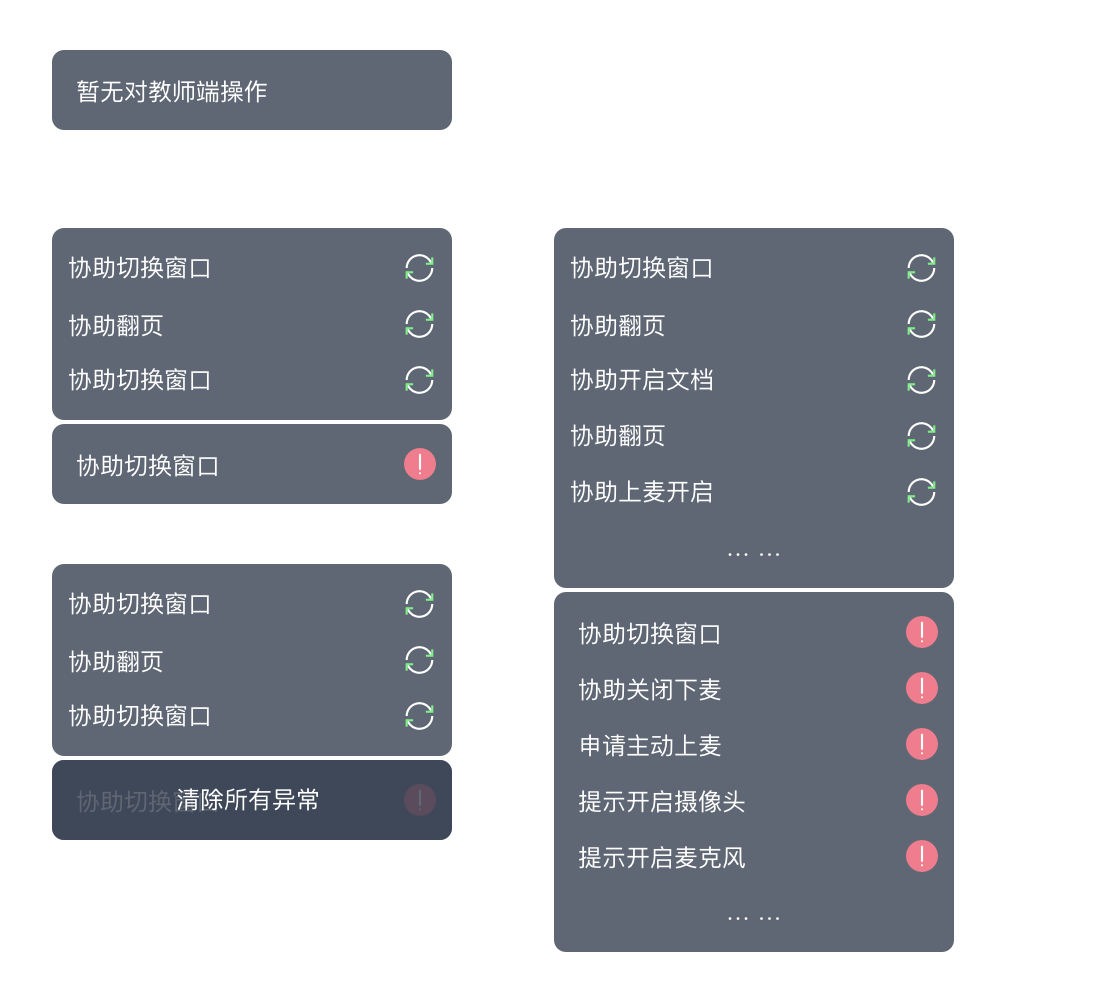
以上是所有UI部分(包括交互):效果如下:
下面是hoc逻辑部分:
import React, { Component } from 'react'

import {

  observable,

  action,

} from 'mobx'

import {

  observer,

} from 'mobx-react'

import uid from 'uuid'

import { AssistantOperateFeedbackArea } from '@dby-h5-clients/pc-1vn-components'

import { Rnd } from 'react-rnd'

import _ from 'lodash'

const operateListClump = observable.object({

  failedOperateList: [],

  processingOperateList: [],

})

class OperateState {

  @action

  constructor(operate = '') {

    this.operateId = uid()

    this.operate = operate

    operateListClump.processingOperateList.push({ operate, operateId: this.operateId, state: 'processing' })

  }

  operateId

  operate

  @action

  success(operate = '') {

    const operateIndex = _.findIndex(operateListClump.processingOperateList, { operateId: this.operateId })

    operateListClump.processingOperateList[operateIndex] = { operate: operate || this.operate, operateId: this.operateId, state: 'success' }

  }

  @action

  failed(operate = '') {

    operateListClump.failedOperateList.push({ operate: operate || this.operate, operateId: this.operateId, state: 'failed' })

    _.remove(operateListClump.processingOperateList, { operateId: this.operateId })

  }

}

@observer

class AssistantOperateList extends Component {

  static addOperate = action((operate) => {

    return new OperateState(operate)

  })

  @action

  removeSuccessOperate = (operateId) => {

    _.remove(operateListClump.processingOperateList, { operateId })

  }

  @action

  handleCleanAllFailedFeedbackInfo = () => {

    operateListClump.failedOperateList = []

  }

  render() {

    return (

      <Rnd

        bounds=".main-space-wrap"

        dragHandleClassName="assistant-operate-feedback-area-wrap"

        lockAspectRatio={16 / 9}

        enableResizing={{

          top: false,

          right: false,

          bottom: false,

          left: false,

          topRight: false,

          bottomRight: false,

          bottomLeft: false,

          topLeft: false,

        }}

        default={{

          x: 30,

          y: 30,

        }}

      >

        <AssistantOperateFeedbackArea

          failedOperateList={operateListClump.failedOperateList.toJSON()}

          processingOperateList={operateListClump.processingOperateList.toJSON()}

          animationEndCallback={this.removeSuccessOperate}

          onClickCleanFailedOperateBtn={this.handleCleanAllFailedFeedbackInfo}

        />

      </Rnd>

    )

  }

}

export default AssistantOperateList
使用说明:
在其它组件中导入:
import AssistantOperateList from '../AssistantOperateList'
const msg = AssistantOperateList.addOperate('协助开启答题器')

msg.success()

msg.failed()
react 提示消息队列 (支持动态添加,删除,多实例化)的更多相关文章
- easyui 扩展layout的方法,支持动态添加删除块
$.extend($.fn.layout.methods, { remove: function(jq, region){ return jq.each(function(){ var panel = ...
- Lua中如何实现类似gdb的断点调试—09支持动态添加和删除断点
前面已经支持了几种不同的方式添加断点,但是必须事先在代码中添加断点,在使用上不是那么灵活方便.本文将支持动态增删断点,只需要开一开始引入调试库即可,后续可以在调试过程中动态的添加和删除断点.事不宜迟, ...
- 编辑 Ext 表格(一)——— 动态添加删除行列
一.动态增删行 在 ext 表格中,动态添加行主要和表格绑定的 store 有关, 通过对 store 数据集进行添加或删除,就能实现表格行的动态添加删除. (1) 动态添加表格的行 gridS ...
- 用Javascript动态添加删除HTML元素实例 (转载)
<!DOCTYPE html PUBLIC "-//W3C//DTD XHTML 1.0 Transitional//EN" "http://www.w3.org/ ...
- js实现网页收藏功能,动态添加删除网址
<html> <head> <title> 动态添加删除网址 </title> <meta charset="utf-8"&g ...
- jquery动态添加删除div--事件绑定,对象克隆
我想做一个可以动态添加删除div的功能.中间遇到一个问题,最后在manong123.com开发文摘 版主的热心帮助下解答了(答案在最后) 使用到的jquery方法和思想就是:事件的绑定和销毁(unbi ...
- jQuery动态添加删除CSS样式
jQuery框架提供了两个CSS样式操作方法,一个是追加样式addClass,一个是移除样式removeClass,下面通过一个小例子讲解用法. jQuery动态追加移除CSS样式 <!DOCT ...
- JS动态添加删除html
本功能要求是页面传一个List 集合给后台而且页面可以动态添加删除html代码需求如下: 下面是jsp页面代码 <%@ page language="java" pageEn ...
- C#控制IIS动态添加删除网站
我的目的是在Winform程序里面,可以直接启动一个HTTP服务端,给下游客户连接使用. 查找相关技术,有两种方法: 1.使用C#动态添加网站应用到IIS中,借用IIS的管理能力来提供HTTP接口.本 ...
随机推荐
- Seurat V3.0
最新版V3文档:https://satijalab.org/seurat/vignettes.html 不要再用V2的版本了,V3已经涵盖了V2所有的功能. 最新版3.0已经发布了,有重大更新,以前的 ...
- 用variant的数据来推导基因表达 | Imputation of Expression Using PrediXcan
一个工具的逻辑得足够完善.意义足够重大,才有资格发在NG上. A gene-based association method for mapping traits using reference tr ...
- ES6 克隆对象 浅克隆:只能克隆原始对象自身的值,不能克隆它继承的值
https://www.cnblogs.com/xbblogs/p/8954165.html return JSON.parse(JSON.stringify(origin)) 最早由Barbara ...
- Facebook 对 PHP 的改进
PHP 是传统意义上的解释型语言,而不是编译型语言. 因此,在命令行或 Web 服务器调用解释器解释 PHP 代码之前,PHP 代码就是 PHP 代码.PHP 解释器会解释 PHP 脚本,把代码转换为 ...
- 在调用self对象时,本类调用用Win32Info().collect()
import platform class Test: def test(self): func = getattr(self,'windows') func() @staticmethod def ...
- ROS tf基础使用知识
博客参考:https://www.ncnynl.com/archives/201702/1306.html ROS与C++入门教程-tf-坐标变换 说明: 介绍在c++实现TF的坐标变换 概念: Co ...
- kinova environment
luo@luo-ThinkPad-W530:~$ luo@luo-ThinkPad-W530:~$ luo@luo-ThinkPad-W530:~$ luo@luo-ThinkPad-W530:~$ ...
- jquery创建一个新的节点对象(自定义结构/内容)的好方法
jq创建一个新的节点对象,这对一些自定义功能很有帮助,而且可以随意控制对象的结构与内容,何乐而不为呢,看到这里,相信有些朋友已经按耐不住了,好记下来为大家介绍实现方法,感兴趣的朋友可以了解下哦 < ...
- SpringMVC:学习笔记(11)——依赖注入与@Autowired
SpringMVC:学习笔记(11)——依赖注入与@Autowired 使用@Autowired 从Spring2.5开始,它引入了一种全新的依赖注入方式,即通过@Autowired注解.这个注解允许 ...
- logstash kafka output 日志处理
今天在用logstash解析日志并传送给kafka的时候,发现kafka能收到数据但数据内容已经丢失,具体如下: 在logstash output中增加输出样式之后,问题解决kafka再次接受到的内容 ...