
玩转DNS服务器——Bind服务
合理的配置DNS的查询方式
实验环境:
虚拟机:VMware® Workstation 15 Pro
均使用NAT连接 网段为192.168.1.0/24
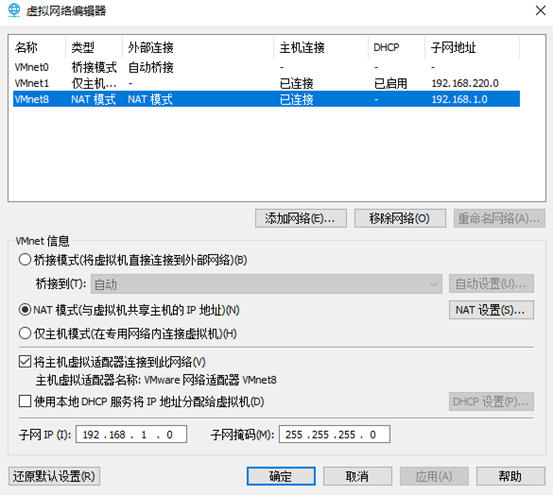
DNS 服务器 ---- Centos 7.4
内核版本 Kernel: Linux 3.10.0-693.el7.x86_64
IP地址:192.168.1.1/24
网关: 192.168.1.254
DNS: 192.168.1.1
客户端 ---- Centos 7.4
内核版本 Kernel: Linux 3.10.0-693.el7.x86_64
IP地址:192.168.1.2/24
网关: 192.168.1.254
DNS: 192.168.1.1
安装DNS服务
[root@localhost ~]#yum install bind -y                //安装

Loaded plugins: fastestmirror, langpacks

repo                                                            | 3.6 kB  ::

Determining fastest mirrors

Resolving Dependencies

--> Running transaction check

---> Package bind.x86_64 :9.9.-.el7 will be installed

--> Finished Dependency Resolution

Dependencies Resolved

=======================================================================================

 Package         Arch              Version                       Repository       Size

=======================================================================================

Installing:

 bind            x86_64            :9.9.-.el7               repo            1.8 M

Transaction Summary

=======================================================================================

Install   Package

Total download size: 1.8 M

Installed size: 4.3 M

Downloading packages:

Running transaction check

Running transaction test

Transaction test succeeded

Running transaction

  Installing : :bind-9.9.-.el7.x86_64                                         /

  Verifying  : :bind-9.9.-.el7.x86_64                                         /

Installed:

  bind.x86_64 :9.9.-.el7

Complete!

[root@localhost ~]#
编辑dns服务器配置文件
[root@localhost ~]# vim /etc/named.conf
//
// named.conf
//
// Provided by Red Hat bind package to configure the ISC BIND named(8) DNS // server as a caching only nameserver (as a localhost DNS resolver only).
//
// See /usr/share/doc/bind*/sample/ for example named configuration files.
//
// See the BIND Administrator's Reference Manual (ARM) for details about the
// configuration located in /usr/share/doc/bind-{version}/Bv9ARM.html
options {
listen-on port { 127.0.0.1; }; //修改为listen-on port 53 { any; };
listen-on-v6 port { ::; }; //修改为linsten-on-v6 port 53 { any; };
directory "/var/named";
dump-file "/var/named/data/cache_dump.db";
statistics-file "/var/named/data/named_stats.txt";
memstatistics-file "/var/named/data/named_mem_stats.txt";
allow-query { localhost; }; //修改为allow-query { any; };
/*
- If you are building an AUTHORITATIVE DNS server, do NOT enable recursion.
- If you are building a RECURSIVE (caching) DNS server, you need to enable
recursion.
- If your recursive DNS server has a public IP address, you MUST enable access
control to limit queries to your legitimate users. Failing to do so will
cause your server to become part of large scale DNS amplification
attacks. Implementing BCP38 within your network would greatly
reduce such attack surface
*/
recursion yes;
dnssec-enable yes;
dnssec-validation yes;
/* Path to ISC DLV key */
bindkeys-file "/etc/named.iscdlv.key";
managed-keys-directory "/var/named/dynamic";
pid-file "/run/named/named.pid"; session-keyfile "/run/named/session.key";
};
logging {
channel default_debug {
file "data/named.run";
severity dynamic;
};
};
zone "." IN {
type hint;
file "named.ca";
};
include "/etc/named.rfc1912.zones";
include "/etc/named.root.key";
编辑DNS正反向区域
 [root@localhost named]# vim /etc/named.rfc1912.zones

 // named.rfc1912.zones:

 //

 // Provided by Red Hat caching-nameserver package

 //

 // ISC BIND named zone configuration for zones recommended by

 // RFC 1912 section 4.1 : localhost TLDs and address zones

 // and http://www.ietf.org/internet-drafts/draft-ietf-dnsopdefault-local-zones-02.txt

 // (c)2007 R W Franks

 //

 // See /usr/share/doc/bind*/sample/ for example named configuration files.

 //

 zone "localhost.localdomain" IN {

         type master;

         file "named.localhost";

         allow-update { none; };

 };

 zone "localhost" IN {

         type master;

         file "named.localhost";

         allow-update { none; };

 };

 zone "1.0.0.0.0.0.0.0.0.0.0.0.0.0.0.0.0.0.0.0.0.0.0.0.0.0.0.0.0.0.0.0.ip6.arpa" IN {

         type master;

         file "named.loopback";

         allow-update { none; };

 };

 zone "1.0.0.127.in-addr.arpa" IN {

         type master;

         file "named.loopback";

         allow-update { none; };

 };

 zone "0.in-addr.arpa" IN {

         type master;

         file "named.empty";

         allow-update { none; };

 };

 //-------------------------------------------//在最底下添加下面两段

 //第一段为正向解析

 zone "netdj.net" IN {

         type master;

         file "netdj.net.zone";

         allow-update { none; };

 };

 //第二段为反向解析

 zone "1.168.192.in-addr.arpa" IN {

         type master;

         file "1.168.192.zone";

         allow-update { none; };

 };
创建DNS正反向区域解析文件
[root@localhost ~]# cd /var/named/

[root@localhost named]# ls

data dynamic named.ca named.empty named.localhost named.loopback slaves

//复制模板创建正反向解析文件

[root@localhost named]# cp -p named.empty netdj.net.zone

[root@localhost named]# cp -p named.empty 1.168..zone
编辑正向解析文件
 [root@localhost named]# vim netdj.net.zone

 $TTL 3H

 @       IN SOA  @ rname.invalid. (

                                                ; serial

                                         1D      ; refresh

                                         1H      ; retry

                                         1W      ; expire

                                         3H )    ; minimum

         NS      @

         A       127.0.0.1

 dns     A       192.168.1.1         //使用A记录将dns.netdj.net指向192.168.1.1

 client  A       192.168.1.2         //使用A记录将client.netdj.net指向192.168.1.2
编辑反向解析文件
 [root@localhost named]# vim 1.168..zone

 $TTL 3H

 @       IN SOA  @ rname.invalid. (

                                                ; serial

                                         1D      ; refresh

                                         1H      ; retry

                                         1W      ; expire

                                         3H )    ; minimum

         NS      @

         A       127.0.0.1

        PTR     dns.netdj.net.         //使用PTR记录将192.168.1.1指向dns.netdj.net

        PTR     client.netdj.net.      //使用PTR记录将192.168.1.2指向client.netdj.net
重启服务
[root@localhost named]# systemctl restart named //重启服务

[root@localhost named]# systemctl enable named //开机自启动

Created symlink from /etc/systemd/system/multi-user.target.wants/named.service to /usr/lib/systemd/system/named.service.
关闭防火墙、selinux
[root@localhost named]# systemctl stop firewalld.service

[root@localhost named]# setenforce  //临时生效,重启后失效
服务端测试
[root@localhost named]# nslookup

> dns.netdj.net

Server: 192.168.1.1

Address: 192.168.1.1#

Name: dns.netdj.net

Address: 192.168.1.1

> client.netdj.net

Server: 192.168.1.1

Address: 192.168.1.1#

Name: client.netdj.net

Address: 192.168.1.2

> exit

[root@localhost named]#
客户端测试
[root@localhost ~]# nslookup

> dns.netdj.net

Server: 192.168.1.1

Address: 192.168.1.1#

Name: dns.netdj.net

Address: 192.168.1.1

> client.netdj.net

Server: 192.168.1.1

Address: 192.168.1.1#

Name: client.netdj.net

Address: 192.168.1.2

> exit

[root@localhost ~]#
DNS服务搭建完成!!
限制区域传送,可实现两个IP之间的区域传送。避免黑客的缓存投毒进而利用虚假IP地址替换域名系统表中的地址造成破坏。此外还可以防止注册劫持,DNS欺骗等攻击
 [root@localhost named]# vim /etc/named.rfc1912.zones

 // named.rfc1912.zones:

 //

 // Provided by Red Hat caching-nameserver package

 //

 // ISC BIND named zone configuration for zones recommended by

 // RFC 1912 section 4.1 : localhost TLDs and address zones

 // and http://www.ietf.org/internet-drafts/draft-ietf-dnsop-default-local-zones-02.txt

 // (c)2007 R W Franks

 //

 // See /usr/share/doc/bind*/sample/ for example named configuration files.

 //

 zone "localhost.localdomain" IN {

     type master;

     file "named.localhost";

     allow-update { none; };

 };

 zone "localhost" IN {

     type master;

     file "named.localhost";

     allow-update { none; };

 };

 zone "1.0.0.0.0.0.0.0.0.0.0.0.0.0.0.0.0.0.0.0.0.0.0.0.0.0.0.0.0.0.0.0.ip6.arpa" IN {

     type master;

     file "named.loopback";

     allow-update { none; };

 };

 zone "1.0.0.127.in-addr.arpa" IN {

     type master;

     file "named.loopback";

     allow-update { none; };

 };

 zone "0.in-addr.arpa" IN {

     type master;

     file "named.empty";

     allow-update { none; };

 };

 zone "netdj.net" IN {

     type master;

     file "netdj.net.zone";

     allow-update { none; };     //修改为allow-transfer { 192.168.1.1;192.168.1.2; };

 };

 zone "1.168.192.in-addr.arpa" IN {

     type master;

     file "1.168.192.zone";

     allow-update { none; };     //修改为allow-transfer { 192.168.1.1;192.168.1.2; };

 };
修改DNS配置查询,可实现仅指定网段主机查询DNS信息。以保障DNS服务器不易被黑客发现并攻击。
 [root@localhost named]# vim /etc/named.conf

 //

 // named.conf

 //

 // Provided by Red Hat bind package to configure the ISC BIND named(8) DNS

 // server as a caching only nameserver (as a localhost DNS resolver only).

 //

 // See /usr/share/doc/bind*/sample/ for example named configuration files.

 //

 // See the BIND Administrator's Reference Manual (ARM) for details about the

 // configuration located in /usr/share/doc/bind-{version}/Bv9ARM.html

 options {

         listen-on port  { any; };

         listen-on-v6 port  { any; };

         directory       "/var/named";

         dump-file       "/var/named/data/cache_dump.db";

         statistics-file "/var/named/data/named_stats.txt";

         memstatistics-file "/var/named/data/named_mem_stats.txt";

         allow-query     { any; };      //修改为allow-query     { 192.168.1.0/24; };

         /*

          - If you are building an AUTHORITATIVE DNS server, do NOT enable recursion.

          - If you are building a RECURSIVE (caching) DNS server, you need to enable

            recursion.

          - If your recursive DNS server has a public IP address, you MUST enable access

            control to limit queries to your legitimate users. Failing to do so will

            cause your server to become part of large scale DNS amplification

            attacks. Implementing BCP38 within your network would greatly

            reduce such attack surface

         */

         recursion yes;

         dnssec-enable yes;

         dnssec-validation yes;

         /* Path to ISC DLV key */

         bindkeys-file "/etc/named.iscdlv.key";

         managed-keys-directory "/var/named/dynamic";

         pid-file "/run/named/named.pid";

         session-keyfile "/run/named/session.key";

 };

 logging {

         channel default_debug {

                 file "data/named.run";

                 severity dynamic;

         };

 };

 zone "." IN {

         type hint;

         file "named.ca";

 };

 include "/etc/named.rfc1912.zones";

 include "/etc/named.root.key";
本文由博主亲测有效,若有错误请评论指出谢谢
----------持续更新中
玩转DNS服务器——Bind服务的更多相关文章
- centos6.5环境DNS-本地DNS服务器bind的搭建
centos6.5环境DNS-本地DNS服务器bind的搭建 域名系统(英文:Domain Name System,缩写:DNS)是因特网的一项服务.它作为将域名和IP地址相互映射的一个分布式数据库, ...
- 内建DNS服务器--BIND
参考 BIND 官网:http://www.isc.org/downloads/bind/ 1.系统环境说明 [root@clsn6 ~]# cat /etc/redhat-release CentO ...
- Debian9.5系统DNS服务器BIND软件配置说明
DNS的出现的历史 网络出现的早期是使用IP地址通讯的,那时就几台主机通讯.但是随着接入网络主机的增多,这种数字标识的地址非常不便于记忆,UNIX上就出现了建立一个叫做hosts的文件(Linux和W ...
- CentOS7-1810 系统DNS服务器BIND软件配置说明
DNS的出现的历史 网络出现的早期是使用IP地址通讯的,那时就几台主机通讯.但是随着接入网络主机的增多,这种数字标识的地址非常不便于记忆,UNIX上就出现了建立一个叫做hosts的文件(Linux和W ...
- Centos7.3搭建DNS服务器--BIND
1.系统环境说明 [root@dns-server etc]# cat /etc/redhat-release CentOS Linux release (Core) 防火墙和Selinux关闭 [r ...
- centos7 主从dns配置 bind服务
一,配置前请先关闭防火墙selinux 防火墙关闭方法,参见上一篇文章. setenforce 0 #临时关闭 修改/etc/selinux/config 文件 将SELINUX=enforc ...
- redhat配置dns服务器bind
配置Oracle11g的RAC需要使用DNS服务器来解析SCAN IP,本文就是以此为例介绍bind服务器的使用.首先科普一下bind服务器,属于企业级产品了,还是开源的: Bind是Berkeley ...
- 搭建DNS服务器-bind
1. 安装 yum install -y bind-chroot yum install -y bind-utils service named-chroot start 2. 修改配置 增加一 ...
- 简单搭建DNS服务器——bind
1安装bind yum install -y bind bind-utils bind-chroot 2 修改配置文件 # grep '^[^#]' /etc/named.conf options { ...
随机推荐
- redis 简单教程
一.redis的安装 安装环境:centos 7 1) 下载redis 这里我们下载的是redis-4.0.10.tar.gz 2)将redis tar包移动至 /usr/local 执行如下命令 c ...
- Redis实现实时热点查询
Redis内存淘汰 定义: 指的是用户存储的一些键被可以被Redis主动地从实例中删除,从而产生读miss的情况 机制存在原因: Redis最常见的两种应用场景为缓存和持久存储 首先要明确的一个问题是 ...
- charles 4.2.1 Ubuntu破解版安装
charles 4.2.1 Ubuntu破解版安装 下载 charles-proxy-4.2.1_amd64.tar.gz 破解版 charles.jar 破解包 解压 sudo tar -zxvf ...
- C++的菱形继承会发生什么问题?如何解决?画出其内存布局图
菱形继承问题样例: #include <iostream> using namespace std; class A { public: ; virtual int getx() { re ...
- spring data jpa碰到的坑
1.不能从别的类的repository那里 执行另一个类的sql,这样映射会失败. 2.有entity,就要有repository,并且还要有id注解 3.还要多表联查未测试,估计要用map去映射出来 ...
- shared_ptr 用法
引入 shared_ptr 是c++为了提高安全性而添加的智能指针,方便了内存管理. 特点 shared_ptr 是通过指针保持对象共享所有权的智能指针.多个 shared_ptr 对象可占有同一对象 ...
- C程序编译和执行
编译 & 执行 C 程序 首先准备一个源码文件 hello.c 键入如下代码: #include <stdio.h> int main() { /* 我的第一个 C 程序 */ p ...
- 【EBS】取数SQL-平均成本更新的物料事务处理追溯到应付发票
SELECT hou.name,--组织 aia.invoice_num,--发票编号 msib.segment1,--物料编码 mmt.transaction_id--物料事务处理 FROM mtl ...
- 阿里巴巴 Java 开发手册(四): OOP 规约
. [强制]避免通过一个类的对象引用访问此类的静态变量或静态方法,无谓增加编译器解析成 本,直接用类名来访问即可. 2. [强制]所有的覆写方法,必须加@Override 注解. 说明:getObje ...
- Java知识回顾 (15) 文档注释
说明注释允许你在程序中嵌入关于程序的信息. 你可以使用 javadoc 工具软件来生成信息,并输出到HTML文件中,使你更加方便的记录你的程序信息. javadoc 标签 标签 描述 示例 @auth ...