
python 使用 matplotlib.pyplot来画柱状图和饼图
导入包
import matplotlib.pyplot as plt
柱状图
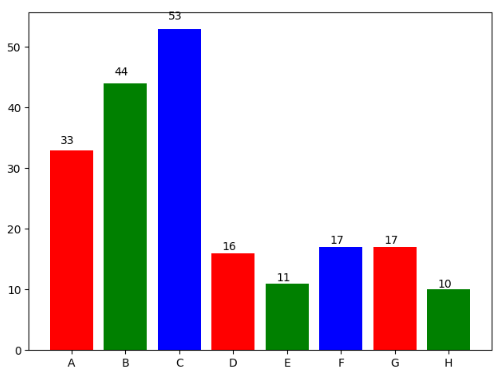
最简柱状图
# 显示高度

def autolabel(rects):

    for rect in rects:

        height = rect.get_height()

        plt.text(rect.get_x()+rect.get_width()/2.- 0.2, 1.03*height, '%s' % int(height))

name_list = ['A', 'B', 'C', 'D', 'E', 'F', 'G', 'H']

num_list = [33, 44, 53, 16, 11, 17, 17, 10]

autolabel(plt.bar(range(len(num_list)), num_list, color='rgb', tick_label=name_list))

plt.show()
结果
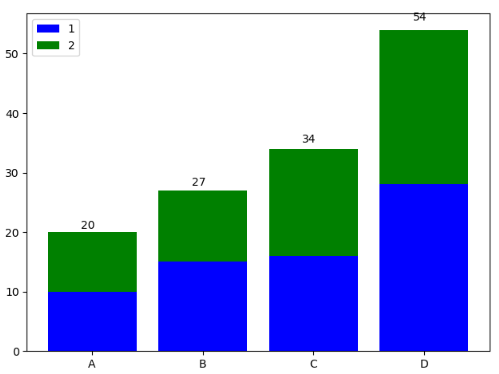
堆叠柱状图
# 显示高度

def autolabel(rects1, rects2):

    i = 0

    for rect1 in rects1:

        rect2 = rects2[i]

        i += 1

        height = rect1.get_height() + rect2.get_height()

        plt.text(rect1.get_x()+rect1.get_width()/2. - 0.1, 1.03*height, '%s' % int(height))

name_list = ['A', 'B', 'C', 'D']

num_list = [10, 15, 16, 28]

num_list2 = [10, 12, 18, 26]

z1 = plt.bar(range(len(num_list)), num_list, label='1', fc='b')

z2 = plt.bar(range(len(num_list)), num_list2, bottom=num_list, label='2', tick_label=name_list, fc='g')

autolabel(z1, z2)

plt.legend()

plt.show()
结果
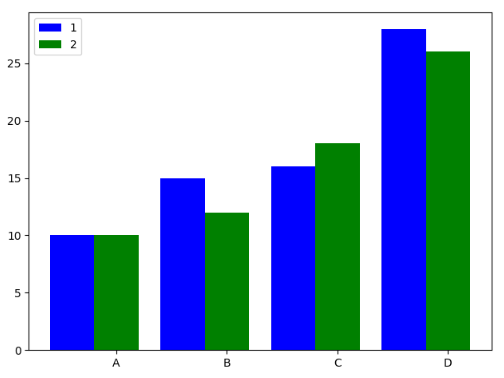
并列柱状图
name_list = ['A', 'B', 'C', 'D']

num_list = [10, 15, 16, 28]

num_list2 = [10, 12, 18, 26]

x = list(range(len(num_list)))

total_width, n = 0.8, 2

width = total_width / n

plt.bar(x, num_list, width=width, label='1', fc='b')

for i in range(len(x)):

    x[i] += width

plt.bar(x, num_list2, width=width, label='2', tick_label=name_list, fc='g')

plt.legend()

plt.show()
结果
饼图
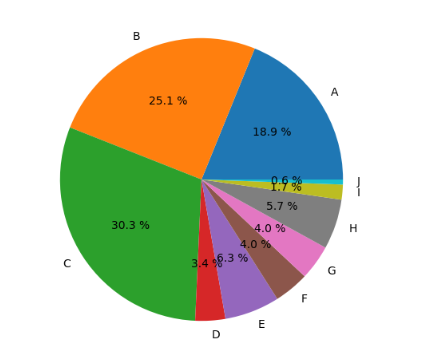
最简饼图
name_list = ['A', 'B', 'C', 'D', 'E', 'F', 'G', 'H', 'I', 'J']

num_list = [33, 44, 53, 6,11, 7, 7, 10, 3, 1]

# 保证圆形

plt.axes(aspect=1)

plt.pie(x=num_list, labels=name_list, autopct='%3.1f %%')

plt.show()
结果
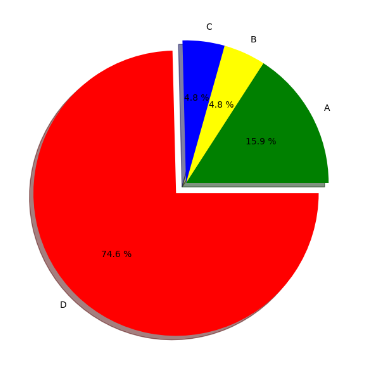
带切割的饼图
name_list = ['A', 'B', 'C', 'D']

num_list = [10, 3, 3, 47]

colors = ['green', 'yellow', 'blue', 'red']

# 圆形

plt.figure(1, figsize=(6, 6))

#决定分割部分,及其与其它部分之间的间距

expl = [0, 0, 0, 0.1]

plt.pie(x=num_list, explode=expl, labels=name_list, autopct='%3.1f %%', colors=colors, shadow=True)

plt.show()
结果
python 使用 matplotlib.pyplot来画柱状图和饼图的更多相关文章
- Python中matplotlib.pyplot.imshow画灰度图的多种方法
转载:https://www.jianshu.com/p/8f96318a153f matplotlib库的教程和使用方法此处就不累赘了,网上有十分多优秀的教程资源.此处直接上代码: def demo ...
- Python:matplotlib.pyplot
翻译总结自:matplotlib.pyplot - Matplotlib 3.4.3 documentation 函数 说明 acorr x的自相关性图 angle_spectrum 角度谱 anno ...
- python的matplotlib.pyplot绘制甘特图
博主本来就想简单地找一下代码,画一幅甘特图,结果百度之后发现甘特图的代码基本都不是用matplotlib库,但是像柱状图等统计图通常都是用这个库进行绘制的,所以博主就花了一些时间,自己敲了一份代码,简 ...
- python中matplotlib.pyplot中cm的属性
https://matplotlib.org/gallery/color/colormap_reference.html
- Python:matplotlib.cm 色表
官网:Choosing Colormaps in Matplotlib - Matplotlib 3.5.0 documentation Colormap与matplotlib.cm 我们以等高区域函 ...
- Python:Matplotlib 画曲线和柱状图(Code)
原文链接:http://blog.csdn.net/ikerpeng/article/details/20523679 参考资料:http://matplotlib.org/gallery.html ...
- python画柱状图并且输出到html文件
import matplotlibmatplotlib.use('Agg')import matplotlib.pyplot as pltfrom Cstring import StringIO y ...
- Python 的 Matplotlib 画图库
Matplotlib安装 NumPy库方便数值运算,但枯燥的数据并不利于人们的直观理解. 数据需要可视化. Matplotlib:一个数据可视化函数库 使用前需要安装 利用Python自带 ...
- Python 中 plt 画柱状图和折线图
1. 背景 Python在一些数据可视化的过程中需要使用 plt 函数画柱状图和折线图. 2. 导入 import matplotlib.pyplot as plt 3. 柱状图 array= np. ...
随机推荐
- SPRING框架中ModelAndView、Model、ModelMap区别及详细分析
转载内容:http://www.cnblogs.com/google4y/p/3421017.html 1. Model Model 是一个接口, 其实现类为ExtendedModelMap,继承了M ...
- django运行时报错
我是python manage.py runserver的时候报以下错误,import sqlite3也报同样的错误,ImportError: No module named _sqlite3,我的系 ...
- CSS 基础 例子 最小高度和最大高度设置
最小高度,无论什么时候,高度不会小于该值,即使内容很少,不限制高度最大值,超出时候,按照实际内容来决定高度 最大高度,无论什么时候,高度不会大于该值,即使内容很多,不限制最小高度,超出时候,多出部分会 ...
- 《javascript高级程序设计》 touch事件的一个小错误
最近一段时候都在拜读尼古拉斯大神的<javascript高级程序设计>,真的是一本好书,通俗易懂,条理比<javascript权威指南>好理解一些,当然<javascri ...
- Android-HttpClient-Get与Post请求登录功能
HttpClient 是org.apache.http.* 包中的: 第一种方式使用httpclient-*.jar (需要在网上去下载httpclient-*.jar包) 把httpclient-4 ...
- Network in Network 个人理解
关键点是1*1的卷积是怎么用的,也就是MLP卷积.看如下的数据就可以理解了 输入为224*224*3的图像,第一层卷积为11*11*3*96(也就是96个11*11*3的卷积核,另外还有步长),卷积完 ...
- Nanui 教程
彩票自动投注软件定制-联灬系-\加/Q;2943075966 黑/科/技问/世.详情直接添加咨询.信/誉/文本 最近接到一个项目 是关于构建一套 电脑端会员管理系统 但考虑到个人比较喜欢写Web ...
- AngularJS指令封装高德地图组件
1 概述 公司移动门户原来是基于AngularJS指令封装的百度地图组件,用于签到.签退.定位等功能,在使用过程中发现百度地图频繁的弹出广告,所以打算重新引用其它地图组件,最后决定基于AngularJ ...
- Python基础 --函数的参数
定义函数的时候,我们把参数的名字和位置确定下来,函数的接口定义就完成了.对于函数的调用者来说,只需要知道如何传递正确的参数,以及函数将返回什么样的值就够了,函数内部的复杂逻辑被封装起来,调用者无需了解 ...
- Python MySQL - 进行数据查询
#coding=utf-8 import mysql.connector import importlib import sys # reload(sys) # sys.setdefaultencod ...