
关于Maven项目build时出现No compiler is provided in this environment的处理(转)
本文转自https://blog.csdn.net/lslk9898/article/details/73836745
近日有同事遇到在编译Maven项目时出现
[ERROR] No compiler is provided in this environment. Perhaps you are running on a JRE rather than a JDK?
的问题, 原以为这是个个例, 源于同事粗心, 配置环境出问题造成, 后到百度查看一下, 遇到这个问题的不在少数, 但是对问题的解释没有说到根源, 于是写下这篇博客供大家参阅, 如有纰漏, 还请指正.
错误代码节选:
- [ERROR] COMPILATION ERROR :
- [INFO] -------------------------------------------------------------
- [ERROR] No compiler is provided in this environment. Perhaps you are running on a JRE rather than a JDK?
- [INFO] 1 error
- [INFO] -------------------------------------------------------------
- [INFO] ------------------------------------------------------------------------
- [INFO] BUILD FAILURE
- [INFO] ------------------------------------------------------------------------
- [INFO] Total time: 1.436 s
- [INFO] Finished at: 2017-06-28T11:16:07+08:00
- [INFO] Final Memory: 10M/151M
- [INFO] ------------------------------------------------------------------------
- [ERROR] Failed to execute goal org.apache.maven.plugins:maven-compiler-plugin:3.1:compile (default-compile) on project manage: Compilation failure
- [ERROR] No compiler is provided in this environment. Perhaps you are running on a JRE rather than a JDK?
- [ERROR] -> [Help 1]
但是编写普通Java Project编译运行却是正常的,下图为只有输出语句的普通java类

从上图中可以看出, java编译环境未jre1.7.0_17, 也就是说并没有配置成jdk目录, 然后看Eclipse-->Window-->preferences-->Java-->Installed JREs
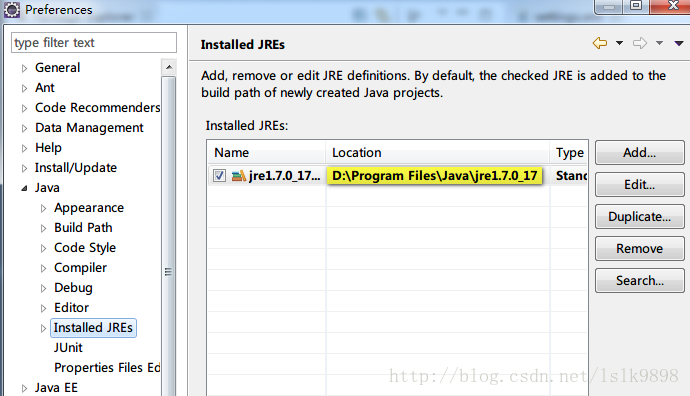
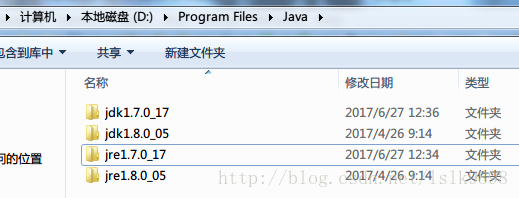
为了演示出效果, 在测试之前, 我已经将系统java环境配置成如上图所示路径, 并只保留该配置, 由下图可以看出, 该路径是我所安装的两个JDK版本中的一个JDK自带的jre运行环境. 使用该环境编译普通项目没有问题, 但为什么会在编译Maven项目时出错呢?
我们看看Maven的环境是如何配置的:先找到Eclipse-->Window-->preferences-->Maven-->Installations
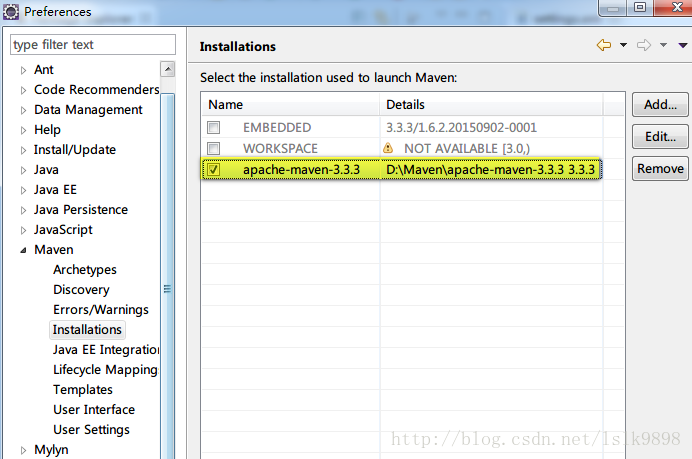
在Maven配置中, 我并没有使用Eclipse自带的Maven插件, 而是重新配置的Maven环境, 然后再看Eclipse-->Window-->preferences-->Maven-->User Settings
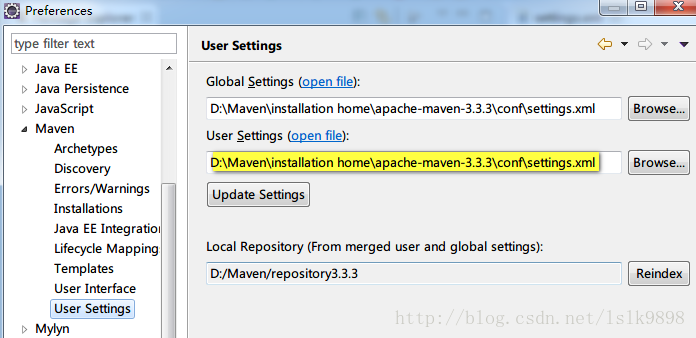
Maven设置使用的是Maven中conf文件夹下的settings.xml, 点击"open file" 在Eclipse中查看具体配置信息, 仅摘录与本错误信息相关的部分
- <profiles>
- <!-- profile
- | Specifies a set of introductions to the build process, to be activated using one or more of the
- | mechanisms described above. For inheritance purposes, and to activate profiles via <activatedProfiles/>
- | or the command line, profiles have to have an ID that is unique.
- |
- | An encouraged best practice for profile identification is to use a consistent naming convention
- | for profiles, such as 'env-dev', 'env-test', 'env-production', 'user-jdcasey', 'user-brett', etc.
- | This will make it more intuitive to understand what the set of introduced profiles is attempting
- | to accomplish, particularly when you only have a list of profile id's for debug.
- |
- | This profile example uses the JDK version to trigger activation, and provides a JDK-specific repo.-->
- <profile>
- <id>jdk-1.7</id>
- <activation>
- <activeByDefault>true</activeByDefault>
- <jdk>1.7</jdk>
- </activation>
- <properties>
- <maven.compiler.source>1.7</maven.compiler.source>
- <maven.compiler.target>1.7</maven.compiler.target>
- <maven.compiler.compilerVersion>1.7</maven.compiler.compilerVersion>
- </properties>
- </profile>
- </profiles>
中间具体信息的理解, 可以参见 冰河winner 的博客. 也就是说, 根据上面的配置, 我们需要指定一个符合配置的JDK环境, 这是我们之前在Eclipse-->Window-->preferences-->Java-->Installed JREs下的配置就不行了, 而需要指定一个JDK目录, 例如我的JDK安装目录下的jdk1.7.0_17, 这也是这个错误出现的罪魁祸首. 不过对于Java开发者来说, Installed JREs中使用jdk目录而不适用jre目录也是最好的选择.
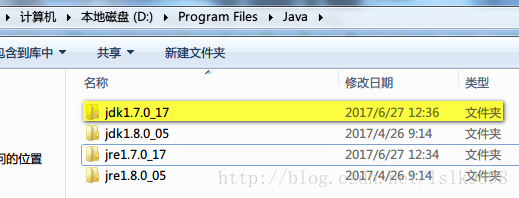
步骤:
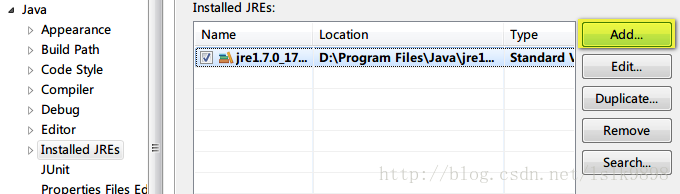
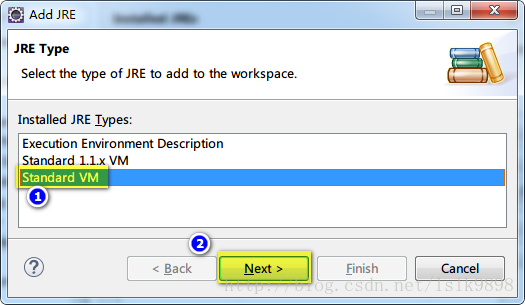
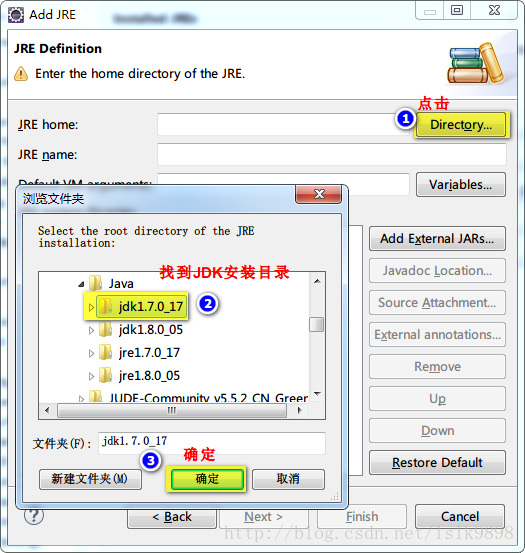
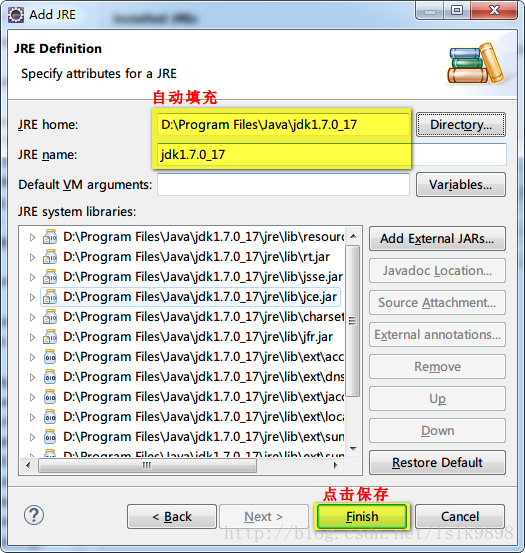
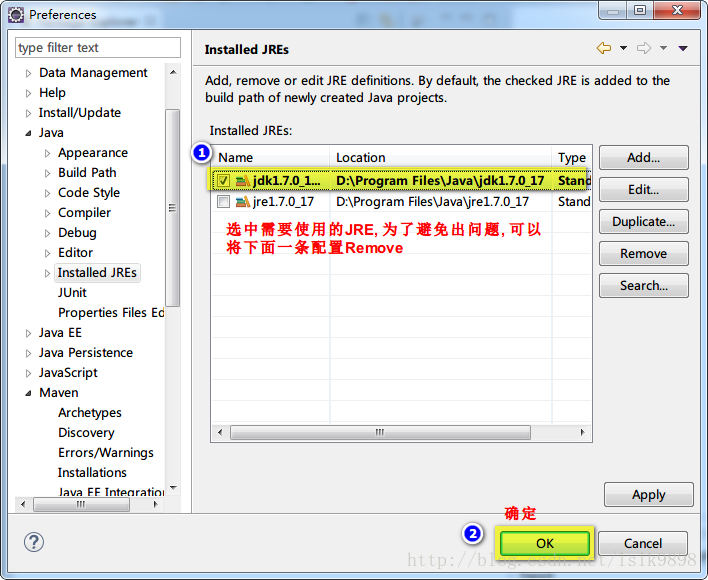
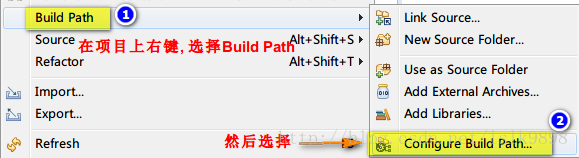
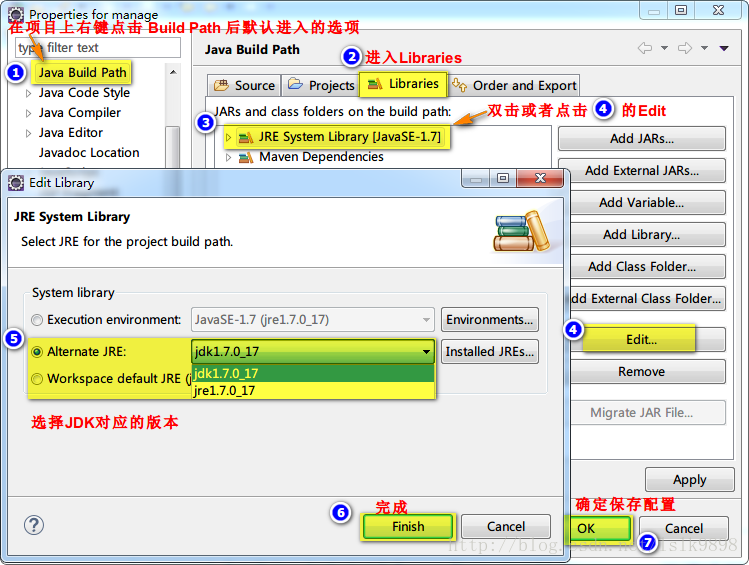
然后再编译运行项目即可.
关于Maven项目build时出现No compiler is provided in this environment的处理(转)的更多相关文章
- 关于Maven项目build时出现No compiler is provided in this environment的处理
版权声明:本文为博主原创文章,未经博主允许不得转载. http://blog.csdn.net/lslk9898/article/details/73836745 近日有同事遇到在编译Maven项目时 ...
- 【转载】关于Maven项目build时出现No compiler is provided in this environment的处理
参考地址;https://blog.csdn.net/lslk9898/article/details/73836745
- 关于Maven项目install时出现No compiler is provided in this environment的处理
关于Maven项目build时出现No compiler is provided in this environment的处理 新配置的Eclipse环境,运行现有项目没问题,一日,从svn上检出了一 ...
- maven打包时出现no compiler is provided in this environment
我是使用maven打jar包时出现的问题,与我问题不同的可以查看下面链接是否有棒状 http://blog.csdn.net/lslk9898/article/details/73836745 可以确 ...
- 【maven】maven的web项目打包报错:No compiler is provided in this environment. Perhaps you are running on a JRE rather than a JDK
打包过程中报错如下: No compiler is provided in this environment. Perhaps you are running on a JRE rather than ...
- maven项目bulid失败_No compiler is provided in this environment.
错误信息如下: [ERROR] No compiler is provided in this environment. Perhaps you are running on a JRE rather ...
- Maven构建项目出现No compiler is provided in this environment. Perhaps you are running on a JRE rather than a JDK?
No compiler is provided in this environment. Perhaps you are running on a JRE rather than a JDK? 你应该 ...
- Maven 项目 启动时 解决3 字节的 UTF-8 序列的字节 3 无效
"org.activiti.bpmn.exceptions.XMLException: 3 字节的 UTF-8 序列的字节 3 无效." Maven 项目启动时,由于读XML配置文 ...
- Maven No compiler is provided in this environment. Perhaps you are running on a JRE rather than a JDK? 问题
maven编译项目时出错,提示信息如下: [ERROR] Failed to execute goal org.apache.maven.plugins:maven-compiler-plugin:3 ...
随机推荐
- linux系统下安装nginx
1.第一步:获取nginx的安装包 wget http://nginx.org/download/nginx-1.7.8.tar.gz 2.解压安装包tar -xvf nginx-1.7.8.tar. ...
- 接收二进制流(ArrayBuffer) ,并且显示二进制流图片
1.调用接口,返回二进制流数据 var xhr = new XMLHttpRequest(); xhr.onreadystatechange = function() { && xhr ...
- 08 Go 1.8 Release Notes
Go 1.8 Release Notes Introduction to Go 1.8 Changes to the language Ports Known Issues Tools Assembl ...
- mysql 当前时间
1. mysql 获取当前时间 select now() ,current_timestamp(),localtimestamp(),sysdate() ,curdate(),curtime(),u ...
- [转]Mahout推荐算法API详解
Mahout推荐算法API详解 Hadoop家族系列文章,主要介绍Hadoop家族产品,常用的项目包括Hadoop, Hive, Pig, HBase, Sqoop, Mahout, Zookeepe ...
- CF601A 【The Two Routes】
看数据范围,然后果断邻接矩阵$Floyd$啊 对于公路和铁路,各建一个图,分别跑最短路,然后取最大值即可 #include<iostream> #include<cstdio> ...
- MySQL Replication Report
很多人都会MySQL主从框架的搭建,但很多人没有真正理解同步基本用途.同步的基本原理,还有当Master和Slave同步断开后的处理以及导致Master和slave不同步的原因等等,当你对这些都了如指 ...
- 关于 Google 与 Chrome
不断更新... 查看chrome版本 chrome浏览器中输入 chrome://version/ Chrome吧 :http://tieba.baidu.com/f?kw=chrome&i ...
- SpringAOP实战应用
Springboot中使用AOP特性非常简单,使用@AspectJ注解,然后再配置中开启AspectJ即可.在日常的应用,有时可以将日志记录和异常处理在一个拦截器中统一处理,但有时在项目中无法通过一个 ...
- 入门智能家居,从 IFTTT 到 HomeKit 自动化(二)
入门智能家居,从 IFTTT 到 HomeKit 自动化(二) 目录 0. HomeKit.HomeBridge.HomeAssistant 分别是什么?关系是什么? 1. 开始前的准备 2. 整 ...