https://www.javacodegeeks.com/2014/03/how-hashmap-works-in-java.html
Most common interview questions are “How HashMap works in java”, “How get and put method of HashMap work internally”. Here I am trying to explain internal functionality with an easy example. Rather than going through theory, we will start with example first, so that you will get better understanding and then we will see how get and put function work in java.
Lets take a very simple example. I have a Country class, we are going to use Country class object as key and its capital name(string) as value. Below example will help you to understand, how these key value pair will be stored in hashmap.
1. Country.java
01 |
package org.arpit.javapostsforlearning; |
02 |
public class Country { |
07 |
public Country(String name, long population) { |
10 |
this.population = population; |
12 |
public String getName() { |
15 |
public void setName(String name) { |
18 |
public long getPopulation() { |
21 |
public void setPopulation(long population) { |
22 |
this.population = population; |
25 |
// If length of name in country object is even then return 31(any random number) and if odd then return 95(any random number). |
26 |
// This is not a good practice to generate hashcode as below method but I am doing so to give better and easy understanding of hashmap. |
28 |
public int hashCode() { |
29 |
if(this.name.length()%2==0) |
35 |
public boolean equals(Object obj) { |
37 |
Country other = (Country) obj; |
38 |
if (name.equalsIgnoreCase((other.name))) |
If you want to understand more about hashcode and equals method of object, you may refer hashcode() and equals() method in java
2. HashMapStructure.java(main class)
01 |
import java.util.HashMap; |
02 |
import java.util.Iterator; |
04 |
public class HashMapStructure { |
07 |
* @author Arpit Mandliya |
09 |
public static void main(String[] args) { |
11 |
Country india=new Country("India",1000); |
12 |
Country japan=new Country("Japan",10000); |
14 |
Country france=new Country("France",2000); |
15 |
Country russia=new Country("Russia",20000); |
17 |
HashMap<country,string> countryCapitalMap=new HashMap<country,string>(); |
18 |
countryCapitalMap.put(india,"Delhi"); |
19 |
countryCapitalMap.put(japan,"Tokyo"); |
20 |
countryCapitalMap.put(france,"Paris"); |
21 |
countryCapitalMap.put(russia,"Moscow"); |
23 |
Iterator<country> countryCapitalIter=countryCapitalMap.keySet().iterator();//put debug point at this line |
24 |
while(countryCapitalIter.hasNext()) |
26 |
Country countryObj=countryCapitalIter.next(); |
27 |
String capital=countryCapitalMap.get(countryObj); |
28 |
System.out.println(countryObj.getName()+"----"+capital); |
34 |
</country></country,string></country,string> |
Now put debug point at line 23 and right click on project->debug as-> java application. Program will stop execution at line 23 then right click on countryCapitalMap then select watch.You will be able to see structure as below.

Now From above diagram, you can observe following points
- There is an Entry[] array called table which has size 16.
- This table stores Entry class’s object. HashMap class has a inner class called Entry.This Entry have key value as instance variable. Lets see structure of entry class Entry Structure.
1 |
static class Entry implements Map.Entry |
7 |
...//More code goes here |
- Whenever we try to put any key value pair in hashmap, Entry class object is instantiated for key value and that object will be stored in above mentioned Entry[](table). Now you must be wondering, where will above created Enrty object get stored(exact position in table). The answer is, hash code is calculated for a key by calling Hascode() method. This hashcode is used to calculate index for above Entry[] table.
- Now, If you see at array index 10 in above diagram, It has an Entry object named HashMap$Entry.
- We have put 4 key-values in hashmap but it seems to have only 2!!!!This is because if two objects have same hashcode, they will be stored at same index. Now question arises how? It stores objects in a form of LinkedList(logically).
So how hashcode of above country key-value pairs are calculated.
1 |
Hashcode for Japan = 95 as its length is odd. |
2 |
Hashcode for India =95 as its length is odd |
3 |
HashCode for Russia=31 as its length is even. |
4 |
HashCode for France=31 as its length is even. |
Below diagram will explain LinkedList concept clearly.
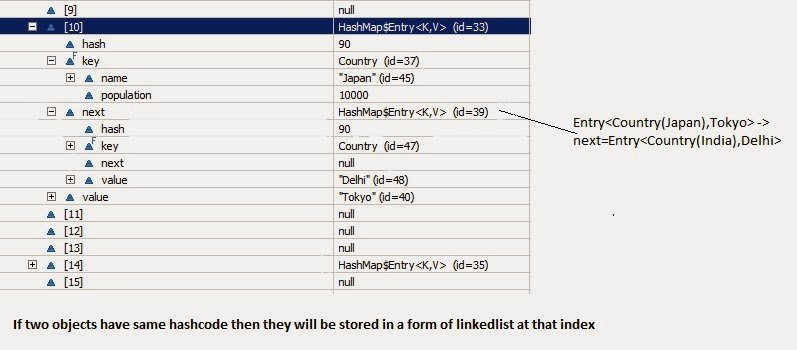
So now if you have good understanding of hashmap structure,Lets go through put and get method.
Put :
Lets see implementation of put method:
02 |
* Associates the specified value with the specified key in this map. If the |
03 |
* map previously contained a mapping for the key, the old value is |
07 |
* key with which the specified value is to be associated |
09 |
* value to be associated with the specified key |
10 |
* @return the previous value associated with <tt>key</tt>, or <tt>null</tt> |
11 |
* if there was no mapping for <tt>key</tt>. (A <tt>null</tt> return |
12 |
* can also indicate that the map previously associated |
13 |
* <tt>null</tt> with <tt>key</tt>.) |
15 |
public V put(K key, V value) { |
17 |
return putForNullKey(value); |
18 |
int hash = hash(key.hashCode()); |
19 |
int i = indexFor(hash, table.length); |
20 |
for (Entry<k , V> e = table[i]; e != null; e = e.next) { |
22 |
if (e.hash == hash && ((k = e.key) == key || key.equals(k))) { |
31 |
addEntry(hash, key, value, i); |
now lets understand above code step by step
- Key object is checked for null. If key is null then it will be stored at table[0] because hashcode for null is always 0.
- Key object’s hashcode() method is called and hash code is calculated. This hashcode is used to find index of array for storing Entry object. It may happen sometimes that, this hashcode function is poorly written so JDK designer has put another function called hash() which takes above calculated hash value as argument.If you want to learn more about hash() function, you can refer hash and indexFor method in hashmap.
- indexFor(hash,table.length) is used to calculate exact index in table array for storing the Entry object.
- As we have seen in our example, if two key objects have same hashcode(which is known as collision) then it will be stored in form of linkedlist.So here, we will iterate through our linkedlist.
- If there is no element present at that index which we have just calculated then it will directly put our Entry object at that index.
- If There is element present at that index then it will iterate until it gets Entry->next as null.Then current Entry object become next node in that linkedlist
- What if we are putting same key again, logically it should replace old value. Yes,it will do that.While iterating it will check key equality by calling equals() method(key.equals(k)), if this method returns true then it replaces value object with current Entry’s value object.
Get:
Lets see implementation of get now:
02 |
* Returns the value to which the specified key is mapped, or {@code null} |
03 |
* if this map contains no mapping for the key. |
06 |
* More formally, if this map contains a mapping from a key {@code k} to a |
07 |
* value {@code v} such that {@code (key==null ? k==null : |
08 |
* key.equals(k))}, then this method returns {@code v}; otherwise it returns |
09 |
* {@code null}. (There can be at most one such mapping.) |
12 |
* A return value of {@code null} does not <i>necessarily</i> indicate that |
13 |
* the map contains no mapping for the key; it's also possible that the map |
14 |
* explicitly maps the key to {@code null}. The {@link #containsKey |
15 |
* containsKey} operation may be used to distinguish these two cases. |
17 |
* @see #put(Object, Object) |
19 |
public V get(Object key) { |
21 |
return getForNullKey(); |
22 |
int hash = hash(key.hashCode()); |
23 |
for (Entry<k , V> e = table[indexFor(hash, table.length)]; e != null; e = e.next) { |
25 |
if (e.hash == hash && ((k = e.key) == key || key.equals(k))) |
As you got the understanding on put functionality of hashmap. So to understand get functionality is quite simple. If you pass any key to get value object from hashmap.
- Key object is checked for null. If key is null then value of Object resides at table[0] will be returned.
- Key object’s hashcode() method is called and hash code is calculated.
- indexFor(hash,table.length) is used to calculate exact index in table array using generated hashcode for getting the Entry object.
- After getting index in table array, it will iterate through linkedlist and check for key equality by calling equals() method and if it returns true then it returns the value of Entry object else returns null.
Key points to Remeber:
- HashMap has a inner class called Entry which stores key-value pairs.
- Above Entry object is stored in Entry[ ](Array) called table
- An index of table is logically known as bucket and it stores first element of linkedlist
- Key object’s hashcode() is used to find bucket of that Entry object.
- If two key object ‘s have same hashcode , they will go in same bucket of table array.
- Key object ‘s equals() method is used to ensure uniqueness of key object.
- Value object ‘s equals() and hashcode() method is not used at all
- How HashMap works in Java
https://www.javainterviewpoint.com/hashmap-works-internally-java/ How a HashMap Works internally has ...
- HashMap如何工作 - Java
大多数人应该会同意HashMap是现在面试最喜欢问的主题之一.我和同事常常进行讨论,并很有帮助.现在,我继续和大家讨论. 我假设你对HashMap的内部工作原理感兴趣,并且你已经知道了基本的HashM ...
- SpringMvc中Hashmap操作遇到 java.util.ConcurrentModificationException: null
代码按照网上修改为类似,还不能解决问题 for (Iterator<String> it = target.keySet().iterator(); it.hasNext(); ) { i ...
- HashTable HashMap HashSet区别(java)
Hashtable: 1. key和value都不许有null值 2. 使用enumeration遍历 3. 同步的,每次只有一个线程能够访问 4. 在java中Hashtable是H大写,t小写,而 ...
- HashMap如何在Java中工作?
通过优锐课学习笔记分享,我们可以看到HashMap问题在工作面试中很常见. 这也是HashMaps在Java内部如何工作的一些深入说明,分享给大家参考学习. HashMap在内部如何工作已成为几乎所有 ...
- JSONObject JSONArray json字符串 HashMap ArryList 在java开发中用到的数据结构
1.JSONObject 长成这样的: { "key1":value1, "key2":value2, "key3":value3} ...
- Understanding How Graal Works - a Java JIT Compiler Written in Java
https://chrisseaton.com/truffleruby/jokerconf17/ https://chrisseaton.com/truffleruby/tenthings/ http ...
- LRU hashMap(拉链) + 双向链表 java实现
//基于 hash (拉链法) + 双向链表,LRUcache //若改为开放寻址,线性探测法能更好使用cpuCache public class LRU { private class Node { ...
- Java集合框架(Collection Framework)学习之 HashMap
从API文档可以得到HashMap的以下几个特点: 基于哈希表(hash table)实现,并且是链式哈希表 允许空值和空键(null=null 键值对) HashMap与Hashtable基本相同, ...
随机推荐
- 多线程编程(六)-Executor与ThreadPoolExecutor的使用
使用Executors工厂类创建线程池 1.使用newCachedThreadPool()方法创建无界线程池 newCachedThreadPool()方法创建的是无界线程池,可以进行线程自动回收,此 ...
- GCD之Source
参考:http://blog.csdn.net/lengshengren/article/details/12905811
- ASCX呼叫ASPX.CS的方法
为了安全设计,一般情况之下,改用为接口(interface). 在网页中实现这个接口: 用户控件: 当然,把用户控件ascx拉至网页之后,在用户控件的linkbutton的click事件,就可以呼叫至 ...
- HTML 常用标记
一 常用标签  : -- 表示空格 也可以在设计页面中按 ctrl+shift+space <br> 或<br /&g ...
- <tbody>标签的用途
如果一个表格是 分 好几个部分 ,那么每个部分 使用一组<tbody>这样,下载完第一个部分 就可以先显示了,不用等后面的部分是否下载好,这是写给浏览器看的.
- JavaSE Set集合
明确Set集合接口的特点. java.util.Set接口和java.util.List接口一样,同样继承自Collection接口,它与Collection接口中的方法基本一致,并没有对Collec ...
- 了解java虚拟机—堆相关参数设置(3)
堆相关配置 -Xmx 最大堆空间 -Xms 初始堆空间大小,如果初始堆空间耗尽,JVM会对堆空间扩容,其扩展上限为最大堆空间.通常-Xms与-Xmx设置为同样大小,避免扩容造成性能损耗. -Xmn 设 ...
- org.springframework.beans.factory.xml.XmlBeanDefinitionStoreException Line 47 in
org.springframework.beans.factory.xml.XmlBeanDefinitionStoreException: Line 47 in XML document from ...
- vue 笔记
<div id="root"> <div> <input v-model="inputValue" /> <butto ...
- 如何用JS获取页面上的所有标签
最近忙的一匹,忙着大保健,都来不及写博客,今天特意抽出点时间来写一写 前两天看到一个题,是问如何从页面上获取所有的标签的并查看他们的数量,感觉还是有点意思的,所以给大家来搞一下子 我们先来捋捋思路,那 ...
