
Flex验证器 validate stringvalidate
1 validate
<?xml version="1.0" encoding="utf-8"?>

<s:Application xmlns:fx="http://ns.adobe.com/mxml/2009"

               xmlns:s="library://ns.adobe.com/flex/spark"

               xmlns:mx="library://ns.adobe.com/flex/mx" minWidth="955" minHeight="600">

   <fx:Declarations>

     <mx:Validator source="{username}" property="text" required="true" />

   </fx:Declarations>

    <s:VGroup horizontalCenter="0" verticalCenter="0">

       <s:Label text="输入你的名字"/>

        <s:TextInput id="username"/>

    </s:VGroup>

</s:Application>
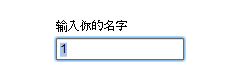
2StringValidate
<?xml version="1.0" encoding="utf-8"?>

<s:Application xmlns:fx="http://ns.adobe.com/mxml/2009"

               xmlns:s="library://ns.adobe.com/flex/spark"

               xmlns:mx="library://ns.adobe.com/flex/mx" minWidth="955" minHeight="600">

    <fx:Declarations>

        <mx:StringValidator source="{username}"  property="text" minLength="3" maxLength="20"

                             trigger="{submitButton}" triggerEvent="click"

                             tooShortError="最少要有3个字符"

                             tooLongError="最多只能20个字符"

                            >

        </mx:StringValidator>

    </fx:Declarations>

    <s:VGroup horizontalCenter="0" verticalCenter="0">

       <s:Label text="输入你的名字"/>

        <s:TextInput id="username"/>

        <s:Button label="Submit" id="submitButton"/>

    </s:VGroup>

</s:Application>

3 NumberValidator
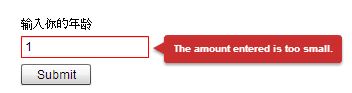
<?xml version="1.0" encoding="utf-8"?>

<s:Application xmlns:fx="http://ns.adobe.com/mxml/2009"

               xmlns:s="library://ns.adobe.com/flex/spark"

               xmlns:mx="library://ns.adobe.com/flex/mx" minWidth="" minHeight="">

    <fx:Declarations>

          <mx:NumberValidator source="{age}" property="text" allowNegative="false"

                               negativeError="年龄不太对昂"

                               minValue="" maxValue="" domain="int"

                               trigger="{submitButton}" triggerEvent="click"

              />

    </fx:Declarations>

<s:VGroup horizontalCenter="" verticalCenter="">

    <s:Label text="输入你的年龄"/>

    <s:TextInput id="age" />

    <s:Button label="Submit" id="submitButton"/>

</s:VGroup>

</s:Application>
但是 negativeError="报错内容" 似乎不太起作用
4 DateVlidator
<?xml version="1.0" encoding="utf-8"?>

<s:Application xmlns:fx="http://ns.adobe.com/mxml/2009"

               xmlns:s="library://ns.adobe.com/flex/spark"

               xmlns:mx="library://ns.adobe.com/flex/mx" minWidth="955" minHeight="600">

<fx:Declarations>

      <mx:DateValidator source="{birthday}" property="text" inputFormat="mm/dd/yyyy" allowedFormatChars="/"

                         trigger="{submitButton}"  triggerEvent="click"

          />

</fx:Declarations>

    <s:VGroup horizontalCenter="0" verticalCenter="0">

        <s:Label text="请输入日期"/>

        <s:TextInput id="birthday"/>

        <s:Button label="Submit" id="submitButton"/>

    </s:VGroup>

</s:Application>
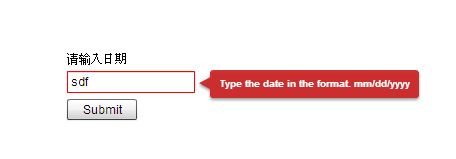
5 dateValidator 具体到日月年
<?xml version="1.0" encoding="utf-8"?>

<s:Application xmlns:fx="http://ns.adobe.com/mxml/2009"

               xmlns:s="library://ns.adobe.com/flex/spark"

               xmlns:mx="library://ns.adobe.com/flex/mx" minWidth="955" minHeight="600">

<fx:Declarations>

      <mx:DateValidator

           monthSource="{month}" monthProperty="value" daySource="{day}" dayProperty="value" yearSource="{year}" yearProperty="text"

                        property="text" inputFormat="mm/dd/yyyy" allowedFormatChars="/"

                         trigger="{submitButton}"  triggerEvent="click"

          />

</fx:Declarations>

    <s:VGroup horizontalCenter="0" verticalCenter="0">

        <s:Label text="请输入日期月"/>

        <s:NumericStepper id="month"/>

        <s:Label text="请输入日期日"/>

        <s:NumericStepper id="day"/>

        <s:Label text="请输入日期年"/>

        <s:TextInput id="year" width="60"/>

        <s:Button label="Submit" id="submitButton" />

    </s:VGroup>

</s:Application>
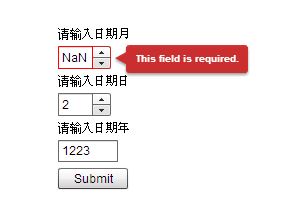
6 EmailValidator
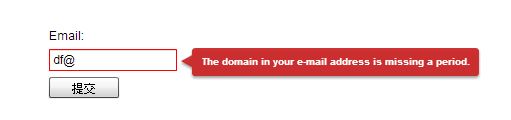
<?xml version="1.0" encoding="utf-8"?>

<s:Application xmlns:fx="http://ns.adobe.com/mxml/2009"

               xmlns:s="library://ns.adobe.com/flex/spark"

               xmlns:mx="library://ns.adobe.com/flex/mx" minWidth="955" minHeight="600">

<fx:Declarations>

     <mx:EmailValidator source="{email}" property="text"

                     invalidCharError="你输入的邮箱格式不正确"

                     trigger="{submitButton}" triggerEvent="click" />

</fx:Declarations>

 <s:VGroup horizontalCenter="0" verticalCenter="0">

     <s:Label text="Email:"/>

     <s:TextInput id="email"/>

     <s:Button label="提交" id="submitButton"/>

 </s:VGroup>

</s:Application>
7 CreditCardValidator
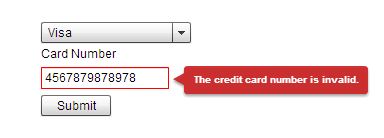
<?xml version="1.0" encoding="utf-8"?>

<s:Application xmlns:fx="http://ns.adobe.com/mxml/2009"

               xmlns:s="library://ns.adobe.com/flex/spark"

               xmlns:mx="library://ns.adobe.com/flex/mx" minWidth="955" minHeight="600">

     <fx:Declarations>

          <mx:CreditCardValidator

              cardNumberSource="{cardNumber}"

              cardNumberProperty="text"

              cardTypeSource="{cardType}"

              cardTypeProperty="selectedItem"

              trigger="{submitButton}"

              triggerEvent="click" />

     </fx:Declarations>

    <s:VGroup horizontalCenter="0" verticalCenter="0">

        <s:DropDownList id="cardType" width="150">

            <s:ArrayCollection>

                <fx:String>American Express</fx:String>

                <fx:String>Visa</fx:String>

                <fx:String>Diners</fx:String>

                <fx:String>Discover</fx:String>

                <fx:String>MasterCard</fx:String>

            </s:ArrayCollection>

        </s:DropDownList>

        <s:Label text="Card Number"/>

        <s:TextInput id="cardNumber"/>

        <s:Button label="Submit"  id="submitButton"/>

    </s:VGroup>

</s:Application>
8 PhoneNumberValidator
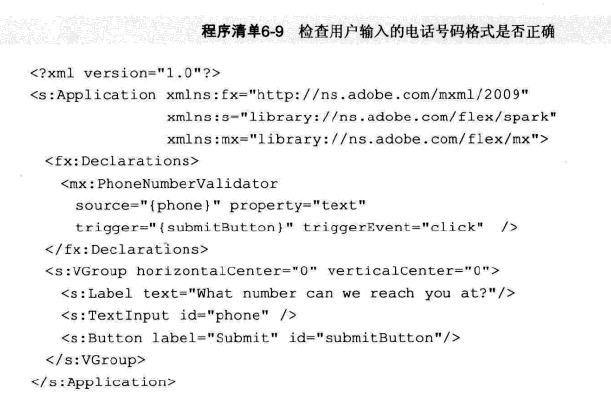
8 RegExpValidator 正则表达式
ssn(Social Security Number)以美国社保账号为例

9用正则表达式 RegExpValidator 查找与模式匹配的所有匹配项
<?xml version="1.0" encoding="utf-8"?>

<s:Application xmlns:fx="http://ns.adobe.com/mxml/2009"

               xmlns:s="library://ns.adobe.com/flex/spark"

               xmlns:mx="library://ns.adobe.com/flex/mx" minWidth="955" minHeight="600">

    <fx:Declarations>

        <mx:RegExpValidator source="{ssn}" property="text"

                         flags="gmi"

                         expression="\d\{3\}.\d\{2\}.\d\{\4}"

                         noMatchError="你的社保账号输入的不正确"

                         trigger="{submitButton}"

                         triggerEvent="click"

                         >

        </mx:RegExpValidator>

    </fx:Declarations>

    <s:VGroup horizontalCenter="0" verticalCenter="0">

        <s:Label text="美国社保号"/>

        <s:TextInput id="ssn"/>

        <s:Button label="提交" id="submitButton"/>

    </s:VGroup>

</s:Application>
flags="gmi" 是忽略大小写

10查找与模式匹配的所有匹配项
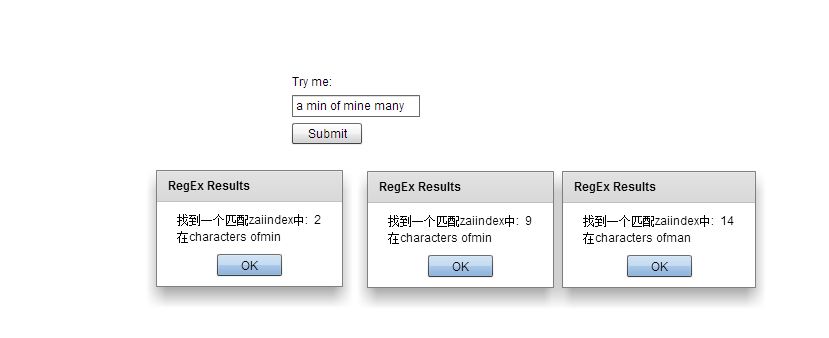
<?xml version="1.0" encoding="utf-8"?>

<s:Application xmlns:fx="http://ns.adobe.com/mxml/2009"

               xmlns:s="library://ns.adobe.com/flex/spark"

               xmlns:mx="library://ns.adobe.com/flex/mx" minWidth="955" minHeight="600">

   <fx:Script>

       <![CDATA[

            import mx.controls.Alert;

            import mx.events.ValidationResultEvent;

            import mx.validators.RegExpValidationResult;

            private function handleValidation(event:ValidationResultEvent):void

            {

              var oneResult:RegExpValidationResult;

              for(var i:int =0; i<event.results.length;i++)

              {

               oneResult = event.results[i];

               Alert.show("找到一个匹配zaiindex中:  "+ oneResult.matchedIndex +"\n在characters of"+oneResult.matchedString,"RegEx Results",Alert.NONMODAL);

              }

            }

       ]]>

   </fx:Script>

   <fx:Declarations>

       <mx:RegExpValidator source="{test}" property="text" flags="gmi"

                           valid="handleValidation(event)"

                           expression="m[ai]n" noMatchError="我不喜欢这个"

                           trigger="{submitButton}" triggerEvent="click"/>

   </fx:Declarations>

    <s:VGroup horizontalCenter="0" verticalCenter="0">

        <s:Label text="Try me:"/>

        <s:TextInput id="test"/>

        <s:Button label="Submit" id="submitButton" />

    </s:VGroup>

</s:Application>
11 实时验证
<?xml version="1.0" encoding="utf-8"?>

<s:Application xmlns:fx="http://ns.adobe.com/mxml/2009"

               xmlns:s="library://ns.adobe.com/flex/spark"

               xmlns:mx="library://ns.adobe.com/flex/mx" minWidth="955" minHeight="600">

   <fx:Declarations>

       <mx:StringValidator source="{address}"

                           minLength="5" property="text"

                           trigger="{address}" triggerEvent="change"/>

   </fx:Declarations>

    <s:VGroup horizontalCenter="0" verticalCenter="0">

        <s:Label text="请输入你的地址"/>

        <s:TextInput id="address"/>

        <s:Button label="提交" id="submitButton" />

    </s:VGroup>

</s:Application>

12 提交值验证,提交值包括Tab键、回车键、方向键或鼠标单击其他组件
<?xml version="1.0" encoding="utf-8"?>

<s:Application xmlns:fx="http://ns.adobe.com/mxml/2009"

               xmlns:s="library://ns.adobe.com/flex/spark"

               xmlns:mx="library://ns.adobe.com/flex/mx" minWidth="955" minHeight="600">

   <fx:Declarations>

       <mx:StringValidator source="{address}"

                           minLength="5" property="text"

                           trigger="{address}" triggerEvent="valueCommit"/>

   </fx:Declarations>

    <s:VGroup horizontalCenter="0" verticalCenter="0">

        <s:Label text="请输入你的地址"/>

        <s:TextInput id="address"/>

        <s:Button label="提交" id="submitButton" />

    </s:VGroup>

</s:Application>
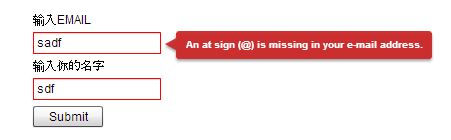
13 通过性验证
<?xml version="1.0" encoding="utf-8"?>

<s:Application xmlns:fx="http://ns.adobe.com/mxml/2009"

               xmlns:s="library://ns.adobe.com/flex/spark"

               xmlns:mx="library://ns.adobe.com/flex/mx" minWidth="955" minHeight="600">

   <fx:Declarations>

       <mx:StringValidator source="{username}"

                           minLength="6" property="text"

                           trigger="{submitButton}" triggerEvent="click"/>

       <mx:EmailValidator source="{email}" property="text"

                          invalidCharError="你输入的邮箱格式不正确"

                          trigger="{submitButton}" triggerEvent="click" />

   </fx:Declarations>

    <s:VGroup horizontalCenter="0" verticalCenter="0">

        <s:Label text="输入EMAIL"/>

        <s:TextInput id="email"/>

        <s:Label text="输入你的名字"/>

        <s:TextInput id="username"/>

        <s:Button label="Submit" id="submitButton"/>

    </s:VGroup>

</s:Application>
Flex验证器 validate stringvalidate的更多相关文章
- thinkphp5 验证器 validate 和 layer
首先tp5的验证器使用特方便 设置规则即可通用 首先页面html(layer 配合) 毕竟是后端 尽量用一些成熟的前台框架 之前用boostrap $.ajax({ url:'/index/Regi ...
- thinkphp5.0自定义验证器
虽然我早就会些php基础语法,我套过数据,自己写的控制器层,不是用的api方式,那个公司是为了锻炼我,所以才那样做的,基本上的东西都是用的框架自带的,重来自己没有去封装过这些东西,所以编程思想上,还很 ...
- gin中如何自定义验证器
package main import ( "github.com/gin-gonic/gin" "github.com/gin-gonic/gin/binding&qu ...
- Flex 内置验证器—验证用户输入
今晚对于Flex中的Validator类(所有验证器的父类)测试一下 ---->其中常用的验证类有StringValidator,NumberValidator,DateValidator 测试 ...
- Thinkphp5中的Validate验证器的使用
更多笔记: http://note.youdao.com/noteshare?id=e97a5df64888f27d912b3e966b9ec297&sub=web1520841813815 ...
- 9、 Struts2验证(声明式验证、自定义验证器)
1. 什么是Struts2 验证器 一个健壮的 web 应用程序必须确保用户输入是合法.有效的. Struts2 的输入验证 基于 XWork Validation Framework 的声明式验证: ...
- vue-validator(vue验证器)
官方文档:http://vuejs.github.io/vue-validator/zh-cn/index.html github项目地址:https://github.com/vuejs/vue-v ...
- 原生JS 表单提交验证器
转载:http://www.cnblogs.com/sicd/p/4613628.html 一.前言 最近在开发一个新项目,需要做登陆等一系列的表单提交页面.在经过“缜密”的讨论后,我们决定 不用外部 ...
- yii框架中验证器声明一组内置验证器可以使用短名称引用
1.内置验证器的短名称分别有: boolean: yii\validators\BooleanValidator captcha: yii\captcha\CaptchaValidator compa ...
随机推荐
- java中的自定义注解的使用
https://www.cnblogs.com/acm-bingzi/p/javaAnnotation.html
- css-去掉IE浏览器自带×号
1.去除IE输入框的叉号 /* 去除IE输入框的叉号 */ ::-ms-clear, ::-ms-reveal{ display:none; } 2.前端多行展现代码,多余部分使用...代替 div{ ...
- unittest框架 assertEqual 报错 让其出现中文的方法(这个问题出现时 我找了老半天) 还追加了 报错信息自定义的方法
1,发现如果assertEqual里面放的是变量,不会展示中文出来 2,放的是中文(注意前面加u)就可以展示中文出来 改进后的方法:(可以放入变量去对比还可以展示中文的方法)
- hessian 反序列化问题
有class 比如 class Test{ private TestArrayList list=new TestArrayList(""); public static void ...
- mysql root情况
180829 11:15:20 [ERROR] Fatal error: Please read "Security" section of the manual to ...
- 标准C库函数
标准库函数由15个头文件组成 1.math.h 1.1 绝对值函数 1.2 幂函数.开平方函数 1.3 指数函数.对数函数 1.5 三角函数 注意参数范围: 1.6 取整函数.取余函数 2.字符串处理 ...
- 关于dict的formkeys方法注意
使用容器中的元素生成k, v为统一值, 指向同一个内存地址 默认值指向同一个内存, 修改就全部修改 strvar = 'abcd' listvar = [] dictvar = {} dictvar ...
- 第15课 右值引用(2)_std::move和移动语义
1. std::move (1)std::move的原型 template<typename T> typename remove_reference<T>::type& ...
- 第6章 静态路由和动态路由(3)_RIP动态路由协议
5. RIP动态路由协议 5.1 RIP协议(Routing Information Protocol) (1)是一个距离矢量路由选择协议.选择最佳路径的标准是跳数,如果到达目标网络经过的路由器最少, ...
- 推荐7个GitHub上不错的Python机器学习项目
1.Pylearn2 [Star:2633] Pylearn是一个让机器学习研究简单化的基于Theano的库程序. 2. Scikit-learn [Star:32449] Scikit-learn是 ...