
UWP ListView 绑定 单击 选中项 颜色
refer: https://www.cnblogs.com/lonelyxmas/p/7650259.html
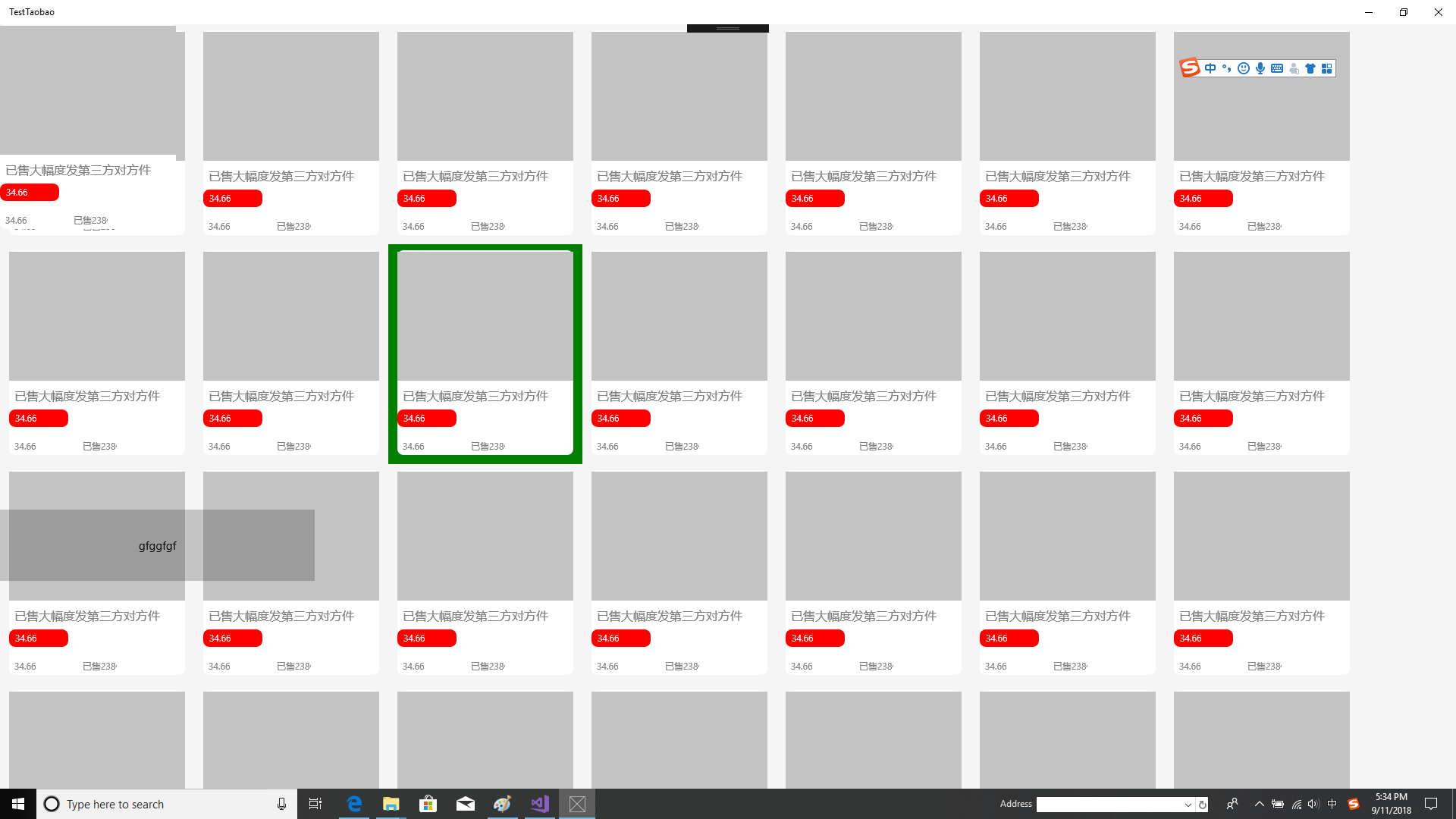
using System;

using System.Collections.Generic;

using System.Collections.ObjectModel;

using System.Diagnostics;

using System.IO;

using System.Linq;

using System.Runtime.InteropServices.WindowsRuntime;

using Windows.Foundation;

using Windows.Foundation.Collections;

using Windows.UI.Popups;

using Windows.UI.Xaml;

using Windows.UI.Xaml.Controls;

using Windows.UI.Xaml.Controls.Primitives;

using Windows.UI.Xaml.Data;

using Windows.UI.Xaml.Input;

using Windows.UI.Xaml.Media;

using Windows.UI.Xaml.Navigation;

// The Blank Page item template is documented at https://go.microsoft.com/fwlink/?LinkId=402352&clcid=0x409

namespace TestTaobao

{

    /// <summary>

    /// An empty page that can be used on its own or navigated to within a Frame.

    /// </summary>

    public sealed partial class MainPage : Page

    {

        public MainPage()

        {

            this.InitializeComponent();

            listView.DataContext = listData;

            bindData();//?????????

            Loaded += MainPage_Loaded;

        }

        ObservableCollection<data> listData = new ObservableCollection<data>();//????????????

         private void MainPage_Loaded(object sender, RoutedEventArgs e)

        {

        }

        void bindData()

        {

            listData.Add(new data() { title = "ttttt1", picUrl = "Assets/3.png" });

            listData.Add(new data() { title = "ttttt1", picUrl = "Assets/3.png" });

            listData.Add(new data() { title = "ttttt1", picUrl = "Assets/3.png" });

            listData.Add(new data() { title = "ttttt1", picUrl = "Assets/3.png" });

            listView.ItemsSource = listData;

        }

        private async  void Button_Click(object sender, RoutedEventArgs e)

        {

            bindData();

           // var  s= await  web.InvokeScriptAsync("eval",new string[] { "document.cookie;"});

           // new MessageDialog(s).ShowAsync();

        }

        public class data

        {

            public string title { get; set; }

            public string picUrl { get; set; }

        }

        private void listView_ItemClick(object sender, ItemClickEventArgs e)

        {

            new MessageDialog("" + (e.ClickedItem as data).picUrl).ShowAsync();

            listView.SelectedItem=null ;

        }

    }

}

/*-----------UI--------------------------------------------*/

     <Page

    x:Class="TestTaobao.MainPage"

    xmlns="http://schemas.microsoft.com/winfx/2006/xaml/presentation"

    xmlns:x="http://schemas.microsoft.com/winfx/2006/xaml"

    xmlns:local="using:TestTaobao"

    xmlns:d="http://schemas.microsoft.com/expression/blend/2008"

    xmlns:mc="http://schemas.openxmlformats.org/markup-compatibility/2006"

    mc:Ignorable="d"

    Background="{ThemeResource ApplicationPageBackgroundThemeBrush}" >

    <Page.Resources>

        <Style x:Name="MyListViewItemStyle" TargetType="ListViewItem">

            <Setter Property="Template">

                <Setter.Value>

                    <ControlTemplate TargetType="ListBoxItem">

                        <Grid Background="{TemplateBinding Background}">

                            <VisualStateManager.VisualStateGroups>

                                <VisualStateGroup>

                                    <!--????-->

                                    <VisualState x:Name="Normal" />

                                    <!--????????-->

                                    <VisualState x:Name="PointerOver">

                                        <Storyboard>

                                            <ObjectAnimationUsingKeyFrames

                        Storyboard.TargetName="ContentBackground"

                        Storyboard.TargetProperty="Background">

                                                <DiscreteObjectKeyFrame KeyTime="0" Value="Red" />

                                            </ObjectAnimationUsingKeyFrames>

                                        </Storyboard>

                                    </VisualState>

                                </VisualStateGroup>

                            </VisualStateManager.VisualStateGroups>

                            <Grid x:Name="ContentBackground">

                                <ContentPresenter

                  Content="{TemplateBinding Content}"

                  Margin="{TemplateBinding Padding}" />

                            </Grid>

                        </Grid>

                    </ControlTemplate>

                </Setter.Value>

            </Setter>

        </Style>

    </Page.Resources>

    <Grid>

        <ListView Name="listView"  IsItemClickEnabled="True" ItemsSource="{Binding}" Background="WhiteSmoke" ItemClick="listView_ItemClick"  SelectionMode="None">

            <ListView.Resources>

                <Style x:Key="ListViewItemStyle1" TargetType="ListViewItem">

                    <!--HorizontalContentAlignment ListViewItem ??????-->

                    <Setter Property="FontFamily" Value="{ThemeResource ContentControlThemeFontFamily}" />

                    <Setter Property="FontSize" Value="{ThemeResource ControlContentThemeFontSize}" />

                    <Setter Property="Background" Value="{ThemeResource ListViewItemBackground}" />

                    <Setter Property="Foreground" Value="{ThemeResource ListViewItemForeground}" />

                    <Setter Property="TabNavigation" Value="Local" />

                    <Setter Property="IsHoldingEnabled" Value="True" />

                    <Setter Property="Padding" Value="12,0,12,0" />

                    <Setter Property="HorizontalContentAlignment" Value="Stretch" />

                    <Setter Property="VerticalContentAlignment" Value="Center" />

                    <Setter Property="MinWidth" Value="{ThemeResource ListViewItemMinWidth}" />

                    <Setter Property="MinHeight" Value="{ThemeResource ListViewItemMinHeight}" />

                    <Setter Property="AllowDrop" Value="False" />

                    <Setter Property="UseSystemFocusVisuals" Value="True" />

                    <Setter Property="FocusVisualMargin" Value="0" />

                    <Setter Property="FocusVisualPrimaryBrush" Value="{ThemeResource ListViewItemFocusVisualPrimaryBrush}" />

                    <Setter Property="FocusVisualPrimaryThickness" Value="2" />

                    <Setter Property="FocusVisualSecondaryBrush" Value="{ThemeResource ListViewItemFocusVisualSecondaryBrush}" />

                    <Setter Property="FocusVisualSecondaryThickness" Value="1" />

                    <Setter Property="Template">

                        <Setter.Value>

                            <ControlTemplate TargetType="ListViewItem">

                                <ListViewItemPresenter

                                    HorizontalContentAlignment="{TemplateBinding HorizontalContentAlignment}"

                                    VerticalContentAlignment="{TemplateBinding VerticalContentAlignment}"

                                    CheckBoxBrush="{ThemeResource ListViewItemCheckBoxBrush}"

                                    CheckBrush="{ThemeResource ListViewItemCheckBrush}"

                                    CheckMode="{ThemeResource ListViewItemCheckMode}"

                                    ContentMargin="{TemplateBinding Padding}"

                                    ContentTransitions="{TemplateBinding ContentTransitions}"

                                    Control.IsTemplateFocusTarget="True"

                                    DisabledOpacity="{ThemeResource ListViewItemDisabledThemeOpacity}"

                                    DragBackground="{ThemeResource ListViewItemDragBackground}"

                                    DragForeground="{ThemeResource ListViewItemDragForeground}"

                                    DragOpacity="{ThemeResource ListViewItemDragThemeOpacity}"

                                    FocusBorderBrush="{ThemeResource ListViewItemFocusBorderBrush}"

                                    FocusSecondaryBorderBrush="{ThemeResource ListViewItemFocusSecondaryBorderBrush}"

                                    FocusVisualMargin="{TemplateBinding FocusVisualMargin}"

                                    FocusVisualPrimaryBrush="{TemplateBinding FocusVisualPrimaryBrush}"

                                    FocusVisualPrimaryThickness="{TemplateBinding FocusVisualPrimaryThickness}"

                                    FocusVisualSecondaryBrush="{TemplateBinding FocusVisualSecondaryBrush}"

                                    FocusVisualSecondaryThickness="{TemplateBinding FocusVisualSecondaryThickness}"

                                    PlaceholderBackground="{ThemeResource ListViewItemPlaceholderBackground}"

                                    PointerOverBackground="Green"

                                    PointerOverForeground="{ThemeResource ListViewItemForegroundPointerOver}"

                                    PressedBackground="#FFFFAA"

                                    ReorderHintOffset="{ThemeResource ListViewItemReorderHintThemeOffset}"

                                    SelectedBackground="#FFFFAA"

                                    SelectedForeground="{ThemeResource ListViewItemForegroundSelected}"

                                    SelectedPointerOverBackground="Red"

                                    SelectedPressedBackground="#FFFFAA"

                                    SelectionCheckMarkVisualEnabled="{ThemeResource ListViewItemSelectionCheckMarkVisualEnabled}" />

                                <!--

                                    PointerOverBackground ????????;SelectedBackground ??????;SelectedPressedBackground ?????????;

                                    PressedBackground ??????????;SelectedPointerOverBackground ????????????

                                -->

                            </ControlTemplate>

                        </Setter.Value>

                    </Setter>

                </Style>

            </ListView.Resources>

            <ListView.ItemContainerStyle>

                <StaticResource ResourceKey="ListViewItemStyle1" />

            </ListView.ItemContainerStyle>

            <ListView.ItemTemplate>

                <DataTemplate>

                    <Grid  x:Name="tpbg"   Width="232"  Height="270" Margin="0,8,0,12">

                        <Grid.Triggers>

                            <EventTrigger RoutedEvent="Grid.Loaded">

                                <EventTrigger.Actions>

                                    <BeginStoryboard>

                                        <Storyboard  x:Name="graphAnimation" x:Uid="sb">

                                            <DoubleAnimation Duration="0:0:2" From="0" To="1" Storyboard.TargetName="tpbg" Storyboard.TargetProperty="Grid.Opacity"></DoubleAnimation>

                                        </Storyboard>

                                    </BeginStoryboard>

                                </EventTrigger.Actions>

                            </EventTrigger>

                            <!--??????????-->

                            <!--<EventTrigger RoutedEvent="Grid.Unloaded">

                                <EventTrigger.Actions>

                                    <BeginStoryboard >

                                        <Storyboard>

                                            -->

                            <!--<DoubleAnimation Duration="0:0:2" From="1" To="0.5" Storyboard.TargetName="tpbg" Storyboard.TargetProperty="Grid.Opacity"></DoubleAnimation>-->

                            <!--<ColorAnimation From="AliceBlue" To="White" Storyboard.TargetName="tpbg" Storyboard.TargetProperty="(Grid.Background).(SolidColorBrush.Color)"></ColorAnimation>-->

                            <!--

                                        </Storyboard>

                                    </BeginStoryboard>

                                </EventTrigger.Actions>

                            </EventTrigger>-->

                        </Grid.Triggers>

                        <Rectangle RadiusX="8" RadiusY="8" Fill="White"></Rectangle>

                        <Image Stretch="Fill" Source="Assets/3.png" Margin="0,2,0,0" HorizontalAlignment="Center" Height="170" VerticalAlignment="Top"/>

                        <Rectangle RadiusX="8" RadiusY="8"  Height="23" Width="78" Fill="Red"  HorizontalAlignment="Left" Margin="0,210,0,0" VerticalAlignment="Top"></Rectangle>

                        <TextBlock Foreground="Gray" FontSize="16" Text="????????????" VerticalAlignment="Top" Margin="7,180,0,0" HorizontalAlignment="Left"  />

                        <TextBlock Foreground="White" FontSize="12" Text="34.66" VerticalAlignment="Top" Margin="8,213,0,0" HorizontalAlignment="Left" Width="50" />

                        <TextBlock Foreground="Gray" FontSize="12" Text="34.66" VerticalAlignment="Top" Margin="7,250,0,0" HorizontalAlignment="Left" Width="51" />

                        <TextBlock Foreground="Gray" FontSize="12" Text="??238?" VerticalAlignment="Top" Margin="97,250,0,0" HorizontalAlignment="Left" Width="45" />

                    </Grid>

                        <!--<Image Stretch="UniformToFill" Width="190"  Height="250" Source="{Binding picUrl}"></Image>

                        <TextBlock Text="{Binding title}"></TextBlock>-->

                </DataTemplate>

            </ListView.ItemTemplate>

            <ListView.ItemsPanel>

                <ItemsPanelTemplate>

                    <ItemsWrapGrid MaximumRowsOrColumns="8" Orientation="Horizontal"></ItemsWrapGrid>

                </ItemsPanelTemplate>

            </ListView.ItemsPanel>

        </ListView>

        <Button HorizontalAlignment="Left" Height="94" Margin="0,0,0,274" VerticalAlignment="Bottom" Width="415" Click="Button_Click" PointerEntered="Button_PointerEntered">gfggfgf</Button>

        <Grid  x:Name="tpbg444"   Width="232" HorizontalAlignment="Left" Height="270" VerticalAlignment="Top">

            <Rectangle RadiusX="8" RadiusY="8" Fill="White"></Rectangle>

            <Image Stretch="Fill" Source="Assets/3.png" Margin="0,2,0,0" HorizontalAlignment="Center" Height="170" VerticalAlignment="Top"/>

            <Rectangle RadiusX="8" RadiusY="8"  Height="23" Width="78" Fill="Red"  HorizontalAlignment="Left" Margin="0,210,0,0" VerticalAlignment="Top"></Rectangle>

            <TextBlock Foreground="Gray" FontSize="16" Text="????????????" VerticalAlignment="Top" Margin="7,180,0,0" HorizontalAlignment="Left"  />

            <TextBlock Foreground="White" FontSize="12" Text="34.66" VerticalAlignment="Top" Margin="8,213,0,0" HorizontalAlignment="Left" Width="50" />

            <TextBlock Foreground="Gray" FontSize="12" Text="34.66" VerticalAlignment="Top" Margin="7,250,0,0" HorizontalAlignment="Left" Width="51" />

            <TextBlock Foreground="Gray" FontSize="12" Text="??238?" VerticalAlignment="Top" Margin="97,250,0,0" HorizontalAlignment="Left" Width="45" />

        </Grid>

    </Grid>

</Page>
UWP ListView 绑定 单击 选中项 颜色的更多相关文章
- select默认选中项颜色为灰色,选择后变为黑色(js实现)
<script> var unSelected = "#999"; var selected = "#333"; $(function () { $ ...
- Windows 10 UWP开发:如何去掉ListView默认的选中效果
原文:Windows 10 UWP开发:如何去掉ListView默认的选中效果 开发UWP的时候,很多人会碰到一个问题,就是ListView在被数据绑定之后经常有个默认选中的效果,就像这样: 而且它不 ...
- LinkBar选中项字体颜色
通过控制disabledColor样式来控制,选中项字体的颜色.
- WPF中ListBox /ListView如何改变选中条背景颜色
适用ListBox /ListView WPF中LISTVIEW如何改变选中条背景颜色 https://www.cnblogs.com/sjqq/p/7828119.html
- WPF中修改ListBox项的样式病修改选中项的背景颜色
最终效果: 1 <ListBox Name="cmb"> 2 <!--修改颜色--> 3 <ListBox.Resources> 4 <! ...
- 2018-12-1-WPF-修改-ItemContainerStyle-鼠标移动到未选中项效果和选中项背景
title author date CreateTime categories WPF 修改 ItemContainerStyle 鼠标移动到未选中项效果和选中项背景 lindexi 2018-12- ...
- 自定义WPF ListBox的选中项样式
首先介绍一种简单地方法:就是通过自定义SystemColors类的参数来自定义WPF ListBox选择颜色的,SystemColors的HighlightBrushKey和HighlightText ...
- listview改变选中行字体颜色
[android]listview改变选中行字体颜色 目标:选中item,其字体设置为#3197FF,未选中的,其字体为#FFFFFF 与listvew设置选中行item背景图片一样,使用select ...
- Android高级控件(一)——ListView绑定CheckBox实现全选,增加和删除等功能
Android高级控件(一)--ListView绑定CheckBox实现全选,增加和删除等功能 这个控件还是挺复杂的,也是项目中应该算是比较常用的了,所以写了一个小Demo来讲讲,主要是自定义adap ...
随机推荐
- 纯小白入手 vue3.0 CLI - 2.6 - 组件的复用
vue3.0 CLI 真小白一步一步入手全教程系列:https://www.cnblogs.com/ndos/category/1295752.html 我的 github 地址 - vue3.0St ...
- FI配置步骤清单.枫
1. 说明 本版本的FI模块配置内容非常少,主要应用的是系统默认的配置参数,但能完成基本的总帐.应收.应付操作. 配置内容包含以下几部分: 1. 基本的组织结构定义及分配,以及公司代码的全局性 ...
- JSP基本语法总结【1】(jsp工作原理,脚本元素,指令元素,动作元素)
时隔半年,回头对jsp复习整理一下,温故而知新. jsp工作原理: jsp服务器管理jsp页面分两个阶段:转换阶段(translation phase)和执行阶段(execution phase). ...
- Android--自定义控件---自动分页的GridView
最近,根据项目需求,需要一个能够自动分页的导航,所以便自定义了一个自动分页的GridView. 思路:继承RelativeLayout,然后在里面放了一个viewpager和一个GridView... ...
- 通过PMP考试
带了几年项目,终于持证上岗了,5A通过.
- 用例设计之APP用例覆盖准则
基本原则 本文主要讨论APP功能用例的覆盖,基本原则: 用户场景闭环(从哪来到哪去) 遍历所有的实现逻辑路径 需求点覆盖 覆盖维度 APP功能用例设计主要使用传统的黑盒用例设计方法.同时,作为移动AP ...
- 10分钟让你明白MySQL是如何利用索引的
一.前言 在MySQL中进行SQL优化的时候,经常会在一些情况下,对MySQL能否利用索引有一些迷惑. 譬如: MySQL 在遇到范围查询条件的时候就停止匹配了,那么到底是哪些范围条件? MySQL ...
- Linux中 /proc/[pid] 目录各文件简析
Linux 内核提供了一种通过 proc 文件系统,在运行时访问内核内部数据结构.改变内核设置的机制.proc 文件系统是一个伪文件系统,它只存在内存当中,而不占用外存空间.它以文件系统的方式为访问系 ...
- Asp.net core 2.0.1 Razor 的使用学习笔记(六)
Asp.net core 2.0.1 Razor 的使用学习笔记——基本页面的建立 VS这版(vs版本:15.5.6 .net版本:4.7.02558)的Razor页面自动生成就是坑爹货,它自动生成 ...
- IE9 添加事件DOMContentLoaded,方法addEventListener
IE9 新添加 事件DOMContentLoaded,方法addEventListener