
使用Java进行串口SerialPort通讯
1.准备工作
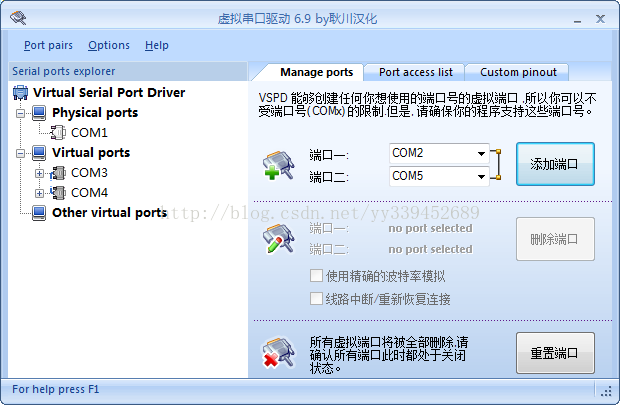
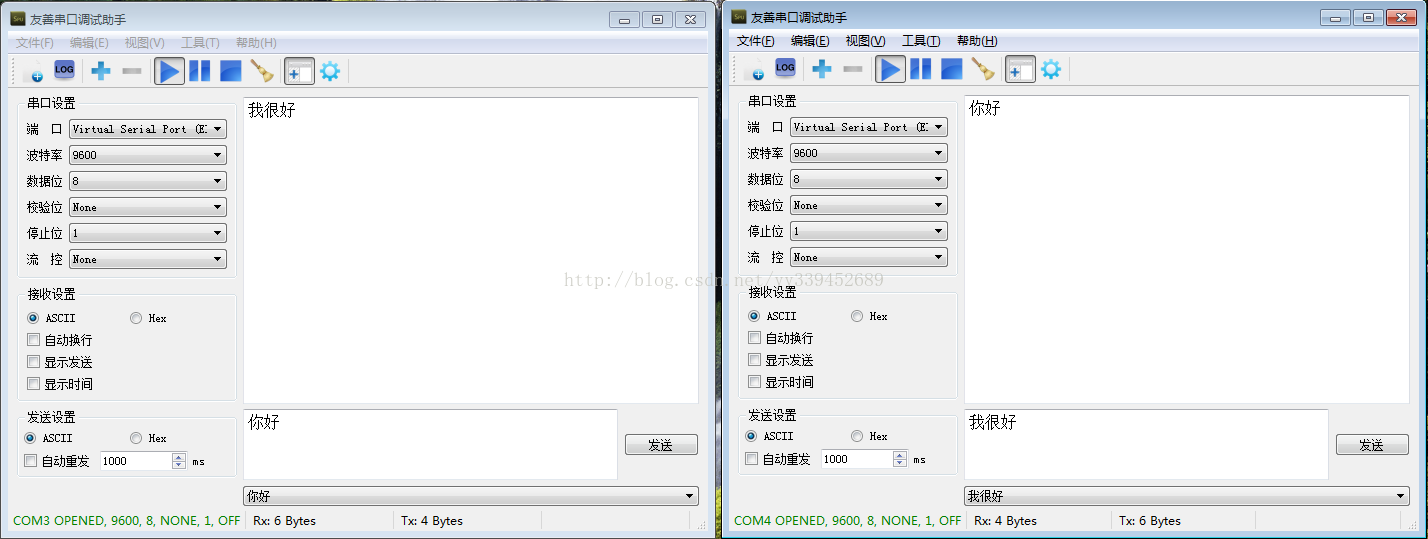
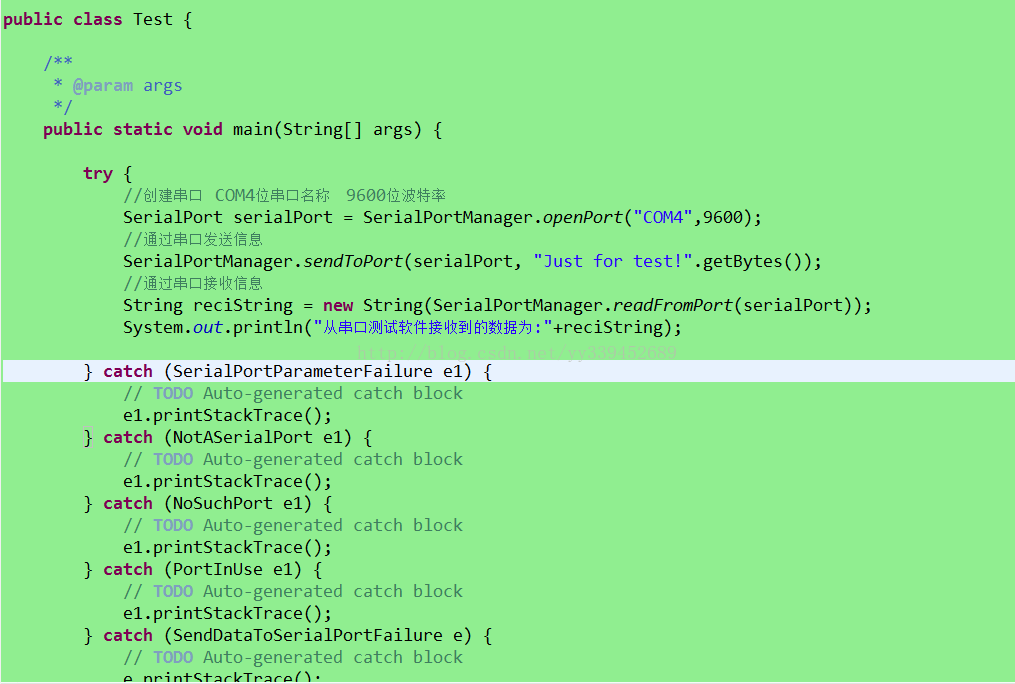
2.JAVA程序的操作
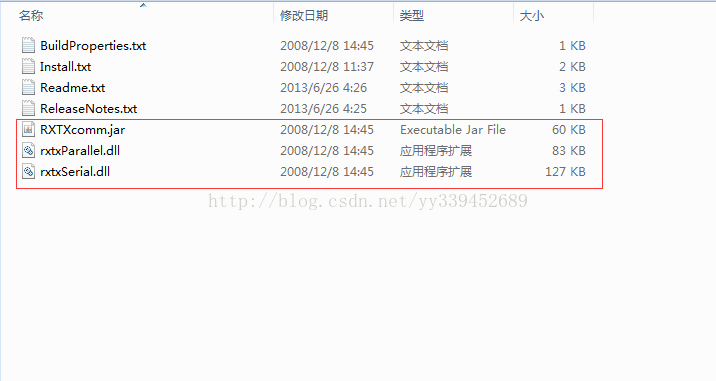
- package com.cams.CaMSMobileService.SerialPort;
- import gnu.io.CommPort;
- import gnu.io.CommPortIdentifier;
- import gnu.io.NoSuchPortException;
- import gnu.io.PortInUseException;
- import gnu.io.SerialPort;
- import gnu.io.SerialPortEventListener;
- import gnu.io.UnsupportedCommOperationException;
- import java.io.IOException;
- import java.io.InputStream;
- import java.io.OutputStream;
- import java.util.ArrayList;
- import java.util.Enumeration;
- import java.util.TooManyListenersException;
- import com.cams.CaMSMobileService.SerialPort.exception.NoSuchPort;
- import com.cams.CaMSMobileService.SerialPort.exception.NotASerialPort;
- import com.cams.CaMSMobileService.SerialPort.exception.PortInUse;
- import com.cams.CaMSMobileService.SerialPort.exception.ReadDataFromSerialPortFailure;
- import com.cams.CaMSMobileService.SerialPort.exception.SendDataToSerialPortFailure;
- import com.cams.CaMSMobileService.SerialPort.exception.SerialPortInputStreamCloseFailure;
- import com.cams.CaMSMobileService.SerialPort.exception.SerialPortOutputStreamCloseFailure;
- import com.cams.CaMSMobileService.SerialPort.exception.SerialPortParameterFailure;
- import com.cams.CaMSMobileService.SerialPort.exception.TooManyListeners;
- public class SerialPortManager {
- /**
- * 查找所有可用端口
- *
- * @return 可用端口名称列表
- */
- @SuppressWarnings("unchecked")
- public static final ArrayList<String> findPort() {
- // 获得当前所有可用串口
- Enumeration<CommPortIdentifier> portList = CommPortIdentifier
- .getPortIdentifiers();
- ArrayList<String> portNameList = new ArrayList<String>();
- // 将可用串口名添加到List并返回该List
- while (portList.hasMoreElements()) {
- String portName = portList.nextElement().getName();
- portNameList.add(portName);
- }
- return portNameList;
- }
- /**
- * 打开串口
- *
- * @param portName
- * 端口名称
- * @param baudrate
- * 波特率
- * @return 串口对象
- * @throws SerialPortParameterFailure
- * 设置串口参数失败
- * @throws NotASerialPort
- * 端口指向设备不是串口类型
- * @throws NoSuchPort
- * 没有该端口对应的串口设备
- * @throws PortInUse
- * 端口已被占用
- */
- public static final SerialPort openPort(String portName, int baudrate)
- throws SerialPortParameterFailure, NotASerialPort, NoSuchPort,
- PortInUse {
- try {
- // 通过端口名识别端口
- CommPortIdentifier portIdentifier = CommPortIdentifier
- .getPortIdentifier(portName);
- // 打开端口,设置端口名与timeout(打开操作的超时时间)
- CommPort commPort = portIdentifier.open(portName, 2000);
- // 判断是不是串口
- if (commPort instanceof SerialPort) {
- SerialPort serialPort = (SerialPort) commPort;
- try {
- // 设置串口的波特率等参数
- serialPort.setSerialPortParams(baudrate,
- SerialPort.DATABITS_8, SerialPort.STOPBITS_1,
- SerialPort.PARITY_NONE);
- } catch (UnsupportedCommOperationException e) {
- throw new SerialPortParameterFailure();
- }
- return serialPort;
- } else {
- // 不是串口
- throw new NotASerialPort();
- }
- } catch (NoSuchPortException e1) {
- throw new NoSuchPort();
- } catch (PortInUseException e2) {
- throw new PortInUse();
- }
- }
- /**
- * 关闭串口
- *
- * @param serialport
- * 待关闭的串口对象
- */
- public static void closePort(SerialPort serialPort) {
- if (serialPort != null) {
- serialPort.close();
- serialPort = null;
- }
- }
- /**
- * 向串口发送数据
- *
- * @param serialPort
- * 串口对象
- * @param order
- * 待发送数据
- * @throws SendDataToSerialPortFailure
- * 向串口发送数据失败
- * @throws SerialPortOutputStreamCloseFailure
- * 关闭串口对象的输出流出错
- */
- public static void sendToPort(SerialPort serialPort, byte[] order)
- throws SendDataToSerialPortFailure,
- SerialPortOutputStreamCloseFailure {
- OutputStream out = null;
- try {
- out = serialPort.getOutputStream();
- out.write(order);
- out.flush();
- } catch (IOException e) {
- throw new SendDataToSerialPortFailure();
- } finally {
- try {
- if (out != null) {
- out.close();
- out = null;
- }
- } catch (IOException e) {
- throw new SerialPortOutputStreamCloseFailure();
- }
- }
- }
- /**
- * 从串口读取数据
- *
- * @param serialPort
- * 当前已建立连接的SerialPort对象
- * @return 读取到的数据
- * @throws ReadDataFromSerialPortFailure
- * 从串口读取数据时出错
- * @throws SerialPortInputStreamCloseFailure
- * 关闭串口对象输入流出错
- */
- public static byte[] readFromPort(SerialPort serialPort)
- throws ReadDataFromSerialPortFailure,
- SerialPortInputStreamCloseFailure {
- InputStream in = null;
- byte[] bytes = null;
- try {
- in = serialPort.getInputStream();
- // 获取buffer里的数据长度
- int bufflenth = in.available();
- while (bufflenth != 0) {
- // 初始化byte数组为buffer中数据的长度
- bytes = new byte[bufflenth];
- in.read(bytes);
- bufflenth = in.available();
- }
- } catch (IOException e) {
- throw new ReadDataFromSerialPortFailure();
- } finally {
- try {
- if (in != null) {
- in.close();
- in = null;
- }
- } catch (IOException e) {
- throw new SerialPortInputStreamCloseFailure();
- }
- }
- return bytes;
- }
- /**
- * 添加监听器
- *
- * @param port
- * 串口对象
- * @param listener
- * 串口监听器
- * @throws TooManyListeners
- * 监听类对象过多
- */
- public static void addListener(SerialPort port,
- SerialPortEventListener listener) throws TooManyListeners {
- try {
- // 给串口添加监听器
- port.addEventListener(listener);
- // 设置当有数据到达时唤醒监听接收线程
- port.notifyOnDataAvailable(true);
- // 设置当通信中断时唤醒中断线程
- port.notifyOnBreakInterrupt(true);
- } catch (TooManyListenersException e) {
- throw new TooManyListeners();
- }
- }
- }
使用Java进行串口SerialPort通讯的更多相关文章
- java实现串口通讯
一. 准备工作 1. 点击此下载java串口通讯相关工具 2. 将RXTXcomm.jar放到 %JAVA_HOME%\jre\lib\ext\ 目录下,工程中引入该jar包 3. 将rxtxSe ...
- java读写串口数据
本博文参考自https://www.cnblogs.com/Dreamer-1/p/5523046.html 最近接触到了串口及其读写,在此记录java进行串口读写的过程. 1.导入串口支持包 需要下 ...
- Java实现串口通信的小样例
用Java实现串口通信(windows系统下),须要用到sun提供的串口包 javacomm20-win32.zip.当中要用到三个文件,配置例如以下: 1.comm.jar放置到 JAVA_HOME ...
- 用Java通过串口发送手机短信
用Java通过串口发短信其实很简单,因为有现成的类库供我们使用.有底层的类库,也有封装好一点的类库,下面我介绍一下在 Win32 平台下发送短信的方法. 如果你想用更底层的类库开发功能更强大的应用程序 ...
- 自制单片机之十七……PC与单片机RS-232串口的通讯和控制
这次我们来试着一步步的去掌握PC与单片机通过RS-232进行通讯和控制. 先说说我硬件的情况.我用的PC是个二手的IBM240小本本,十寸屏,赛扬400,机子很老了.但也有它的优点:1.串口,并口,P ...
- Java编写串口程序
用Java编写串口程序一般都会用到这个 http://fizzed.com/oss/rxtx-for-java 根据电脑的情况下载 解压以后有安装文档 For a JDK installation: ...
- java读取串口-mfz-rxtx-2.2-20081207-win-x86
1.下载jar包 RXTXcomm.jar 2.实现代码 package main; import java.awt.*; import java.awt.event.*; import java.i ...
- gRPC java 客户端,服务器端通讯使用json格式
使用 protobuf 作为通讯内容序列化的简单例子请看:http://www.cnblogs.com/ghj1976/p/5458176.html . 本文是使用 json 做为内容序列化的简单例子 ...
- c# 串口SerialPort
创建SerialPortFun类 using System; using System.Collections.Generic; using System.Linq; using System.Tex ...
随机推荐
- ubuntu16.04系统搜狗输入法的安装
参考博客:https://www.cnblogs.com/lrj567/p/6307329.html 本来不想写的,但是最近老是重装系统,每次百度特别浪费时间,特此记录一下 先去官网下载搜狗输入法li ...
- 【网络编程】使用getnameinfo()/getaddrinfo()/InetPton()
1.简要 从前用的网络编程函数现在又做了一定的改动,报了这么3个错误. error C4996: 'inet_ntoa': Use inet_ntop() or InetNtop() instead ...
- python3之模块io使用流的核心工具
1.io概叙 io模块提供了python用于处理各种类型I/O的主要工具,主要有三种类型的I/O:文本I/O,二进制I/O和原始I/O:这些都是通用类型,各种后备存储可使用其中的每一种类型,所以这些类 ...
- mysql学习------权限机制
MySQL服务器通过MySQL权限表来控制用户对数据库的访问,MySQL权限表存放在mysql数据库里,由mysql_install_db脚本初始化.这些MySQL权限表分别user,db,table ...
- centos7系统下安装配置jdk、tomcat教程
JDK安装与配置 1.下载linux版本的jdk,我下的版本是jdk6.0,下载rpm版本的. 可通过百度搜索文件名:jdk-6u45-linux-x64-rpm.bin下载 也可通过oracle官网 ...
- 004_on-my-zsh漂亮的shell
一. http://www.cnblogs.com/GarveyCalvin/p/4301235.html 二. 前言:Zsh可配置性强,用户可以自定义配置,个性化强.Zsh tab补全更强大,该功能 ...
- Spring:@Cacheable 中condition条件的理解
condition=false时,不读取缓存,直接执行方法体,并返回结果,同时返回结果也不放入缓存. ndition=true时,读取缓存,有缓存则直接返回.无则执行方法体,同时返回结果放入缓存(如果 ...
- .NetCore 分布式日志收集Exceptionless 在Windows下本地安装部署及应用实例
自己安装时候遇到很多问题,接下来把这些问题写出来希望对大家有所帮助 搭建环境: 1.下载安装 java 8 SDK (不要安装最新的10.0) 并配置好环境变量(环境变量的配置就不做介绍了) 2.下载 ...
- JS实现音乐播放器
JS实现音乐播放器 前 言 最近在复习JS,觉得音乐播放器是个挺有意思的东西,今天就来用我们最原生的JS写一个小小的音乐播放器~ 主要功能: 1.支持循环.随机播放 2.在播 ...
- js文件的版本控制
使用grunt完成requirejs的合并压缩和js文件的版本控制 最近有一个项目使用了 requirejs 来解决前端的模块化,但是随着页面和模块的越来越多,我发现我快要hold不住这些可爱的j ...