
使用Java进行串口SerialPort通讯
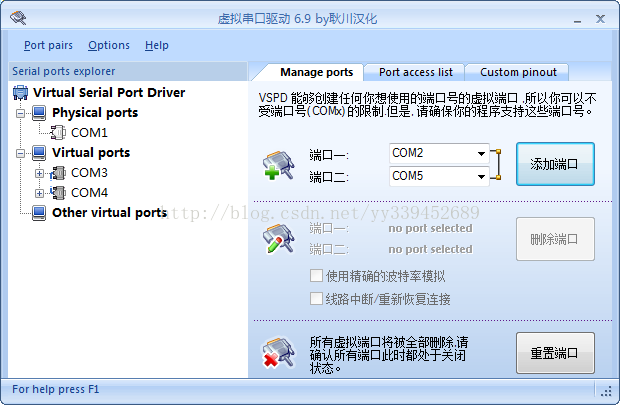
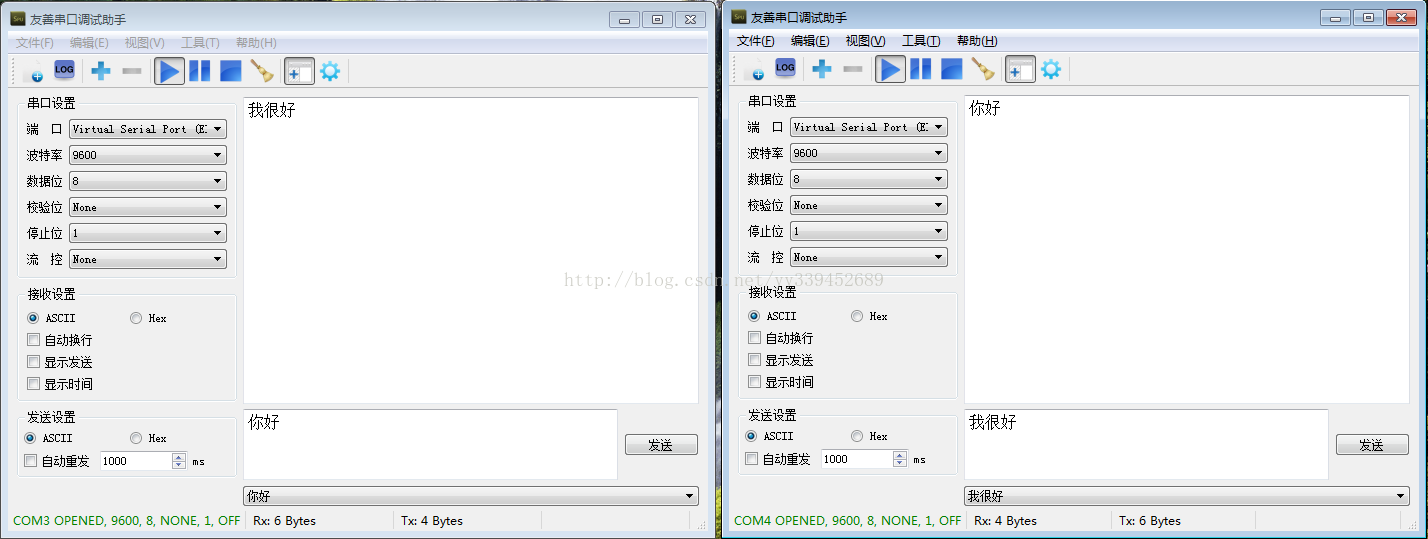
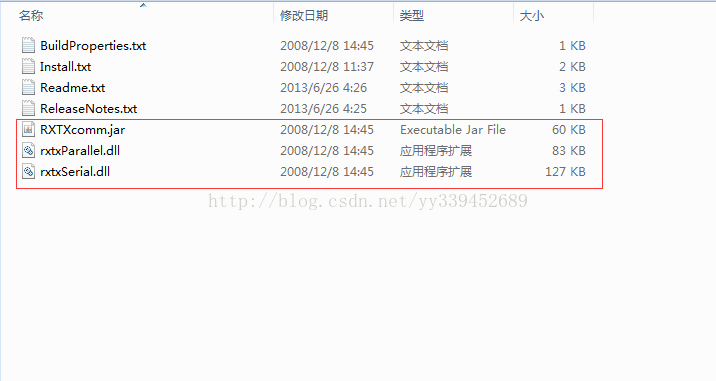
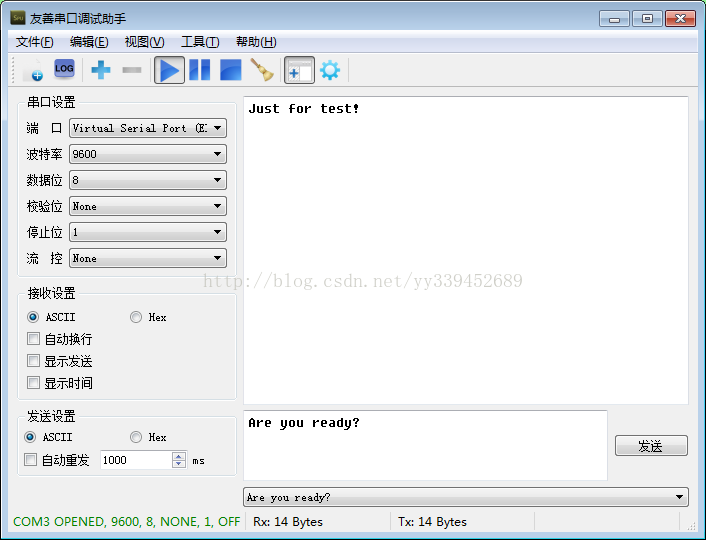
1.准备工作
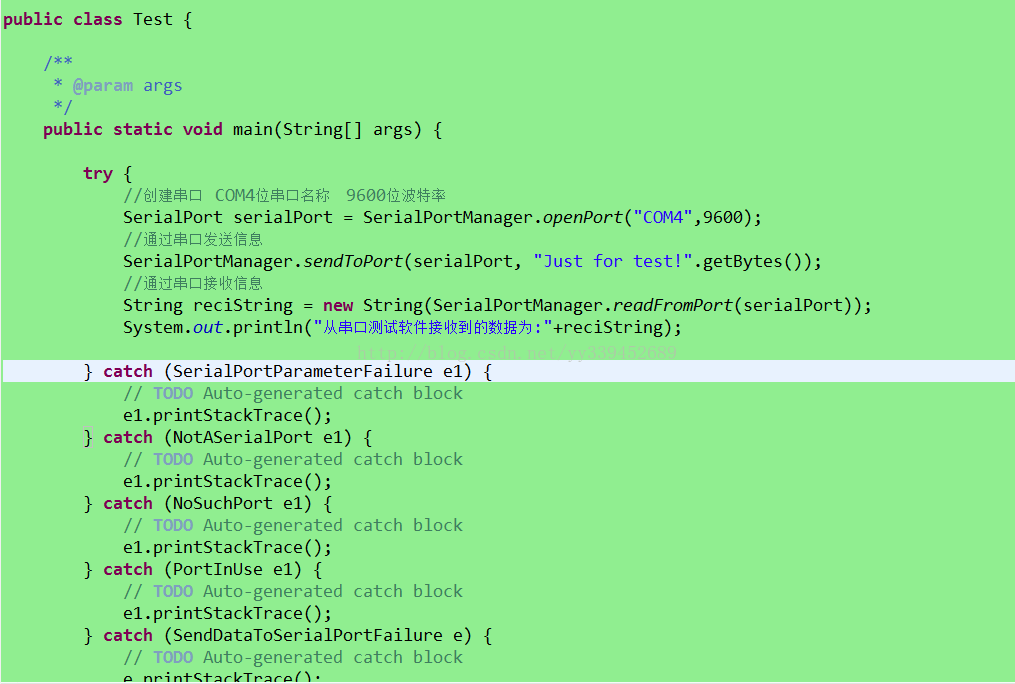
2.JAVA程序的操作
- package com.cams.CaMSMobileService.SerialPort;
- import gnu.io.CommPort;
- import gnu.io.CommPortIdentifier;
- import gnu.io.NoSuchPortException;
- import gnu.io.PortInUseException;
- import gnu.io.SerialPort;
- import gnu.io.SerialPortEventListener;
- import gnu.io.UnsupportedCommOperationException;
- import java.io.IOException;
- import java.io.InputStream;
- import java.io.OutputStream;
- import java.util.ArrayList;
- import java.util.Enumeration;
- import java.util.TooManyListenersException;
- import com.cams.CaMSMobileService.SerialPort.exception.NoSuchPort;
- import com.cams.CaMSMobileService.SerialPort.exception.NotASerialPort;
- import com.cams.CaMSMobileService.SerialPort.exception.PortInUse;
- import com.cams.CaMSMobileService.SerialPort.exception.ReadDataFromSerialPortFailure;
- import com.cams.CaMSMobileService.SerialPort.exception.SendDataToSerialPortFailure;
- import com.cams.CaMSMobileService.SerialPort.exception.SerialPortInputStreamCloseFailure;
- import com.cams.CaMSMobileService.SerialPort.exception.SerialPortOutputStreamCloseFailure;
- import com.cams.CaMSMobileService.SerialPort.exception.SerialPortParameterFailure;
- import com.cams.CaMSMobileService.SerialPort.exception.TooManyListeners;
- public class SerialPortManager {
- /**
- * 查找所有可用端口
- *
- * @return 可用端口名称列表
- */
- @SuppressWarnings("unchecked")
- public static final ArrayList<String> findPort() {
- // 获得当前所有可用串口
- Enumeration<CommPortIdentifier> portList = CommPortIdentifier
- .getPortIdentifiers();
- ArrayList<String> portNameList = new ArrayList<String>();
- // 将可用串口名添加到List并返回该List
- while (portList.hasMoreElements()) {
- String portName = portList.nextElement().getName();
- portNameList.add(portName);
- }
- return portNameList;
- }
- /**
- * 打开串口
- *
- * @param portName
- * 端口名称
- * @param baudrate
- * 波特率
- * @return 串口对象
- * @throws SerialPortParameterFailure
- * 设置串口参数失败
- * @throws NotASerialPort
- * 端口指向设备不是串口类型
- * @throws NoSuchPort
- * 没有该端口对应的串口设备
- * @throws PortInUse
- * 端口已被占用
- */
- public static final SerialPort openPort(String portName, int baudrate)
- throws SerialPortParameterFailure, NotASerialPort, NoSuchPort,
- PortInUse {
- try {
- // 通过端口名识别端口
- CommPortIdentifier portIdentifier = CommPortIdentifier
- .getPortIdentifier(portName);
- // 打开端口,设置端口名与timeout(打开操作的超时时间)
- CommPort commPort = portIdentifier.open(portName, 2000);
- // 判断是不是串口
- if (commPort instanceof SerialPort) {
- SerialPort serialPort = (SerialPort) commPort;
- try {
- // 设置串口的波特率等参数
- serialPort.setSerialPortParams(baudrate,
- SerialPort.DATABITS_8, SerialPort.STOPBITS_1,
- SerialPort.PARITY_NONE);
- } catch (UnsupportedCommOperationException e) {
- throw new SerialPortParameterFailure();
- }
- return serialPort;
- } else {
- // 不是串口
- throw new NotASerialPort();
- }
- } catch (NoSuchPortException e1) {
- throw new NoSuchPort();
- } catch (PortInUseException e2) {
- throw new PortInUse();
- }
- }
- /**
- * 关闭串口
- *
- * @param serialport
- * 待关闭的串口对象
- */
- public static void closePort(SerialPort serialPort) {
- if (serialPort != null) {
- serialPort.close();
- serialPort = null;
- }
- }
- /**
- * 向串口发送数据
- *
- * @param serialPort
- * 串口对象
- * @param order
- * 待发送数据
- * @throws SendDataToSerialPortFailure
- * 向串口发送数据失败
- * @throws SerialPortOutputStreamCloseFailure
- * 关闭串口对象的输出流出错
- */
- public static void sendToPort(SerialPort serialPort, byte[] order)
- throws SendDataToSerialPortFailure,
- SerialPortOutputStreamCloseFailure {
- OutputStream out = null;
- try {
- out = serialPort.getOutputStream();
- out.write(order);
- out.flush();
- } catch (IOException e) {
- throw new SendDataToSerialPortFailure();
- } finally {
- try {
- if (out != null) {
- out.close();
- out = null;
- }
- } catch (IOException e) {
- throw new SerialPortOutputStreamCloseFailure();
- }
- }
- }
- /**
- * 从串口读取数据
- *
- * @param serialPort
- * 当前已建立连接的SerialPort对象
- * @return 读取到的数据
- * @throws ReadDataFromSerialPortFailure
- * 从串口读取数据时出错
- * @throws SerialPortInputStreamCloseFailure
- * 关闭串口对象输入流出错
- */
- public static byte[] readFromPort(SerialPort serialPort)
- throws ReadDataFromSerialPortFailure,
- SerialPortInputStreamCloseFailure {
- InputStream in = null;
- byte[] bytes = null;
- try {
- in = serialPort.getInputStream();
- // 获取buffer里的数据长度
- int bufflenth = in.available();
- while (bufflenth != 0) {
- // 初始化byte数组为buffer中数据的长度
- bytes = new byte[bufflenth];
- in.read(bytes);
- bufflenth = in.available();
- }
- } catch (IOException e) {
- throw new ReadDataFromSerialPortFailure();
- } finally {
- try {
- if (in != null) {
- in.close();
- in = null;
- }
- } catch (IOException e) {
- throw new SerialPortInputStreamCloseFailure();
- }
- }
- return bytes;
- }
- /**
- * 添加监听器
- *
- * @param port
- * 串口对象
- * @param listener
- * 串口监听器
- * @throws TooManyListeners
- * 监听类对象过多
- */
- public static void addListener(SerialPort port,
- SerialPortEventListener listener) throws TooManyListeners {
- try {
- // 给串口添加监听器
- port.addEventListener(listener);
- // 设置当有数据到达时唤醒监听接收线程
- port.notifyOnDataAvailable(true);
- // 设置当通信中断时唤醒中断线程
- port.notifyOnBreakInterrupt(true);
- } catch (TooManyListenersException e) {
- throw new TooManyListeners();
- }
- }
- }
使用Java进行串口SerialPort通讯的更多相关文章
- java实现串口通讯
一. 准备工作 1. 点击此下载java串口通讯相关工具 2. 将RXTXcomm.jar放到 %JAVA_HOME%\jre\lib\ext\ 目录下,工程中引入该jar包 3. 将rxtxSe ...
- java读写串口数据
本博文参考自https://www.cnblogs.com/Dreamer-1/p/5523046.html 最近接触到了串口及其读写,在此记录java进行串口读写的过程. 1.导入串口支持包 需要下 ...
- Java实现串口通信的小样例
用Java实现串口通信(windows系统下),须要用到sun提供的串口包 javacomm20-win32.zip.当中要用到三个文件,配置例如以下: 1.comm.jar放置到 JAVA_HOME ...
- 用Java通过串口发送手机短信
用Java通过串口发短信其实很简单,因为有现成的类库供我们使用.有底层的类库,也有封装好一点的类库,下面我介绍一下在 Win32 平台下发送短信的方法. 如果你想用更底层的类库开发功能更强大的应用程序 ...
- 自制单片机之十七……PC与单片机RS-232串口的通讯和控制
这次我们来试着一步步的去掌握PC与单片机通过RS-232进行通讯和控制. 先说说我硬件的情况.我用的PC是个二手的IBM240小本本,十寸屏,赛扬400,机子很老了.但也有它的优点:1.串口,并口,P ...
- Java编写串口程序
用Java编写串口程序一般都会用到这个 http://fizzed.com/oss/rxtx-for-java 根据电脑的情况下载 解压以后有安装文档 For a JDK installation: ...
- java读取串口-mfz-rxtx-2.2-20081207-win-x86
1.下载jar包 RXTXcomm.jar 2.实现代码 package main; import java.awt.*; import java.awt.event.*; import java.i ...
- gRPC java 客户端,服务器端通讯使用json格式
使用 protobuf 作为通讯内容序列化的简单例子请看:http://www.cnblogs.com/ghj1976/p/5458176.html . 本文是使用 json 做为内容序列化的简单例子 ...
- c# 串口SerialPort
创建SerialPortFun类 using System; using System.Collections.Generic; using System.Linq; using System.Tex ...
随机推荐
- HDU 1869 六度分离 最短路
解题报告: 1967年,美国著名的社会学家斯坦利·米尔格兰姆提出了一个名为“小世界现象(small world phenomenon)”的著名假说,大意是说,任何2个素不相识的人中间最多只隔着6个人, ...
- 第12月第8天 Retrofit.builder
1. retrofit = new Retrofit.Builder() .client(okHttpClient) .addConverterFactory(GsonConverterFactory ...
- F. Ivan and Burgers(线性基,离线)
题目链接:http://codeforces.com/contest/1100/problem/F 题目大意:首先输入n,代表当前有n个数,然后再输入m,代表m次询问,每一次询问是询问区间[l,r], ...
- python3之模块psutil系统性能信息
psutil是个跨平台库,能够轻松实现获取系统运行的进程和系统利用率,包括CPU.内存.磁盘.网络等信息. 它主要应用于信息监控,分析和限制系统资源及进程的管理.它实现了同等命令命令行工具提供的功能, ...
- .net的锁
一.lock .Monitor 处理并行任务的时候,效率最高的就是多线程.当不同线程需要访问同一资源时候,就需要同步了.就像生活中很多人要一起赶飞机大家都要访问飞机这个资源每个人是一条线程那么就有门 ...
- jquery-easyui:格式化列
主框架页面: 在主界面区会加载西区菜单点击的URL内容. <!DOCTYPE html> <html> <head> <meta charset=" ...
- javascript-dom文档对象模型1
HTML DOM (文档对象模型) 当网页被加载时,浏览器会创建页面的文档对象模型(Document Object Model). HTML DOM 模型被构造为对象的树. 一:HTML DOM 树 ...
- AudioEffect中文API
在Android2.3中增加了对音频混响的支持,这些API包含在android.media.audiofx包中. 一.概述 AudioEffect是android audio framework(an ...
- Angular2 CLI安装
官方文档: https://angular.cn/docs/ts/latest/cli-quickstart.html 实现步骤: 1.设置开发环境 2.创建新项目以及应用的骨架 3.启动开启服务 4 ...
- hadoop2.5搭建过程
1 搭建环境所使用的资源 VMware Workstation 9 ubuntu-14.04.2-desktop-amd64.iso jdk-7u80-linux-x64.tar.gz hadoop- ...