
Masonry基本语法
equalTo <=======> NSLayoutRelationEqual 等于
lessThanOrEqualTo <======> NSLayoutRelationLessThanOrEqual 小于或等于
greaterThanOrEqualTo <=======> NSLayoutRelationGreaterThanOrEqual 大于或等于
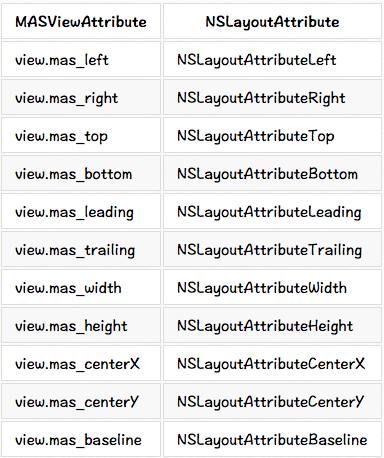
MASViewAttribute:视图约束属性
make.width.greaterThanOrEqualTo(@200);

make.width.lessThanOrEqualTo(@400)
<2>//creates view.left = view.superview.left + 10
make.left.lessThanOrEqualTo(@10)
代替NSNumber,使用原始的数据或者结构体设置约束数据
make.top.mas_equalTo(42);

make.height.mas_equalTo(20);

make.size.mas_equalTo(CGSizeMake(50, 100));

make.edges.mas_equalTo(UIEdgeInsetsMake(10, 0, 10, 0));

make.left.mas_equalTo(view).mas_offset(UIEdgeInsetsMake(10, 0, 10, 0));
使用数组NSArray设置约束
make.height.equalTo(@[view1.mas_height, view2.mas_height]);

make.height.equalTo(@[view1, view2]);

make.left.equalTo(@[view1, @100, view3.right]);
.priorityHigh <======> UILayoutPriorityDefaultHigh 高优先级
.priorityMedium <========> between high and low 介于高/低之间
.priorityLow <=========> UILayoutPriorityDefaultLow 低优先级
make.left.greaterThanOrEqualTo(label.mas_left).with.priorityLow();

make.top.equalTo(label.mas_top).with.priority(600);
// make top, left, bottom, right equal view2

    make.edges.equalTo(view2);

// make top = superview.top + 5, left = superview.left + 10,

// bottom = superview.bottom - 15, right = superview.right - 20

    make.edges.equalTo(superview).insets(UIEdgeInsetsMake(5, 10, 15, 20))
// All edges but the top should equal those of the superview

make.left.right.and.bottom.equalTo(superview);

make.top.equalTo(otherView);
// make width and height greater than or equal to titleLabel

    make.size.greaterThanOrEqualTo(titleLabel)

// make width = superview.width + 100, height = superview.height - 50

    make.size.equalTo(superview).sizeOffset(CGSizeMake(100, -50))
// make centerX and centerY = button1

    make.center.equalTo(button1)

// make centerX = superview.centerX - 5, centerY = superview.centerY + 10

    make.center.equalTo(superview).centerOffset(CGPointMake(-5, 10))
// in public/private interface

@property (nonatomic, strong) MASConstraint *topConstraint;

...

// when making constraints

[view1 mas_makeConstraints:^(MASConstraintMaker *make) {

    self.topConstraint = make.top.equalTo(superview.mas_top).with.offset(padding.top);

    make.left.equalTo(superview.mas_left).with.offset(padding.left);

}];

...

// then later you can call

[self.topConstraint uninstall];
2.更新约束 mas_updateConstraints
- (void)updateConstraints {

    [self.growingButton mas_updateConstraints:^(MASConstraintMaker *make) {

        make.center.equalTo(self);

        make.width.equalTo(@(self.buttonSize.width)).priorityLow();

        make.height.equalTo(@(self.buttonSize.height)).priorityLow();

        make.width.lessThanOrEqualTo(self);

        make.height.lessThanOrEqualTo(self);

    }];

    //according to apple super should be called at end of method

    [super updateConstraints];

}
3.重新设置mas_remakeConstraints
- (void)changeButtonPosition {
    [self.button mas_remakeConstraints:^(MASConstraintMaker *make) {

        make.size.equalTo(self.buttonSize);

        if (topLeft) {

            make.top.and.left.offset(10);

        } else {

            make.bottom.and.right.offset(-10);

        }

    }];

}
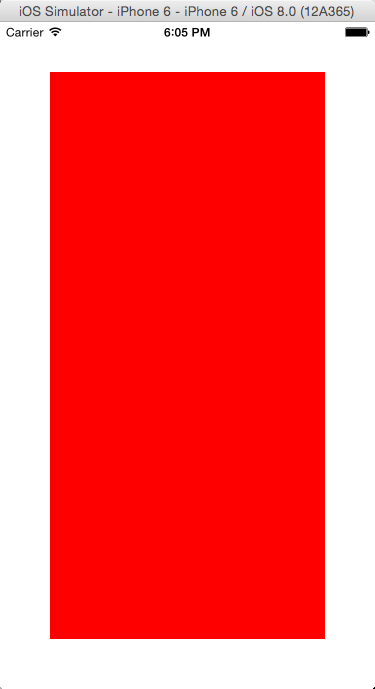
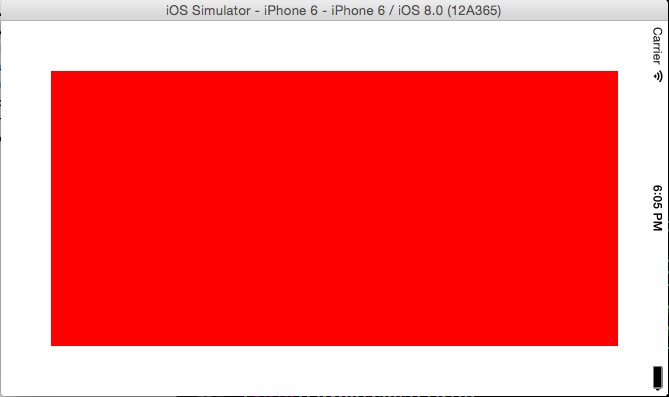
具体的实例如下:设置view1举例父视图的四周距离均为50

/**

方式一:使用NSLayoutConstraint实现手动布局

 ----------------------------

 设置UIEdgeInsets

 ----------------------------

 @interface UIView (UIConstraintBasedLayoutInstallingConstraints)

 - (NSArray *)constraints NS_AVAILABLE_IOS(6_0);

 - (void)addConstraint:(NSLayoutConstraint *)constraint NS_AVAILABLE_IOS(6_0);

 - (void)addConstraints:(NSArray *)constraints NS_AVAILABLE_IOS(6_0);

 - (void)removeConstraint:(NSLayoutConstraint *)constraint

 - (void)removeConstraints:(NSArray *)constraints NS_AVAILABLE_IOS(6_0);

*/

-(void)LayoutConstraint

{

    UIView *superView = self.view;

    UIView *view1 = [[UIView alloc]init];

    view1 .translatesAutoresizingMaskIntoConstraints = NO;

    view1.backgroundColor = [UIColor redColor];

    [superView addSubview:view1];

    //设置距离父视图边界距离

    UIEdgeInsets pading = UIEdgeInsetsMake(50, 50, 50, 50);

    //添加给view1约束

    [superView addConstraints:@[

        [NSLayoutConstraint constraintWithItem:view1 attribute:NSLayoutAttributeTop relatedBy:NSLayoutRelationEqual toItem:superView attribute:NSLayoutAttributeTop multiplier:1.0 constant:pading.top],

        [NSLayoutConstraint constraintWithItem:view1 attribute:NSLayoutAttributeLeft relatedBy:NSLayoutRelationEqual toItem:superView attribute:NSLayoutAttributeLeft multiplier:1.0 constant:pading.left],

        [NSLayoutConstraint constraintWithItem:view1 attribute:NSLayoutAttributeBottom relatedBy:NSLayoutRelationEqual toItem:superView attribute:NSLayoutAttributeBottom multiplier:1.0 constant:-pading.bottom],

        [NSLayoutConstraint constraintWithItem:view1 attribute:NSLayoutAttributeRight relatedBy:NSLayoutRelationEqual toItem:superView attribute:NSLayoutAttributeRight multiplier:1.0 constant:-pading.right],

    ]];

}
/**

方法二:使用block  @implementation MAS_VIEW (MASAdditions)

----------------------------

 设置offset偏移 或者 边缘edges

----------------------------

- (NSArray *)mas_makeConstraints:(void(^)(MASConstraintMaker *))block

- (NSArray *)mas_updateConstraints:(void(^)(MASConstraintMaker *))block

- (NSArray *)mas_remakeConstraints:(void(^)(MASConstraintMaker *make))block

*/

-(void)LayoutForMASConstraintMaker

{

    UIView *superView = self.view;

    UIView *view1 = [[UIView alloc]init];

    view1.backgroundColor = [UIColor redColor];

    [superView addSubview:view1];

    //设置距离父视图边界距离

    UIEdgeInsets pading = UIEdgeInsetsMake(50, 50, 50, 50);

    //添加给view1约束

    [view1 mas_makeConstraints:^(MASConstraintMaker *make) {

        make.top.equalTo(superView.mas_top).with.offset(pading.top);

        make.left.equalTo(superView.mas_left).with.offset(pading.left);

        make.bottom.equalTo(superView.mas_bottom).with.offset(-pading.bottom);

        make.right.equalTo(superView.mas_right).with.offset(-pading.right);

        //设置代码可以更简单(效果与上面的是一样的)

        //make.edges.equalTo(superView).with.insets(pading);

    }];

}
/**

方式三:使用block  @implementation MAS_VIEW (MASAdditions)

 ----------------------------

 设置margin距离

 ----------------------------

 - (NSArray *)mas_makeConstraints:(void(^)(MASConstraintMaker *))block

 - (NSArray *)mas_updateConstraints:(void(^)(MASConstraintMaker *))block

 - (NSArray *)mas_remakeConstraints:(void(^)(MASConstraintMaker *make))block

*/

-(void)LayoutForMASConstraintMakerWithMargin

{

    UIView *superView = self.view;

    UIView *view1 = [[UIView alloc]init];

    view1.backgroundColor = [UIColor redColor];

    [superView addSubview:view1];

    //添加给view1约束

    [view1 mas_makeConstraints:^(MASConstraintMaker *make) {

        make.topMargin.equalTo(superView.mas_top).with.offset(50);

        make.leftMargin.equalTo(superView.mas_left).with.offset(50);

        make.bottomMargin.equalTo(superView.mas_bottom).with.offset(-50);

        make.rightMargin.equalTo(superView.mas_right).with.offset(-50);

    }];

}
/**

 方式四:使用block  @implementation MAS_VIEW (MASAdditions)

 ----------------------------

 设置center和size

 ----------------------------

 - (NSArray *)mas_makeConstraints:(void(^)(MASConstraintMaker *))block

 - (NSArray *)mas_updateConstraints:(void(^)(MASConstraintMaker *))block

 - (NSArray *)mas_remakeConstraints:(void(^)(MASConstraintMaker *make))block

 */

-(void)LayoutForMASConstraintMakerWithCenterWidthHeight

{

    UIView *superView = self.view;

    UIView *view1 = [[UIView alloc]init];

    view1.backgroundColor = [UIColor redColor];

    [superView addSubview:view1];

    //添加给view1约束

    [view1 mas_makeConstraints:^(MASConstraintMaker *make) {

        make.centerX.equalTo(superView);

        make.centerY.equalTo(superView);

        make.size.equalTo(superView).sizeOffset(CGSizeMake(-100,-100));

    }];

}
Masonry基本语法的更多相关文章
- ios的链式编程笔记
1.Masonry的语法为啥能连续的使用点语法? >> 底层使用的是:用block当函数的返回参数 > 链式编程思想 2. 使用block当函数的返回参数 // 之前开发中比较习惯 ...
- MyLinerLayout--推荐
苹果系统的自动布局需要在布局的过程中建立各种各样的依赖,虽然后续使用masonry还算比较便捷. 有一天朋友推荐给我的这个,看了一下demo和这个库的作者的博客,了解到这个库并不是基于苹果的自动布局作 ...
- Masonry介绍与使用实践:快速上手Autolayout
1 MagicNumber -> autoresizingMask -> autolayout 以上是纯手写代码所经历的关于页面布局的三个时期 在iphone1-iphone3gs时代 w ...
- Coding源码学习第四部分(Masonry介绍与使用(一))
Masonry GitHub:https://github.com/SnapKit/Masonry Masonry是一个轻量级的布局框架,拥有自己的描述语法,采用更优雅的链式语法封装自动布局,简洁明了 ...
- iOS常用库之Masonry
简单介绍 Masonry 源码地址:https://github.com/Masonry/Masonry Masonry是一个轻量级的布局框架 拥有自己的描述语法 采用更优雅的链式语法封装自动布局 简 ...
- Masonry -- 使用纯代码进行iOS应用的autolayout自适应布局
简介 简化iOS应用使用纯代码机型自适应布局的工作,使用一种简洁高效的语法替代NSLayoutConstraints. 项目主页: Masonry 最新示例: 点击下载 项目简议: 如果再看到关于纯代 ...
- 使用Masonry搭建特殊布局时与xib的对比
之前只有比较浅的接触过Masonry.项目中大多数的布局还是用xib中的AutoLayout与手码的frame计算相结合,相信也会有很多项目和我一样是这两种布局的组合.其实xib各方面用的感觉都挺好, ...
- [转载]Masonry介绍与使用实践(快速上手Autolayout)
原博地址 http://adad184.com/2014/09/28/use-masonry-to-quick-solve-autolayout/ 前言 1 MagicNumber -> aut ...
- PureLayout和Masonry比较
一年前那时我做iOS开发,为了自动布局适配多种屏幕,我一般使用Masonry,后来偶然地在一个视频教程中发现老师使用了UIView+Autolayout(现在作者改名为PureLayout)自动布局, ...
随机推荐
- 写一个递归函数DigitSum(n),输入一个非负整数,返回组成它的数字之和
例如,调用DigitSum(1729),则应该返回1+7+2+9,它的和是19. 思路:我们可以先将整数的每一个数字取出来,每次取个位数字,取完后退位(将数字除以10),在取个位数字,依次取出所有的数 ...
- 深入理解 Python yield
https://blog.csdn.net/lftaoyuan/article/details/78915518 python2和python3是不兼容的,通篇环境都是python3.6 简单的yie ...
- 配置中心Client端
配置中心Client端 1.在Order工程中的Order-Server模块的pom.xml中增加 <dependency> <groupId>org.springframew ...
- postman测试post请求参数为json类型
1. 设置Headers Content-Type类型为application/json 2.Body 设置如下.请求的数据类型为Json格式
- golang bug Unknown load command 0x32 (50)
问题 编译文件时报错: /usr/local/go/pkg/tool/darwin_amd64/link: /usr/local/go/pkg/tool/darwin_amd64/link: comb ...
- VMware Ubuntu如何连接互联网
Brigde——桥接 :默认使用VMnet0 1.原理: Bridge 桥”就是一个主机,这个机器拥有两块网卡,分别处于两个局域网中,同时在”桥”上,运行着程序,让局域网A中的所有数据包原封不动的 ...
- IDEA中使用springBoot+gradle构建多模块项目
https://blog.csdn.net/forMelo/article/details/78995875
- php限制文件下载速度的代码
有时候你会出于某种目的而要求把下载文件的速度放慢一些,例如你想实现文件下载进度条功能.限制下载速度最大的好处是节省带宽,避免瞬时流量过大而造成网络堵塞.本文将和你分享如何通过php代码来实现限制文件的 ...
- PHP 中 call_user_func 函数 和 call_user_func_array 函数的区别
PHP 中 call_user_func() 函数 和 call_user_func_array() 函数都是回调函数,在写接口的时候经常会用到,但是他们有什么区别呢? 它们的第一个参数都是被调用的回 ...
- Centos 使用find查找
CentOS查找目录或文件 find / -name svn 查找目录:find /(查找范围) -name '查找关键字' -type d查找文件:find /(查找范围) -name 查找关键字 ...