
6.1 如何在spring中自定义xml标签
dubbo自定义了很多xml标签,例如<dubbo:application>,那么这些自定义标签是怎么与spring结合起来的呢?我们先看一个简单的例子。
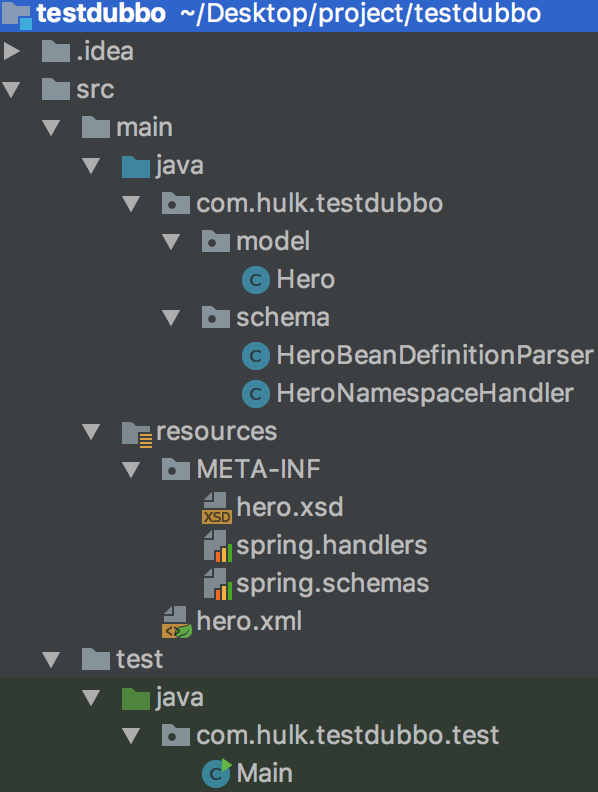
一 编写模型类
 package com.hulk.testdubbo.model;

 public class Hero {

     private  String name;

     private  int    age;

     public String getName() {

         return name;

     }

     public void setName(String name) {

         this.name = name;

     }

     public int getAge() {

         return age;

     }

     public void setAge(int age) {

         this.age = age;

     }

 }
二 定义xsd文件
 <xsd:schema

         xmlns="http://hulk.com/schema"

         xmlns:xsd="http://www.w3.org/2001/XMLSchema"

         targetNamespace="http://hulk.com/schema">

     <xsd:complexType name="elementname1complexType">

         <xsd:attribute name="name" type="xsd:string">

             <xsd:annotation>

                 <xsd:documentation><![CDATA[ The elementname1 name. ]]></xsd:documentation>

             </xsd:annotation>

         </xsd:attribute>

         <xsd:attribute name="age" type="xsd:int">

             <xsd:annotation>

                 <xsd:documentation><![CDATA[ The elementname1 age. ]]></xsd:documentation>

             </xsd:annotation>

         </xsd:attribute>

     </xsd:complexType>

     <xsd:element name="elementname1" type="elementname1complexType">

         <xsd:annotation>

             <xsd:documentation><![CDATA[ elementname1的文档 ]]></xsd:documentation>

         </xsd:annotation>

     </xsd:element>

 </xsd:schema>
说明:
- 定义targetNamespace(目标命名空间),xmlns的值要与这个相同
- xsd:element定义的就是将来会在xml文件中用到的元素,例如<dubbo:application>中的application
- xsd:attribute定义的就是模型类中的属性,例如<dubbo:application name="xxx">中的name,并且可以指定属性类型,进而起到检测的作用(当我们定义的是int,如果在xml中的值是非int型的,直接会报错)。
三 编写spring.schemas
作用:该文件用来指定xsd文件的位置。
http\://hulk.com/schema/hero.xsd=META-INF/hero.xsd
注意:红色部分要与xsd文件中的targetNamespace相同。
四 编写BeanDefinition解析器
作用:主要用来解析自定义的xml标签。
 package com.hulk.testdubbo.schema;

 import org.springframework.beans.factory.config.BeanDefinition;

 import org.springframework.beans.factory.support.BeanDefinitionRegistry;

 import org.springframework.beans.factory.support.RootBeanDefinition;

 import org.springframework.beans.factory.xml.BeanDefinitionParser;

 import org.springframework.beans.factory.xml.ParserContext;

 import org.w3c.dom.Element;

 public class HeroBeanDefinitionParser implements BeanDefinitionParser {

     private final Class<?> beanClass;

     public HeroBeanDefinitionParser(Class<?> beanClass) {

         this.beanClass = beanClass;

     }

     public BeanDefinition parse(Element element, ParserContext parserContext) {

         RootBeanDefinition beanDefinition = new RootBeanDefinition();

         beanDefinition.setBeanClass(beanClass);

         beanDefinition.setLazyInit(false);

         beanDefinition.getPropertyValues().add("name", element.getAttribute("name"));

         beanDefinition.getPropertyValues().add("age", element.getAttribute("age"));

         BeanDefinitionRegistry beanDefinitionRegistry = parserContext.getRegistry();

         beanDefinitionRegistry.registerBeanDefinition(beanClass.getName(),beanDefinition);//注册bean到BeanDefinitionRegistry中

         return beanDefinition;

     }

 }
五 编写命名空间处理器
作用:主要用来注册BeanDefinition解析器。
 package com.hulk.testdubbo.schema;

 import com.hulk.testdubbo.model.Hero;

 import org.springframework.beans.factory.xml.NamespaceHandlerSupport;

 public class HeroNamespaceHandler extends NamespaceHandlerSupport {

     public void init() {

         registerBeanDefinitionParser("elementname1", new HeroBeanDefinitionParser(Hero.class));

     }

 }
说明:通常为每一个xsd:element都要注册一个BeanDefinitionParser。
六 编写spring.handlers文件
作用:主要用于关联命名空间处理器和xsd中的targetNamespace。
http\://hulk.com/schema=com.hulk.testdubbo.schema.HeroNamespaceHandler
说明:key是xsd文件中的targetNamespace。
七 测试 - 编写hero.xml
 <?xml version="1.0" encoding="UTF-8"?>

 <beans xmlns="http://www.springframework.org/schema/beans"

        xmlns:xsi="http://www.w3.org/2001/XMLSchema-instance"

        xmlns:hero="http://hulk.com/schema"

        xsi:schemaLocation="http://www.springframework.org/schema/beans http://www.springframework.org/schema/beans/spring-beans.xsd

        http://hulk.com/schema http://hulk.com/schema/hero.xsd">

     <hero:elementname1 name="xiaona" age="18"/>

 </beans>
说明:
- xmlns:hero的value是xsd文件中的targetNamespace。
- xmlns:hero可以写成xmlns:xxx,此时<hero:elementname1/>就要写成<xxx:elementname1/>
八 测试 - 编写测试主类
 package com.hulk.testdubbo.test;

 import com.hulk.testdubbo.model.Hero;

 import org.springframework.context.ApplicationContext;

 import org.springframework.context.support.ClassPathXmlApplicationContext;

 public class Main {

     public static void main(String[] args) {

         ApplicationContext applicationContext = new ClassPathXmlApplicationContext("hero.xml");

         Hero hero = (Hero) applicationContext.getBean(Hero.class.getName());

         System.out.println("name: " + hero.getName() + " age: " + hero.getAge());

     }

 }
如何在spring中自定义xml标签的方法就结束了。在实际中,随着注解和javaconfg的盛行,xml的方式渐渐的会淡出舞台,但是spring的启动流程还是会的。来看一下上述代码涉及到的流程。
- 使用ResourceLoader将配置文件xml装载为Resource对象;
- 使用BeanDefinitionReader解析配置信息:将每一个<bean>解析为一个BeanDefinition对象,然后存储到BeanDefinitionRegistry中
- 实际上是BeanDefinitionReader调用BeanDefinitionParser进行了解析操作,解析完成后注册到BeanDefinitionRegistry(代码看上边的HeroBeanDefinitionParser)
6.1 如何在spring中自定义xml标签的更多相关文章
- 6.2 dubbo在spring中自定义xml标签源码解析
在6.1 如何在spring中自定义xml标签中我们看到了在spring中自定义xml标签的方式.dubbo也是这样来实现的. 一 META_INF/dubbo.xsd 比较长,只列出<dubb ...
- Spring源码阅读笔记05:自定义xml标签解析
在上篇文章中,提到了在Spring中存在默认标签与自定义标签两种,并且详细分析了默认标签的解析,本文就来分析自定义标签的解析,像Spring中的AOP就是通过自定义标签来进行配置的,这里也是为后面学习 ...
- web.xml中配置Spring中applicationContext.xml的方式
2011-11-08 16:29 web.xml中配置Spring中applicationContext.xml的方式 使用web.xml方式加载Spring时,获取Spring applicatio ...
- ssh整合思想初步 struts2与Spring的整合 struts2-spring-plugin-2.3.4.1.jar下载地址 自动加载Spring中的XML配置文件 Struts2下载地址
首先需要JAR包 Spring整合Structs2的JAR包 struts2-spring-plugin-2.3.4.1.jar 下载地址 链接: https://pan.baidu.com/s/1o ...
- Winform中自定义xml配置文件后对节点进行读取与写入
场景 Winform中自定义xml配置文件,并配置获取文件路径: https://blog.csdn.net/BADAO_LIUMANG_QIZHI/article/details/100522648 ...
- Spring 框架的概述以及Spring中基于XML的IOC配置
Spring 框架的概述以及Spring中基于XML的IOC配置 一.简介 Spring的两大核心:IOC(DI)与AOP,IOC是反转控制,DI依赖注入 特点:轻量级.依赖注入.面向切面编程.容器. ...
- Spring中基于xml的AOP
1.Aop 全程是Aspect Oriented Programming 即面向切面编程,通过预编译方式和运行期动态代理实现程序功能的同一维护的一种技术.Aop是oop的延续,是软件开发中的 一个热点 ...
- Dubbo源码-Dubbo是如何随心所欲自定义XML标签的
叨叨 今天考虑了很久要不要写这篇文章. 距离<Dubbo源码>系列的开篇到现在已经快两个月时间了.当时是想着工作上的RPC框架使用存在一些让人头疼的问题,就来看看Dubbo给出了一套什么样 ...
- dubbo-config-spring自定义xml标签扩展
要实现自定义自定义标签扩展,需要有如下步骤(在spring中定义了两个接口NamespaceHandler.BeanDefinitionParser,用来实现扩展) 1.设计配置属性和JavaBean ...
随机推荐
- java中的PO,VO,TO,BO,DAO,POJO的解释
java的(PO,VO,TO,BO,DAO,POJO)解释 O/R Mapping 是 Object Relational Mapping(对象关系映射)的缩写.通俗点讲,就是将对象与关系数据库绑定 ...
- java 使用grpc步骤
1.配置grpc maven依赖 <dependency> <groupId>io.grpc</groupId> <artifactId>grpc-ne ...
- [POJ1655]Balancing Act
思路:DP求树的重心.对于每个结点$i$,$d_i=\displaystyle{\sum_{j\in s(i)}}d_j+1$.删去这个点能得到的最大子树大小即为$\max(\max\limits_{ ...
- js跨域请求(jsonp)
jsonp是跨域请求的手段之一. jsonp的原理: 先来看看下面这段代码 <!DOCTYPE html> <html lang="en"> <hea ...
- ChromeDriver启动Chrome浏览器后,地址栏只显示data;——chromeDriver版本不对
ChromeDriver启动Chrome浏览器后,地址栏只显示data; 错误原因: chromeDriver版本不对,不同版本的chromeDriver对应不同版本的chrome浏览器 chrome ...
- 阿里云esc云服务器IP不能访问的解决办法
问题:阿里云服务器,专有网络,web设置完毕,在服务器中localhost能够访问,并且关闭防火墙,但是使用公网ip无法访问. 解决:找到本实例安全组,配置规则,按照要求填入80或其他端口.配置完成后 ...
- [Go] 如何正确地 抛出 错误 和 异常(error/panic/recover)?
序言 错误 和 异常 是两个不同的概念,非常容易混淆.很多程序员习惯将一切非正常情况都看做错误,而不区分错误和异常,即使程序中可能有异常抛出,也将异常及时捕获并转换成错误.从表面上看,一切皆错误的思路 ...
- eclipse使用profile完成不同环境的maven打包功能
原文:https://blog.csdn.net/duan9421/article/details/79086335 我们在日常开发工作中通常会根据不同的项目运行环境,添加不同的配置文件,例如 开发环 ...
- 培养iOS开发新人的一个思路
坚持两个方法论: 1.发现问题的方法:(熟悉代码的过程) (1)照着一个完整的工程,从最基本的页面开始做起.不懂的地方就问,就查. (2)在阅读代码或拿到需求后要学会对问题进行分解.一个陌生的问题如果 ...
- Android Timer schedule
timer.schedule(new MyTask(),long time1,long timer2); 今天算是彻底的搞懂了这个以前让我为之头疼的方法. 以下我就重点介绍一下: 第一个參数.是 Ti ...