
压缩校验合并js之grunt搭建
1.在说grunt先认识几个grunt配置中的几个单词,concat(合并文件),uglify(压缩文件),jshint(检测代码规范),watch(实时监听修改的文件)
2.grunt是基于nodejs,安装之前需要安装nodejs。
3.开始,进行项目的路径下,cmd——>npm init生成package.json,暂时没有这么多内容的,但是大致就是这样的
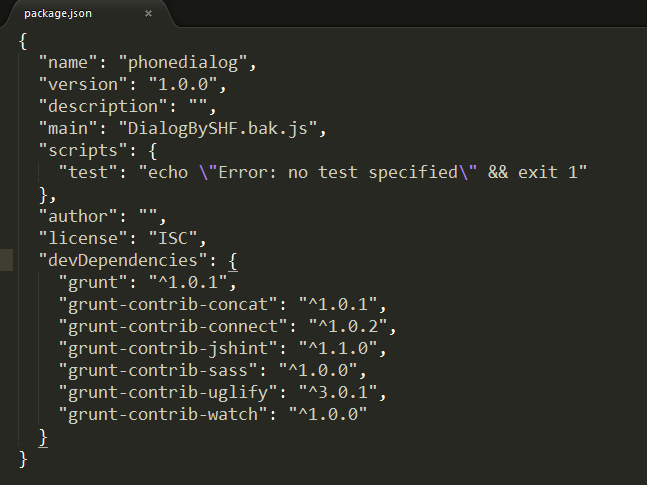
4.然后安装grunt : npm install grunt --save-dev --save-dev这个命令使得package.json文件中出现 “grunt”:“^1.0.1”。
5.安装grunt中的各路插件了:
npm install --save-dev grunt-contrib-concat grunt-contrib-jshint grunt-contrib-sass grunt-contrib-uglify grunt-contrib-watch grunt-contrib-connect
6.建立Gruntfile.js文件开始配置:
module.exports = function(grunt) {

  grunt.initConfig({

      pkg: grunt.file.readJSON('package.json'),

      concat: {

      //合并一下两个文件,合并后的文件名字为global.js

        dist: {

          src: ['slide.js', 'dialog.js'],

          dest: 'global.js',

        },

      },

      uglify: {

      //压缩合并后的文件

        compressjs: {

          files: {

            'global.min.js': ['global.js']

          }

        }

      },

      jshint: {

      //检查校验合并后的文件

        all: ['global.js']

      },

      watch: {

      //监听文件的改动并变化

        scripts: {

          files: ['slide.js','dialog.js'],

          tasks: ['concat','jshint','uglify']

        }

      },

  });

  grunt.loadNpmTasks('grunt-contrib-concat');

  grunt.loadNpmTasks('grunt-contrib-jshint');

  grunt.loadNpmTasks('grunt-contrib-uglify');

  grunt.loadNpmTasks('grunt-contrib-watch');

  grunt.registerTask('concatjs',['concat']);

  grunt.registerTask('compressjs',['concat','jshint','uglify']);

  grunt.registerTask('watchit',['concat','jshint','uglify','watch']);

  grunt.registerTask('default');

};

执行grunt watchit,便可以了。
压缩校验合并js之grunt搭建的更多相关文章
- Gulpfile.js——编译、压缩、合并js和css文件
gulp 一个入门教程:http://www.ydcss.com/gulp API文档地址:http://www.gulpjs.com.cn/docs/api/ 我的一个Low版的gulpfile v ...
- maven 压缩、合并 js, css
转载自:http://blog.csdn.net/fangxing80/article/details/17639607 我们知道在 Web 应用开发中为了提高客户端响应速度,需要将页面使用的资源最小 ...
- 转:利用node压缩、合并js,css,图片
1.安装nodejs http://nodejs.org/ 2.安装各自的node package js我用的是UglifyJS github地址:https://github.com/mishoo/ ...
- Maven插件wro4j-maven-plugin压缩、合并js、css详解
1. 在pom.xml文件中,引入wro4j-maven-plugin插件 <plugin> <groupId>ro.isdc.wro4j</groupId> ...
- MVC4新功能...压缩和合并js文件和样式文件
1.在App_Start文件夹中BundleConfig.cs类中添加相应的文件 1.1bundles.Add(new ScriptBundle("~/bundles/adminJs&quo ...
- MVC4中压缩和合并js文件和样式文件
1.在App_Start文件夹中BundleConfig.cs类中添加相应的文件 1.1bundles.Add(new ScriptBundle("~/bundles/adminJs&quo ...
- grunt自定义任务——合并压缩css和js
npm文档:www.npmjs.com grunt基础教程:http://www.gruntjs.net/docs/getting-started/ http://www.w3cplus.com/to ...
- 引用:使用grunt 压缩 合并js、css文件
引用:https://www.jianshu.com/p/08c7babdec65 压缩 js 文件 1.创建一个目录 名为grunt 目录.png 2.在grunt目录下创建一个 src目录,存 ...
- Grunt的配置及使用(压缩合并js/css)
Grunt的配置及使用(压缩合并js/css) 安装 前提是你已经安装了nodejs和npm. 你能够在 nodejs.org 下载安装包安装.也能够通过包管理器(比方在 Mac 上用 homebre ...
随机推荐
- Maven下载项目依赖jar包和使用方法
一.Maven3.5.0安装与配置+Eclipse应用 参考:Maven3.5.0安装与配置+Eclipse应用 二.http://mvnrepository.com/ 此处以http://mvnre ...
- Linux之chgrp
命令功能: 在lunix系统里,文件或目录的权限的掌控以拥有者及所诉群组来管理.可以使用chgrp指令取变更文件与目录所属群组,这种方式采用群组名称或群组识别码都可以.Chgrp命令就是change ...
- 基于zookeeper的activemq的主从集群配置
项目,要用到消息队列,这里采用activemq,相对使用简单点.这里重点是环境部署. 0. 服务器环境 RedHat710.90.7.210.90.7.1010.90.2.102 1. 下载安装zoo ...
- Django REST framework 源码剖析
前言 Django REST framework is a powerful and flexible toolkit for building Web APIs. 本文由浅入深的引入Django R ...
- 使用copydata实现进程之间数据传递
Winform to Winfrom==> 发送端==> using System; using System.Runtime.InteropServices; namespace Cop ...
- PAT 乙级 1003 我要通过!(20) C++版
1003. 我要通过!(20) 时间限制 400 ms 内存限制 65536 kB 代码长度限制 8000 B 判题程序 Standard 作者 CHEN, Yue “答案正确”是自动判题系统给出的最 ...
- PAT 乙级 1027 打印沙漏(20) C++版
1027. 打印沙漏(20) 时间限制 200 ms 内存限制 65536 kB 代码长度限制 8000 B 判题程序 Standard 作者 CHEN, Yue 本题要求你写个程序把给定的符号打印成 ...
- 学习笔记之Introduction to Data Visualization with Python | DataCamp
Introduction to Data Visualization with Python | DataCamp https://www.datacamp.com/courses/introduct ...
- public class的类名必须跟文件名保持一致吗?
- MySQL 索引建立原则及注意事项
一.索引建立的几大原则: 1) 最左前缀匹配原则,非常重要的原则,mysql会一直向右匹配直到遇到范围查询(>.<.between.like)就停止匹配,比如a = 1 and b = 2 ...