
【NIFI】 开发自定义Nifi Processor
本例需要基础知识:【NIFI】 Apache NiFI 安装及简单的使用
Nifi不光可以使用自带的Processor,还可以自定义Processor。本例简单介绍开发一个Processor
开发
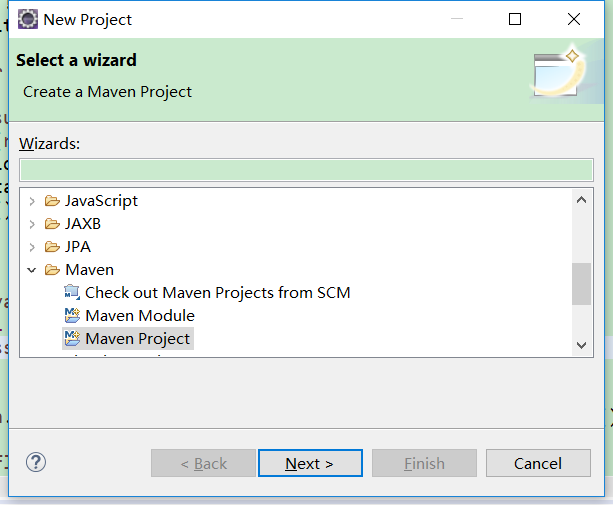
1、新建一个Maven工程,这里采用的是eclipse的模板原型来创建。
a、创建
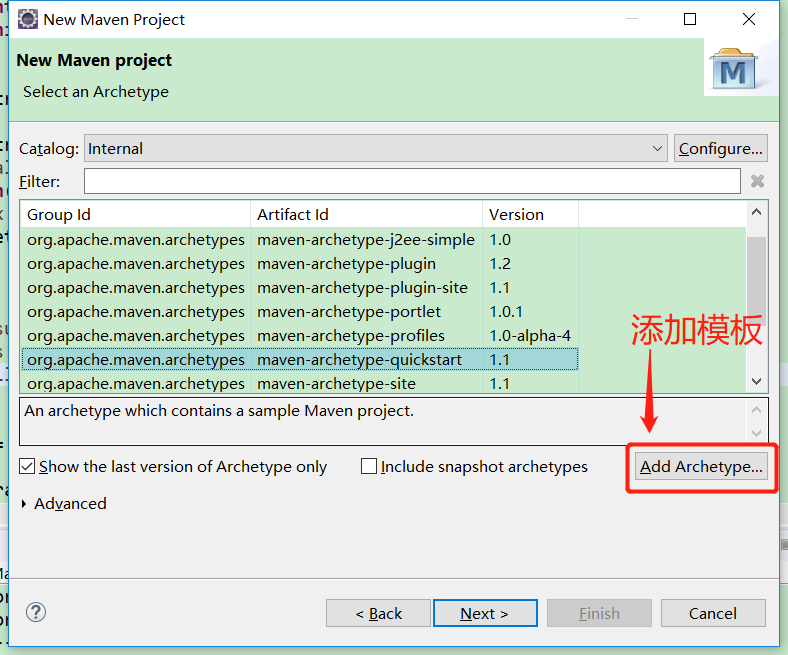
b、添加模板,内容:
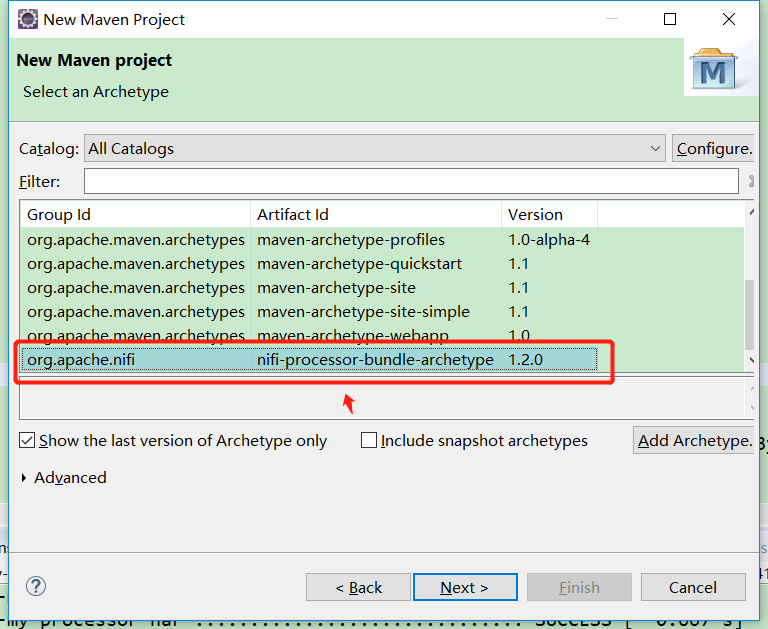
- Archetype Group Id:org.apache.nifi
- Archetype Artifact Id:nifi-processor-bundle-archetype
- Archetype Version:1.2.0
c、根据模板创建,maven项目
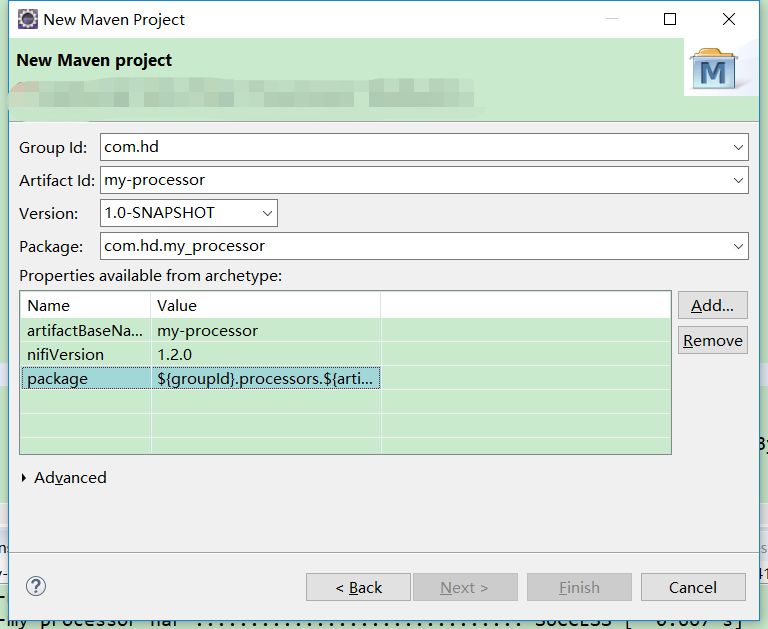
2、创建后,项目目录如下:
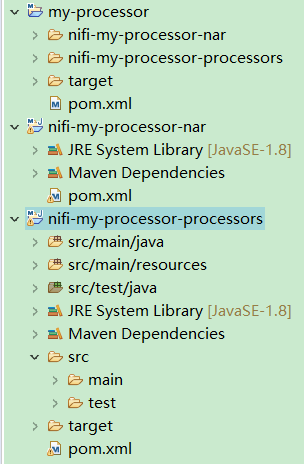
其中3个pom文件如下
 <?xml version="1.0" encoding="UTF-8"?>

 <!--

   Licensed to the Apache Software Foundation (ASF) under one or more

   contributor license agreements. See the NOTICE file distributed with

   this work for additional information regarding copyright ownership.

   The ASF licenses this file to You under the Apache License, Version 2.0

   (the "License"); you may not use this file except in compliance with

   the License. You may obtain a copy of the License at

   http://www.apache.org/licenses/LICENSE-2.0

   Unless required by applicable law or agreed to in writing, software

   distributed under the License is distributed on an "AS IS" BASIS,

   WITHOUT WARRANTIES OR CONDITIONS OF ANY KIND, either express or implied.

   See the License for the specific language governing permissions and

   limitations under the License.

 -->

 <project xmlns="http://maven.apache.org/POM/4.0.0" xmlns:xsi="http://www.w3.org/2001/XMLSchema-instance" xsi:schemaLocation="http://maven.apache.org/POM/4.0.0 http://maven.apache.org/xsd/maven-4.0.0.xsd">

     <modelVersion>4.0.0</modelVersion>

     <parent>

         <groupId>org.apache.nifi</groupId>

         <artifactId>nifi-nar-bundles</artifactId>

         <version>1.2.0</version>

     </parent>

     <groupId>com.test</groupId>

     <artifactId>my-processor</artifactId>

     <version>1.0-SNAPSHOT</version>

     <packaging>pom</packaging>

     <modules>

         <module>nifi-my-processor-processors</module>

         <module>nifi-my-processor-nar</module>

     </modules>

 </project>
my-processor pom.xml
 <?xml version="1.0" encoding="UTF-8"?>

 <!--

   Licensed to the Apache Software Foundation (ASF) under one or more

   contributor license agreements. See the NOTICE file distributed with

   this work for additional information regarding copyright ownership.

   The ASF licenses this file to You under the Apache License, Version 2.0

   (the "License"); you may not use this file except in compliance with

   the License. You may obtain a copy of the License at

   http://www.apache.org/licenses/LICENSE-2.0

   Unless required by applicable law or agreed to in writing, software

   distributed under the License is distributed on an "AS IS" BASIS,

   WITHOUT WARRANTIES OR CONDITIONS OF ANY KIND, either express or implied.

   See the License for the specific language governing permissions and

   limitations under the License.

 -->

 <project xmlns="http://maven.apache.org/POM/4.0.0" xmlns:xsi="http://www.w3.org/2001/XMLSchema-instance" xsi:schemaLocation="http://maven.apache.org/POM/4.0.0 http://maven.apache.org/xsd/maven-4.0.0.xsd">

     <modelVersion>4.0.0</modelVersion>

     <parent>

         <groupId>com.test</groupId>

         <artifactId>my-processor</artifactId>

         <version>1.0-SNAPSHOT</version>

     </parent>

     <artifactId>nifi-my-processor-nar</artifactId>

     <packaging>nar</packaging>

     <properties>

         <maven.javadoc.skip>true</maven.javadoc.skip>

         <source.skip>true</source.skip>

     </properties>

     <dependencies>

         <dependency>

             <groupId>com.test</groupId>

             <artifactId>nifi-my-processor-processors</artifactId>

             <version>1.0-SNAPSHOT</version>

         </dependency>

     </dependencies>

 </project>
nifi-my-processor-nar pom.xml
 <?xml version="1.0" encoding="UTF-8"?>

 <!--

   Licensed to the Apache Software Foundation (ASF) under one or more

   contributor license agreements. See the NOTICE file distributed with

   this work for additional information regarding copyright ownership.

   The ASF licenses this file to You under the Apache License, Version 2.0

   (the "License"); you may not use this file except in compliance with

   the License. You may obtain a copy of the License at

   http://www.apache.org/licenses/LICENSE-2.0

   Unless required by applicable law or agreed to in writing, software

   distributed under the License is distributed on an "AS IS" BASIS,

   WITHOUT WARRANTIES OR CONDITIONS OF ANY KIND, either express or implied.

   See the License for the specific language governing permissions and

   limitations under the License.

 -->

 <project xmlns="http://maven.apache.org/POM/4.0.0" xmlns:xsi="http://www.w3.org/2001/XMLSchema-instance" xsi:schemaLocation="http://maven.apache.org/POM/4.0.0 http://maven.apache.org/xsd/maven-4.0.0.xsd">

     <modelVersion>4.0.0</modelVersion>

     <parent>

         <groupId>com.test</groupId>

         <artifactId>my-processor</artifactId>

         <version>1.0-SNAPSHOT</version>

     </parent>

     <artifactId>nifi-my-processor-processors</artifactId>

     <packaging>jar</packaging>

     <dependencies>

         <dependency>

             <groupId>org.apache.nifi</groupId>

             <artifactId>nifi-api</artifactId>

         </dependency>

         <dependency>

             <groupId>org.apache.nifi</groupId>

             <artifactId>nifi-utils</artifactId>

         </dependency>

         <dependency>

             <groupId>org.apache.nifi</groupId>

             <artifactId>nifi-mock</artifactId>

             <scope>test</scope>

         </dependency>

         <dependency>

             <groupId>org.slf4j</groupId>

             <artifactId>slf4j-simple</artifactId>

             <scope>test</scope>

         </dependency>

         <dependency>

             <groupId>junit</groupId>

             <artifactId>junit</artifactId>

             <scope>test</scope>

         </dependency>

     </dependencies>

 </project>
nifi-my-processor-processors pom.xml
3、修改项目,因环境引起的错误
a、删除nifi-my-processor-processors子项目中,src/test中的测试文件(打包可能出现错误)
b、在org.apache.nifi.processor.Processor文件中配置自己的Porcessor

4、代码编写,编辑MyProcessor.java文件,文件在项目创建的时候已经生成,做适当修改即可。其中有设置状态,属性,及处理方法(onTrigger)等
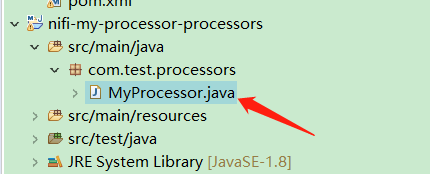
内容:
 /*

  * Licensed to the Apache Software Foundation (ASF) under one or more

  * contributor license agreements.  See the NOTICE file distributed with

  * this work for additional information regarding copyright ownership.

  * The ASF licenses this file to You under the Apache License, Version 2.0

  * (the "License"); you may not use this file except in compliance with

  * the License.  You may obtain a copy of the License at

  *

  *     http://www.apache.org/licenses/LICENSE-2.0

  *

  * Unless required by applicable law or agreed to in writing, software

  * distributed under the License is distributed on an "AS IS" BASIS,

  * WITHOUT WARRANTIES OR CONDITIONS OF ANY KIND, either express or implied.

  * See the License for the specific language governing permissions and

  * limitations under the License.

  */

 package com.test.processors;

 import org.apache.nifi.components.PropertyDescriptor;

 import org.apache.nifi.flowfile.FlowFile;

 import org.apache.nifi.annotation.behavior.ReadsAttribute;

 import org.apache.nifi.annotation.behavior.ReadsAttributes;

 import org.apache.nifi.annotation.behavior.WritesAttribute;

 import org.apache.nifi.annotation.behavior.WritesAttributes;

 import org.apache.nifi.annotation.lifecycle.OnScheduled;

 import org.apache.nifi.annotation.documentation.CapabilityDescription;

 import org.apache.nifi.annotation.documentation.SeeAlso;

 import org.apache.nifi.annotation.documentation.Tags;

 import org.apache.nifi.processor.exception.ProcessException;

 import org.apache.nifi.processor.AbstractProcessor;

 import org.apache.nifi.processor.ProcessContext;

 import org.apache.nifi.processor.ProcessSession;

 import org.apache.nifi.processor.ProcessorInitializationContext;

 import org.apache.nifi.processor.Relationship;

 import org.apache.nifi.processor.util.StandardValidators;

 import java.io.InputStreamReader;

 import java.io.StringWriter;

 import java.util.ArrayList;

 import java.util.Collections;

 import java.util.HashSet;

 import java.util.List;

 import java.util.Set;

 import java.util.concurrent.atomic.AtomicReference;

 @Tags({"example"})

 @CapabilityDescription("Provide a description")

 @SeeAlso({})

 @ReadsAttributes({@ReadsAttribute(attribute="", description="")})

 @WritesAttributes({@WritesAttribute(attribute="", description="")})

 public class MyProcessor extends AbstractProcessor {

     public static final PropertyDescriptor MY_PROPERTY = new PropertyDescriptor

             .Builder().name("MY_PROPERTY")

             .displayName("My property")

             .description("Example Property")

             .required(true)

             .addValidator(StandardValidators.NON_EMPTY_VALIDATOR)

             .build();

     public static final Relationship MY_RELATIONSHIP_SUCCESS = new Relationship.Builder()

             .name("sucess")

             .description("Example relationship Success")

             .build();

     public static final Relationship MY_RELATIONSHIP_FAILURE = new Relationship.Builder()

             .name("failure")

             .description("Example relationship Failure")

             .build();

     private List<PropertyDescriptor> descriptors;

     private Set<Relationship> relationships;

     @Override

     protected void init(final ProcessorInitializationContext context) {

         final List<PropertyDescriptor> descriptors = new ArrayList<PropertyDescriptor>();

         descriptors.add(MY_PROPERTY);

         this.descriptors = Collections.unmodifiableList(descriptors);

         final Set<Relationship> relationships = new HashSet<Relationship>();

         relationships.add(MY_RELATIONSHIP_SUCCESS);

         relationships.add(MY_RELATIONSHIP_FAILURE);

         this.relationships = Collections.unmodifiableSet(relationships);

     }

     @Override

     public Set<Relationship> getRelationships() {

         return this.relationships;

     }

     @Override

     public final List<PropertyDescriptor> getSupportedPropertyDescriptors() {

         return descriptors;

     }

     @OnScheduled

     public void onScheduled(final ProcessContext context) {

     }

     @Override

     public void onTrigger(final ProcessContext context, final ProcessSession session) throws ProcessException {

         FlowFile flowFile = session.get();

         if ( flowFile == null ) {

             return;

         }

         // TODO implement

         final AtomicReference<String> value = new AtomicReference<>();

         session.read(flowFile, in -> {

             try{

                 StringWriter sw = new StringWriter();

                 InputStreamReader inr = new InputStreamReader(in);

                 char[] buffer = new char[1024];

                 int n = 0;

                 while (-1 != (n = inr.read(buffer))) {

                     sw.write(buffer, 0, n);

                 }

                 String str = sw.toString();

                 String result = "处理了:" + str + context.getProperty("MY_PROPERTY").getValue();

                 value.set(result);

             }catch(Exception ex){

                 ex.printStackTrace();

                 getLogger().error("Failed to read json string.");

             }

         });

         String results = value.get();

         if(results != null && !results.isEmpty()){

             flowFile = session.putAttribute(flowFile, "match", results);

         }

         flowFile = session.write(flowFile, out -> out.write(value.get().getBytes()));

         session.transfer(flowFile, MY_RELATIONSHIP_SUCCESS);

     }

 }
5、打包,使用maven命令:mvn clean package
6、将nifi-my-processor-nar工程target目录中的 nifi-my-processor-nar-1.0-SNAPSHOT.nar 文件,拷贝到 nifi\lib 目录中
7、启动 NIFI 项目,使用自定义的Process:MyProcessor
配置如下:
a、拉入三个Processor
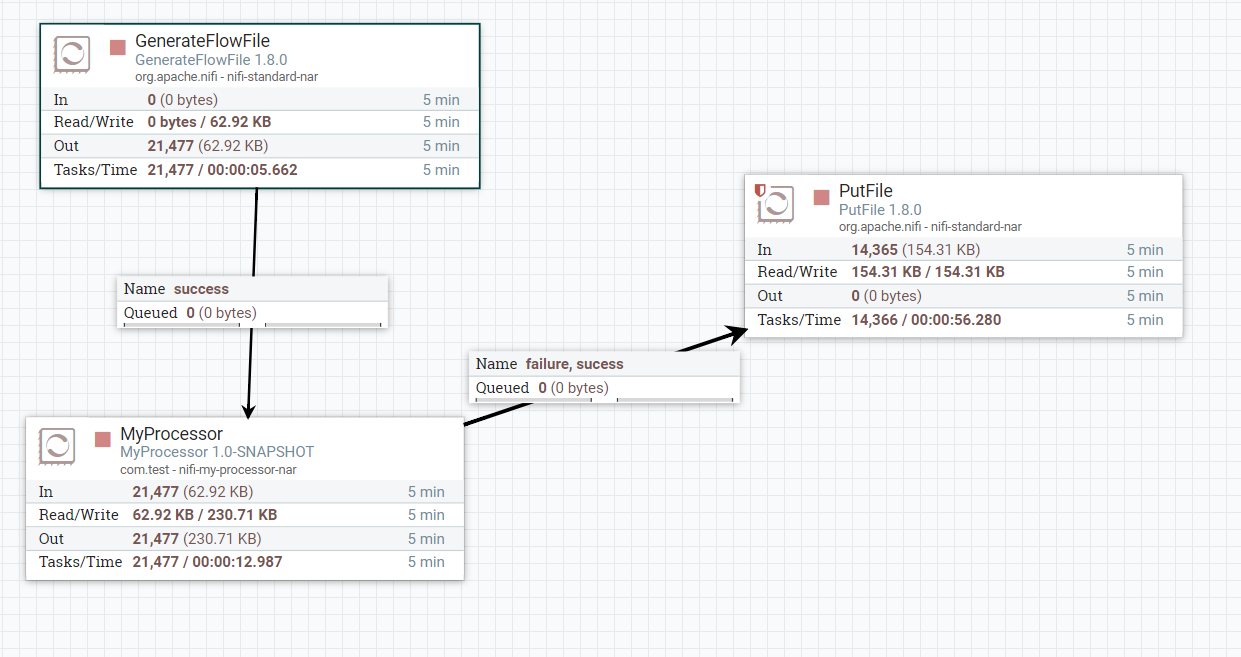
b、配置三个Processor,
下图是GenerateFlowFile的配置,主要配置了执行的时间(10s)及产生的字符串(123)

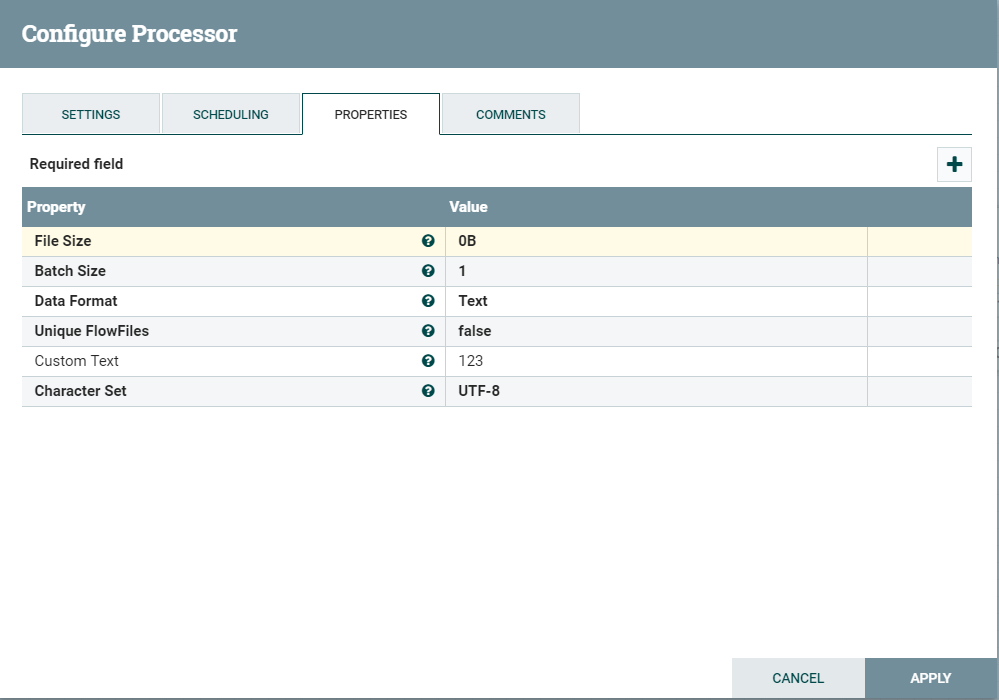
下图是MyProcessor配置
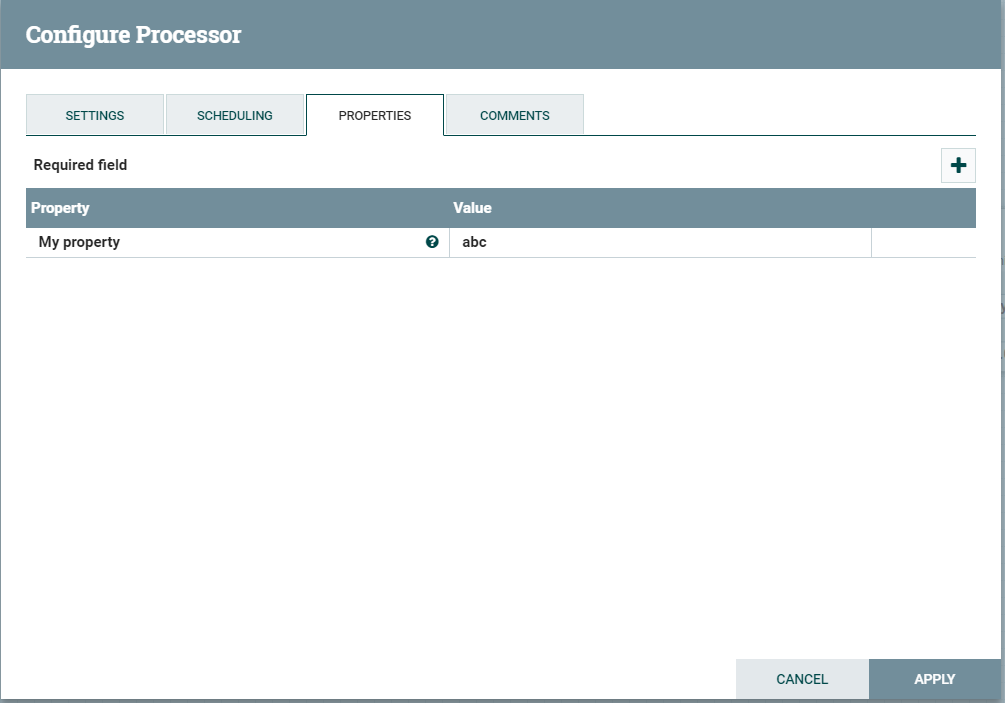
c、启动三个Processor
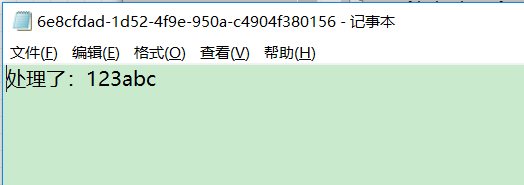
d、查看输出,可以看到字符串 123 经过处理成 : "处理了:123abc"
【NIFI】 开发自定义Nifi Processor的更多相关文章
- Nifi:nifi内置处理器Processor的开发
本篇主要是介绍自定义处理器的开发方式及Nifi处理器开发的一些细节 Nifi-Processor自定义开发的流程 之前说过,大部分的数据处理,我们可以基于ExcuseGroovyScript处理器,编 ...
- Apache NiFi 开发 安装说明
系统环境: vmware安装的centos6.7虚拟机 jdk1.8版本 maven库3.3.9版本(在使用源码编译启动的时候需要修改配置文件与当前使用的maven版本匹配,最低使用版本好像是3.1. ...
- Nifi:初识nifi
写在前面: 第一次接触这一系统的时候,只有github上的一坨源码和官方的英文文档,用起来只能说是一步一个坑,一踩一个脚印,现在回想那段血泪史,只想 ***,现在用起来算是有了一些经验和总结,这里就做 ...
- 【NIFI】 Apache NiFI 与 SQL 操作
本里需要基础知识:[NIFI] Apache NiFI 安装及简单的使用 查询SQL 1.拖入一个 Processor:ExecuteSQLRecord(执行sql记录) 2.配置,SETTINGS的 ...
- [转]jquery开发自定义的插件总结
本文转自:http://www.cnblogs.com/Jimmy009/archive/2013/01/17/jquery%E6%8F%92%E4%BB%B6.html 前几天在玩jquery,今天 ...
- 基于Spring的可扩展Schema进行开发自定义配置标签支持
一.背景 最近和朋友一起想开发一个类似alibaba dubbo的功能的工具,其中就用到了基于Spring的可扩展Schema进行开发自定义配置标签支持,通过上网查资料自己写了一个demo.今天在这里 ...
- BizTalk开发系列(二十二) 开发自定义Map Functoid
尽管 BizTalk Server 提供许多Functoid以支持一系列不同的操作,但仍可能会遇到需要其他方法的情况.<BizTalk开发系列 Map扩展开发>介绍了通过使用自定义 XSL ...
- 开发自定义View
当开发者打算派生自己的UI组件时,首先定义一个继承View基类的子类,然后重写View类的一个或多个方法,通常可以被用户重写的方法如下:构造器:重写构造器是定制View的最基本方法,当Java代码创建 ...
- JSP进阶 之 SimpleTagSupport 开发自定义标签
绝大部分 Java 领域的 MVC 框架,例如 Struts.Spring MVC.JSF 等,主要由两部分组成:控制器组件和视图组件.其中视图组件主要由大量功能丰富的标签库充当.对于大部分开发者而言 ...
随机推荐
- RecyclerView的单击和长按事件(转)
转自:http://www.jianshu.com/p/f2e0463e5aef 前言 上一篇文章揭开RecyclerView的神秘面纱(一):RecyclerView的基本使用中,主要讲述了Recy ...
- 【Nodejs】ExpressのRequestとResponseの内容
Request 对象 - request 对象表示 HTTP 请求,包含了请求查询字符串,参数,内容,HTTP 头部等属性.常见属性有: req.app:当callback为外部文件时,用req.ap ...
- 201. Bitwise AND of Numbers Range (Bit)
Given a range [m, n] where 0 <= m <= n <= 2147483647, return the bitwise AND(按位与) of all nu ...
- PHP连接数据库(mysql)
前端链接后台,数据库几乎必不可少.所以本文总结了PHP链接数据库的常用方法步骤. 首先 链接数据库:mysqli_connect参数①主机地址 ②mysql用户名③nysql密码④选择连接的数据库⑤端 ...
- PHP抽象方法、抽象类以及接口
1.什么是抽象方法? 我们在类里面定义的没有方法提的方法就是抽象方法.所谓的没有方法体指的是,在声明的时候没有大括号以及其中的内容,而是直接在声明时在方法名后加上分号结束,另外在声明抽象方法时 ...
- Django import相关
from django.shortcuts import render,redirect from django.contrib.auth import authenticate,logout,log ...
- windows+nginx+tomcat实现集群负载均衡(生产环境必读)
概念理解(原文链接) 集群:多个tomcat服务器运行同一个web服务就能称之为集群 负载均衡:apache按照一定方式将不同的客户端访问分配到不同的tomcat服务器 简单负载均衡实现: 网上参考了 ...
- swift - 根试图控制器的手势返回冲突 - push 新的tabbar控制器手势冲突
1. 禁用手势 和开启手势 extension JYRTSShopListController: UIGestureRecognizerDelegate { /// 禁止使用手势返回 func for ...
- es6问答
1. 箭头函数的特点 *箭头函数this的指向是定义时所在的对象,而不是使用时所在的对象: * 箭头函数不能做构造函数 * 不能使用argument对象 *不能使用yield命令 2.let cons ...
- An enumerable sequence of parameters (arrays, lists, etc) is not allo
环境:dapper asp.net core 出错代码如下: public Task<IEnumerable<dynamic>> GetList(string query, p ...