
C#使用MiniDump捕获异常
c/c++语言里MiniDump是一个重要的调试手段,他们没有C#/java这样语言有很多异常输出信息(
JVM异常导出bug日志功能,通常在jdk目录,文件格式hs_err_%pid%.log,pid是进程id)。
我们通常在项目中都会把可预见性进行异常处理。常见的处理方法如下
try{

   ...

catch(Exception ex)

{

   HandleExeption(ex);

}
项目部署到客户机中运行在程序员无法评估的情况下,如(堆栈溢出、访问冲突)则无法处理
或者很难重现这种异常,这给程序调试带来一定程度上的障碍,而这个时候内存及当前机器环境的快
照信息对程序排错则至关重要。幸好我们.NET提供了应用程序域未捕获异常(不是所有异常)事件处理
接口AppDomain.UnhandledException,先贴出Minidump封装类:
public sealed class MiniDump

    {

        [Flags]

        public enum DumpType : uint

        {

            // From dbghelp.h:

            MiniDumpNormal = 0x00000000,

            MiniDumpWithDataSegs = 0x00000001,

            MiniDumpWithFullMemory = 0x00000002,

            MiniDumpWithHandleData = 0x00000004,

            MiniDumpFilterMemory = 0x00000008,

            MiniDumpScanMemory = 0x00000010,

            MiniDumpWithUnloadedModules = 0x00000020,

            MiniDumpWithIndirectlyReferencedMemory = 0x00000040,

            MiniDumpFilterModulePaths = 0x00000080,

            MiniDumpWithProcessThreadData = 0x00000100,

            MiniDumpWithPrivateReadWriteMemory = 0x00000200,

            MiniDumpWithoutOptionalData = 0x00000400,

            MiniDumpWithFullMemoryInfo = 0x00000800,

            MiniDumpWithThreadInfo = 0x00001000,

            MiniDumpWithCodeSegs = 0x00002000,

            MiniDumpWithoutAuxiliaryState = 0x00004000,

            MiniDumpWithFullAuxiliaryState = 0x00008000,

            MiniDumpWithPrivateWriteCopyMemory = 0x00010000,

            MiniDumpIgnoreInaccessibleMemory = 0x00020000,

            MiniDumpValidTypeFlags = 0x0003ffff,

        };

        //typedef struct _MINIDUMP_EXCEPTION_INFORMATION {

        //    DWORD ThreadId;

        //    PEXCEPTION_POINTERS ExceptionPointers;

        //    BOOL ClientPointers;

        //} MINIDUMP_EXCEPTION_INFORMATION, *PMINIDUMP_EXCEPTION_INFORMATION;

        [StructLayout(LayoutKind.Sequential, Pack = )]  // Pack=4 is important! So it works also for x64!

        struct MiniDumpExceptionInformation

        {

            public uint ThreadId;

            public IntPtr ExceptioonPointers;

            [MarshalAs(UnmanagedType.Bool)]

            public bool ClientPointers;

        }

        //BOOL

        //WINAPI

        //MiniDumpWriteDump(

        //    __in HANDLE hProcess,

        //    __in DWORD ProcessId,

        //    __in HANDLE hFile,

        //    __in MINIDUMP_TYPE DumpType,

        //    __in_opt PMINIDUMP_EXCEPTION_INFORMATION ExceptionParam,

        //    __in_opt PMINIDUMP_USER_STREAM_INFORMATION UserStreamParam,

        //    __in_opt PMINIDUMP_CALLBACK_INFORMATION CallbackParam

        //    );

        [DllImport("dbghelp.dll",

          EntryPoint = "MiniDumpWriteDump",

          CallingConvention = CallingConvention.StdCall,

          CharSet = CharSet.Unicode,

          ExactSpelling = true, SetLastError = true)]

        static extern bool MiniDumpWriteDump(

          IntPtr hProcess,

          uint processId,

          IntPtr hFile,

          uint dumpType,

          ref MiniDumpExceptionInformation expParam,

          IntPtr userStreamParam,

          IntPtr callbackParam);

        [DllImport("kernel32.dll", EntryPoint = "GetCurrentThreadId", ExactSpelling = true)]

        static extern uint GetCurrentThreadId();

        [DllImport("kernel32.dll", EntryPoint = "GetCurrentProcess", ExactSpelling = true)]

        static extern IntPtr GetCurrentProcess();

        [DllImport("kernel32.dll", EntryPoint = "GetCurrentProcessId", ExactSpelling = true)]

        static extern uint GetCurrentProcessId();

        public static bool Write(string fileName)

        {

            return Write(fileName, DumpType.MiniDumpWithFullMemory);

        }

        public static bool Write(string fileName, DumpType dumpType)

        {

            using (var fs = new System.IO.FileStream(fileName, System.IO.FileMode.Create, System.IO.FileAccess.Write, System.IO.FileShare.None))

            {

                MiniDumpExceptionInformation exp;

                exp.ThreadId = GetCurrentThreadId();

                exp.ClientPointers = false;

                exp.ExceptioonPointers = System.Runtime.InteropServices.Marshal.GetExceptionPointers();

                bool bRet = MiniDumpWriteDump(

                  GetCurrentProcess(),

                  GetCurrentProcessId(),

                  fs.SafeFileHandle.DangerousGetHandle(),

                  (uint)dumpType,

                  ref exp,

                  IntPtr.Zero,

                  IntPtr.Zero);

                return bRet;

            }

        }
以下以Winform演示这个事件的使用方法
先拖一个界面如下
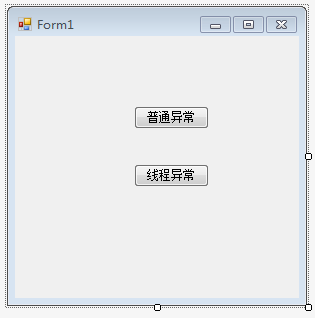
class Program

    {

        /// <summary>

        /// 应用程序的主入口点。

        /// </summary>

        static void Main(string[] args)

        {

            //exception handler

            Application.SetUnhandledExceptionMode(UnhandledExceptionMode.CatchException);

            AppDomain.CurrentDomain.UnhandledException += CurrentDomain_UnhandledException;

            Application.ThreadException += Application_ThreadException;

            bool isRunWinService = args.Length >  && args[].ToLower().Equals("-service");

            //用户手工启动

            if (!isRunWinService)

            {

                Application.Run(new frmSetup());

            }

            else

            {

                ServiceBase.Run(new ServiceBase[] {

                    new Daemon()

                });

            }

        }

        private static void Application_ThreadException(object sender, ThreadExceptionEventArgs e)

        {

            string dumpFile = System.IO.Path.Combine(System.Environment.CurrentDirectory, string.Format("crash-dump-{0}.dmp", DateTime.Now.ToString("yyyy-MM-dd HH-mm-ss")));

            MiniDump.Write(dumpFile);

        }

        private static void CurrentDomain_UnhandledException(object sender, UnhandledExceptionEventArgs e)

        {

            string dumpFile = System.IO.Path.Combine(System.Environment.CurrentDirectory, string.Format("thread-dump-{0}.dmp", DateTime.Now.ToString("yyyy-MM-dd HH-mm-ss")));

            MiniDump.Write(dumpFile);

        }

    }
两个按钮事件代码分别如下:
private void button1_Click(object sender, EventArgs e)

        {

            new Thread(() => { throw new Exception("Other thread"); }).Start();

        }

        private void button2_Click(object sender, EventArgs e)

        {

            string a = null;

            a.PadLeft();

        }
随便点击一个按钮都能触发异常处理,生成如下dump.dmp文件
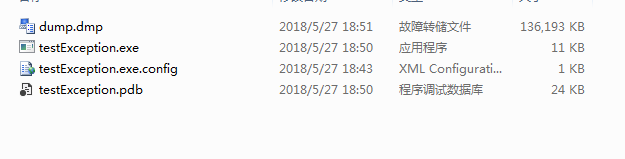
拖到visual studio里面打开如下

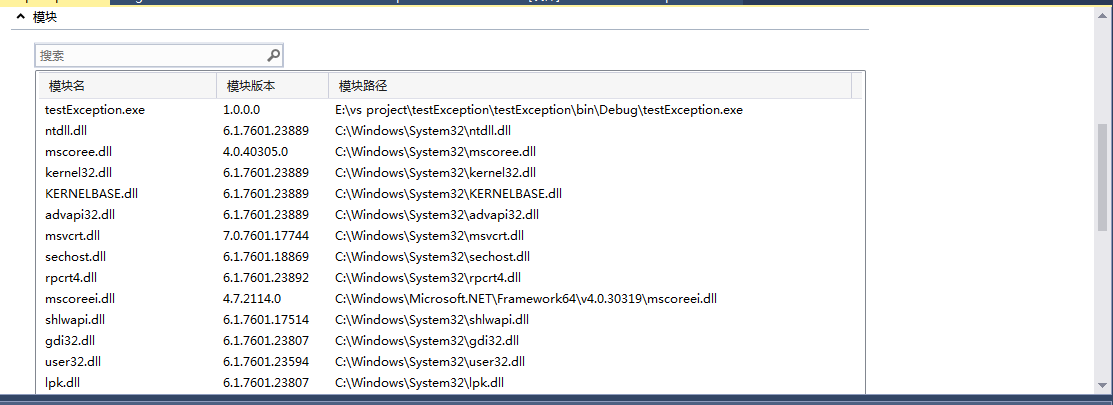
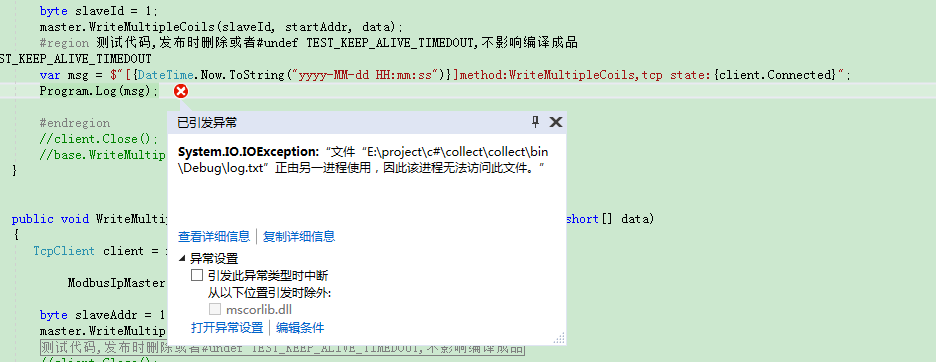
“使用 仅托管进行调试”以下是打开dump文件后的效果,直接定位到异常处:
最近比较忙,时间紧张,文章写得比较粗糙,大家应该能明白什么意思了,有疑问欢迎留言。
参考:
AppDomain.CurrentDomain.UnhandledException not firing without debugging
application level global exception handler didn't get hit
How to create minidump of a .NET process when a certain first chance exception occurs
Should use both AppDomain.UnhandledException and Application.DispatcherUnhandledException?
The simplest way to generate minidump for mixed managed & unmanaged stack?
How to Use the Debug Diagnostic Tool v1.1 (DebugDiag) to Debug User Mode Processes
C#使用MiniDump捕获异常的更多相关文章
- 异常处理与MiniDump详解(1) C++异常(转)
异常处理与MiniDump详解(1) C++异常 write by 九天雁翎(JTianLing) -- blog.csdn.net/vagrxie 讨论新闻组及文件 一. 综述 我很少敢为自己写 ...
- Android 捕获异常并在应用崩溃后重启应用
问题概述: 在Android应用开发中,偶尔会因为测试的不充分导致一些异常没有被捕获,这时应用会出现异常并强制关闭,这样会导致很不好的用户体验,为了解决这个问题,我们需要捕获相关的异常并做处理. 首先 ...
- APP级别处理未捕获异常
前言: 项目APP有时候会出现Crash,然后就是弹出系统强制退出的对话框,点击关闭APP. 有的APP进行了处理,会发现,当程序出现异常的时候,会Toast一个提示"程序出现异常,3秒后将 ...
- 关于未捕获异常的处理(WPF)
这一篇文章来谈谈对于WPF应用程序开发中的未捕获异常的处理. 首先,我们当然是要求应用程序开发人员,尽可能地在程序可能出现异常的地方都去捕捉异常,使用try-catch的方式.但是总是有一些意外的情况 ...
- asp.net开发中常见公共捕获异常方式总结(附源码)
本文实例总结了asp.net开发中常见公共捕获异常方式.分享给大家供大家参考,具体如下: 前言:在实际开发过程中,对于一个应用系统来说,应该有自己的一套成熟的异常处理框架,这样当异常发生时,也能得到统 ...
- oracle plsql 捕获异常和抛出异常
在写oracle存储过程的时候很多东西放到存储过程里面比如一些判断等,要比在程序逻辑里面简单很多,但是也会涉及到捕获和抛出一样的问题. 捕获异常 语法: 首先定义异常: <异常情况> E ...
- spring中配置了事务,数据业务层捕获异常,事务配置不成功?
原理:spring aop 异常捕获原理:被拦截的方法需显式抛出异常,并不能经任何处理,这样aop代理才能捕获到方法的异常,才能进行回滚,默认情况下aop只捕获runtimeexception的异常 ...
- [IT学习]关于minidump
windows debug里面需要用到数据分析. 很重要的一个工具就是dump. 什么事minidump,就是windows在蓝屏或其他故障时,转存的内存数据.(我现在是这么理解的) Applicat ...
- 异常处理与MiniDump详解(4) MiniDump
http://blog.csdn.net/vagrxie/article/details/4398721 异常处理与MiniDump详解(4) MiniDump 分类: [Wi ...
随机推荐
- Haskell语言学习笔记(81)Data.Typeable
Data.Typeable 利用 Data.Typeable,可以打印动态类型信息. class Typeable (a :: k) where typeRep# :: TypeRep a typeR ...
- split()方法解析
split()方法用于将字符串分割为字符串数组. 废话不多说,直接贴代码: var str="How are you doing today?" console.log(str.s ...
- Downloadftp
#!/bin/bash FILENAME=$ DSTDIR=$ FTPSRV=ip FTPUSER="user" FTPPWD="password" SRCDI ...
- MOSS 2007 错误0x80040E14解决
今天公司内网莫名的出现错误,只能新建列表条目,不能创建网站,到后来列表条目也不能创建了,一直报0x80040E14错误.于是Google一把,搜索这个错误号,然后在apearce 的Blog找到了原因 ...
- Django2.0 path和re_path使用
Django2.0发布后,很多人都拥抱变化,加入了2的行列.但是和1.11相比,2.0在url的使用方面发生了很大的变化,下面介绍一下: 一.实例 先看一个例子: from django.urls i ...
- Python列表推导式
- kafka清理
由于项目原因,最近经常碰到Kafka消息队列拥堵的情况.碰到这种情况为了不影响在线系统的正常使用,需要大家手动的清理Kafka Log.但是清理Kafka Log又不能单纯的去删除中间环节产生的日志, ...
- centos6 7 yum安装mongodb 3.6
配置MongoDB的yum源 # 编辑文件 vim /etc/yum.repos.d/mongodb-org-3.6.repo # 添加以下内容 [mongodb-org-3.6] name=Mong ...
- 重启虚拟机后,再次重启nginx会报错:[emerg] open() "/var/run/nginx/nginx.pid" failed (2: No such file or directory)
问题: 重启虚拟机后,再次重启nginx会报错: open() "/var/run/nginx/nginx.pid" failed (2: No such file or dire ...
- appium API接口
appium API接口 标签(空格分隔): appium常用api 1.contexts contexts(self) 返回当前会话的上下文,使用可以识别H5页面的控件: driver.contex ...