
008.OpenShift Metric应用
一 METRICS子系统组件
1.1 metric架构介绍
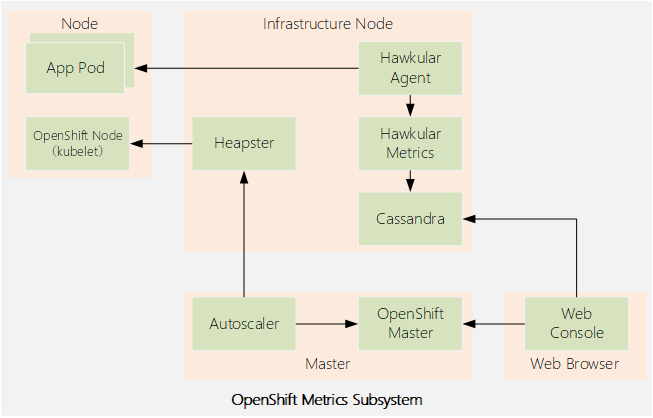
- Heapster
- Hawkular Metrics
- Hawkular Agent
- Cassandra
- web控制台调用Hawkular Metrics API来获取数据,以呈现项目中pod的性能图形。如果没有部署度量子系统,则不显示图表。
- oc adm top命令使用Heapster API来获取关于集群中所有pod和节点的当前状态的数据。
- Kubernetes的autoscaler控制器调用Heapster API来从部署中获取关于所有pod当前状态的数据,以便决定如何伸缩部署控制器。
1.2 访问Heapster和Hawkular
1.3 Metrics subsystem大小
1.4 CASSANDRA配置持久存储
二 METRICS子系统
2.1 部署metrics子系统
  1 [defaults]

  2 remote_user = student

  3 inventory = ./inventory

  4 log_path = ./ansible.log

  5 [privilege_escalation]

  6 become = yes

  7 become_user = root

  8 become_method = sudo

  9 Metrics子系统剧本:

 10 # ansible-playbook \

 11 /usr/share/ansible/openshift-ansible/playbooks
2.2 卸载metrics子系统
  1  # ansible-playbook \

  2 /usr/share/ansible/openshift-ansible/playbooks/openshift-metrics/config.yml \

  3 -e openshift_metrics_install_metrics=False
2.3 验证metrics子系统
2.4 部署metrics子系统常见错误
- image缺失;
- metrics所需资源过高,节点无法满足;
- Cassandra pod所需的持久卷无法满足。
2.5 其他配置
2.6 metrics涉及变量
- openshift_metrics_cassandra_replicas
- openshift_metrics_hawkular_replicas
- openshift_metrics_cassandra_requests_memory
- openshift_metrics_cassandra_limits_memory
- openshift_metrics_cassandra_requests_cpu
- openshift_metrics_cassandra_limits_cpu
- openshift_metrics_hawkular_requests_memory
- openshift_metrics_heapster_requests_memory
- openshift_metrics_duration
- openshift_metrics_resolution
- openshift_metrics_cassandra_storage_type
- openshift_metrics_cassandra_pvc_prefix
- openshift_metrics_cassandra_pvc_size
- openshift_metrics_image_prefix
- openshift_metrics_image_version
- openshift_metrics_heapster_standalone
- openshift_metrics_hawkular_hostname
  1 [OSEv3:vars]

  2 ...output omitted...

  3 openshift_metrics_cassandra_replicas=2

  4 openshift_metrics_cassandra_requests_memory=2Gi

  5 openshift_metrics_cassandra_pvc_size=50Gi
  1 # ansible-playbook \

  2 /usr/share/ansible/openshift-ansible/playbooks/openshift-metrics/config.yml \

  3 -e openshift_metrics_cassandra_replicas=3 \

  4 -e openshift_metrics_cassandra_requests_memory=4Gi \

  5 -e openshift_metrics_cassandra_pvc_size=25Gi
三 安装metrics子系统
3.1 前置准备
3.2 本练习准备
1 [student@workstation ~]$ lab install-metrics setup
3.3 验证image
  1 [student@workstation ~]$ docker-registry-cli registry.lab.example.com \

  2 search metrics-cassandra ssl

  3 [student@workstation ~]$ docker-registry-cli registry.lab.example.com \

  4 search ose-recycler ssl
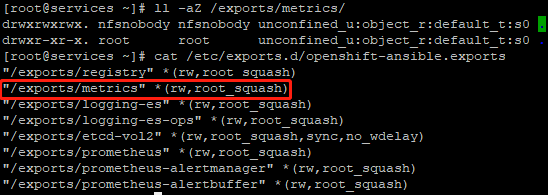
3.4 验证NFS
  1 [root@services ~]# ll -aZ /exports/metrics/

  2 drwxrwxrwx. nfsnobody nfsnobody unconfined_u:object_r:default_t:s0 .

  3 drwxr-xr-x. root      root      unconfined_u:object_r:default_t:s0 ..

  4 [root@services ~]# cat /etc/exports.d/openshift-ansible.exports
3.5 创建PV
  1 [student@workstation ~]$ cat /home/student/DO280/labs/install-metrics/metrics-pv.yml

  2 apiVersion: v1

  3 kind: PersistentVolume

  4 metadata:

  5   name: metrics

  6 spec:

  7   capacity:

  8     storage: 5Gi			#定义capacity.storage容量为5G

  9   accessModes:

 10   - ReadWriteOnce			#定义访问模式

 11   nfs:

 12     path: /exports/metrics		#定义nfs.path

 13     server: services.lab.example.com	#定义nfs.services

 14   persistentVolumeReclaimPolicy: Recycl	#定义回收策略
  1 [student@workstation ~]$ oc login -u admin -p redhat https://master.lab.example.com

  2 [student@workstation ~]$ oc create -f /home/student/DO280/labs/install-metrics/metrics-pv.yml

  3 [student@workstation ~]$ oc get pv

  4 NAME        CAPACITY    ACCESS MODES    RECLAIM POLICY    STATUS    CLAIM    STORAGECLASS    REASON    AGE

  5 metrics     Gi          RWO             Recycle           Available                                    14s
3.6 规划安装变量
3.7 配置安装变量
  1 [student@workstation ~]$ cd /home/student/DO280/labs/install-metrics

  2 [student@workstation install-metrics]$ cat metrics-vars.txt

  3 # Metrics Variables

  4 # Append the variables to the [OSEv3:vars] group

  5 openshift_metrics_install_metrics=True

  6 openshift_metrics_image_prefix=registry.lab.example.com/openshift3/ose-

  7 openshift_metrics_image_version=v3.9

  8 openshift_metrics_heapster_requests_memory=300M

  9 openshift_metrics_hawkular_requests_memory=750M

 10 openshift_metrics_cassandra_requests_memory=750M

 11 openshift_metrics_cassandra_storage_type=pv

 12 openshift_metrics_cassandra_pvc_size=5Gi

 13 openshift_metrics_cassandra_pvc_prefix=metrics

 14 [student@workstation install-metrics]$ cat metrics-vars.txt >> inventory

 15 [student@workstation install-metrics]$ lab install-metrics grade		#本环境使用脚本判断配置
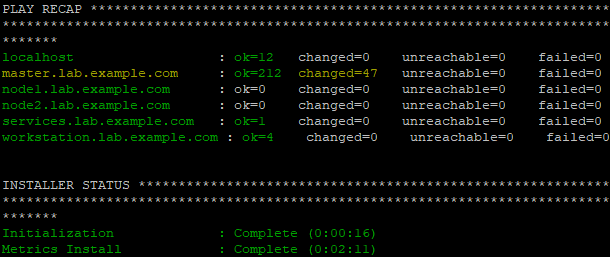
3.8 执行安装
1 [student@workstation install-metrics]$ ansible-playbook /usr/share/ansible/openshift-ansible/playbooks/openshift-metrics/config.yml
3.9 验证安装
  1 [student@workstation install-metrics]$ oc get pvc -n openshift-infra		#验证持久卷是否成功挂载

  2 NAME        STATUS    VOLUME    CAPACITY   ACCESS MODES   STORAGECLASS   AGE

  3 metrics-1   Bound     metrics   5Gi        RWO                           5m

  4 [student@workstation install-metrics]$ oc get pod -n openshift-infra		#验证metric相关pod

  5 NAME                         READY     STATUS    RESTARTS   AGE

  6 hawkular-cassandra-1-6k7fr   1/1       Running   0          5m

  7 hawkular-metrics-z9v85       1/1       Running   0          5m

  8 heapster-mbdcl               1/1       Running   0          5m

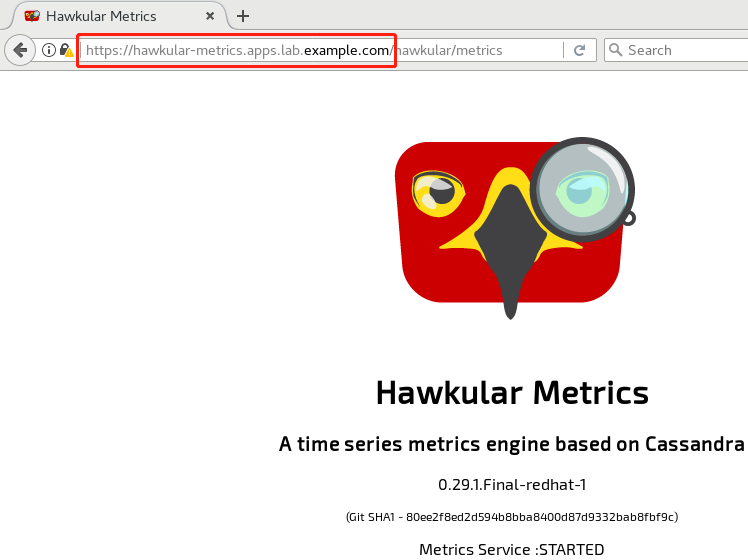
  9 [student@workstation install-metrics]$ oc get route -n openshift-infra		#查看metric route地址

 10 NAME                HOST/PORT                                PATH    SERVICES            PORT    TERMINATION    WILDCARD

 11 hawkular-metrics   hawkular-metrics.apps.lab.example.com             hawkular-metrics    <all>   reencrypt

 12 None
3.10 部署测试应用
  1 [student@workstation ~]$ oc login -u developer -p redhat \

  2 https://master.lab.example.com				#登录OpenShift

  3 [student@workstation ~]$ oc new-project load		#创建project

  4 [student@workstation ~]$ oc new-app --name=hello \

  5 --docker-image=registry.lab.example.com/openshift/hello-openshift	#部署应用

  6 [student@workstation ~]$ oc scale --replicas=9 dc/hello			#扩展应用

  7 [student@workstation ~]$ oc get pod -o wide				#查看pod

  8 NAME            READY     STATUS    RESTARTS   AGE       IP            NODE

  9 hello-1-4nvfd   1/1       Running   0          1m        10.129.0.40   node2.lab.example.com

 10 hello-1-c9f8t   1/1       Running   0          1m        10.128.0.22   node1.lab.example.com

 11 hello-1-dfczg   1/1       Running   0          1m        10.128.0.23   node1.lab.example.com

 12 hello-1-dvdx2   1/1       Running   0          1m        10.129.0.36   node2.lab.example.com

 13 hello-1-f6rsl   1/1       Running   0          1m        10.128.0.20   node1.lab.example.com

 14 hello-1-m2hb4   1/1       Running   0          1m        10.129.0.39   node2.lab.example.com

 15 hello-1-r64z9   1/1       Running   0          1m        10.128.0.21   node1.lab.example.com

 16 hello-1-tf4l5   1/1       Running   0          1m        10.129.0.37   node2.lab.example.com

 17 hello-1-wl6zx   1/1       Running   0          1m        10.129.0.38   node2.lab.example.com

 18 [student@workstation ~]$ oc expose svc hello
3.11 压力测试
  1 [student@workstation ~]$ sudo yum -y install httpd-tools

  2 [student@workstation ~]$ ab -n 300000 -c 20 http://hello-load.apps.lab.example.com/
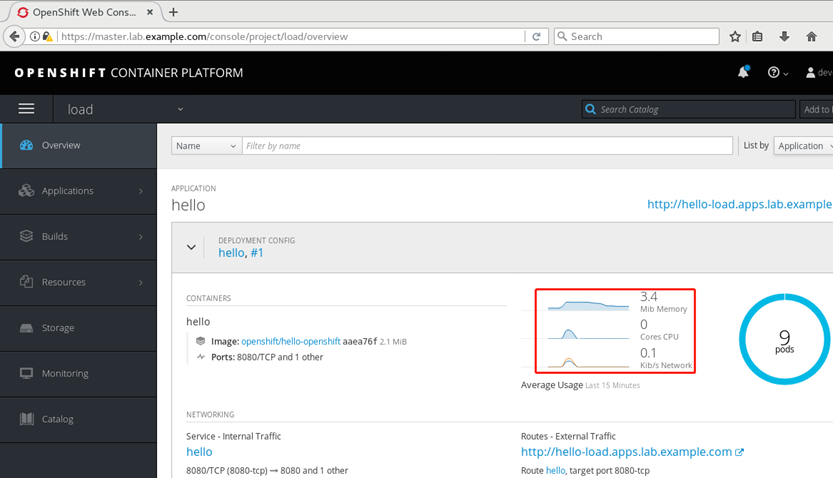
3.12 查看资源使用情况
  1 [student@workstation ~]$ oc login -u admin -p redhat

  2 [student@workstation ~]$ oc adm top node \

  3 --heapster-namespace=openshift-infra \

  4 --heapster-scheme=https

  5 NAME                     CPU(cores)   CPU%      MEMORY(bytes)   MEMORY%

  6 master.lab.example.com   273m         13%       1271Mi          73%

  7 node1.lab.example.com    1685m        84%       3130Mi          40%

  8 node2.lab.example.com    1037m        51%       477Mi           6%
3.13 获取指标
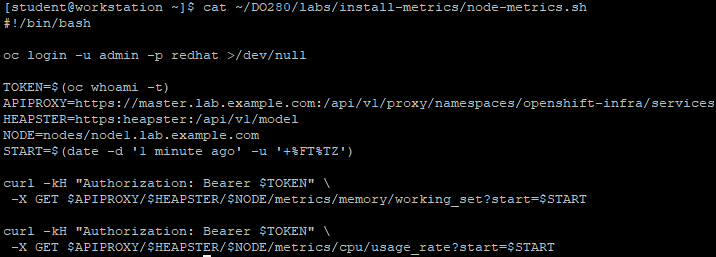
1 [student@workstation ~]$ cat ~/DO280/labs/install-metrics/node-metrics.sh #使用此脚本获取指标
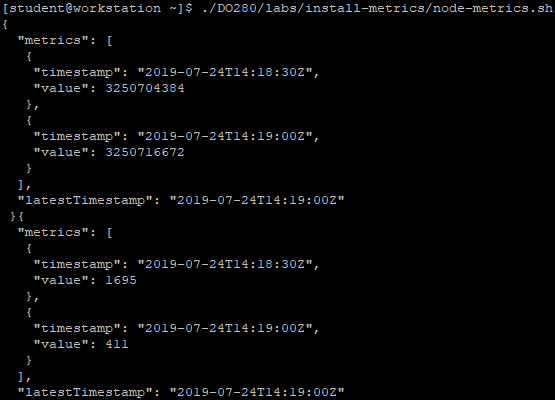
1 [student@workstation ~]$ ./DO280/labs/install-metrics/node-metrics.sh
008.OpenShift Metric应用的更多相关文章
- 009.OpenShift管理及监控
一 资源限制 1.1 pod资源限制 pod可以包括资源请求和资源限制: 资源请求 用于调度,并控制pod不能在计算资源少于指定数量的情况下运行.调度程序试图找到一个具有足够计算资源的节点来满足pod ...
- OpenShift实战(五):OpenShift容器监控Metrics
1.创建持久化metric pv卷 [root@master1 pv]# cat metrics.json apiVersion: v1 kind: PersistentVolume metadata ...
- 理解OpenShift(3):网络之 SDN
理解OpenShift(1):网络之 Router 和 Route 理解OpenShift(2):网络之 DNS(域名服务) 理解OpenShift(3):网络之 SDN 理解OpenShift(4) ...
- openshift pod对外访问网络解析
openshift封装了k8s,在网络上结合ovs实现了多租户隔离,对外提供服务时报文需要经过ovs的tun0接口.下面就如何通过tun0访问pod(172.30.0.0/16)进行解析(下图来自理解 ...
- OpenShift DNS的机制
为什么不直接用kube-dns? 为什么不直接用kube-dns? 为什么不直接用kube-dns? 感谢各位前辈的专研,在下午有限的时间里把Openshift DNS的机制理了一下.更详细的材料大家 ...
- Openshift中Pod的SpringBoot2健康检查
Openshift中Pod的SpringBoot2应用程序健康检查 1. 准备测试的SpringBoot工程, 需要Java 8 JDK or greater and Maven 3.3.x or g ...
- 在OpenShift平台上验证NVIDIA DGX系统的分布式多节点自动驾驶AI训练
在OpenShift平台上验证NVIDIA DGX系统的分布式多节点自动驾驶AI训练 自动驾驶汽车的深度神经网络(DNN)开发是一项艰巨的工作.本文验证了DGX多节点,多GPU,分布式训练在DXC机器 ...
- 调戏OpenShift:一个免费能干的云平台
一.前因后果 以前为了搞微信的公众号,在新浪sae那里申请了一个服务器,一开始还挺好的 ,有免费的云豆送,但是一直运行应用也要消费云豆,搞得云豆也所剩无几了.作为一名屌丝,日常吃土,就单纯想玩一玩微信 ...
- redhat openshift 跳转
网址: https://openshift.redhat.com/ OpenShift免费套餐的限制是:最多15PV/s,有3个512MB内存的应用,月流量在50K以下. 可以绑米,可惜的是,需要代理 ...
随机推荐
- dsPIC单片机的CAN引脚设置
用单片机的引脚复用 查询芯片数据手册C1RX的寄存器为RPINR26.C1RXR=(设置为需要用到的引脚) 引脚设置为输入(C1RX),TRIS=1: C1TX需要用的引脚为RPn41,查询数据手册R ...
- Elasticsearch系列---生产集群部署(上)
概要 本篇开始介绍Elasticsearch生产集群的搭建及相关参数的配置. ES集群的硬件特性 我们从开始编程就接触过各种各样的组件,而每种功能的组件,对硬件要求的特性都不太相同,有的需要很强的CP ...
- 08 . Nginx状态码
HTTP状态码 本篇文章主要介绍运维过程中经常遇到的状态码,并通过业界流行的Nginx进行模拟实现. 2XX状态码 2XX类型状态码表示一个HTTP请求成功,最典型的就是200 # 200状态码 # ...
- JSON.parse() 的实现
目录 1. JSON.parse() 2. 前置知识 2.1 JSON格式中的数据类型 2.2 转义字符的处理 2.2 判断对象是否相等 2.3 寻找匹配的字符串 2.4 基础的递归思想 3. 实现流 ...
- Java实现 蓝桥杯 算法训练 二进制数数
试题 算法训练 二进制数数 资源限制 时间限制:1.0s 内存限制:256.0MB 问题描述 给定L,R.统计[L,R]区间内的所有数在二进制下包含的"1"的个数之和. 如5的二进 ...
- Java实现 蓝桥杯 历届试题 错误票据
问题描述 某涉密单位下发了某种票据,并要在年终全部收回. 每张票据有唯一的ID号.全年所有票据的ID号是连续的,但ID的开始数码是随机选定的. 因为工作人员疏忽,在录入ID号的时候发生了一处错误,造成 ...
- java实现第四届蓝桥杯带分数
带分数 题目描述 100 可以表示为带分数的形式:100 = 3 + 69258 / 714 还可以表示为:100 = 82 + 3546 / 197 注意特征:带分数中,数字1~9分别出现且只出现一 ...
- pi-star 升级固件命令
单天线热点: sudo pistar-mmdvmhshatflash hs_hat 双天线热点: sudo pistar-mmdvmhshatflash hs_dual_hat 命令: wget ht ...
- 启动appium server时打印日志时间
在调试脚本的时候想看查找元素和执行命令花了多少时间,我们可以在启动appium server的时候加上启动参数,实现我们的需求. 1)输入:appium h,可以查看appium提供的启动参数有哪些. ...
- STL常用序列容器
这里简要的记述一下STL常用容器的实现原理,要点等内容. vector vector是比较常用的stl容器,用法与数组是非类似,其内部实现是连续空间分配,与数组的不同之处在于可弹性增加空间,而arra ...